Ricoh Y406 Guía de inicio rápido

Interactive Whiteboard Options
Machine Code:
Y406/Y407/Y413/Y414/Y419/Y420/Y4
22
Field Service Manual
Ver 2.01
Latest Release: March, 2018
Initial Release: February, 2017
Copyright (c) 2017, 2018 Ricoh Co.,Ltd.


Revision History
Version
Revision
Date
Revision History
V1.00
February,
2017
-
V2.00
22 January,
2018
Added Controller Type 2, Controller OP-10, and Controller OP-5
Corrected information in [Troubleshooting - Error Messages]
Corrected information in [Troubleshooting - Troubleshooting]
V2.01
22 March,
2018
Corrected information in [Troubleshooting (Only Controller Type 1/Type 2) -
Error Messages - Error Messages Related to the External Application]

Symbols, Abbreviations and Trademarks
Symbols, Abbreviations
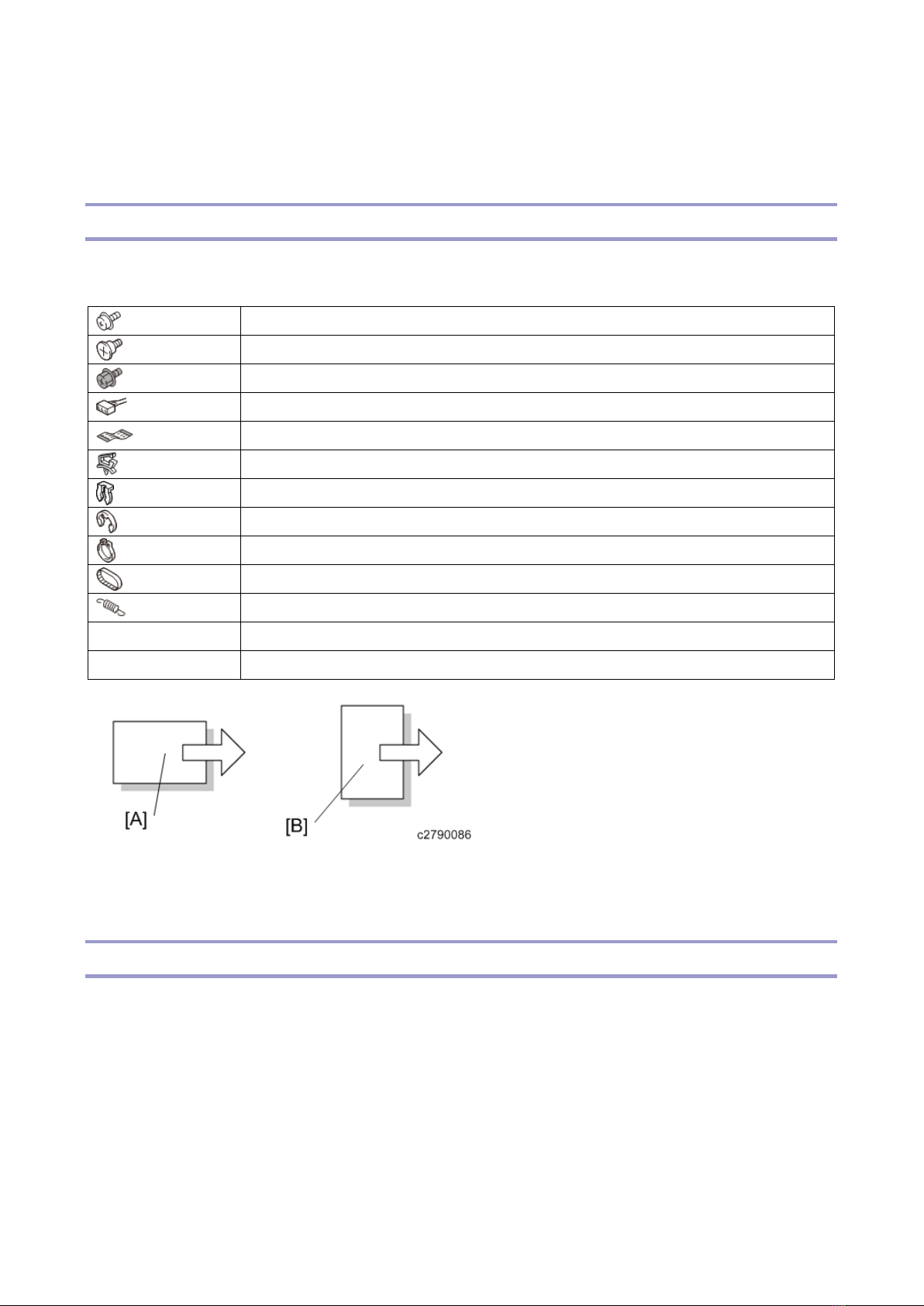
This manual uses several symbols and abbreviations. The meaning of those symbols and abbreviations
are as follows:
Screw
Shoulder screw
Black screw (TCRU)
Connector
FFC (Flat Film Connector)
Harness clamp
Clip
E-ring
C-ring
Timing belt
Spring
SEF
Short Edge Feed
LEF
Long Edge Feed
[A] Short Edge Feed (SEF)
[B] Long Edge Feed (LEF)
Trademarks
Intel and Core are trademarks of Intel Corporation in the U.S. and / or other countries.
Google Chrome and Android are trademarks of Google Inc.
iOS® is a registered trademark or trademark of Cisco Systems, Inc. and/or its affiliates in the United
States and certain other countries.
iPhone, iPad, Mac OS, and Safari are trademarks or registered trademarks of Apple Inc., in the United
States and other countries.
Firefox is a registered trademark of the Mozilla Foundation.
Dropbox is a registered trademark or trademark of Dropbox, Inc.

Oracle and Java are registered trademarks of Oracle and/or its affiliates. Other names may be
trademarks of their respective owners.
DisplayPort and VESA are registered trademarks of Video Electronics Standards Association in the U.S.
and/or other jurisdictions.
VGA is a trademark of International Business Machines Corporation in the United States, other
countries, or both.
Crestron and RoomView are trademarks or registered trademarks of Crestron Electronics, Inc.
HDMI and High-Definition Multimedia Interface are trademarks or registered trademarks of HDMI
Licensing, LLC.
Bluetooth is a trademark or registered trademark of Bluetooth SIG Inc. in the United States and other
countries.
Microsoft, Windows, Internet Explorer, Excel, OneDrive, and PowerPoint are either registered
trademarks or trademarks of Microsoft Corporation in the United States and / or other countries.
The proper name of Internet Explorer 11 is Windows® Internet Explorer® 11.
The proper names of the Windows operating systems are as follows:
• The product names of Windows 7 are as follows:
Microsoft® Windows® 7 Home Premium
Microsoft® Windows® 7 Professional
Microsoft® Windows® 7 Ultimate
Microsoft® Windows® 7 Enterprise
• The product names of Windows 8.1 are as follows:
Microsoft® Windows® 8.1
Microsoft® Windows® 8.1 Pro
Microsoft® Windows® 8.1 Enterprise
• The product names of Windows 10 are as follows:
Microsoft® Windows® 10 Home
Microsoft® Windows® 10 Pro
Microsoft® Windows® 10 Enterprise
Microsoft product screen shots reprinted with permission from Microsoft Corporation.
Other product names used herein are for identification purposes only and might be trademarks of their
respective companies. We disclaim any and all rights to those marks.


1
Table of Contents
1. Product Information...........................................................................................................................4
Product Overview .................................................................................................................................4
Controller Type 1 ..............................................................................................................................4
Controller Type 2/ OP-10/ OP-5........................................................................................................5
Pen Sensor Kit Type 2/Type 3 ..........................................................................................................6
Camera Unit Type 1..........................................................................................................................7
Machine Codes and Peripherals...........................................................................................................8
Product List.......................................................................................................................................8
2. Installation.......................................................................................................................................10
Installation Requirements ...................................................................................................................10
Main Unit Installation ..........................................................................................................................11
3. Replacement and Adjustment.........................................................................................................12
Special Tools ......................................................................................................................................12
Controller ............................................................................................................................................13
Controller Box (Controller Type 1) ..................................................................................................13
Controller Box (Controller Type 2) ..................................................................................................13
Controller Box (Controller OP-10/ OP-5).........................................................................................15
SSD ................................................................................................................................................16
Memory Card (Only Controller Type 2/ OP-10/ OP-5) ....................................................................24
Capture Box (Only Controller Type 1/Type 2).................................................................................25
Capture Board (Only Controller Type 1/Type 2) .............................................................................26
Pen Sensor Kit....................................................................................................................................28
Receiving Module ...........................................................................................................................28
USB Cable ......................................................................................................................................28
Camera Unit .......................................................................................................................................30
4. System Maintenance (Only Controller Type 1/Type 2) ...................................................................31
Displaying the Administrator Settings .................................................................................................31
System Update ...................................................................................................................................32
System Update Procedure..............................................................................................................32
Export/Import of Application Settings..................................................................................................33
Items Subject to Export/Import........................................................................................................33
File Type .........................................................................................................................................34
Export Procedure ............................................................................................................................34
Import Procedure ............................................................................................................................36
Log Collection.....................................................................................................................................39
Collecting System Logs ..................................................................................................................39
Collecting Logs for Analyzing Problems Linked with Skype for Business .......................................39

2
Re-recognize the Electronic Pen ........................................................................................................40
Breaking the SSD (Only Controller Type 1) ........................................................................................41
Service Mode......................................................................................................................................43
Service Mode..................................................................................................................................43
Device Manager..............................................................................................................................45
Display Color Patterns ....................................................................................................................45
Display Touch Keyboard.................................................................................................................46
Simple CAN Bus .............................................................................................................................47
Initialize Administrator Password ....................................................................................................47
Windows Activation.........................................................................................................................48
5. Troubleshooting (Only Controller Type 1/Type 2) ...........................................................................52
Error Messages ..................................................................................................................................52
Error Messages during the System Startup ....................................................................................52
Error Messages Related to Operating Pages .................................................................................53
Error Messages Related to Drawing Strokes ..................................................................................54
Error Messages Related to Remote Whiteboard Sharing ...............................................................56
Error Messages Related to Capture Input.......................................................................................60
Error Messages Related to Sending Email .....................................................................................62
Error Messages Related to Reading and Saving ............................................................................63
Error Messages Related to the UCS Screen Sharing .....................................................................73
Error Messages Related to the UCS Linkage .................................................................................74
Error Messages Related to the External Application.......................................................................76
Error Messages Related to the System Update..............................................................................78
Troubleshooting..................................................................................................................................80
Problems with the Display Manual Operation Buttons ....................................................................80
Problems in the Display ..................................................................................................................80
Problems in the Capture Board.......................................................................................................80
Problems with startup .....................................................................................................................80
Problems with the Electronic Pen ...................................................................................................83
Problems with Skype for Business..................................................................................................85
IWB Network Environment Check Tool...............................................................................................88
Outline ............................................................................................................................................88
Diagnostic Content..........................................................................................................................88
How to Use the Tool .......................................................................................................................88
6. Detailed Descriptions ......................................................................................................................95
Overview.............................................................................................................................................95
Signal Detection of the Electronic Pen............................................................................................95
Block Diagram (Controller Type 1)..................................................................................................96
Block Diagram (Controller Type 2/ OP-10/ OP-5) ...........................................................................97

1.Product Information
4
1. Product Information
Product Overview
Controller Type 1
Controller Box
No.
Name
1
WiFi antenna
2
RS232C
3
Ethernet (10/100/1000 Mbps)
4
POWER indicator
5
HDMI output
6
RESET button
7
HDD indicator
8
Audio output (line)
9
Audio output (mic)
10
USB2.0
11
USB3.0
12
Power button
13
2.5” SATA HDD tray
Otros manuales para Y406
2
Este manual sirve para los siguientes modelos
6
Tabla de contenidos
Otros manuales de Pizarra blanca de Ricoh

Ricoh
Ricoh D5530 Manual de usuario

Ricoh
Ricoh D6500 Guía de inicio rápido

Ricoh
Ricoh D6500 Guía de instalación

Ricoh
Ricoh Y406 Guía de inicio rápido

Ricoh
Ricoh IWB-D1 Manual

Ricoh
Ricoh D5520 Manual de usuario

Ricoh
Ricoh A6500 Manual de usuario

Ricoh
Ricoh D7500 Manual de usuario

Ricoh
Ricoh D5500 Guía de inicio rápido

Ricoh
Ricoh D7500 Manual de usuario