
REI UHD-808VW Manual de usuario

MXB88H Seamless UHD Matrix
8x8 Seamless UHD Matrix
Model No. UHD-808VW
Warning
Do not expose this device to Rain, Moisture, and Dripping
Only use accessories specified by the manufacture
Unplug this device during Lightning Storms
Product specifications may be subject to technical upgrades without further
notice

MXB88H Seamless UHD Matrix
1. Introduction
MXB88H is a high-performance seamless UHD matrix switcher with 8x HDMI inputs and 8x
HDMI outputs. Audio extract or insert can also be enabled on this device. IR matrix routing on
this video matrix is followed with video routing
MXB88H key features:
Support HDMI 2.0/HDCP 2.2
Support seamless switching
Support IR matrix
Support HDMI audio extract
Support external LR audio insert on HDMI stream
Support EDID management
HDMI video output resolution:
3840x2160@60, 3840x2160@30,1920x1080@60,1280x720@60,
1920x1200@60,1360x768@60,1280x1024@60, 1024x768@60
Front panel,RS232,TCP/IP (LAN 10M/100M) control

MXB88H Seamless UHD Matrix
2. Front Panel Control
OUTPUT/INPUT buttons
Press buttons OUTPUT n + INPUT m+ TAKE by sequence, user can switch matrix routing
Press button POWER , to make the matrix enter or release standby state. When standby,
the power LED will be lighted
Press button LOCK, to lock or un-lock front buttons. When locked, the Lock LED will be
lighted
Press buttons ALL + INPUT m + TAKE by sequence, to switch input m to all the outputs
Press button SAVE + OUTPUT n to save current routing scene as scene n. The maximum
allowable scene No. is 8
Press button RECALL + OUTPUT n to recall routing scene n as current routing
Press buttons RES + OUTPUT n + NEXT + TAKE, to change output resolution of OUTPUT n
port
Resolution option :
3840x2160@60, 3840x2160@30,1920x1080@60,1280x720@60,
1920x1200@60,1360x768@60,1280x1024@60, 1024x768@60
Press buttons EDID + INPUT m + NEXT + TAKE, change the EDID mode of port INPUT m
EDID option: Manual,3840x2160@60, 3840x2160@30, 1280x1024@60
1920x1080@60,1280x720@60,1920x1200@60
MXB88H Seamless UHD Matrix
3. Back Panel
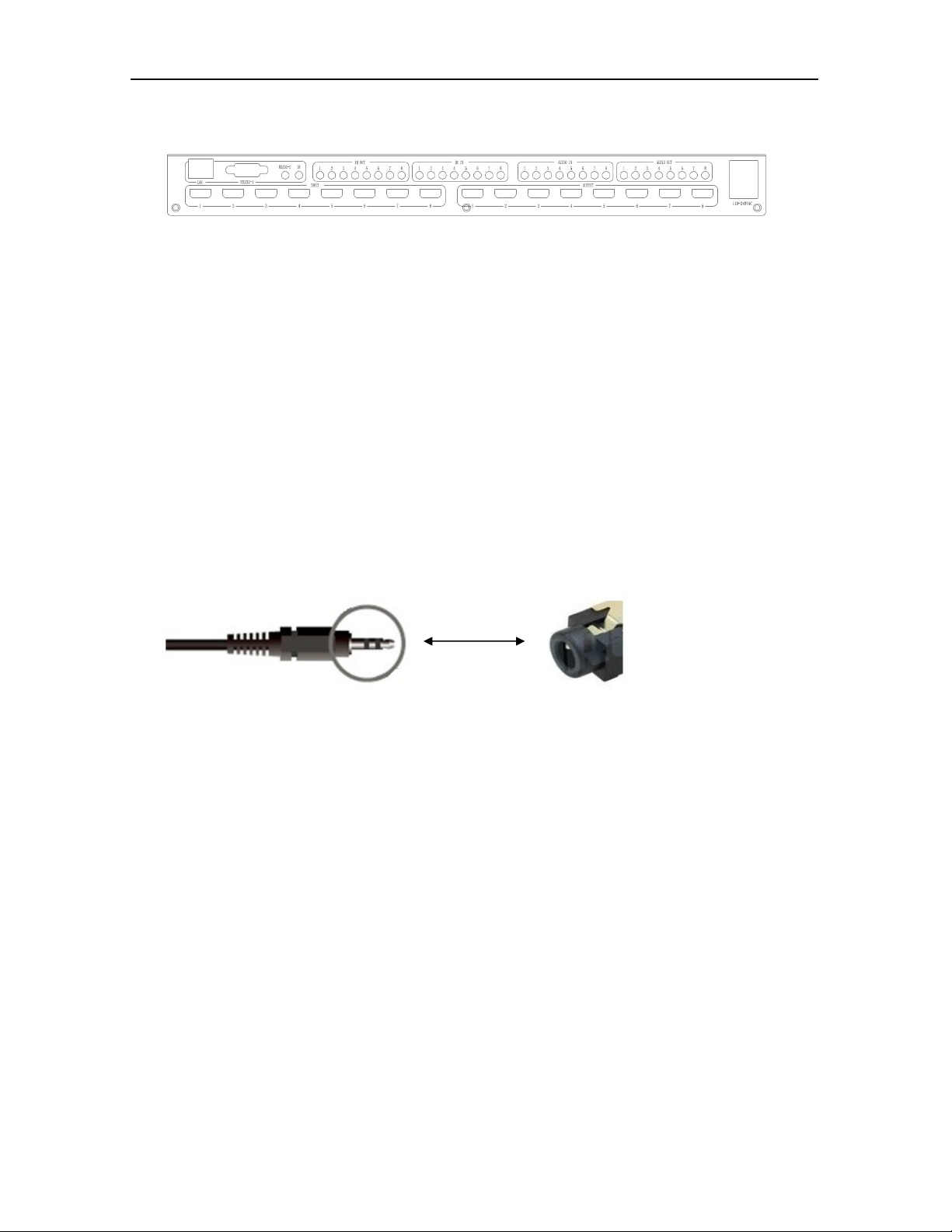
LAN(10M/100M), RS232 are for PC control
Analog Audio IN/OUT ports are bond with corresponding HDMI ports .
For example, if INPUT HDMI 1 signal is DVI, matrix will use analog AUDIO IN 1 as HDMI 1
audio source
Note, Analog AUDIO IN is only available when the corresponding video input is DVI
signal.
Analog AUDIO OUT n will always output the same audio content with HDMI OUTPUT n
Analog Audio IN/OUT connection
IR IN and IR OUT
IR IN/OUT is for remote control routing, and followed with video routing,
For example, if input HDMI m is routed to output HDMI n1 and n2 ports, then
IR IN n1 and n2 ports will be routed to IR OUT m port. Please refer to bellow
illustration.
Relationship between video and IR routing
Analo
g Audio

MXB88H Seamless UHD Matrix
IR extender connectors (not as accessories)

MXB88H Seamless UHD Matrix
4. PC Tool and RS232/LAN Control
4.1 RS232 connector
RS-232 control, baud rate 9600, DB9 connector
Pins configuration as bellow. User need use the corresponding cable, directly link cable
Baud rate 9600
4.2 Ethernet control and connection
Note:Factory default network setting:
Index
Pin
1 N/u
2 Tx( Matrix →PC )
3 Rx( Matrix ←PC )
4 N/u
5 Gnd
6 N/u
7 N/u
8 N/u
9 N/u

MXB88H Seamless UHD Matrix
4.3 PC Tool
The PC tool needs no installation, support serial control and network control.
Please note, Fine Tune/OSD CTRL/TV Wall pages are reserved for future used
4.3.1 UART Control
Control steps as follows:
1. Connect PC and device with a straight serial port cable
2. Run PC control tool and switch to "Matrix Switch" page
3. Click to switch "Ctrl Mode" to "UART"
4. Click the combo box which is right to the "Port", select the right COM port (There may be
some COM ports connected to the PC)
5. Click the “Disconnected”button (which is right to "Status") to connect to the device
6. If connected successfully, the "Disconnected" button will show "Connected"

MXB88H Seamless UHD Matrix
The UI after connected successfully will be as follows:
4.3.2 Network Control
Direct connection via Ethernet cable
Control steps as follows:
1. Connect the PC and device directly via an Ethernet cable
2. Manually setting up the IP address of the PC, and the IP address of the PC and the device
should be in a same network segment (The default IP address of the device is
192.168.0.247, and the default network mask of the device is 255.255.255.0). The
screenshots of setting up the IP address are as follows:

MXB88H Seamless UHD Matrix
Manually setting up the IP address of the PC
3. Run the PC control software (If the IP address of the PC changed after running the
software, you should close it and run it again)
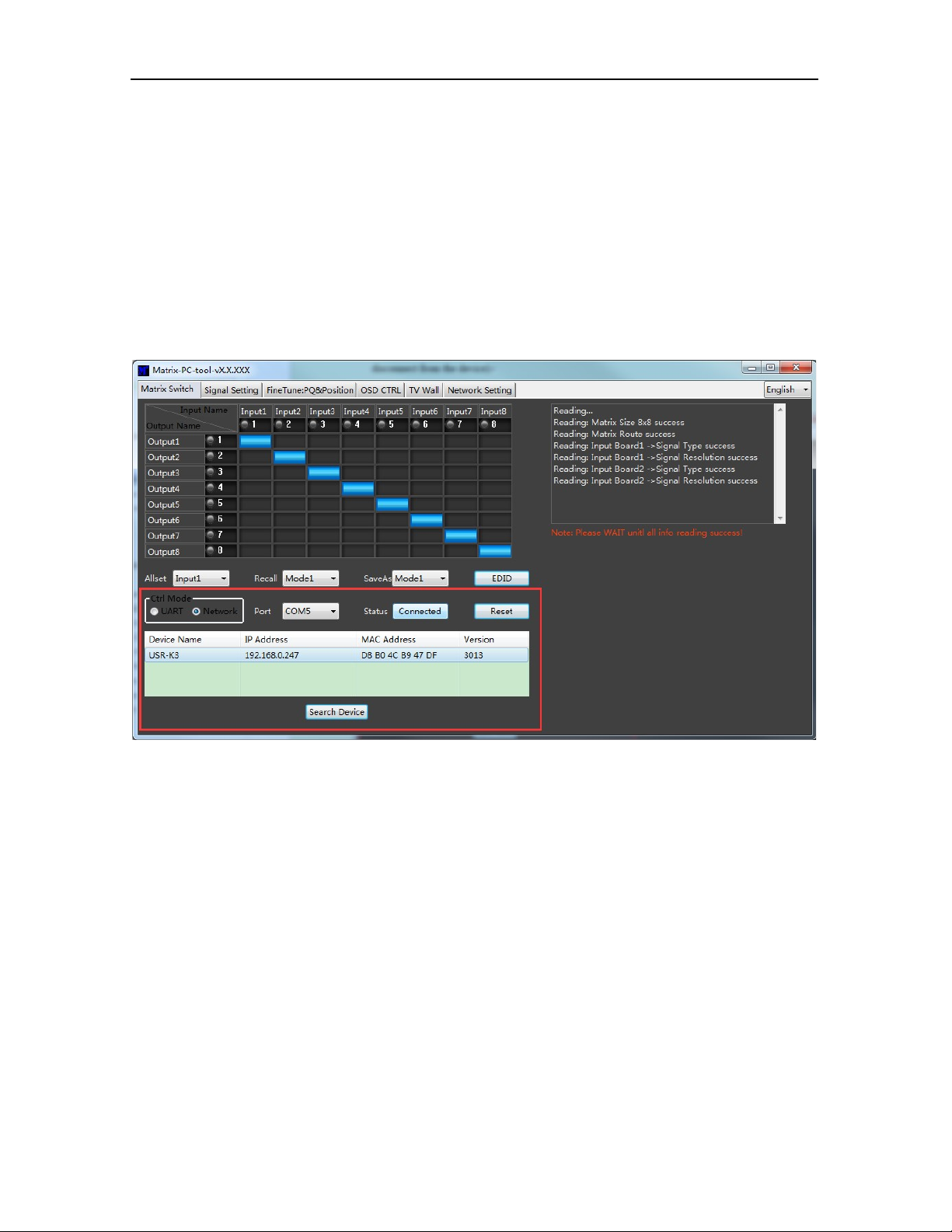
4. Click to switch "Ctrl Mode" to "Network"
5. Click the "Search Device" button
6. Click the device you want to control in the result list (When you click it, the software will
MXB88H Seamless UHD Matrix
read the network configuration such as network port and so on of the device
automatically)
7. Click the ‘Disconnected’ button (which is right to "Status") to connect to the device
8. If connected successfully, "Disconnected" button will show "Connected"
The UI after connected successfully will be as follows:
Connection via LAN
Control steps as follows:
1. Connect the PC and the device to a same network router
2. Setting up the IP address of the PC. Either manual(Static) mode or automatic (DHCP) mode
is ok. Just make sure the IP address of the PC and the device are in a same network
segment(When the IP type is obtain automatically, the network router that PC and device
connected to should support HDCP function)
Tabla de contenidos
Otros manuales de Conmutador de matriz de REI


