RDL RDL-MX4K88 Manual de usuario

RDL-VMX4K88 Seamless UHD Matrix
8x8 Seamless UHD Matrix
Model No. RDL-MX4K88
Version 1.2
Warning
l Do not expose this device to Rain, Moisture, and Dripping
l Only use accessories specified by the manufacture
l Unplug this device during Lightning Storms
l Product specifications may be subject to technical upgrades without further notice

RDL-VMX4K88 Seamless UHD Matrix
Content
1 Introduction ................................................................................................................................................... 3
2 Front Panel Control ....................................................................................................................................... 3
3 Rear Panel ..................................................................................................................................................... 4
4 RS232/LAN Control ..................................................................................................................................... 5
4.1 RS232 connector ............................................................................................................................... 5
4.2 Ethernet control and connection ....................................................................................................... 6
5 PC tool user guide ......................................................................................................................................... 6
5.1 Account’s authentication ................................................................................................................... 6
5.1.1 Password modification ......................................................................................................................... 7
5.2 Connect with PC tool ........................................................................................................................ 7
5.3 Matrix Switch page ........................................................................................................................... 8
5.4 Signal Setting page ............................................................................................................................ 9
5.5 FineTune ......................................................................................................................................... 10
5.6 TV Wall ........................................................................................................................................... 10
5.6.1 Build a wall .............................................................................................................................. 11
5.6.2 Bezel adjust ............................................................................................................................. 12
5.6.3 One more TV wall ................................................................................................................... 13
5.6.4 Multi View with TV Wall ........................................................................................................ 14
5.6.5 Save scene/ Load scene ........................................................................................................... 15
5.7 Advanced route switch page ........................................................................................................... 15
6 Control via Web .......................................................................................................................................... 15
7 Electrical parameters ................................................................................................................................... 16
8 Appendix A: Query IP info via UART ........................................................................................................ 17
9 Appendix B: Query IP address info via Network ....................................................................................... 18
10 Appendix C: Set IP info via UART ............................................................................................................. 19
11 Appendix D: Set IP info via Network ......................................................................................................... 20
12 Appendix E: Set IP address on Windows 7 or XP ...................................................................................... 21
13 Appendix F: Direct connect via Ethernet cable .......................................................................................... 23
14 Appendix G: Connect via network route /switch ........................................................................................ 24
15 Appendix H: Troubleshoot with Network control ...................................................................................... 25
16 Appendix I: Advanced routing switch ........................................................................................................ 26
17 Appendix J: Change List ( VS V2 version ) ............................................................................................... 28

RDL-VMX4K88 Seamless UHD Matrix
1 Introduction
RDL-MX4K88 is a high-performance seamless UHD matrix switcher with 8x HDMI inputs and 8x HDMI
outputs. Audio extract or insert can also be enabled on this device. IR matrix routing on this video matrix is
followed with video routing. RDL-MX4K88 support one or more video wall with RS232 command
RDL-MX4K88 key features:
l Support HDMI 2.0/HDCP 2.2
l Support seamless switching
l Support video wall
l Support IR matrix
l Support HDMI audio extract
l Support external LR audio insert on HDMI stream
l Support EDID management
l HDMI video output resolution up to 3840x2160@60
l Front panel,RS232,TCP/IP (LAN 10M/100M) control
2 Front Panel Control
l OUTPUT/INPUT buttons
Press buttons OUTPUT n + INPUT m+ TAKE by sequence, switch matrix input n to output m
l Press button POWER and hold for 5 seconds, to make the matrix enter standby state.
Press button POWER and hold for 1 seconds to power on the matrix
l Press button LOCK more than 2 seconds and less than 6 seconds, to lock or un-lock front buttons.
When locked, the Lock LED lighted;
Press button LOCK more than 6 seconds, enter into the input output lock menu, then press IN n
Or OUTPUT button to toggle the input or output lock status, then press TAKE to set,
Press CLEAR to exit.
l Press buttons ALL + INPUT m + TAKE by sequence, to switch input m to all the outputs
l Press button SAVE + OUTPUT n to save current routing scene as scene n. The maximum available
scene No. is 8
l Press button RECALL + OUTPUT n to recall routing scene n as current routing
l Press button RES + OUTPUT + NEXT + TAKE, to change output resolution of OUTPUT n
Resolution options:
3840x2160@60, 3840x2160@50, 3840x2160@30, 3840x2160@25,
1920x1200@60,1920x1080@60, 1920x1080@50, 1600x1200@60,
1400x1050@60, 1366x768@60,1360x768@60,1280x1024@60,
1280x768@60,1280x720@60, 1280x720@50, 1024x768@60

RDL-VMX4K88 Seamless UHD Matrix
l Press buttons EDID + INPUT m + NEXT + TAKE, change the EDID mode of port INPUT m
EDID option:
Manual, 3840x2160@60, 3840x2160@30, 1920x1200@60,
1920x1080@60, 1280x1024@60, 1280x720@60, 1024x768@60
Manual EDID is loaded by PC Tool
3 Rear Panel
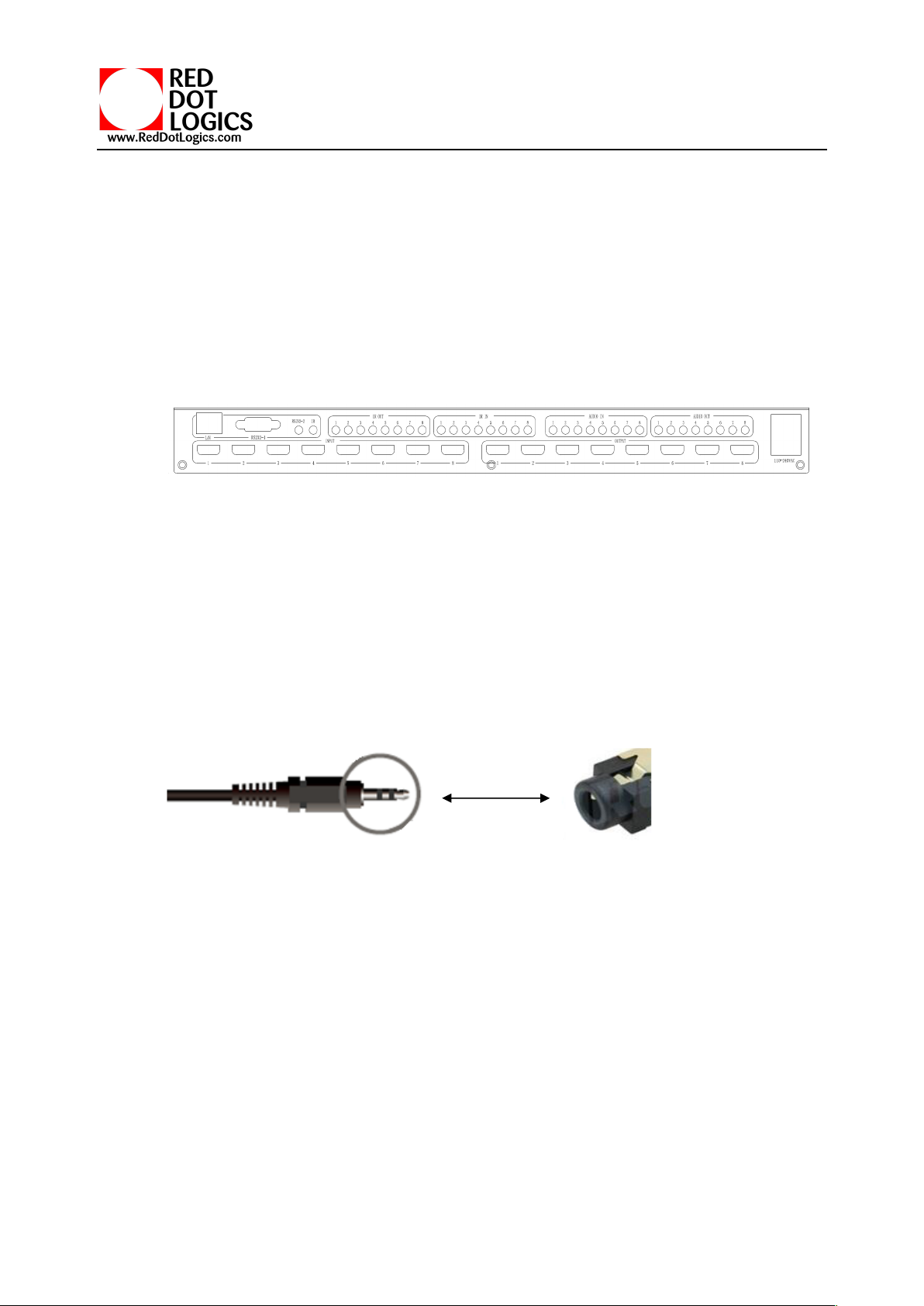
l LAN(10M/100M), RS232 are for PC control
l Analog Audio IN/OUT ports bind to corresponding HDMI ports.
For example:
If HDMI 1 audio source is selected with External LR by PC Tool, then analog AUDIO IN LR1 (with
ф3.5mm jacket) will be selected to replace the embedded audio of the HDMI input 1 data stream. If
HDMI 1 audio source is selected with AUTO by PC TOOL, then will use the original embedded audio of
input HDMI 1 as its audio data stream.
If the input is DVI signal, no matter how it is set up, system will get external analog audio input.Analog
AUDIO OUT n will always output the same audio content with HDMI OUTPUT n Analog Audio
IN/OUT connection
l IR IN and IR OUT
IR IN/OUT is for remote control routing, and follow the video routing.
For example, if input HDMI m is routed to output HDMI n1 and n2 ports, then IR IN n1 and n2 ports
will be routed to IR OUT m port. Please refer bellow illustration.
Relationship between video and IR routing
Analog
Audio

RDL-VMX4K88 Seamless UHD Matrix
IR extender connectors (not as accessories)
4 RS232/LAN Control
4.1 RS232 connector
l RS-232 control, baud rate 9600, DB9 connector
l Port RS232-1 is DB9 female connector, Pins layout as bellow. User need use the corresponding cable,
directly/straight RS232 cable
Baud rate 9600
I
ndex
Pin
1
N/u
2
Tx( Matrix → PC)
PC )
3
Rx( Matrix ←PC )
4
N/u
5
Gnd
6
N/u
7
N/u
8
N/u
9
N/u

RDL-VMX4K88 Seamless UHD Matrix
l RS232-2 and IR-EXT ports are reserved for future development
4.2 Ethernet control and connection
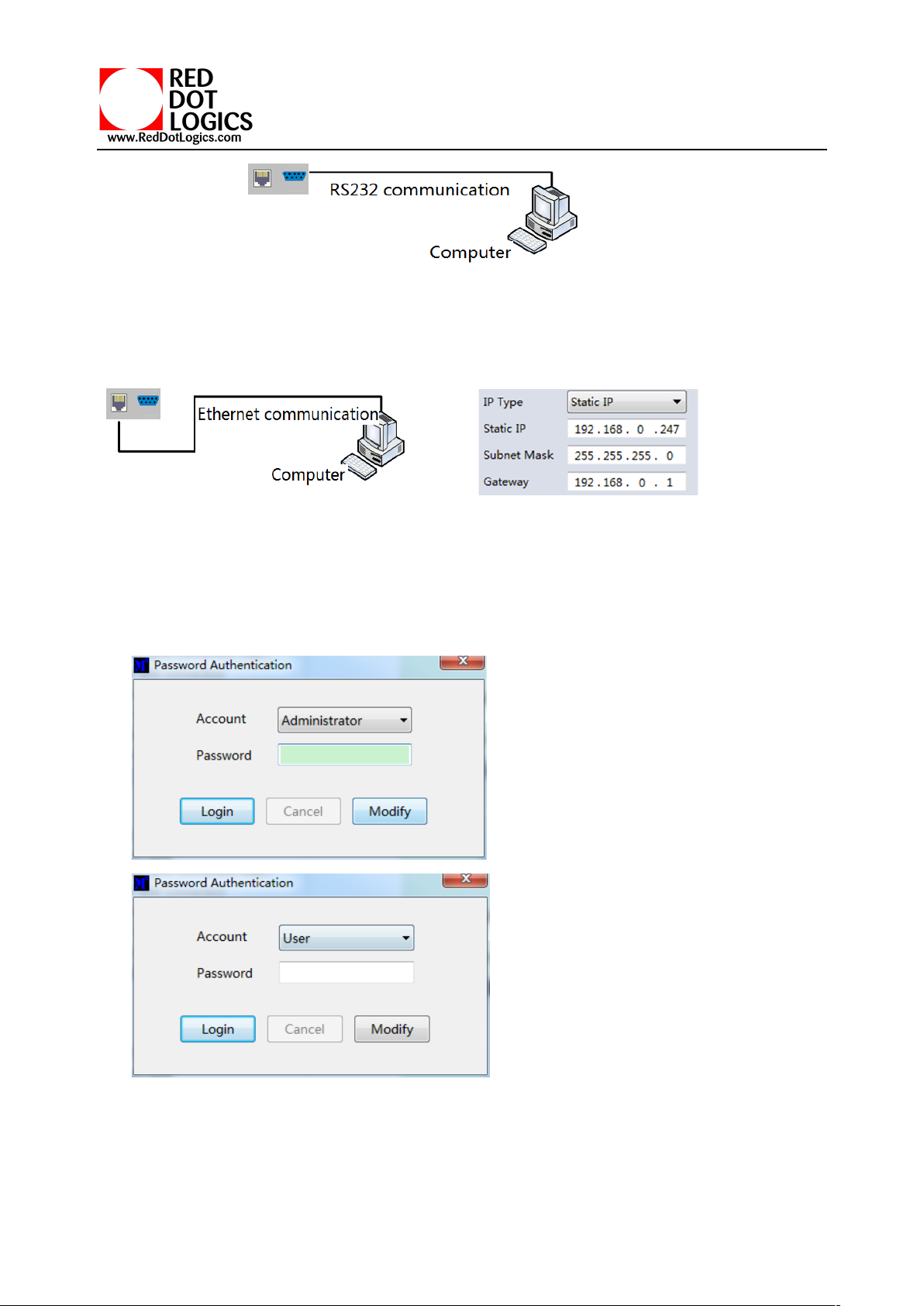
Note:Factory default network setting:
5 PC tool user guide
5.1 Account’s authentication
When you run the PC tool, there needs password to authenticate.
Default password of Administrator(access to all features): 111111
Default password of User(access to all features, except OSD function): 000000
NOTE:In case of password lost, there’s a super password to login and modify password: Smartsecuri@2010

RDL-VMX4K88 Seamless UHD Matrix
5.1.1 Password modification
1. Click drop-down list to select account: Administrator or User
2. Input current password, then click the ‘modify’ button to authenticate
3. Input new password twice, then click the ‘modify’ button
5.2 Connect with PC tool
1. The default PC tool’s UI style as bellow
2. User can select UART (with RS232 cable) or Network to connect, baud rate is 9600 bps
3. Network control (with cat5/6 cable, default IP address, 192.168,0.247), follow below steps:
a) Query IP address info via UART, please refer to Appendix A
Or query IP address info via Network, please refer to Appendix B
b) Set IP info via UART, please refer to Appendix C
Or set IP info via Network, please refer to Appendix D

RDL-VMX4K88 Seamless UHD Matrix
c) Set IP address on Windows 7/XP, please refer to Appendix E
d) User can directly connect via Ethernet cable ( please refer to Appendix F ),
Or connect via network route/switch ( please refer to Appendix G )
e) Click Connected button to setup link and connect
4. When connect with PC Tool, User sometimes may encounter connection failure, please refer to
Appendix H, Troubleshoot with Network control to fix
5.3 Matrix Switch page
1. There are 3 options for Matrix Switch page, user can press button to change the UI style.
Suggest use the default one
2. There is a shortcut button to switch one input port to all output ports, that is Allset,
3. For example, switch input 1 to all outputs, user can select
4. Recall mode:Recall a inputs/outputs routing scene which already be saved before.
The device supports maximum 8 scenes.
5. Save mode:Save current inputs /outputs routing in one
index. Maximum 8 modes supported.
Note:Save/Recall here button here works the same with front
panel save/recall control
6. System reset: The PC tool support reset system to recover
to factory configuration.
7. EDID Control: Click the ‘EDID’ button on Matrix Switch
page, then opens a EDID control window

RDL-VMX4K88 Seamless UHD Matrix
a) Read EDID: Select the output port ,then click the ‘Read ’button to read EDID
b) Write EDID: First read a EDID from output port,or open a EDID file that saved before,then select
c) the input port,and click the ‘Write’ button to write EDID
d) Save EDID:After reading EDID successfully, Click ‘Save’ button to save
e) This EDID for one input port is act as the Manual EDID, which can be selected or deselected
f) by the front panel
5.4 Signal Setting page
1. Audio Select
There are two options for input Audio Select
a) Auto: If the input source is HDMI signal, system will get the embeded audio, and if the input source
is DVI signal, the system will get the corresponding analog audio
b) External: System will get the corresponding analog audio
2. Output type
There are four options for input Output Type:
A. UHD-HDMI (HDCP OFF): HDCP Off
B. UHD-DVI
C. UHD-HDCP-1.4,
D. UHD-HDCP-2.2
3. Output Format
User can set output resolution here
1) 3840x2160@60
2) 3840x2160@50
3) 3840x2160@30
4) 3840x2160@25,
5) 1920x1200@60
6) 1920x1080@60
7) 1920x1080@50
8) 1600x1200@60
9) 1400x1050@60
10) 1366x768@60
11) 1360x768@60

RDL-VMX4K88 Seamless UHD Matrix
12) 1280x1024@60
13) 1280x768@60
14) 1280x720@60
15) 1280x720@50
16) 1024x768@60
5.5 FineTune
User can read and set the brightness/contrast/saturation/sharpness of each output.
NOTE:
If none special occasions, do not change the default settings;
If there is a problem after the change, click Reset to return to the factory settings.
5.6 TV Wall
Set the TV wall display quantity , how many rows and columns of panels to be layout
Tabla de contenidos
Otros manuales de Conmutador de matriz de RDL