
Rakoso M400 Manual de usuario

M400
User's Manual
Network 4 Zone Pre-Amplifier
4 Zone Spotify AirPlay Multi-Room Internet Radio


Table of contents
1. Introduction..............................................................................................................................................1
2. System Requirements .............................................................................................................................1
3. What's in the box ...................................................................................................................................2
3.1 Font Panel .........................................................................................................................................3
3.2 Back Panel ............................................................................................................................................3
3.3. Interface................................................................................................................................................4
4. Remote controller ....................................................................................................................................4
5. Connection diagram ................................................................................................................................5
5.1 How to use.........................................................................................................................................6
5.2 App download....................................................................................................................................6
5.3 Connection ........................................................................................................................................7
5.4 Connect to USB storage device ........................................................................................................7
5.5 Connect to audio playback device ....................................................................................................8
5.6 RS232 Serial Port .............................................................................................................................8
5.7 Connect to network ...........................................................................................................................9
6. Download 4Stream APP........................................................................................................................10
7. Using M400 ...........................................................................................................................................10
7.1 Selecting a zone..............................................................................................................................10
7.2 Play same music to multiple rooms................................................................................................. 11
7.3 Listen to online music......................................................................................................................12
7.4 Spotify..............................................................................................................................................12
7.5 Airplay..............................................................................................................................................12
7.6 Qplay ...............................................................................................................................................12
7.7 Listen to local music ........................................................................................................................12
7.8 Music Playlist...................................................................................................................................13
7.9 Play music from line in.....................................................................................................................13
7.10 Play music from Optical/Coaxial in................................................................................................13
7.11 Play music from PC .......................................................................................................................13
7.12 Changing Output channels............................................................................................................13
8. Device Settings......................................................................................................................................14
9. Firmware Update...................................................................................................................................14
10. Specication ........................................................................................................................................15
11. FAQ......................................................................................................................................................16

1
M400 is a multi-room system that enables you to enjoy your favorite music anywhere in your home. M400
contains 4 audio streamers for you to use as audio source, you can easily play music form online music
services, your phone storage, NAS and other sources by using the 4Stream app on your iOS or Android device.
High Speed Internet Connection:
M400 needs internet connection to stream music from online music services and to get online rmware updates.
You may experience performance issues with slower internet connections.
Wireless Router:
In order to use M400, you will need to have a working Wi-Fi network in your home, since the control APP on
your mobile device need to be in the same network as the streamer.
Control APP – 4Stream:
You can control M400 using our free 4Stream app on any iOS and Android device that meets these minimum
requirements:
-Multi-room audio function: play dierent songs in dierent rooms or same song in every room.
-Easy network setup: Connect to your home network and it is ready to use.
- Rich I/O interface: Each zone has separate digital output and analog input/output. There is also a master
source input that all zones can be used at the same time.
1. Introduction
2. System Requirements

2
3. What's in the box
User’s Manual
Rack Mount Brackets x2 12V/2A Power Adapter
M400 Ethernet Cable

Power Button
Streaming Indicator – LED on when streaming.
Input Source Indicator – LED Color: White for Network Audio, Green for Line in 1 (Zone Line in),
Yellow for Line in 2 (Master Line in), Magenta for Master Optical in, Cyan for Master Coaxial in, Red for USB.
Network Indicators – LED on when network is available.
Pre-Out
Line In (Line 1 in APP)
Digital Coaxial Out
Digital Optical Out
12v Trigger out
USB port
Master Line In (Line in 2 in APP)
Master Digital Coaxial In
Master Digital Optical In
Master 12V Trigger out
Reset button
Pass Through (RS232 port)
RS232 Port
Network input
Network output
DC input
3.1 Font Panel
3.2 Back Panel

M400 is an audio streamer and need to use with an external device that oers audio amplication. You should
place M400 near to the amplication device you want to connect to.
M400 is designed to t in a 1U equipment rack for easy installation. Attach the included rack mounting brackets on
each side of M400 if you want to mount it in a standard EIA equipment rack.
-Remove the two screws on each side of M400
-Align the rack mounting brackets with the screw holes and screw back the screws, make sure they are tightly secure.
Zone ID Switch for RS232 port program use.
3.3 Side Panel
4. Placing your M400

5
You can play the same audio source in all four zone at the same time, you can also play dierent audio sources in
dierent zones.
5. Zone Connection

6
Connect the LINE OUT output to the input on your amplier or AV receiver using the appropriate cable. M400
supports both analog output (RCA) and digital output (Optical & Coaxial).
Connect the LINE OUT “L” output to the input on
your active subwoofer or subwoofer amplier.
5.1 Connect to external amplier or AV receiver
5.2 Connect to external subwoofer
Your amplifier or
AV receiver
AUDIO
IN
R L
COAXIAL
IN
OPTICAL
IN
———— AUDIO ———— ———— AUDIO ————
IN
Subwoofer
with built-in
amplifier
7
If the audio amplier connected to M400 has a trigger input connector, you can connect it to the TRIGGER OUT of
M400 using a 4.5mm cable (not included). A12V/150mA signal is output from the TRIGGER OUT port.
Use a monaural mini-plug cable for connecting the TRIGGER OUT port. Do not use a stereo mini-plug cable.
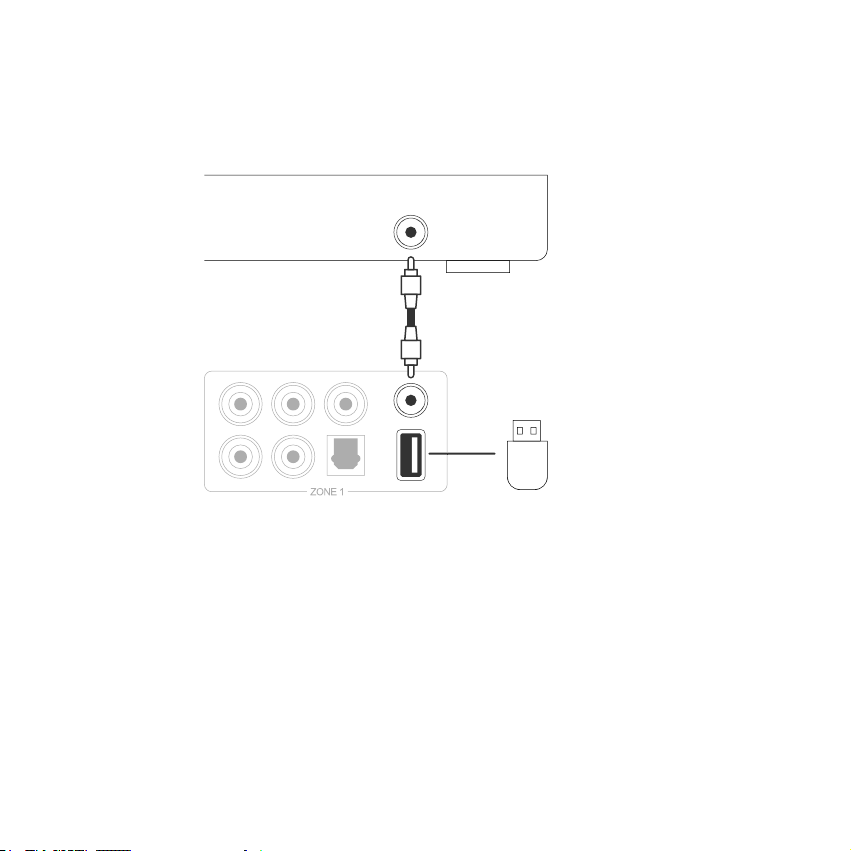
To play music stored in a USB storage device, just plugin a USB storage device containing music les to the USB
port of the Zone you want to play with.
5.3 Trigger Control
5.4 Connect to USB storage device
TRIGGER IN
USB memory
device
Tabla de contenidos
Otros manuales de Amplificador de Rakoso


