RAK RAK411 Manual del propietario

RAK411 PROGRAMMING MANUAL V1.7
COPYRIGHT ©
SHENZHEN RAKWIRELESS TECHNOLOGY CO., LTD
ETDX1602191815
1
RAK411 SPI-WIFI Module
Programming Manual V1.7
Shenzhen Rakwireless Technology Co., Ltd
www.rakwireless.com [email protected]
©2015 Rakwireless all rights reserved.
Mentioned in this document , the actual company and product names,
trademarks are their respective owners.
After update the new version, this document without prior notice.

RAK411 PROGRAMMING MANUAL V1.7
COPYRIGHT ©
SHENZHEN RAKWIRELESS TECHNOLOGY CO., LTD
ETDX1602191815
2
Content
1 Overview........................................................................................................................................ 1
1.1 Module Introduction............................................................................................................................... 1
1.2 Device Features......................................................................................................................................... 1
1.3 Key Applications....................................................................................................................................... 2
2 Functional Description............................................................................................................... 3
2.1 HW Interface.............................................................................................................................................. 3
2.2 Wireless Driver...........................................................................................................................................3
2.3 TCP/IP...........................................................................................................................................................3
2.4 Power Consumption................................................................................................................................ 3
3 SPI Interface.................................................................................................................................. 4
3.1 Hardware Connection..............................................................................................................................4
3.2 SPI Timing Diagram................................................................................................................................. 4
3.3 Interrupt Pin............................................................................................................................................... 5
3.4 SPI Frame Format..................................................................................................................................... 5
3.4.1 Command frame header.............................................................................................................5
3.4.2 Read Status..................................................................................................................................... 6
3.4.3 Read Data........................................................................................................................................ 7
3.4.4 Write Data....................................................................................................................................... 8
3.4.5 Command example...................................................................................................................... 9
3.4.6 Status Register............................................................................................................................. 12
3.4.7 Error code......................................................................................................................................12
3.5 Boot............................................................................................................................................................13
3.6 Power Mode.............................................................................................................................................13
3.7 Operational Process.............................................................................................................................. 14
4. AT Command............................................................................................................................. 16
4.1 Module Management Commands....................................................................................................17
4.1.1 Initializing Module......................................................................................................................17
4.1.2 Checking Software Version...................................................................................................... 18
4.1.3 Setting Power Mode.................................................................................................................. 18
4.1.4 Reading Module Status.............................................................................................................19
4.1.5 Reset............................................................................................................................................... 19
4.1.6 Module firmware upgrade....................................................................................................... 20
4.2 Network Operation Commands.........................................................................................................21
4.2.1 Scanning Wireless Network..................................................................................................... 21
4.2.2 Getting Scanned Information..................................................................................................22
4.2.3 Setting Password.........................................................................................................................23

RAK411 PROGRAMMING MANUAL V1.7
COPYRIGHT ©
SHENZHEN RAKWIRELESS TECHNOLOGY CO., LTD
ETDX1602191815
3
4.2.4 Setting Channel...........................................................................................................................23

4.2.5 Connecting Wireless Network................................................................................................ 24
4.2.6 Configuring Static IP Address................................................................................................. 25
4.2.7 Setting DHCP Mode...................................................................................................................26
4.2.8 Connecting Network by Easyconfig...................................................................................... 27
4.2.9 Connecting Network by WPS..................................................................................................28
4.2.10 Getting Network Connection Status...................................................................................29
4.2.11 Querying module IP information.........................................................................................30
4.2.12 Getting Network Signal Strength........................................................................................ 31
4.2.13 DNS...............................................................................................................................................31
4.2.14 PING............................................................................................................................................. 32
4.2.15 AP Network Advanced Settings........................................................................................... 33
4.2.16 Setting Network Listening Intervals....................................................................................34
4.2.17 Disconnecting Current Wireless Network......................................................................... 34
4.3 Socket Operation Commands............................................................................................................ 35
4.3.1 TCP Server.....................................................................................................................................35
4.3.2 TCP Client...................................................................................................................................... 36
4.3.3 UDP Client.....................................................................................................................................37
4.3.4 UDP Server....................................................................................................................................38
4.3.5 UDP multicast ............................................................................................................................. 39
4.3.6 Query TCP server connections................................................................................................40
4.3.7 Closing Socket............................................................................................................................. 41
4.3.8 Sending Data................................................................................................................................42
4.3.9 Receiving Data............................................................................................................................. 43
4.4 Save Parameters Commands.............................................................................................................. 45
4.4.1 Storing Network Configuration Parameters....................................................................... 45
4.4.2 Storing Current Network Parameters....................................................................................46
4.4.3 Modifying Web Parameters.....................................................................................................47
4.4.4 Enabling Automatic Connection............................................................................................ 48
4.4.5 Starting Web Server...................................................................................................................49
4.4.6 Getting Saved Network Parameters...................................................................................... 50
5 Sales and Service....................................................................................................................... 54
6 Revision History......................................................................................................................... 55

RAK411 PROGRAMMING MANUAL V1.7
COPYRIGHT ©
SHENZHEN RAKWIRELESS TECHNOLOGY CO., LTD
ETDX1603021415
1
1 Overview
1.1 Module Introduction
RAK411 module is a Wi-Fi module that fully compliant with IEEE 802.11b/g/n wireless
standards, with internally integrated TCP / IP protocol stack, supporting numerous protocols
such as ARP, IP, ICMP, TCP, UDP, DHCP CLIENT, DHCP SERVER, DNS and other etc. It supports AP
mode, Station mode and Ad-hoc and mode. Users can easily and quickly use it to networking
and data transmission. Through SPI interface, the module’s maximum transmission rate is up to
2Mbps.
RAK411 supports storing parameters, and by the customer commands it determines
whether to enable automatic networking to realize easy networking and reduce time for system
to networking. The module has built-in WEB server, supporting wireless network parameters
configuration, supporting wireless firmware upgrade. It also supports WPS and EasyConfig
one-key networking, significantly reducing software development effort.
RAK411 has four power management modes, among which the minimum standby power
consumption is 2uA, fully meet customer’s requirement for low power design.
1.2 Device Features
Support IEEE 802.11b/g/n wireless standards
Support four-wire SPI interface
Support SPI Clock up to Maximum 16Mhz
Minimalist hardware peripheral circuit design
Support Station, Ad-hoc and AP modes
Support DHCP SERVER / DHCPCLIENT
Support OPEN, WEP, WPA-PSK, WPA2-PSK and WPS encryption
Support TCP, UDP protocols, with maximum 8 UDP/TCP connections
Support webpage-based parameter configuration
Support WPS and EasyConfig one-key to network connection
Support parameter storage, customer orders loading after boot
Support parameters store in Deep Sleep State, with connection time as
fastest as 300m
Support wireless upgrade firmware

RAK411 PROGRAMMING MANUAL V1.7
COPYRIGHT ©
SHENZHEN RAKWIRELESS TECHNOLOGY CO., LTD
ETDX1603021415
2
On-board ceramic antenna or U.FL antenna connector
Operating voltage: 3.3V
4 kinds power working modes, with minimum power consumption as
1-2uA
Small package size: 28.75mmX23.14mmX3.40mm
FCC, RoHS and CE compliant
1.3 Key Applications
Portable products
Home appliances and electrical appliances
Industrial sensors
Sales terminals
Buildings automation
Logistics and freight management
Home security and automation
Medical applications, such as patient monitoring, medical diagnostics
Metering (stop timing, measuring instruments, meters, etc.)

RAK411 PROGRAMMING MANUAL V1.7
COPYRIGHT ©
SHENZHEN RAKWIRELESS TECHNOLOGY CO., LTD
ETDX1603021415
3
2 Functional Description
2.1 HW Interface
Support clock 16MHz Maximum
Interface actual throughput up to 2Mbps
Four-wire SPI interface, support SPI data interrupt pin
2.2 Wireless Driver
Compliant with IEEE 802.11b/g/n standards
Support AP and STA Mode
Support WEP, WPA/WPA2-PSK encryption
Fast networking, allowing module to be added to network within 1 sec
after power up
Support WPS and EasyConfig one-key to network connection
Support wireless configuration and firmware upgrade
2.3 TCP/IP
DHCP Client and Server features
DNS Client and Server functions
TCP Client, TCP Server, UDP Client, UDP Server and Multicast functions
8-way socket applications
2.4 Power Consumption
The module supports four power consumption modes:
Full speed working mode, with approx 80mA average power consumption, peak current
less than 310mA
Power-saving mode, with approx 10mA average power consumption, peak current
<310mA, DTIM = 100ms
Deep sleep mode, with approx 5mA average power consumption, peak current <310mA,
DTIM = 100ms
Standby mode, with power consumption<2uA

RAK411 PROGRAMMING MANUAL V1.7
COPYRIGHT ©
SHENZHEN RAKWIRELESS TECHNOLOGY CO., LTD
ETDX1603021415
4
3 SPI Interface
RAK411 communicates with the host through a standard 4-wire SPI interface. SPI clock
supports maximum 16MHZ and optional SPI-INT pin. The SPI interface configuration diagram is
as follows:
3.1 Hardware Connection
3.2 SPI Timing Diagram
SPI_CS
SPI_CL
SPI_MO
SPI_MIS
CPOL = 0--------------------------------------SCK is idle in low level voltage
CPHA = 0--------------------------------------Data is latched on clock rising edge, while
transmitted on clock falling edge
MSB_FIRST--------------------------------------MSB is first sent8 BIT
MODE----------------------------------------------Data length is 8
bitsCS-----------------------------------------------Slave selective signal is effective low

RAK411 PROGRAMMING MANUAL V1.7
COPYRIGHT ©
SHENZHEN RAKWIRELESS TECHNOLOGY CO., LTD
ETDX1603021415
5
3.3 Interrupt Pin
RAK411 provides an optional INT pin, so that the host can quickly respond to module data
requests via the INT pin. The normal INT pin is low level voltage, when there is abnormal data to
be sent, the module pulls INT to high level. After the host receives the rising edge, the module
can read the data by sending read frames directly.After reading a package, INT pin goes low. If
there is data in the module needs to be sent to the host, the module will once again pull up INT
pin.
3.4 SPI Frame Format
The SPI basic operations are divided into three categories: read status, write data, and read
data.
3.4.1 Command frame header
The frame head is composed of three parts, CMD, Length, 0x97.
Field Bytes Value Instruction
CMD 1 0xA0-0xCD Command code for all commands
0x97 1 0x97 Fixed
Length 2 0-1416
The command and the length of the
data, the low byte in the front

RAK411 PROGRAMMING MANUAL V1.7
COPYRIGHT ©
SHENZHEN RAKWIRELESS TECHNOLOGY CO., LTD
ETDX1603021415
6
3.4.2 Read Status
Description:
1.The Host end loop sends the Head CMD to the module, and the sending
process requires a query if there is received ACK (0x85) .
2.If received CMD then stop the current Head ACK send.
3.Send 1 Dummy bytes for the subsequent status status.
4.Status is the status byte, the detail 3.4.6 status register.
CMD Head:
1.CMD fill in the read status command (0xA1).
2.0x97 fixed.
3.Length should fill in 0 because the current command does not include any
parameters.

RAK411 PROGRAMMING MANUAL V1.7
COPYRIGHT ©
SHENZHEN RAKWIRELESS TECHNOLOGY CO., LTD
ETDX1603021415
7
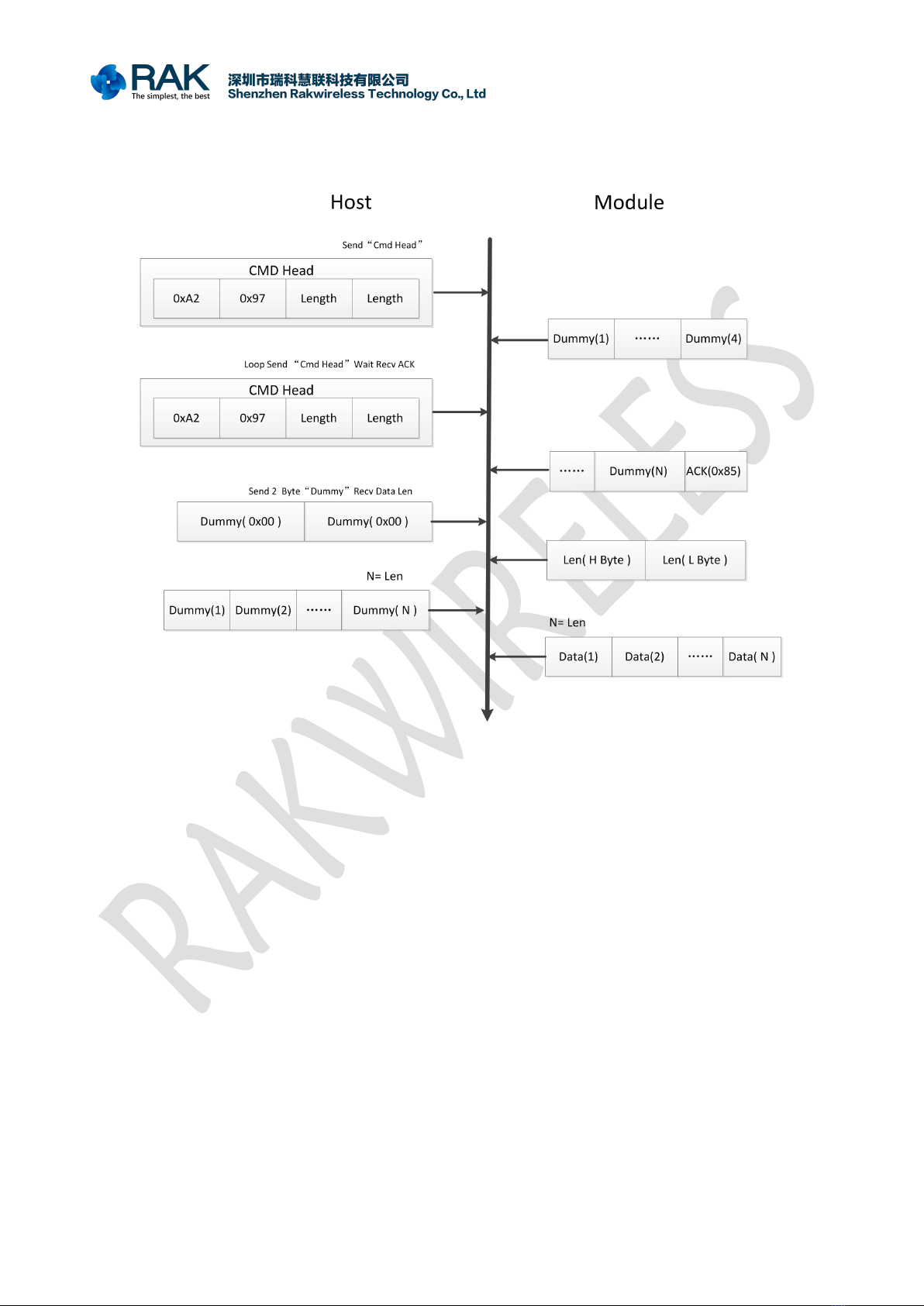
3.4.3 Read Data
Description:
1.The Host end loop sends the Head CMD to the module, and the sending
process requires a query if there is received ACK (0x85) .
2.If received CMD then stop the current Head ACK send.
3.Send 2 bytes Dummy for receiving len, the high byte in the front.
4.After the value of the len, the Dummy bytes of len are sent to receive the
following data.
CMD Head:
1.CMD fill in the read status command (0xA2).
2.0x97 fixed.
3.Length should fill in 0 because the current command does not include any
parameters.
Tabla de contenidos
Otros manuales de Enrutador inalámbrico de RAK