
Raiing WT702 Manual de usuario

Wireless
Thermometer WT702
User Manual
Temperature Probe
Battery Compartment
Raiing Medical Company

1
Content
01 Accessories
02 Upload Battery
03 Download App
04 Build Connection
04 Wearing Description
06 Operating Instructions
09 Troubleshooting
12 Important Precautions
14 Intended Use
14 Application
15 Maintenance
16 Cleaning&Disinfection
17 Technical Specications
18 Functional Description
19 Symbol Denition
20 Disclaimer
21 Declaration
21 Copyright Statement
Accessories
1. A CR2025 battery 2. A battery tool
3. Medical sticker (1 box) 4. User manual
5. Guarantee card 6. Certicate of competency
Word Denitions:
Thermometer/Device: Smart Fertility Tracker.
Receiver: Smart devices that can run iFertracker app and receive Bluetooth signal
from Smart Fertility Tracker.
2 3
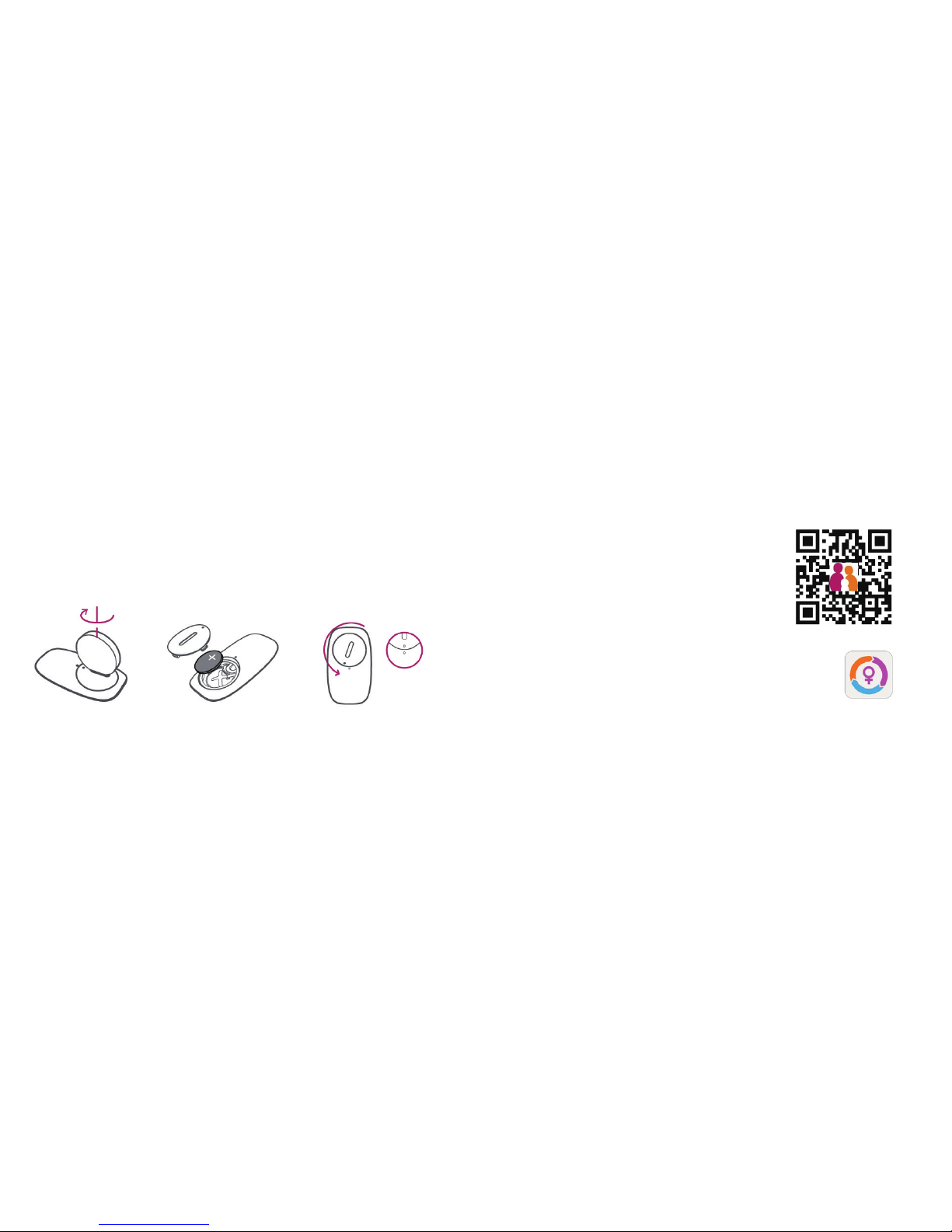
Upload Battery
1. Open battery
compartment
2. Upload a CR2025
battery
3. Close battery
compartment
Download App
1. Go to iFertracker Download Center
http:// www.raiing.com/iFertracker/download.php
2. Download iFertracker and set up user account. iFertracker

4 5
Put thermometer on the top of
screen of receiver to connect.
1.Wearing Preparation 2.Wearing
Build Connection Wearing Description Note:
1. We recommend users to use the original manufactured stickers. Wearing the
thermometer in a neutral-thermal environment is recommended. Please make sure
wear the thermometer during whole night(whole sleeping period) to get accurate data.
If you feel unwell (uncomfortable or Allergic) when use the sticker, please replace other
sticker as doctor’s advice.
2. Please do not repaste the sticker if it appears folded, a new sticker is required.
3. Skin preparation in advance is required.
4. Please make sure the contacted area of skin stays at and smooth.

6 7
Operating Instructions
1. Power on/off
- Power on: Thermometer will automatically power on when it is worn under the
armpit. (Note: When use thermometer for the rst time or just change a new battery,
you should tightly touch temperature probe of thermometer with your palm until LED
blink indicates power-on, and then connect the thermometer with receiver to sync time
before wearing.)
- Power off: Thermometer will automatically power off when it is taken off from armpit.
2. LED indicators
- Single blink in one-second period indicates that thermometer needs to sync time with
receiver.(by connecting with receiver)
- Single blink in four-second period indicates that thermometer successfully powers on.
- LED long brightness indicates battery low and cannot continues to work, please
change with new button cell.
3. Frequently operating modes
- Connect to receiver for the first time to sync time:
1) Turn on receiver and open Bluetooth, and make sure receiver’s access to internet.
2) Turn on the thermometer.( Tightly touch temperature probe of thermometer with
your palm until LED blink indicates power-on)
3) Run "iFertracker" on the receiver and sign in,put thermometer on the top of
receiver, the two devices will automatically connect and sync time.
“Connect to receiver for the rst time” means the following situations:1. Right after
uploading a new battery. 2. Right after upgrading Firmware. 3. Anytime when you see
LED’s single blink in one-second period. When you are in these three situations, just
connect thermometer with receiver to sync time before wearing.

8 9
- Daily Use:
1) Go to sleep when wearing thermometer; user should sleep more than 6 hours and
wear thermometer all the sleeping hours.
2) Take off thermometer after getting up in the morning, and put it on the top of
receiver that has already started “iFertracker”App. “iFertracker” will automatically
connect thermometer to sync data and then analyze. (Recommendation: user should
connect thermometer with receiver every day after taking off thermometer to get
information and reminders timely.)
Troubleshooting
1. Cannot turn on thermometer
- Possible Reasons
1) The battery power might be at shortage or no electricity.
2) The device itself might be damaged.
- Solutions
1) Please replace battery.
2) Restart the device.
3) Contact customer service.

10 11
2. Cannot make connection between thermometer and receiver
- Possible Reasons
1) Bluetooth on receiver might be switched off or in error.
2) iFertracker might not run or in error.
3) Out of connection range.
4) Already connect with another receiver.
- Solutions
1) Open Bluetooth on receiver.
2) Run iFertracker.
3) Put thermometer close to receiver or on the top of the screen of receiver.
4) Please check other receivers,if any of them connected, disconnect and connect
targeting receiver.
3. No temperature data uploaded
- Possible Reasons
1) Did not sync time with receiver after uploading a new battery.
2) Measuring duration is too short. 3) Contacted area of skin is not at and smooth.
4) Low battery power. 5) Accidentally connect with receiver during wearing time,
already uploaded data.
- Solutions
1) Open iFertracker App on receiver and connect receiver with thermometer to sync
time.
2) Please keep measuring more than 3 hours.
3) Please adjust wearing position.
4) Please replace battery.
5) We suggest to turn off receiver or turn off Bluetooth on receiver during wearing.

12 13
Important Precautions
In order to avoid unnecessary harm, please read the following information before using
thermometer:
1. Warning: Any form of modication to this device is forbidden.
2. Do not use the device together with MRI or CT equipment.
3. Explosion danger: do not use the device in ammable anesthetic gas.
4. Doctor should make diagnosis on clinical manifestation and symptoms, only using
the device as subsidiary.
5. Please check device regularly to make sure that it contacts skin tightly; otherwise
the data may be inaccurate.
6. Soaking device in liquid or disinfectant may lead to incorrect data or break the
device.
7. Do not press the device. If the housing is broken, please stop using the device.
8. Please pay attention to the operation temperature and humidity(see Technical
Specications). Using the device in a condition that does not satisfy the requirements
may lead to measurement error.
9. The device is for indoor use only.
10. Please upgrade the application from App Store when necessary.
11. It is almost impossible that the application is incompatible with other application
on your receiver. Please contact us if you meet this kind of matters.
12. The device is not sterile.
13. Please take off battery in thermometer if you will not use it in a month.

14 15
Intended Use
The Wireless Thermometer is a battery operated electronic device with intended
use of measuring human armpit temperature and transmitting wireless signal of the
measuring results to receiver, monitoring human body basal temperature.This system
is reusable and intended for monitoring body basal temperature of females who want
to get pregnant.
Application
The device is reusable and intended for body basal temperature measurement of
adult. It can be used in hospital and at home. Not used in ICU and other emergency
condition.
Maintenance
1. Please replace the battery when the low battery indication appears, otherwise the
device will not work correctly.
2. Clean the surface of the device with 75% concentrated medicinal alcohol.
3. The temperature of storage environment should be 0˚C ~ 50˚C (32˚F ~122˚F), the
humidity should be 10% ~ 85% and barometric pressure should be 70kPa ~ 106kPa.
4. The treatment of the device and battery at the end of their life should be in
compliance with local laws and regulations.
Note:No need to regularly calibrate and maintain except uploading new battery when
necessary.

16 17
The probe should be cleaned and disinfected, but no need to be sterilized. Follow the
procedure outlined below.
- Cleaning and Low-Level Disinfection
Clean the surface of the device with 75% concentrated medicinal alcohol before and
after using.
- Warnings
1) Other use of cleaning agents and disinfectants except alcohol may damage the
device and shorten product lifetime or cause safety risks.
2) Do not soak the device in any liquid.
3) Do not sterilize or autoclave the device.
4) If you notice any deterioration or damage to probe, stop using the device immediately.
Cleaning & Disinfection
Product Name Wireless Thermometer
Model WT702
Size 55.6mm×31.6mm×6.5mm
Weight 6g(without battery)
Power Supply DC 3V
Accuracy ±0.05˚C (35˚C-38.5˚C)
±0.1˚C (25˚C-34.99˚C
& 38.51˚C-45˚C)
Temperature unit ˚C or ˚F
Receiver
Battery CR2025
Battery work time 60 days, 8 hours per day
Operating Temperature 5˚C-40˚C
Operating Humidity 15%-85%
Operating Barometric 86kPa-106kPa
pressure
iPhone 4S+ (iPhone 4S, iPhone
5, iPhone 5c, iPhone 5s and future versions),
iPad3+, iPad mini, iPad Air,iPod touch 5+
Android support is in progress, please refer to
our website.
Technical Specications
Tabla de contenidos


