Quatech 940-0161-100 Manual de usuario

FreedomUSB Series
PCD-U
FLASHCARDREADER/WRITER
Users Manual
QUATECH, Inc. TEL: (330) 434-3154
662 Wolf Ledges Pkwy FAX: (330) 434-1409
Akron, Ohio 44311 http://www.quatech.com
FLASHCARDREADER/WRITER
FORPERSONALCOMPUTERS

PCD-U
User’s Manual
Revision 1.0
PN 940-0161-100

WarrantyInformation
Quatech Inc. warrants the PCD-U to be free of defects for one (1)
year from the date of purchase. Quatech Inc. will repair or replace any
system component that fails to perform under normal operating conditions
in accordance with the procedures outlined in this document, provided the
failure occurs during the one year warranty period. Any damage resulting
from improper installation, operation or general misuse voids all warranty
rights. No representation is made regarding the suitability of this product
for any particular purpose.
Please complete the following information and retain for your records.
Date of Purchase:
ModelNumber: PCD-U
Product: Flash Card Reader/Writer__
SerialNumber:
All products returned to Quatech for either warranty or non-
warrantyrepairMUSTbeassignedaReturned MaterialAuthorization(RMA)
numberpriortoshipment. ThisRMA number must be clearlymarkedonthe
exterior of the product’s return packaging and in any correspondence to
ensure proper routing and prompt attention. To obtain an RMA number,
contact the Quatech Technical Support Department at 1-800-553-1170 or
(330)434-3154. In order to prevent damage to returned merchandise during
shipment, pleasepackage electronic components in anti-static/shock proof
materials.
Forwarrantyrepair/returns, please have the following information available
when contacting the Technical Support department:
1. Modelnumberand serial number oftheproductunder warranty,
2. Repair instructions and/or specific description of the problem.
For non-warranty repairs or upgrades, contact the Technical Support
department for current repair charges and please have the following
information available:
1. Purchase order number to cover the cost of the service,
2. Model number and serial number of the product,
3. Repair or upgrade instructions relative to the product.

Notice
The information contained in this document cannot be
reproducedinany formwithoutthe writtenconsent of Quatech
Inc. Any software programs accompanying this document can
be used only in accordance with any licensing agreement(s)
between the purchaser and Quatech Inc. Quatech Inc. reserves
the right to change this documentation or the product to which
it refers at any time and without notice.
The authors have taken due care in the preparation of this
document and any associated software program(s). Every
attempt has been made to ensure accuracy and completeness.
Undernocircumstances willQuatechInc. beliablefor damages
of any kind, incidental or consequential, in regard to or arising
fromtheperformance or formofthe materialspresentedherein
or in any software program(s) that may accompany this
document.
Quatech Inc. encourages and appreciates feedback concerning
this document. Please send any written comments to the
Technical Support Department at the address listed on the
cover of this manual.

Table of Contents
1. Introduction 7
2. Installation 8
2.1 Using the “Add New Hardware” Wizard 8
3. Operation 14
3.1 Device Status Indicators 14
3.2 Using the PCD-U 15
6. Specifications 23

Figure 1-1 PCD-U Card Reader/Writer 8
Figure 2-1.1 Add New Hardware Dialog Window #1 9
Figure 2-1.2 Add New Hardware Dialog Window #2 10
Figure 2-1.3 Add New Hardware Dialog Window #3 10
Figure 2-1.4 Add New Hardware Dialog Window #4 12
Figure 2-1.5 Removable Disks in Windows Explorer 13
Figure3-1.1 PCD-U Slot Identification 14
Figure 3-1.2 LED Indicators 14
List of Figures and Tables

8 Quatech PCD-U Manual
1. Introduction
Part of the FreedomUSB Series, Quatech’s PCD-U USB Card
Reader/Writer implements the latest technology advance-
ments in the PC industry. The PCD-U features USB technol-
ogy to offer convenient, high-speed access to a variety of data
storage cards.
The PCD-U features include:
High-speed USB interface to storage cards
Data transfer rates up to 1.5 MB/sec
USB port power supply- no power supply adapter
required
Hot-swapping - dynamic plug-in and removal to/
from USB port without having to reboot
SmartMediaäcard support
Type I, Type II PC Card ATA Flash/Compact Flash
Card support
OperatingSystems:Windows98Ò& Windows 2000Ò
Package Contents:
PCD-U: USB Card Reader/Writer Unit (with con-
nected USB cable) See Figure 1-1.
Setup disk
User’s Manual
If the package does not include all of the items listed above,
please notify Quatech for immediate replacement.
Figure 1-1. PCD-U Card Reader / Writer

Quatech PCD-U Manual 9
2.1 Using the Add New Hardware Wizard
The following procedures are step-by-step instructions for
installing the Quatech PCD-U adapter under Windows 98Ò or
Windows 2000Òusing the “Add New Hardware” wizard.
1. Turn on the computer and boot up the Windows
98Ò or Windows 2000Òoperating system.
2. Plug the wide flat end of the USB cable into the
downstream connector located on the back of the
computer or USB hub.
3. Once the cable is connected to the USB box, the
“Add New Hardware Wizard” dialog window
shown in Figure 2-1.1 should appear.
2. Installation
Figure 2-1.1 Add New Hardware Dialog Window #1
Windows 98
Windows 2000

10 Quatech PCD-U Manual
Figure 2-1.2 Add New Hardware Dialog Window #2
4. Insert the setup disk provided with your hard-
ware into the system’s floppy drive and press the
‘Next’ button to proceed to the dialog window
shown in Figure 2-1.2.
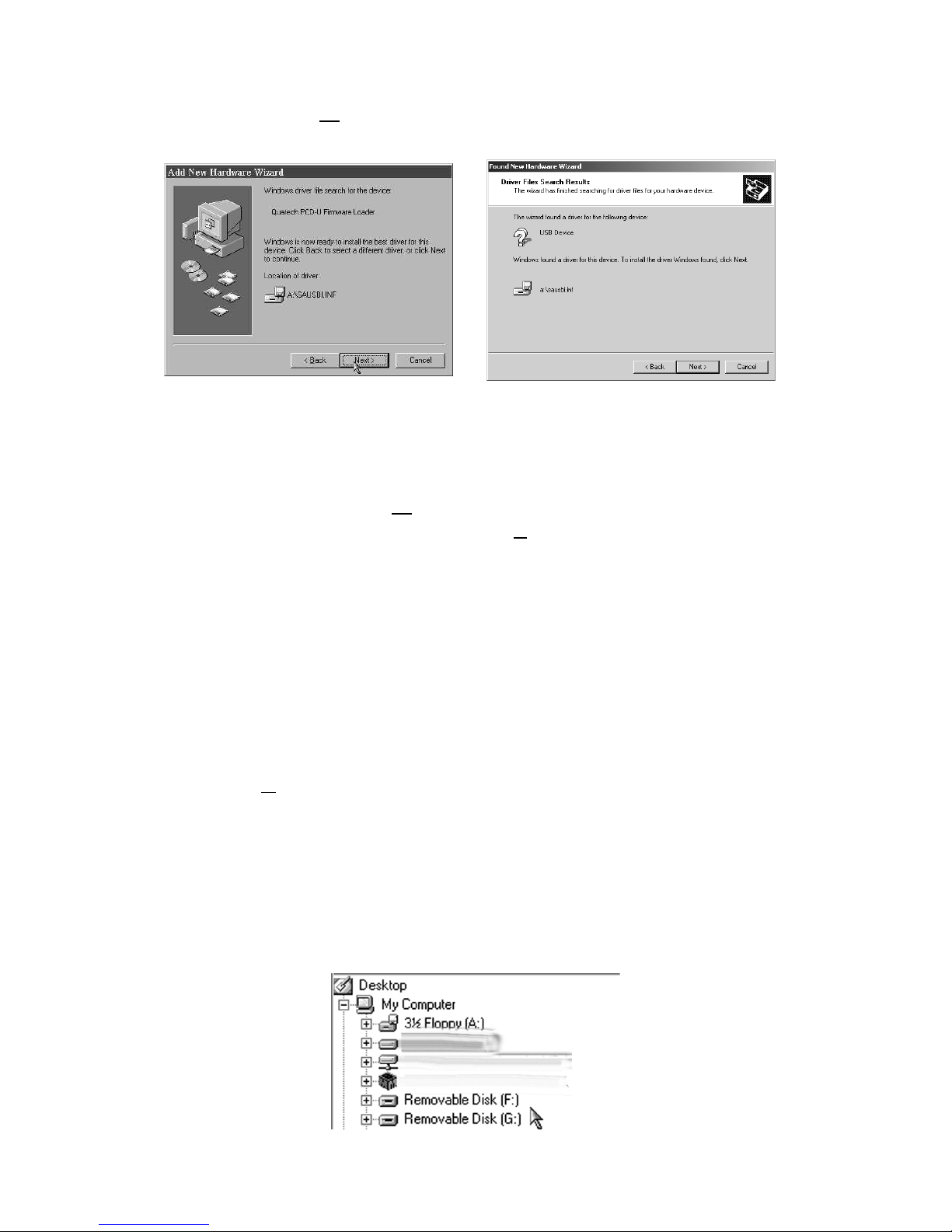
5. Selecttherecommendedoption: ‘Search forthebest
driver for your device’ and then press the ‘Next’
button to proceed to the dialog window shown in
Figure 2-1.3.
Figure 2-1.3 Add New Hardware Dialog Window #3
Windows 98 Windows 2000

Quatech PCD-U Manual 11
Figure 2-1.4 Add New Hardware Dialog Window #4
6. Select the ‘Floppy Disk Drives’ check box and
click the ‘Next’ button to proceed to the dialog
window shown in Figure 2-1.4.
7. When the dialog window shown in Figure 2-1.4 ap-
pears, click the ‘Next’ button to view the final dia-
log window and then click ‘Finish’ to complete the
installation of your USB adapter.
8. Oncetheadapter configurationisfinished, Windows
98 or Windows 2000 will then configure the Com-
pact Flash /ATAcard reader and the SmartMediaä
card reader which completes the hardware installa-
tion process.
9. To verify that the PCD-U is properly installed, open
Windows Explorer.(Click the Start button and se-
lect Program => Windows Explorer. ) In Windows
Explorer, check to see that two new icons have been
added under the My Computer directory. The
drives are labeled Removable Disk and represent
each of the two storage card sockets on the PCD-U.
The PCD-U’s lower socket is the first drive (Drive F
in Figure 2-1.5) while the upper socket is the sec-
ond. (Drive G in Figure 2-1.5).
Figure 2-1.5 Removable Disks in Windows Explorer.
Windows 98 Windows 2000
Este manual sirve para los siguientes modelos
1
Tabla de contenidos
Otros manuales de Lector de tarjetas de Quatech