
Pyle PTEDK50 Manual de usuario

PTEDK50
ElectronicDrumKit
Compact Drumming Machine, MIDI Computer Connection,
Quick Setup Roll-Up Design (Mac & PC Compatible)

www.PyleUSA.com
2
CONGRATULATIONS!
Thank you for purchasing this digital drum set. The drum set has been
developed to act and play like a drum set but with greater ease.
Before you use the instrument, we recommend you to read through
this manual.
Location
• To avoid deformation, discoloration,
or more serious damage, do not expose
the unit to direct sunlight, high
temperature sources, or excessive
humidity.
• Direct sunlight.
• High temperature (near a heat source,
or in car during the day time).
• Disconnect all cables before moving
Power Supply
• Use the specied adapter only. Using
the wrong adapter can result in damage
to the instrument or overheating.
• Turn the power switch OFF when the
instrument is not in use.
• Remove the electric plug from the
outlet when the instrument is not to
be used for extended periods of time,
or during electrical storms.
• Avoid plugging the AC adaptor into
an AC outlet that is also powering
high-consumption appliances such as
electric heaters or televisions.
Also avoid usingmulti plug adaptors
since these can reduce sound quality,
cause operation errors and result in
possible damage.
Turn Power OFF When Making
Connections
• To avoid damage, turn OFF the power
switch and all related devices prior to
connecting or disconnecting cables.
Handling and Transport
• Never apply excessive force to controls,
connectors, and other part
• Unplug cables by gripping the plug
rmly. Do not pull on the cable.
• Disconnect all cables before moving
the instrument.
• Physical shocks caused by dropping,
bumping, or placing heavy objects on
the instrument can result in scratches
and more serious damage.
Cleaning
• Clean the module with a dry, soft cloth.
• A slightly damp cloth may be used to
remove stubborn grime and dirt.
• Never use cleaners such as alcohol or
thinner.
• To avoid discoloration, do not place
vinyl objects on top of the instrument.
Electrical Interference
• This instrument contains digital
circuitry and may cause interference
if placed too close to radio or television
receivers. If this occurs, move the
instrument further away from the
aected equipment.

www.PyleUSA.com
3
ASSEMBLY INSTRUCTIONS
CAUTION!
Watch your ngers when adjusting clamps, they may become pinched resulting
in injury. Be careful of metal pieces, pipe ends and screws.
Please install in the specied order and make sure that all parts are installed in
the correct position.
INSIDE THIS PACKAGE
Before assembly, please make sure that all the items listed below are present.
PTEDK50
Drum Key (x1) Owner's Manual (x1)
Assembly Instruction (x1)
Drum Cable (X1)
Drum Stick (x2) AC Adaptor (x1) Ribbon (x12)
Ctrl Pedal (x2) Drum Stand (x1) Module (x1)
8" Cymbal (x3) 7" Snare (x1) 7" Tom (x3)

www.PyleUSA.com
4
ASSEMBLY
1. Loosen frame bracket bolts with supplied drum key, and open the drum stand
as shown below. Tighten bolts to secure once the stand is set into the position
pictured. (Do not over tighten)
2. Loosen pad bracket bolts and insert pads and module as shown below, tighten
bolts to secure. (Do not over tighten) Remove cymbal top nut and lower cymbal
onto holder, re-install nut to secure cymbal.
PTEDK50
CRASH
HI- HAT
SNARE
TOM1 TOM2
RIDE
TOM3

www.PyleUSA.com
5
CONNECT
Connect the drum cables to the correct parts. Secure the D-SUB plug to the rear
of the module with the 2 attached bolts.
The Contoller pedals are placed on the oor and connected to the 'HH CTRL' (left)
and 'KICK' (right) cable for your bass drum sound and HiHat control.
Precautions
When connecting or disconnecting cables on the module, please make sure
the power switch is set to 'OFF' position to avoid damage to the module.
FUNCTION BUTTON DESCRIPTION
FRONT PANEL
1. LED Display: Displays the menu parameters.
2. VOLUME: Adjusts the headphone and main output volume.
3. SETUP: Enters setting menu, to adjust parameters of VOICE/SONG/TEMPO.
Press and hold to save user presets.
4. PAGE: Changes sub menu of VOICE/SONG/TEMPO.
5. DOUBLE BASS: The hi-hat ctrl pedal becomes a 2nd bass drum.
6. CLICK: Turns ON/OFF the metronome.
7. RECORD: Records the drum sound.
8. START/STOP: Starts/stops demo songs or recording.
9. [+/-1]: Adjusts the parameters, e.g. drum kit, Voice, etc. (Hold the button to
change value quickly)

www.PyleUSA.com
6
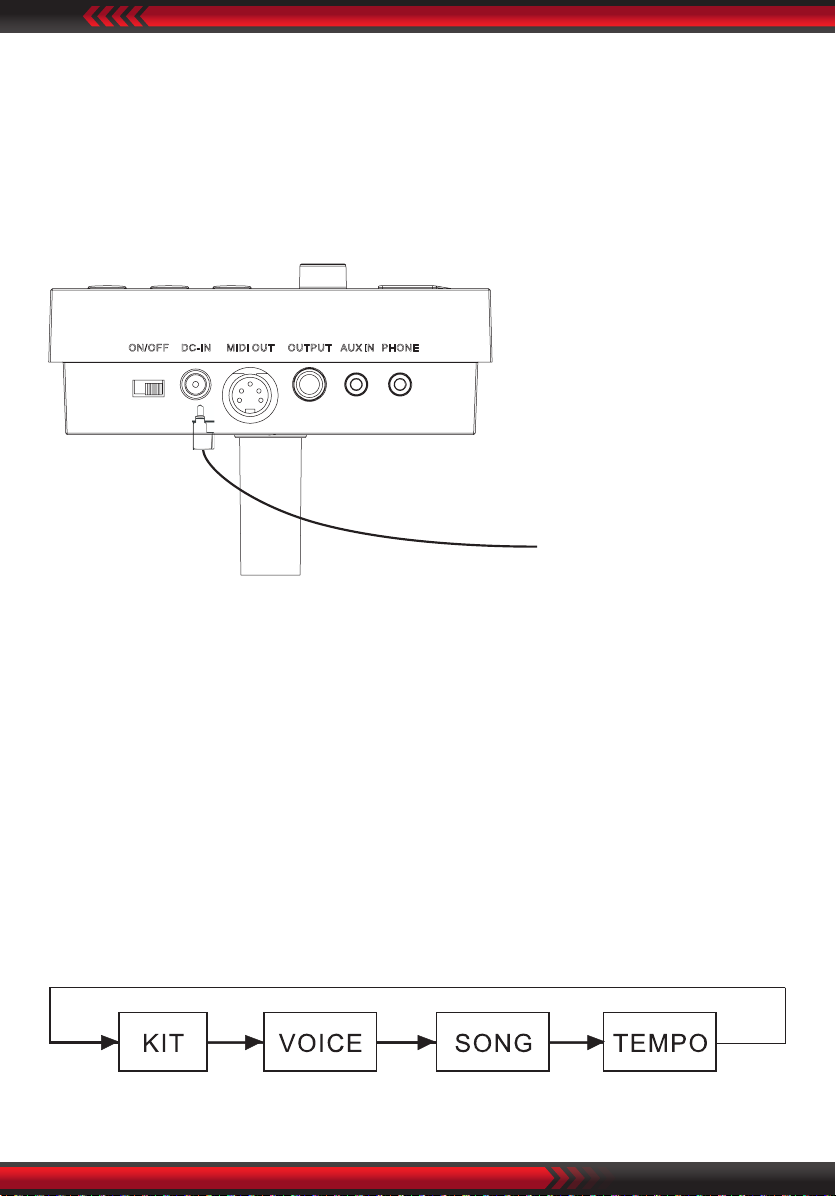
TOP PANEL
10. PHONE: Stereo headphone connector.
11. AUX IN: External stereo input connection, e.g. MP3 or CD player.
12. OUTPUT: The stereo output connector to connect with audio system or drum
amp, mono output.
13. MIDI OUT: Connects with external MIDI devices (The drum MIDI signal outputs
via MIDI OUT to external audio source.)
14. DC IN: Power adapter connector.
15. ON/OFF: Switches the power on and o.
REAR PANEL
16. Trigger in connector: D-SUB pad signal input connector.

www.PyleUSA.com
7
CONNECT WITH EXTERNAL DEVICES
Connecting with audio system or drum amplier
Connect Drum Kit OUTPUT socket to audio system or drum amplier using 1/4"
jack instrument cable.
Note:
The volume is controlled by the Drum Kit volume knob and device volume knob.
Connect with Headphones
Connect headphones with 1/8" stereo connector, to the headphone socket on
the Drum Kit. The volume is controlled by the Volume knob on the Drum Kit.

www.PyleUSA.com
8
Connect with MP3 or CD player
Connect the output of your MP3 or CD player with the INPUT socket on the Drum
Kit. Volume of input can be adjusted via your MP3 or CD player.
Connect with PC
Connect PC via MIDI port
MIDI OUT: Delivers pad signal to PC.

www.PyleUSA.com
9
Power Supply
1. Turn o the Drum Kit power switch.
2. Connect the power supply with DC IN connector.
3. Conrm all the pads are correctly connected. Set the Drum Kit volume to
minimum, then turn ON the power switch of the Drum Kit. The display lights up
and it enters into the drum kit menu.
Turn o the power switch before connecting with other devices.
OPERATION
Adjust the master volume
Strike the pads and adjust the volume knob for suitable master volume.
Preset drum kit: KIT01--10
1. Power on to enter drum kit selection, the KIT LED lights up (the display shows
drum kit number saved last time before power-o);
2. Press [SET UP] button to enter drum kit setting, the KIT LED lights up;
(The corresponding mode LED will also light up in mode switch)

www.PyleUSA.com
10
3. In drum kit mode, LED shows the current drum kit number, press [+/-] button
to switch the drum kit and select any drum kit as current drum kit.
VOICE
The Drum Kit has 108 voices, including the GM voices.
1. Select voice you are playing.
This change will automatically save until the Drum Kit is switched o.
To permanently save this setting to a user drum kit please refer to the “Saving
Adjustments” page.
2. Adjust voice volume
Tabla de contenidos
Otros manuales de Tambor de Pyle

Pyle
Pyle PTED06 Manual de usuario

Pyle
Pyle PTEDRL12 Manual de usuario

Pyle
Pyle PTEDRL11 Manual de usuario

Pyle
Pyle PED02M Manual de usuario

Pyle
Pyle PED-021M Manual de usuario

Pyle
Pyle PED03 Manual de usuario

Pyle
Pyle PDRMKIT72N Manual de usuario

Pyle
Pyle PTED01 Manual de usuario

Pyle
Pyle PTED01 Manual de usuario


