PXM PX741 Manual de usuario

MANUAL
Trailing Edge
Dimmer
4 x 200W
PX741
R

CONTENTS
3
3
5
5
8
8
8
8
8
9
10
11
14
15
17
17
17
18
18
19
21
22
26
26
27
1. General description...............................................................................................................
2. Safety conditions...................................................................................................................
3. Description of connectors and control elements...................................................................
4. Symbols of shown messages................................................................................................
5. Device programming.............................................................................................................
5.1. Menu navigation..........................................................................................................
5.2. Setting control modes..................................................................................................
5.2.1. DMX control........................................................................................................
5.2.1.1. DMX addressing........................................................................................
5.2.1.2. Reaction to the lack of the DMX signal.....................................................
5.2.2. Analogue control................................................................................................
5.2.3. Control with buttons............................................................................................
5.3. Choice of the control curve..........................................................................................
5.4. Control range...............................................................................................................
5.5. Screen saving..............................................................................................................
5.6. Temperature.................................................................................................................
5.7. Working time................................................................................................................
5.8. Version of company software.......................................................................................
5.9. Default settings............................................................................................................
6. RDM......................................................................................................................................
7. Menu diagram.......................................................................................................................
8. Wiring diagram......................................................................................................................
9. Dimensions...........................................................................................................................
10. Technical data.....................................................................................................................
Declarations of conformity.........................................................................................................
The manufacturer reserves the right to change the operation and handling of the device in order
to improve the product.
tel.: (12) 385 83 06
fax: (12) 626 46 94
E-mail: [email protected]
Internet: www.pxm.pl
Rev 1.0
PXM Marek Żupnik spółka komandytowa
Podłęże 654
32-003 Podłęże

3
1. GENERAL DESCRIPTION
2. SAFETY CONDITIONS
PX741 is an intelligent transistor dimmer with phase cutting where control is carried out
on the falling edge (the so-called trailing edge dimming)
The module controls four channels 200VA each and has an built-in system of interference
suppression, fuses and signal controls.
The device has the DMX512 input, analogue inputs 0-10 V or a possibility to link outer buttons
and control them in compliance with one of four functions. The dimmer offers a lot of possibilities
to adjust the control characteristic.
Each of the four output channels can be configured individually.
The settings consist of the following parameters:
Ÿthe control mode (DMX, analogue, buttons)
ŸDMX address
Ÿthe reaction to the lack of the DMX signal
Ÿthe choice of key functions together with the full regulation of reaction time
Ÿadvanced functions and parameters allowing to adjust control to the type and characteristic of
capacity (a minimum and maximum level of control, a characteristic curve,
a function of pre-glow)
The dimmer is designated to work with capacity of R and RC types:
Ÿdimmable LED bulbs
ŸLEDs connected with a dimmable adapter of the CC type
Ÿtraditional bulbs
Ÿhalogen bulbs 230 V
Ÿhalogen bulbs 12 V connected with the dimmable electronic transformer
The device is closed in the standard housing of the width of 105 mm, designated for bar
assembling.
Dimmer PX741 is powered directly from standard 230V grid, what can cause electric shock when
safety rules are not observed. Therefore it is necessary to observe
the following :
1. Installation, particularly power connection, should be performed by a person holding
the appropriate qualifications, according to the description in the instruction manual.
2. Dimmers can be connected to socket which has protecting installation - separate PE
strand - in working order only (3-strand grid).
3. All the conductors should be protected against mechanical and thermal damage.

4. In the event of damaging any conductor, it should be replaced with a conductor of the same
technical data and attestations.
2
5. The external devices can be connected to the dimmer with 3-strand 0.75 mm minimum
crosssection area only.
6. Dimmer can be installed in closed electrical switching stations only, with restricted access
for people who does not handle proper qualifications in 230V supplied devices maintenance.
7. Power input must to be protected with an external residual current breaker with overload
of 6A rated current and B-type characteristic.
8. After the installation is completed, check the neutralization efficacy of all powered devices.
9. All repairs demanding casing opening should be made with cut off power supply.
10. The device should be strictly protected against water and other liquids.
11. All sudden shocks, particularly dropping, should be avoided.
12. Device with damaged (bent) casing should not be connected to the mains.
13. The device cannot be turned on in places with humidity exceeding 90%.
14. The device cannot be used in places with temperature lower than 2° C or higher than 40° C.
WARNING!!!
1. The inappropriate connection of a protective wire creates the risk of electric shock.
2. The inappropriate connection of the neutral wire results in the faulty operation of a dimmer.
3. The dimmer can regulate exclusively the circuits (of capacity) of the resistive type
or the capacitive one.
4

3. DESCRIPTION OF CONNECTORS AND CONTROL ELEMENTS
output 10V signal
Supply connector (starting from the left L4, L3, L2,
L1, 3xN, Lin and PE) L1-L4 are the output (con-
trolled) phases
DMX input analogue/digital inputs
4. SYMBOLS OF SHOWN MESSAGES
address of the DMX device – the elementary position in the MENU
setting parameters for each channel separately
current temperature value
blanc screen – screen saving ON/OFF
setting parameters for all the channels simultaneously
5
total working time
version of software

setting a linear control curve
setting a switched control curve
setting a logarithmic control curve
setting an exponential control curve with index 2
setting an exponential control curve with index 3
minimum level of an output connection while rising
minimum level of an output connection while falling
maximum control level
forcing a minimum output level
extension of an output curve to the full control range
channel control with the analogue input
channel control with the DMX signal
channel control with buttons
control range selection
control curve selection
control source selection
setting the DMX address
selection of the reaction mode to no DMX signal
reset to factory default settings
6
rise time in the push-button mode (from min to max)
calibration of analogue inputs
selection of one of four control functions
duration in the push-button mode (in function 4)
falling time in the push-button mode
minimum level which can be reached while dimming in function 2

first channel
total working time of the device
total duration of channel control
setting seconds
setting minutes
setting an hour
setting a day number
setting a year
infinity
inversion of the selected control curve
confirmation
setting a normal (non-inverted) selected control curve
switching off
switching on for 100%
setting the first function
scene: a control value for no DMX signal
7

5.1. Menu navigation
5. DEVICE PROGRAMMING
On switching on the device, the version of the programme appears for a moment on the display.
Press “previous” or “next” in order to select the appropriate menu and press “enter” to confirm
the choice.
5.2. Setting control modes
The menu of the PX741 device allows to set the control mode of the device.
Each of the device channels can be controlled with:
Ÿ the DMX dMX signal( ),
Ÿthe analogue input AnL,
Ÿthe buttons diG.
Setting the modes, the curve and the range of control is possible individually (Ind) for one of four
channels (CH1 – CH4) or collectively (ALL) for four channels simultaneously.
8
5.2.1.1. DMX addressing
In this menu, the DMX address can be set for individual channels individually or collectively for all
the channels simultaneously and then the set address will be designated to the first channel
and the next DMX addresses will be designated to next channels.
The address programmed this way cancels all the previous individual settings of each channel.
enterenter enter
enter
next
enter enter
next
next
enter
next
enter
enter
enter
5.2.1. DMX control
escape
previous
next
enter
- goes back to the previous MENU level or discards changes made
- scrolls to the previous feature on the same MENU level or decreases
the parameter's value
- scrolls to the next feature on the same MENU level or increases
the parameter's value
- enters the next MENU level and confirms changes made

5.2.1.2. Reaction to the lack of the DMX signal
This function is used both to secure the installation against disappearance of the DMX signal
and to achieve the desired value without the connection of an outer controller. On activating it,
in case of no DMX signal, the module will realize the selected option individually. The realized
option will be stopped automatically after re-connecting the DMX signal and the module will
realize commands sent through the DMX line again.
enterenter enter
enter
next
enter enter
next
next
enter
enter
enter enter
next
next
nextnext
prev
prev
prev
enter
next nextnext
prev
prev
prev
enter
next
next
next
next
next
Sc - programming the values of the scene, for which the following options are available:
Ÿthe value 0 - 255
Ÿmaintaining the last value of HLd
Ÿa signal from the analogue inputs AnL
Ÿa signal from the buttons diG
Apart from that, the transition parameters can be defined:
Ÿup time - uPt - the rise time in the push-button mode (from min to max)
Ÿhold - hLd - duration in the push-button mode (in function 4)
Ÿdown time - dnt - falling time in the push-button mode
SEC - setting seconds
Min ( ) - setting minutes
Hr - setting hours
dAY ( ) - setting days
9

5.2.2. Analogue control
enterenter
enter
next
enter
next
enter
enter
next
next
enter
next
enter
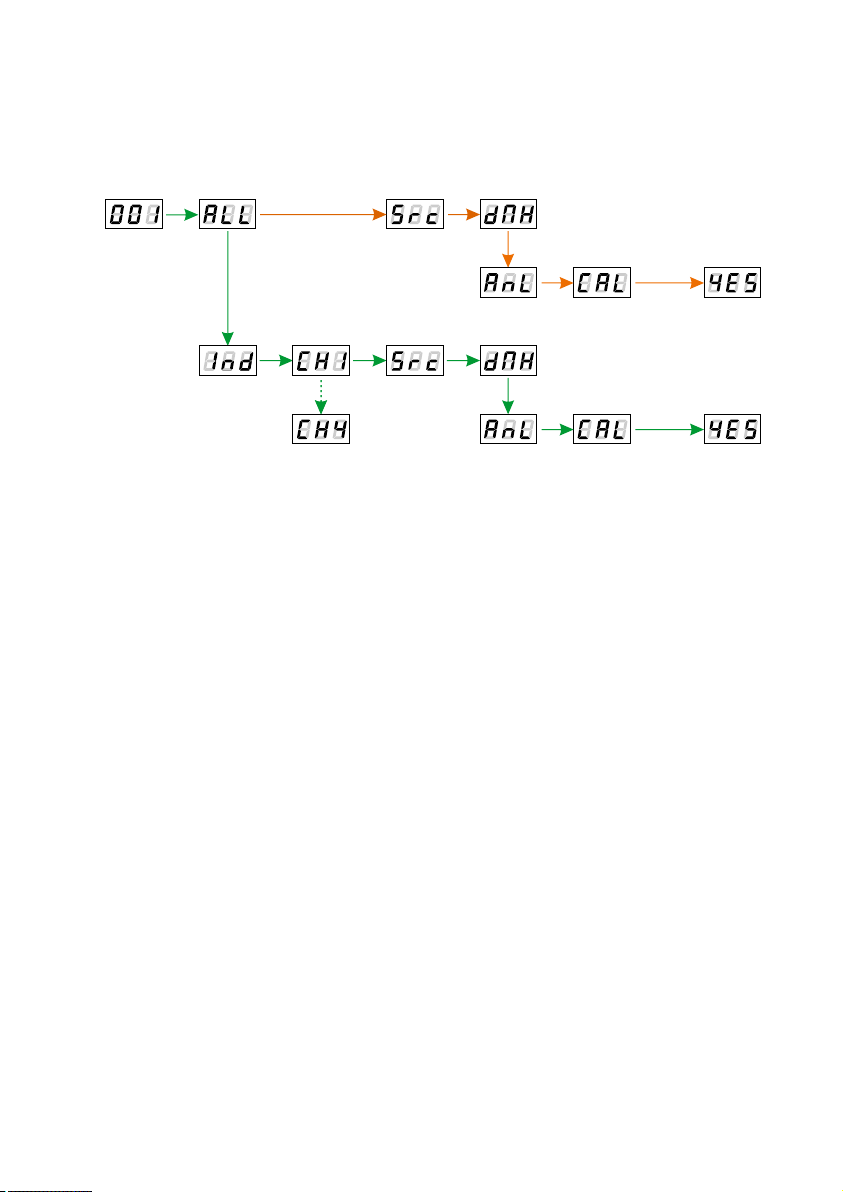
The control source from the analogue inputs can be set for each channel individually (Ind for the
channels CH1 – CH4) or collectively for all of them ALL. Calibration should be carried out
to ensure that the inputs work correctly. In order to do it, the maximum value should be set in the
input and the CAL option should be selected, and then the message YES should be confirmed
with the key “enter”.
wciśnięty
enter
wciśnięty
enter
10
Otros manuales para PX741
1
Tabla de contenidos
Otros manuales de Regulador de intensidad de PXM