
Proxel 3WM+A Manual de usuario

---------- PROXEL ENGINEERING ---------------- www.proxel-bg.com-------------------------------- 3WMREG rev. 2.4 /02.20 7------
TEMPERATURE CONTROLLER FOR 3 WAY VALVE
WITH OR WITHOUT EXTERNAL TEMPERATURE COMPENSATION
(IZOTHERMAL REGULATOR ) 3WM+A
DESCRIPTION
The unit is applicable for controlling the output temperature of electrically actuated 3 way
mixing valve:
- Mode “Setp C =ExtTemp” – compensation of regulated temperature according to external
temperature (isothermal regulation)
- Mode 2“ Setp C =Local T” – fixed temperature preset by user
Characteristics:
. Control commands for „Open” and „Close” for directions of motor driven 3-way mixing
valve.
2. Reads or 2 temperatures
3. Parameters 6
4. User selectable mode of operation – fixed temperature or isothermal regulator
5. Push button Start/Stop
6. Power supply – 230 V AC, consumption <2VA
7. Outputs: 2 x – separate relays for commutation of :
- R n.o. – for “open” command
- R2 n.o. – for “close” command
8. LCD display – alphanumeric 8х2
9. Buttons for navigation – 3pcs. Button for On/Off
TECHNICAL DATA
Power Supply: 230V± 0% /50Hz. ≤ 2VА
Installation on DIN rail 35mm; for
incorporation
Operating temperature: -5T40, RH80%
Transport -20/+60 º C
Overall dimensions: 68x85x58 mm.
Case IP20
Sensor types: PTC k
Reading range : -40ºC÷ 50 ºC;
Accuracy ± ºC if (-5ºC ÷ + 00 ºC); else±4ºC.
Outputs:
-Relay R - 230V - 5A и 80W/AC3 (motor
)
-Relay R2- 230V - 5А и 500W/AC3(motor)
-Relay R3- 230V - 5A option
- Power supply 230V AC – (internal and R ) – # 7 (Live “La”); # 6 („N”);
- R : valve – “open” – # 8 (switches Live); # 5 („N”); – 5А max.
- R2: valve – “close” – #20 (separate Live ”Lb”); #22 output – 5А max.
-
R3: Option
---------- PROXEL ENGINEERING ---------------- www.proxel-bg.com-------------------------------- 3WMREG rev. 2.4 /02.20 7------
WIRING DIAGRAM
Insta ation and commusioning
This device is dedicated to be incorporated in apartment electrical box with size of 4 or more poles
or a cabinet and can be attached on 35mm DIN rail.
Sensors and outputs wiring:
1. Scheme 1 “Loca Setp” (Regu ates output temperature to a fixed set point)
TS1: Regulated temperature TS2:not used TS3: Room temperature
R1: “Open” direction R2: “Close” direction
2. Scheme 2 “TSyphReC” (Regu ates output temperature to a variab e set point, ambient
temperature dependant)
TS1: Regulated temperature TS2: Ambient temperature TS3: Room temperature
R1: отваряне R2: затваряне
PARAMETERS:
„ROOM T.” – Set point of room temperature.
[range = 10º C ÷ 45º C]. Factory= 25 º C;
. „Set T.” – Set point of water temperature.
[range = -10º C ÷ 90º C]. Factory = 40 º C;
2. „±Hist I” – Hysteresis (fine regulation)
[range 2º C ÷ 10º C] Factory= +5º C
3. „±Hist II” – Hysteresis 2 (coarse regulation)
[range Hist I +2º C ÷ Hist I+ 15º C] Factory = +15 º C
4. „PulseDur” – Duration of signal pulses for “moving” the valve - either direction.
[range 0. 5sec ÷5.0 sec] Factory = + 1.0 sec;
5. „ON<>OFF” – Time constant of valve to change from fully open to fully close state.
[range 15 sec ÷ 250 sec] Factory . = 0 sec;
. „Period+” – Period of applying signal pulse for direction “open”
[range 5 sec ÷ 0 sec] Factory = 15 sec”
7. „Period-” – Period of applying signal pulse for direction “close”
[range 5 sec ÷ 0 sec] Factory = 15 sec”
8. „Setp=” – Mode of operation : at fixed set point (local) or with temperature compensation
based on ambient temperature
9. “dTAlarm” – Alarm temperature ,a ± margin from current set point. If temperature reading is
“outside” this margin device starts emergency “open” or “close” procedure [-35
º C ÷ 35º C].
Factory = 35
Attention!
3WMreg is not a safety device as by means of EN60730-1-Annex H
Attention
!
Danger of e ectric shock!
A activities invo ving insta ation and commissioning shou d be done whi e e ectric power is off
Attention!
Power supp y shou d be app ied via fuses Phase-La / Lb 6A max.
---------- PROXEL ENGINEERING ---------------- www.proxel-bg.com-------------------------------- 3WMREG rev. 2.4 /02.20 7------
B:XX ZZ
= YYºC WW
0. „EXT.T.L” – Lower point of ambient temperature
. „EXT.T.М” – Middle point of ambient temperature
2. „EXT.T.H” – Highest point of ambient temperature
3. „Fluid Lo” – Lower possible temperature of fluid
4. „Fluid Hi” – Highest possible temperature of fluid
5. „FluidCorr” – General correction of fluid temperature setting
Others:
Fixed hysteresis 2 ºC Fault notification - entire screen blinking
Visualization of R and R2
operation
Manual open / close
Important parameter change is password protected
USAGE
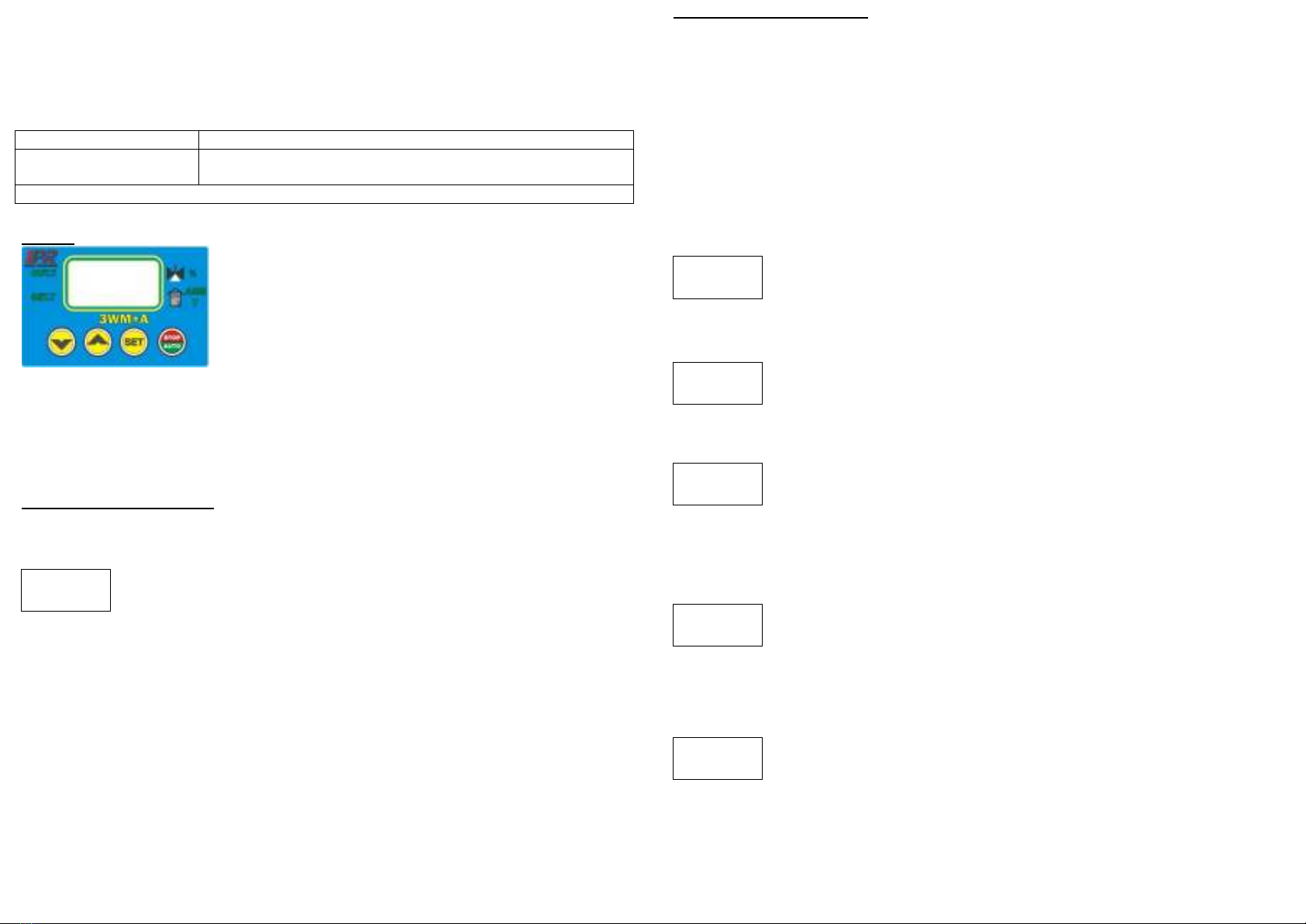
Front pannel
Description
- two lines
display
- 3x push buttons: for Up „Up↑”, for Down „Dn↓”, to select
„Set”
- Push button for selection of operation mode (stop/ automatic)
- Indicaton of alarm event – blinking of backlight (if a sensor is
defective)
Usage of buttons:
. button „Up- ↑”/„Dn-↓”, navigates among list of parameter screens previous/next;
activation with holding button "Set" increase / decrease selected value with
2. button „Set” change value of selected parameter
3. button „AUTO/STOP-” – selects the operational mode of the unit „AUTO”/ „STOP”
Avai ab e windows and usage
Window #1 - Main window
Displays temperature reading of sensors and operational mode of outputs.
Row 1: Outgoing water temperature "XX", "ZZ" relative valve status in percent.
If there is no sensor - „no” is displayed, if sensor is shor circuit or
resistance - “sc” is displayed.
Row 2: temperature set point "YY", "WW" ambient temperature when operating in ambient
temperature correction mode
Meaning of symbols:
” + ” - When submitting the “opening” command, the sign "=" is changed to "+"
” - ” - When submitting the "close" command, the sign "=" is changed with "-"
„ * ” - If the maximum movement is exceeded in the respective direction, the output effects are
discontinued (to save the life of the switching element) and the "sign" = "changes with " * "
„ R ” – While the room temperature displayed differs from the set point by more than -2÷ + °C,
the controller switches for 4 minutes in forced “opening” or “closing” mode to reach the set room
temperature more quickly. Visualized by blinking the "°c" sign alternatively with "R
When "STOP" mode is enabled, row 2 alternately outputs "-STOP--"
---------- PROXEL ENGINEERING ---------------- www.proxel-bg.com-------------------------------- 3WMREG rev. 2.4 /02.20 7------
Set T.
[ 45ºC] 2
±Hist I
[ 2ºC] 3
dTAlar
[ 65ºC] 5
±Hist II
[ 10ºC] 4
ROOM T.25
[ 45ºC] 1
Manua activation of outputs:
Press and hold „SET” button.
Press „Up- ↑” button to manual activation in the "open" mode
Press the "Dn- ↓" button to manually activate in the "close" mode
Using the Buttons for Parameters Adjustment:
Navigates among screens: buttons „Up- ↑” and „Dn-↓”.
To change required parameter – push the „Set” button.
Adjust the value using the buttons „Up- ↑” and „Dn-↓” . Confirm with the button „Set
*Note: Adjustment of all parameters is possible onl after pressing the "Set" button indicated b
placing the value in "[" and "]". Confirm the value again with the "Set" button.
Window/Screen #1 - Room temperature
Display - set and readed room temperature.
Row 1: Displays the selected parameter "ROOM T." and the room temperature
measured at 25°C
Row 2: The value of the parameter. Range 0ºC ÷ 45ºC.
Screen [ ]
Window/Screen #2 - temperature set point
Display - set the operating temperature
Row 1: Displays the selected parameter "Set T."
Row 2: The value of the parameter. Range - 0ºC ÷ 90ºC.
Screen [2]
* If operation mode is based on ambient temperature this value is automatically
selected and can not be adjusted manually
Window/Screen #3 – Hysteresis fine adjustment
Row 1: Displays the selected parameter "± Hist I",
Row 2: The value of the parameter. Range 2ºC ÷ 0ºC. ".
Screen [3]
If there is a difference between the set point and reading below the selected value,
the adjustment is made only by an integral factor.
At a difference above the set value - adjustment is done with a fine step.
* to change this parameter a password is required
Window/Screen #4 – Hysteresis of coarse adjustment
Row 1: Displays the selected parameter “±Hist II
Row 2: The value of the parameter. Range “±Hist I” + 2ºC ÷ 5ºC. ”
Screen [4]
.
If the difference between the set and the achieved between Hist I and Hist II
regulation is done fine.
If the difference is outside the range, the adjustment is done with a coarse (fast) step.
* to change this parameter a password is required
Window/Screen #5 –Emergency c osing / opening temperature
Row 1: Displays the selected parameter “dTAlarm”.
Row 2: The value of the parameter. Range “Set.T”±35ºC.
Screen [5] .
* to change this parameter a password is required
-at "dTAlarm"> "Set T." to an emergency closing is reached if the measured value exceeds the "dT
alarm”
-in "dTAlarm" <"Set T." until emergency closing is reached when the measured value reduces
below "dT Alarm"

---------- PROXEL ENGINEERING ---------------- www.proxel-bg.com-------------------------------- 3WMREG rev. 2.4 /02.20 7------
PulseDur
[3.5sec]6
Ext T L
[-25ºC]11
Period+
[10sec] 8
ON<>OFF
[ 60sec]7
Period-
[10sec] 9
Passwrd
[00] 10
Ext T M
[ 0 ºC]12
Ext T H
[ 25ºC]13
Window/Screen #6 –Duration of output pu se for fine adjustment
Row 1: Displays the selected parameter “PulseDur”
Row 2: The value of the parameter. Range 0.5 ÷ 5.0sek.
Screen [6] .
* to change this parameter a password is required
Window/Screen #7 - Tota Time to fu y open / c ose the actuator.
Row 1: Displays the selected parameter “ON<>OFF”
Row 2: The value of the parameter. Range 5÷250sec.
Screen [7]
.
* to change this parameter a password is required
1 . Window/Screen #8 - Period of applying signal pulse for direction “open”
Row 1: Displays the selected parameter “Period+”
Ред 2: The value of the parameter. Range 0 ÷ 60sec.
Screen [8]
.
* to change this parameter a password is required
17. Window/Screen #9 - Period of applying signal pulse for direction “close”
Row 1: Displays the selected parameter “Period-”
Row 2: The value of the parameter. Range 0 ÷ 60sec.
Screen [9] .
* to change this parameter a password is required
Window/Screen #10 - Password fie d to access protected parameters.
Row 1: Displays the selected parameter “Passwrd”.
Screen [ 0]
Row 2: Set password.
Enter the required password to access the protected parameters.
Window/Screen #11 - Lower point of ambient temperature to describe the temperature
curve (corresponds to "F uidHi")
Row 1: Displays the selected parameter “Ext T L”
Row 2: The value of the parameter. Range -35ºC ÷ “Ext T M- ” ºC.
Screen [ ]
* to change this parameter a password is required
** the parameter is only visible only if operation mode is ambient temperature correction
Window/Screen #12 - Midd e point of ambient temperature to describe the temperature
curve (corresponds to average of "F uidLo and F uidHi")
Row 1: Displays the selected parameter “Ext T M”
Row 2: The value of the parameter. Range “Ext T L+ ” ºC ÷ “Ext T H- ” ºC.
Screen
[ 2] .
* to change this parameter a password is required
** the parameter is only visible only if operation mode is ambient temperature correction
Window/Screen #13 – Midd e point of ambient temperature to describe the temperature
curve (corresponds to of “FluidLo”)
Row 1: Displays the selected parameter “Ext T H”
Row 2: The value of the parameter. Range “Ext T M- ” ºC ÷ 60 ºC.
Screen [ 3]
* to change this parameter a password is required
** the parameter is only visible only if operation mode is ambient temperature correction
---------- PROXEL ENGINEERING ---------------- www.proxel-bg.com-------------------------------- 3WMREG rev. 2.4 /02.20 7------
[Setp
ºC
]
:ExtTe p
02f90278
03ff
FluidLo
[ 40ºC]14
FluidHi
[ 85ºC]15
CorrFlu
[ 0ºC]16
[Setp
ºC
]
:Local T
Window/Screen #14 – Minimum temperature of the f uid to describe the temperature curve.
(corresponds to "ExtT H")
Row 1: Displays the selected parameter “Fluid Lo”
Row 2: The value of the parameter. Range - 0ºC÷“Fluid Lo”+3 ºC.
Screen [ 4]
* to change this parameter a password is required
** the parameter is only visible only if operation mode is ambient temperature correction
Window/Screen #15 – Maximum temperature of the f uid to describe the temperature curve.
(corresponds to "Ext T L")
Row 1: Displays the selected parameter “Fluid Ho”
Row 2: The value of the parameter. Range “Fluid Lo”+3÷90ºC.
Screen [ 5]
* to change this parameter a password is required
** the parameter is only visible only if operation mode is ambient temperature correction
Window/Screen #16 – Temperature correction F uidLo and F uidHi "tota . (fast and
simu taneous increase / decrease together of temperatures
Row 1: Displays the selected parameter "CorrFlu"
Row 2: The value of the parameter. Range -5ºC ÷ + 5ºC.
Screen [ 6]
* to change this parameter a password is required
** the parameter is only visible only if operation mode is ambient temperature correction
Window/Screen #17 - Se ection of the working circuit (with or without compensation for
ambient temperature).
Set the operational mode
Row 1: Displays the selected parameter “Setp°C”.
Row 2: The selected scheme of work –Sch. =“:ExtTemp”, Sch.2=”:Local T”,
Attention! For the correct operation of the device, observe the correct setting of the
controller operating diagram
* to change this parameter a password is required
Window/Screen #18 - Ca ibration of temperature inputs (service mode).
Temperature curve

---------- PROXEL ENGINEERING ---------------- www.proxel-bg.com-------------------------------- 3WMREG rev. 2.4 /02.20 7------
WARRANTY THERMS AND CONDITIONS:
The warranty period of the product is 24 months from the day of sale or installation by the installer
but no more than 30 months from the date of manufacture. The warranty covers defects
attributable to the manufacturer (manufacturing defects or defective materials). They are not
subject to warranty defects in the product or damage to other equipment as a result of improper or
unskilled installation, improper workflow selection and / or adjustment, unauthorized change of
the product, natural disasters, non-standard power supply, improper storage or transportation
Warranty card
P ease comp ete y fi this card for va id guarantee
Manufacturer: Proxe Engineering Ltd Type: Temperature contro er 3WM+A
Plovdiv, Bulgaria, [email protected]
Seria number: Data of manufacture:
............................. .................................
Se er/Insta er:.............................................................................................................................
Address: ........................................................................................................................................
Date of (sa e) Insta ation: .........................................................................................
Insta er/ se er :.........................................................................................................
(name and signature )
Insta ation is made by
Insta er
C ient
(please mark the true one)
2004/108/EC
200 /95/EC
Otros manuales de Controladores de temperatura de Proxel


