
ProFlight ORBIT PFBD201 Manual de usuario

USER MANUAL
ORBIT
PFBD201
Thank you for choosing ProFlight.
Please read this user manual before using this drone
and keep it safe for future reference.

2of 20
CONTENTS
SAFETY WARNINGS
3
SAFETY PRECAUTIONS
4
BATTERY CHARGING
5
PREPARING FOR FIRST FLIGHT
5
INSTALLING CONTROLLER BATTERIES
6
CONTROLLER DIAGRAM
6
DRONE DIAGRAM
7
UNFOLDING THE ARMS
7
FOLDING THE ARMS
7
REPLACEMENT OF THE PROPELLERS
8
BINDING OF CONTROLLER AND RECEIVER
8
GPS COMPASS CALIBRATION
9
GYROSCOPE CALIBRATION
10
GPS LOCATION SEARCH
10
PREPARING FOR TAKE OFF
11
FLIGHT INSTRUCTIONS
11
AIRCRAFT FUNCTIONS & FEATURES
12
HEADLESS MODE
12
ORBIT MODE
12
SPEED CONTROL
12
AUTO RETURN
13
CAMERA
13
APP
14
TROUBLESHOOTING GUIDE
19
SUPPORT
20

3of 20
SAFETY WARNINGS
Read the entire instruction manual and familiarise yourself with the product
and all its features before operating. Failure to operate the product correctly
can result in damage to the product, surroundings or even serious injury. This
product is not a toy and must be operated with caution and common sense. It
requires some basic mechanical knowledge. This product is not intended for
use by children without direct adult supervision. This manual contains
instructions for safety, operation and maintenance. It is essential to read and
follow all the instructions and warnings in this manual prior to assembly, setup
or use in order to operate correctly and avoid damage or serious injury.
Not intended for use by children under 14 years of age. This is not a toy.
Always operate your drone in open spaces away from vehicles, buildings,
traffic and people.
Always keep out of reach of children.
Avoid exposure to water as moisture can cause damage to the electronics.
Never operate your drone with low transmitter batteries.
The battery charger included with the drone has been designed to safely
charge the Li-Po battery.
Mishandling of Li-Po batteries can result in a fire, personal injury, and /or
property damage.
By handling, charging or using the included Li-Po battery you assume all
risks associated with lithium batteries.
If at any time the battery begins to balloon or swell, discontinue use
immediately. If charging or discharging, discontinue and disconnect.
Continuing to use, charge or discharge a battery that is ballooning or
swelling can result in fire.
Always store the battery at room temperature in a dry area for best results.
Do not store battery or drone in a car or direct sunlight. If stored in a hot
environment, the battery can be damaged or even catch fire.

4of 20
Never use any other type of battery charger other than the one supplied with
the drone. Failure to charge the battery with a compatible charger may
cause fire resulting in personal injury and/or property damage.
Never exceed the recommended charge rate.
When a Li-Po battery is discharged below 3.7V, the battery may be
damaged and may no longer accept a charge. The drone will automatically
land and become inactive when the battery reaches this level, this is to
protect the battery.
SAFETY PRECAUTIONS
Only fly in an
open space
Ensure good
GPS signal
Keep within
line of sight
Fly at a height
below 80m
When flying ensure that the drone is kept away from other people,
trees, electric wires, buildings, airports or signal transmitting tower etc.
Ensure that the weather conditions are suitable for flying. Do not fly
the drone during snow, rain, fog, thunder or in windy conditions.
DO NOT touch the rotating blades
during operation. They can cause
injury or damage to property
No-fly zones must be observed. It is the user’s responsibility to ensure
that the drone is operated legally and safely.

5of 20
BATTERY CHARGING
Use only the supplied USB Li-Po charger to
charge your battery.
Remove the battery from the battery
compartment on the right of the aircraft.
Press down the release button and slide the
battery out.
Plug the charger into a USB socket before attaching the battery. When
the battery is charging the green LED on the charger will flash. When
the battery is fully charged the LED will be illuminated. Charging should
take around 180 minutes. DO NOT leave the battery unattended whilst
charging.
WARNINGS:
DO NOT use other USB cables. They may lead to incorrect
charging, and could cause damage or present a safety risk.
When reinserting the battery, make sure it is secure and fully clicks
into place.
PREPARING FOR FIRST FLIGHT
1. Fully read and understand the safety warnings, and precautions.
2. Make sure both the transmitter and aircraft batteries are sufficiently
charged.
3. Find a suitable place to fly the aircraft, away from people, buildings
and vehicles.
4. Make sure the throttle stick is centred before turning on the
transmitter.
5. Calibrate the GPS compass and gyroscope.

6of 20
INSTALLING THE CONTROLLER BATTERIES
Unclip the battery cover from the rear of the controller and insert 4 x AA
batteries, making sure the correct polarity is followed. Once the
batteries are correctly installed, the battery cover must be re fitted.
CONTROLLER DIAGRAM
1
Speed Button
2
Power Button
3
Decoration Antenna
4
Headless mode (Short Press)
Orbit mode (Long Press)
5
Left Joystick
Start Video (Short Press)
6
Auto Take-Off
Auto Land (Short Press)
Emergency Stop (Long Press)
7
Ring
8
Auto Return (Short Press)
GPS Calibration (Long Press)
Right Joystick
1
2
1
3
4
5
6
7
8
9
SMARTPHONE HOLDER
9Take photo (Short Press)

7of 20
DRONE DIAGRAM
UNFOLDING THE ARMS
FOLDING THE ARMS
1
Switch
2
Blades
3
Motor
4
Camera
5
Battery
1
2
3
4
5
Unfold each arm, ensuring that they click
into position
Fold each arm individually
by sliding the switch on the
underside of the arm to
unlock the mechanism, and
then carefully push the arm
into the folded position.
8of 20
REPLACEMENT OF THE PROPELLERS
Should one of the fitted propellers become damaged, it can be
replaced, by removing the screw from the side of the propeller
before sliding the propeller off the motor shaft. Refitting is the
reversal of removal.
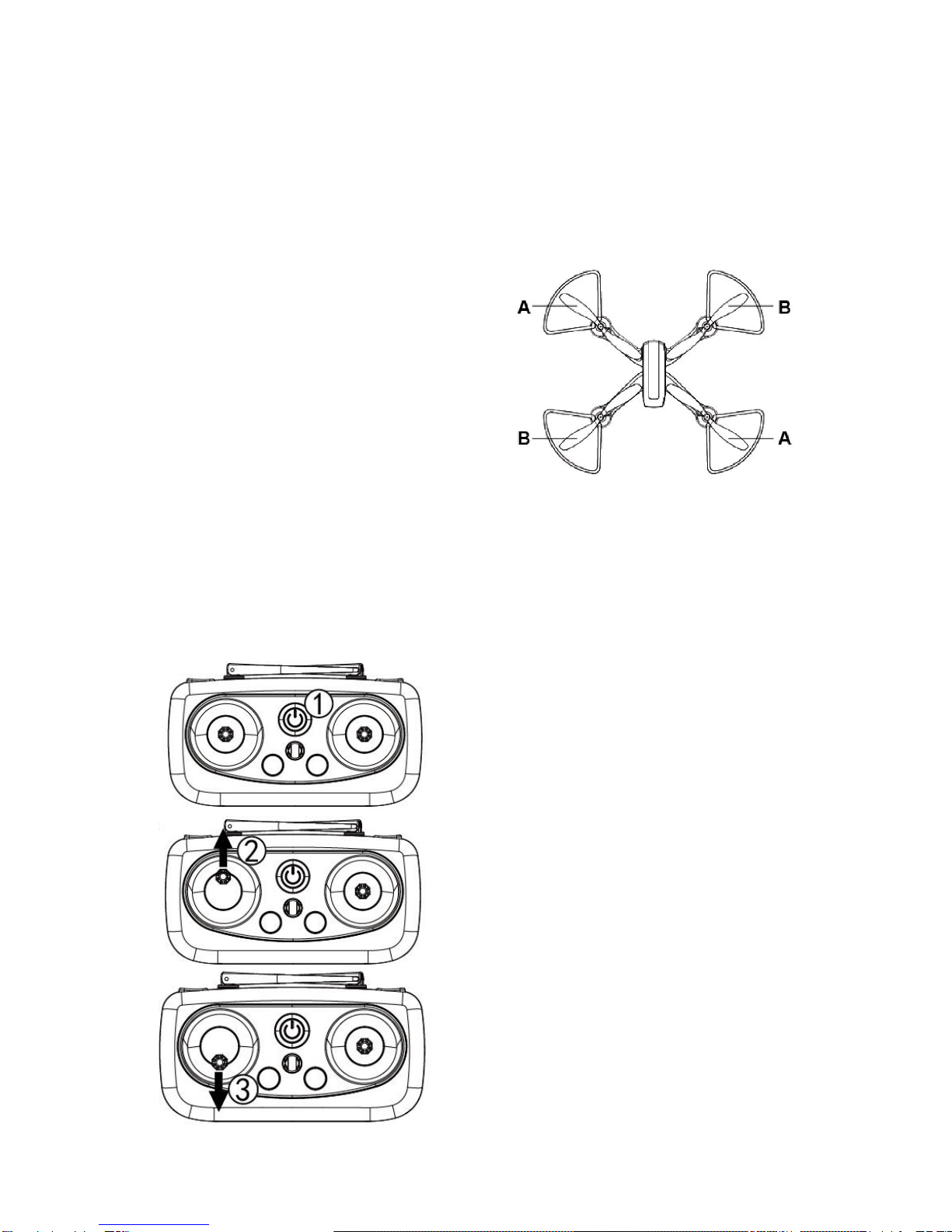
It is important for the correct
blade to be placed on the
correct motor or the aircraft will
not fly correctly. Each blade is
marked with an A or B on the
underside to indicate which
motor it corresponds to.
BINDING OF CONTROLLER & RECEIVER
1. Place the aircraft on a flat surface in an open area and insert the
battery in before turning on. The lights on the underside of the
drone will flash.
2. Turn on the controller.
3. Press the left joystick up, until
the controller bleeps.
4. Press the left joystick down until
the controller bleeps again.
The front lights on the drone will
illuminate, while the rear lights flash.
The drone will then find its location
using GPS, at which point the rear
lights will illuminate constantly.
Please note this can take upto 2
minutes.
The aircraft can be flown using either
the radio control supplied or by using
the App on a smart device.

9of 20
GPS COMPASS CALIBRATION
1. Long press the GPS compass
calibration button. The lights on the
drone will flash.
2. With the drone level, rotate it
anticlockwise for 3 full
revolutions. The lights at the
rear of the drone will illuminate.
3. Then hold the drone with the front
facing down, and rotate it anticlockwise
for 3 full revolutions. The lights at the
front of the drone will illuminate. The
lights will then return to the same
status as prior to calibration, indicating
that calibration has finished.
For accuracy the GPS should be calibrated before each flight, and we
would advise that the drone is at least 50cm away from the ground
during calibration.

10 of 20
GYROSCOPE CALIBRATION
With the drone on a level surface, Pull both the joysticks to the lower
right position at the same time, and hold in that position for 3-5 seconds.
The four lights on the drone will flash to indicate it is calibrating.
Release the joystick, which will complete the calibration.
This should be carried out before each flight.
GPS LOCATION SEARCH
Once the drone has been calibrated, as shown in the previous steps, the
drone should be placed on a flat surface in an open area in order to for it
to fix its location via GPS. Once the location has been fixed, the rear
lights will stop flashing and will be illuminated.
It can take around 2
minutes for the drone
to fix on its location,
although if the drone
has been used within
the previous hour, this
time is reduced.
Tabla de contenidos
Otros manuales de Zumbido de ProFlight

ProFlight
ProFlight MAVERICK AIR PFBD200 Manual de usuario

ProFlight
ProFlight PFBD302 Manual de usuario

ProFlight
ProFlight Wraith PFBD104 Manual de usuario

ProFlight
ProFlight ECHO PFBD77 Manual de usuario

ProFlight
ProFlight Challenger Manual de usuario

ProFlight
ProFlight TRACER PFBD97 Manual de usuario

ProFlight
ProFlight PFBD301 Manual de usuario

ProFlight
ProFlight PFBD103 Manual de usuario

ProFlight
ProFlight PFBD101 Manual de usuario

ProFlight
ProFlight PFBD303 Manual de usuario


