<0.5s <0.5s >0.5s >0.5s<0.5s <0.5s >0.5s <0.5s
a b c
<0.5s <0.5s >0.5s >0.5s<0.5s <0.5s >0.5s <0.5s
a b c
t=3s
t=3s
t=3s
<0.5s <0.5s >0.5s >0.5s<0.5s <0.5s >0.5s <0.5s
a b c
t=3s
t=3s
<0.5s
t=2s..30min
<0.5s
t=2s..30min
<0.5s >0.5s
<0.5s <0.5s >0.5s <0.5s
<0.5s
a b c
<3s <3s >3s <3s >3s <3s
<3s
3s 3s
RFDA-71B RFDEL-71B
1 x
2 x
3 x
4 x
7 x
6 x
1 x
5 x
1 x
- 2s ... 30min.
- 2s ... 30min.
ON/OFF Simulation of sunset Function 4 Function 3 Function 2 Function 1
Stimulation of sunrise
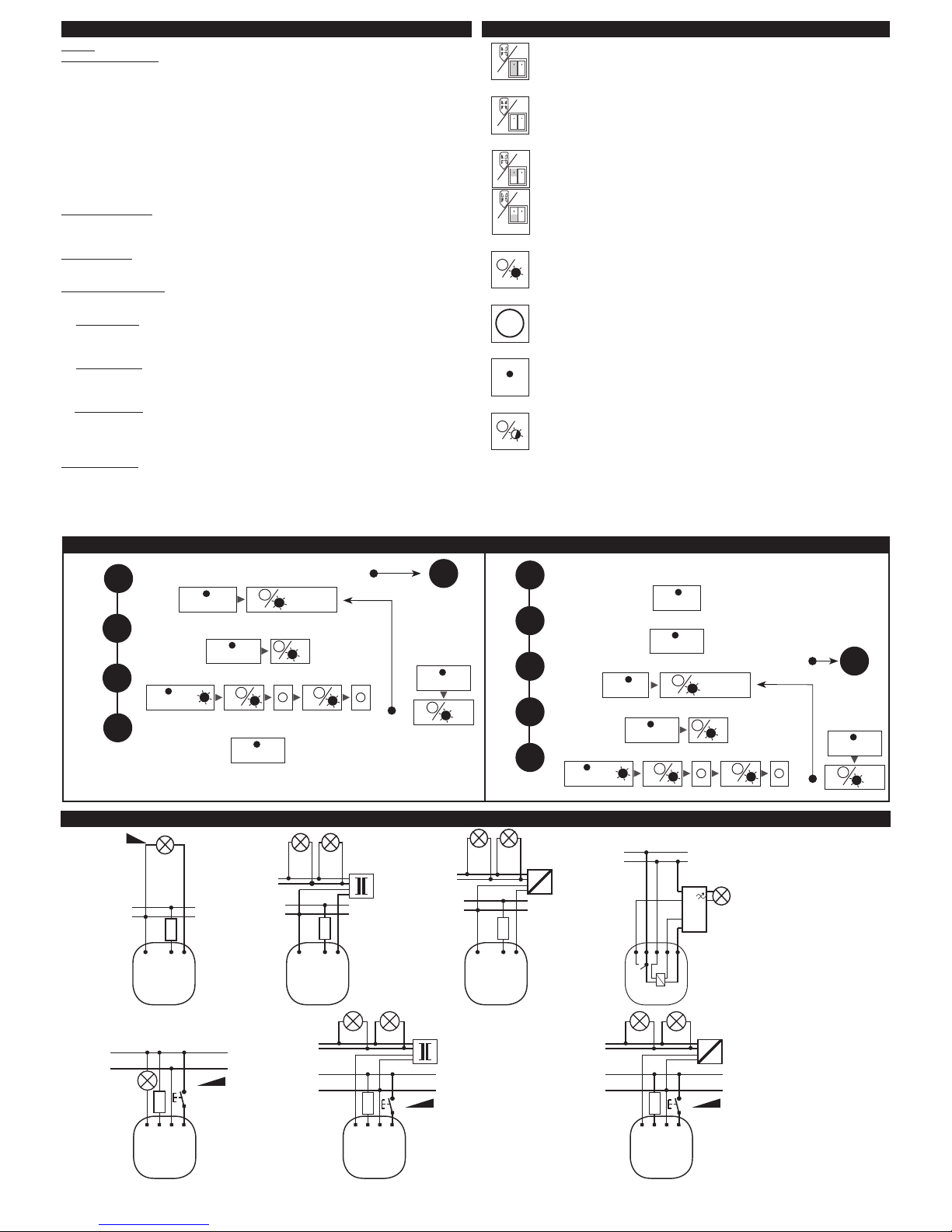
Example: Programming of function “Sunrise simulation” for 5 min on receiver RFDA-71B,
RFDEL-71B
Press of programming button on receiver RFDA-71B for 1second will activate receiver
RFDA-71B into programming mode. LED is ashing in 1s interval.
Required “Sunrise simulation” function is assigned to any button on wireless switch or
key-chain, which is pressed 5x. Press of programming button longer then 5 seconds, will
activate receiver into timing mode. LED ashs 2x in each 1s interval. Time for duration
of “Sunrise simulation” starts to count out (time, for which will light comes from 0 up
till full light luminance). After expiration of required 5 min is timing mode stopped by
press of button (on wireless switch or key-chain), to which was assigned function “Sunrise
simulation”. 5 min interval is than saved into memory of receiver. Press of programming
button on receiver RFDA-71B shorter then 1 second will nish programming mode (LED
switches o).
PROG > 1s1 x
PROG > 1s1 x
PROG > 1s1 x
PROG > 1s1 x
PROG > 1s1 x
PROG > 1s1 x
PROG > 1s1 x
PROG < 1s1 x
PROG < 1s1 x
PROG < 1s1 x
PROG < 1s1 x
PROG > 5s1 x
PROG > 5s1 x
PROG < 1s1 x
PROG < 1s1 x
PROG < 1s1 x
Stimulation of sunrise
7
Multifunction dimming receivers
potentiometer for set the minimum brightness
the switch for light source selector
Type of load
RFDA-11B, RFDA-71B max. 250 W max. 250 W max. 250 W
max. 160 W max. 160 W max. 160 W max. 160 W By switch for selection of light source
230V AC
cannot be connected automaticaly according to load
LED bulbs saving uorescent lamps switching management
lamp,halogen light low-voltage el.bulbs 12-24V el.
transformers
low-voltage el.bulbs 12-24V wound
trans.
incline edge descending edgedimmable
dimmable
RFDEL-71B
Analogous receivers
RFDAC-71B
EN Press and hold the Prog button for 1s to select the output voltage mode 0-10V or 1-10V.
After releasing the button, the LED ashes, indicating the output mode: the green LED - 0-10V, the red LED - 1-10V. All other
signalling is indicated by the relevant colour LED.
For both output modes, the RFDAC-71B analogous actuator oers 7 program functions, which are identical to RFDA-71B functions.
For controlling thermostatic heads, it is recommended for easier operation to select Function 5 to open the valve and Function 6 to
close the valve.
An example for programming the RFDAC-71B receiver with RFWB-40/G wireless switch for controlling the thermostatic head:
Press and hold the Prog button on the RFDAC-71B receiver for 1s to set the receiver to the output voltage 0-10V; the green LED
ashes. Press and hold the Prog button for 3s to set the receiver into the programming mode. The green LED ashes at 1-second
intervals. By pressing the selected button on the wireless switch 5 times assign Function 5 “Sunrise simulation” - open the valve. By
pressing the selected button (other than in the previous case) on the wireless switch 6 times set Function 6 “Sunset simulation” -
close the valve. Press the Prog button on the RFDAC-71B receiver for less than 1s to save the programme and nish the programming
mode (the green LED goes o).
An example of programming the RFDAC-71B receiver for the “Sunrise simulation” for 5mins to control the dimmable lighting
with the RF KEY keyring:
Press and hold the Prog button on the RFDAC-71B receiver for 1s to set the receiver to output voltage 1-10V; the red LED ashes.
Press and hold the Prog button for 3s to set the receiver into the programming mode. The red LED ashes at 1-second intervals.
The required assignment of the “Sunrise simulation” function is done by pressing the selected keyring button 5 times. Pressing and
holding the Prog button for more than 5 seconds will set the receiver into the timer mode. The red LED ashes 2 times at 1-second
intervals. The period of the “Sunrise simulation” will start (the time until the light lights up completely). After the required 5 minutes
have elapsed, nish the timer mode by pressing the keyring button, to which the required “Sunrise simulation” function is assigned.
The 5-minute interval is thus stored in the receiver memory. Press and hold the Prog button on the RFDAC-71B receiver for less than
1 second to save the programme and exit the programming mode (the red LED goes o).
1
0-10V
7
1-10V
RFDA-11B
Function 1
EN Example: Programming of receiver RFDA-11B with wireless switch RFWB-40/G or key-chain RF KEY
Press of programming button on receiver RFDA-11B for 1second will activate receiver RFDA-11B into programming mode. LED
is ashing in 1s interval. Select and press one button on wireless switch or key-chain, to this button will be assigned Function
1 (regulation of intensity). Second control position –open, will be assigned automatically (on the same half of wireless switch/
key-chain).
Press of programming button on receiver RFDA-11B shorter then 1 second will nish programming mode (LED switches o).
1 x
PROG > 1s1 x PROG < 1s1 x
1<0.5s <0.5s >0.5s >0.5s<0.5s <0.5s >0.5s <0.5s
a b c
<0.5s
t=2s
Single-function receivers