
PowMr Keeper Series Manual de usuario

1

2
CONTENTS
1 OVERVIEW..............................................................................................................................1
2 PRODUCT APPEARANCE...................................................................................................2
3 WIRING....................................................................................................................................3
4 DESCRlPTlON ........................................................................................................................ 4
5 INSTALLATION IMPORTANT NOTE...............................................................................5
6 OPERATION STEPS ..............................................................................................................6
7 PROTECTION.......................................................................................................................10
8 COMMON FAULT ..............................................................................................................11
9 TECHNICAL SPECIFICATIONS ........................................................................................12

1
1 OVERVIEW
Thank you for selecting MPPT series solar charge controller with the most advanced MPPT control
algorithm and the maximum power point of the PV array can be quickly tracked in any environment
so that it can get the maximum energy from the solar panel and significantly improve the utilization
of energy in solar system. The machine has the dual display function of LCD and Remote header
(optional) and standard communication interface, convenient for user extension application and
satisfy different monitoring needs to the maximum extent. It can be used in communication base
station, home power supply system, traffic light, solar street lamp, courtyard lamp system, etc.
⚫Advanced MPPT maximum power point tracking technology, the tracking efficiency is no less
than 99.5%.
⚫High quality components are used to improve the system performance, and the maximum
conversion efficiency can reach 97%.
⚫Super fast maximum power tracking speed while ensuring tracking efficiency.
⚫Accurate identification and tracking of the maximum power point of multi-wave peak.
⚫Reliable maximum input power of PV array to ensure the safety of equipment.
⚫Wide PV array maximum power point operating voltage range. 12/24v automatic voltage
identification
⚫The LCD is designed to dynamically display the operation data and working status of the
equipment.
⚫Various load control modes: general mode, light control mode, dual time mode, pure charger
mode and timing mode.
⚫Seal, GEL, Flooded, LifeP04 and Li (NiCoMn) 02 charging process can be selected.
⚫The function of battery temperature compensation.
⚫Power statistics recording function.
⚫Use the RS485methods to maximize the communication needs of different occasions.
⚫Support PC monitor, external display unit and other peripherals, realize real-time data view and
parameter setting function.
2
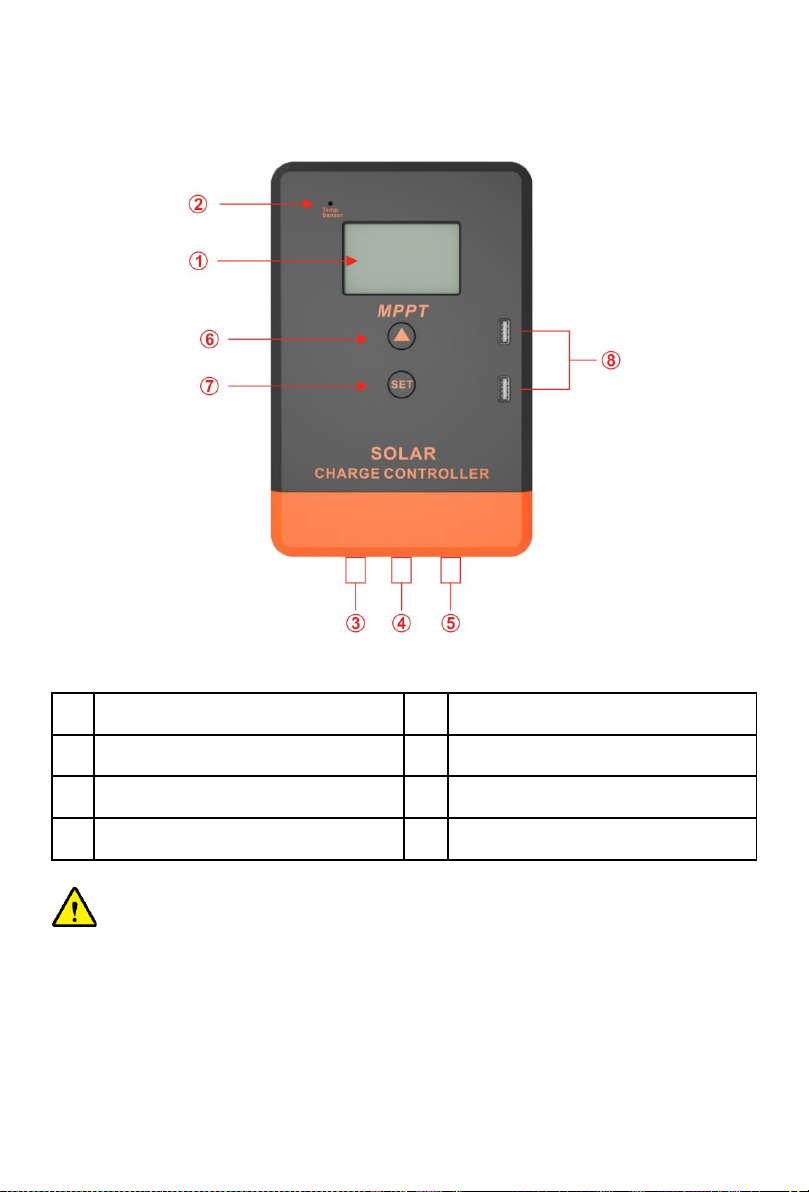
2 PRODUCT APPEARANCE
Photo 1 Appearance
①
LCD
⑤
Load terminal
②
Temperature sensor interface(Selection)
⑥
Menu Button
③
Photovoltaic array terminals
⑦
Set Button
④
Battery terminal
⑧
USB output
NOTICE: In the case of the remote temperature sensor not connected, the controller will
compensate the charging parameters by 25℃for the battery temperature.

3
3 WIRING
Photo 2 Connection diagram
Order of connection:
1. Connect battery
Notice: The battery terminal shall be installed with insurance, and the installation distance shall not
exceed 50mm.
2. Connected Load
3. Connect PV array
4. Controller is powered on
Connect the battery identify the voltage of the control system and observe whether the display
screen is lighted. If it doesn't work or the display is abnormal, refer to section 6 for troubleshooting.
NOTICE: This series of MPPT is a common positive:
controller, PV array, battery and load of the positive pole can be grounded at the same time.
NOTICE: If the inverter or other starting current is loaded. Sin the system, please connect
the inverter directly to the battery. Do not connect with the controller's load terminal.
PV Array
Breaker
Fuse
Fuse
Fuse
Inverter
AC output
Load

4
4 DESCRlPTlON
4.1 Buttons
Mode
Remarks
load switch
When the load is manual mode, by short pressing set button can switch
the load.
Breakdown
Pressing the set button shortly
Browse mode
Pressing the menu or set button shortly
Setting mode
Long press menu button enter the secondary browsing interface and
then press menu or set button to browse interface, long press menu
again to enter the setting mode, short press menu or set button to set
parameters then long press menu button to save the setting. Long press
set button or 20s without keystroke operation will exit secondary
browsing interface (parameter not saved)
4.2 LCD
1. The default night display of controller:
When the solar panel input voltage have been detected by controller less than sensor identification
point voltage, this graphic symbol will be light.
2. The default daytime display of controller:
When the solar panel input voltage have been detected by controller more than sensor identification
point voltage, this graphic symbol will be light.
3. The indicator of PV array parameter:
When the solar panels data was displaying, this graphic symbol will be light, for example the
voltage of solar panel.

5
4. The indicator of battery parameter: When the battery parameter was displaying, this graphic
symbol will be light, for example the voltage of battery, temperature of battery
5. The indicator of load parameter:
When the load parameter was displaying, this graphic symbol will be light.
6. System voltage:
When the LCD shows different system voltage controller will adjust the technical data automatically.
7. Numerical display area
8. Timer setting function
9. Switch graphic symbol
10.Unit symbol value
11.Warning:
When there is fault, this graphic symbol will be light.
12.The indicator of load status:
Load on, Load off.
13.The indicator of output power:
When the load terminal have output, this graphic symbol will be light.
14.The indicator of capacity of battery:
When the battery was in different capacity, the strip-type will show.
15.The indicator of charge status:
When the controller is charging, the symbol will be light, float charge will be flash, no charging no
display.
5 INSTALLATION IMPORTANT NOTE
1) The controller should be installed well-ventilated place, avoid direct sunlight, high temperature
and do not install in location where water can enter the controller.
2) Please select correct screw to fix the controller on the wall or other platform. Screw M4 or M5,
screw cap diameter less than 10mm
3) Please reserve enough space between the wall and controller, to allow for cooling and cable
connection.
4) The mounting holes distance is 155.8mm*63mm, diameter of the hole is 5mm.
5) Connect components to the charge controller in the sequence, please pay much attention to the
positive" and "negative", don't insert the fuse or turn on the breaker during the installation.
When disconnecting the system, the order will be reserved.

6
6) Always connect the battery first, in order to allow the controller recognize the system voltage.
7) The battery fuse should be installed as close to battery as possible.
8) The distance between the battery fuse to battery group is within 150mm
9) Positive grounding controller, any positive connection of solar load or battery can be earth
grounded as required.
10) AII terminals are in tight status after leaving factory, in order to well connected, please loose all
terminals at first.
11) The sequence of connection please do not free change, otherwise cause system voltage
recognition fault.
12) The length of cable between battery and controller as shorter as possible. Suggest 30cm to
100cm.
13) lf short circuit happened on the terminals of controller, it will be result in fire or explode. Please
be careful. (We strongly suggest to connecting a fuse at the battery side 1.5 time of rated
current of controller)
14) If the battery reverse connection, the output of controller also same with battery polarity,please
do not connect any load with controller at that time, or the load and controller will be destroyed.
15) The voltage of solar panel is very high under sunshine, high voltage can cause injury or destroy
controller, make sure PVmax under required safety MPP range.
16) Avoiding injury from load voltage, please close to the output of controller with button at first,
then connected the load on the controller. The controller do not offer reverse connection
protection for load, so please take care, reverse connection for load will be destroy bulb.
6 OPERATION STEPS
Main interface
1) The controller will have Is initialization interface after electrified, then go into main interface.
1s laterb

7
2) If no operation at main interface inner 20s, the main interface will be auto exchange during
voltage of battery, voltage of solar panel, temperature of environment, each interface keep 3s.
Long press "set" more than 5s at main interface, it will speed auto exchange. Loose button will
stop speed.
3) Press "set" under main interface could open or close
4) Press "menu' button could join into next menu under main interface.
MENU
MENU
MENU
MENU
MENU
MENU
MENU
MENU
Main interface
Load disconnect voltage
Load Mode
Total charge power
Load reconnect voltage
Total load usage
Total Charge power
Float voltage
System voltage select

8
a) Float voltage set up
This parameter is high voltage disconnection (HVD) voltage. (Boost state voltage will be increase
0.6V base on HVD). The controller will be started PWM function at this point (HVD), limited voltage
rising.
Press "menu" button join in float voltage menu.
Long press "menu" button more than 5st the parameter on the interface will be flash, here is set up
state. Loose the button, press "menu" button again could operate plus data, press "set" button
could operate minus data. After finish required technical data, long press "menu" button again more
than 5s, the parameter save and come out set up state, if 20s no any operation, automatically back
to main interface.
b) Low Voltage Reconnect Voltage (LVR)
When the voltage of battery is low, the control will stop offer power to the load. If the controller
needs reconnected the output, the voltage of battery must be higher than LVD voltage or press
'"set" button force to release, The procedure is same with (a).
c) Low Voltage Disconnect Voltage (LVD)
When the voltage of battery is low, the load output will be cut off. When the controller detected the
battery voltage was less than LVD point, the cut off function will be immediately working. At the
same time, the status of controller is in lock. Users have to charge the battery, when the battery
voltage is higher than LVD voltage or press “set" button force to release. The load output will be
back. The procedure is same with (a).
Long press MENU 5s
20s later
Este manual sirve para los siguientes modelos
3
Tabla de contenidos
Otros manuales de Controladores de PowMr


