Polycom DOC2237A Manual

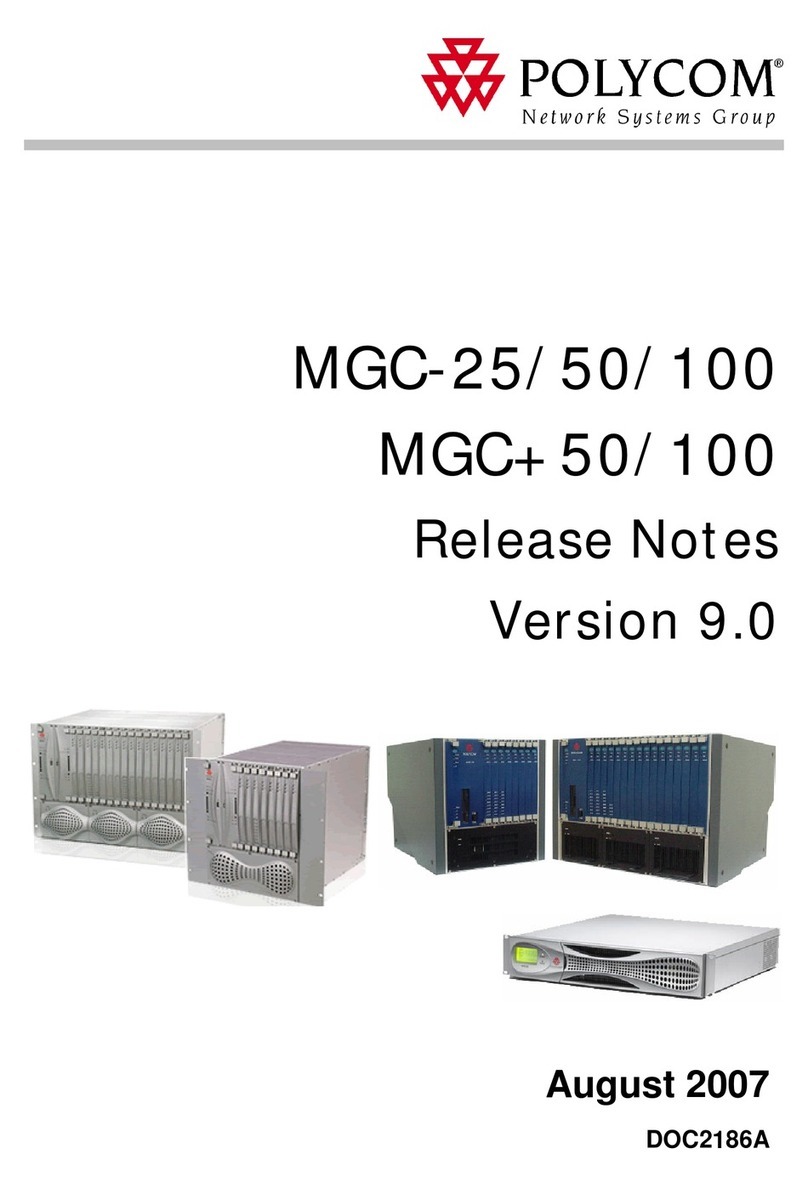
Polycom MGC 50/MGC 100
Hardware & Installation Guide
Version
9.0.4
|August 2010 |DOC2237A

Trademark Information
Polycom®, the Polycom “Triangles” logo, and the names and marks associated with Polycom’s
products are trademarks and/or service marks of Polycom, Inc., and are registered and/or
common-law marks in the United States and various other countries.
All other trademarks are the property of their respective owners.
Patent Information
The accompanying product is protected by one or more U.S. and foreign patents and/or pending
patent applications held by Polycom, Inc.
© 2010 Polycom, Inc. All rights reserved.
Polycom, Inc.
4750 Willow Road
Pleasanton, CA 94588-2708
USA
No part of this document may be reproduced or transmitted in any form or by any means,
electronic or mechanical, for any purpose, without the express written permission of Polycom, Inc.
Under the law, reproducing includes translating into another language or format.
As between the parties, Polycom, Inc., retains title to and ownership of all proprietary rights with
respect to the software contained within its products. The software is protected by United States
copyright laws and international treaty provision. Therefore, you must treat the software like any
other copyrighted material (e.g., a book or sound recording).
Every effort has been made to ensure that the information in this manual is accurate. Polycom, Inc.,
is not responsible for printing or clerical errors. Information in this document is subject to change
without notice.

MGC Hardware and Installation Guide
i
Table of Contents
Before You Begin . . . . . . . . . . . . . . . . . . . . . . . . . . . . . . . . . . 1-1
MGC Unit Main Features . . . . . . . . . . . . . . . . . . . . . . . . . . . . . . . . . . 1-3
MGC-50/MGC-100 Specifications . . . . . . . . . . . . . . . . . . . . . . . . . . . 1-4
Scope of Manual . . . . . . . . . . . . . . . . . . . . . . . . . . . . . . . . . . . . . . . . . 1-8
Conventions . . . . . . . . . . . . . . . . . . . . . . . . . . . . . . . . . . . . . . . . . . . . 1-9
List of Abbreviations . . . . . . . . . . . . . . . . . . . . . . . . . . . . . . . . . 1-10
Installation and Configuration Workflow . . . . . . . . . . . . . . . . . . . . . 1-11
Hardware Installation . . . . . . . . . . . . . . . . . . . . . . . . . . . . . . . 2-1
MGC-100 Hardware Installation . . . . . . . . . . . . . . . . . . . . . . . . . . . . 2-2
Unpacking and Positioning the MGC-100 . . . . . . . . . . . . . . . . . 2-2
Mounting the MGC-100 on a 23” Rack . . . . . . . . . . . . . . . . . . . 2-4
Mounting the MGC-100 on a 19” Rack . . . . . . . . . . . . . . . . . . . 2-6
NEBS Standard . . . . . . . . . . . . . . . . . . . . . . . . . . . . . . . . . . . . . . 2-8
Connecting and Setting Up the MGC-100 . . . . . . . . . . . . . . . . . 2-9
MGC-100 Dongle . . . . . . . . . . . . . . . . . . . . . . . . . . . . . . . . 2-10
Connecting to the power source . . . . . . . . . . . . . . . . . . . . . 2-10
Connecting the MGC-100 to the LAN Network . . . . . . . . . 2-12
Connecting the MGC-100 to the Operator Workstation (PC)
Directly via RS-232 (Optional) . . . . . . . . . . . . . . . . . . . . . . 2-12
Connecting the MGC-100 to the Network . . . . . . . . . . . . . 2-13
MPI-4/8 Hardware Installation for the MGC-100 . . . . . . . . . . . 2-16
To install the MPI-4/8 Network Interface Module: . . . . . . 2-17
To install the MPI Box on Top of the MCU: . . . . . . . . . . . 2-17
MGC-50 Hardware Installation . . . . . . . . . . . . . . . . . . . . . . . . . . . . 2-21
Unpacking and Positioning the MGC-50 . . . . . . . . . . . . . . . . . 2-21
Mounting the MGC-50 on a Rack . . . . . . . . . . . . . . . . . . . . . . . 2-23
Connecting and Setting Up the MGC-50 . . . . . . . . . . . . . . . . . 2-26
MGC-50 Dongle . . . . . . . . . . . . . . . . . . . . . . . . . . . . . . . . . 2-26
Connecting to the Power Source . . . . . . . . . . . . . . . . . . . . . 2-27
Connecting the MGC-50 to the LAN Network . . . . . . . . . . 2-28

Table of Contents
ii
Connecting the MGC-50 to the Operator Workstation (PC)
Directly via RS-232 (Optional) . . . . . . . . . . . . . . . . . . . . . 2-28
Connecting the MGC-50 to the Network . . . . . . . . . . . . . . 2-28
Connecting the MGC-50 to the ATM Network . . . . . . . . . 2-30
Connecting the MGC-50 to the IP Network . . . . . . . . . . . . 2-31
MPI-8 Hardware Installation for the MGC-50 . . . . . . . . . . . . . 2-32
First Entry IP Configuration . . . . . . . . . . . . . . . . . . . . . . . . . . . . . . . 2-35
IP Configuration Change on XPEK and pSOS OS . . . . . . . . . 2-35
Using a DOS Diskette with the Updated LAN.CFG File . 2-39
Clocking . . . . . . . . . . . . . . . . . . . . . . . . . . . . . . . . . . . . . . . . . . . . . . 2-41
System Architecture . . . . . . . . . . . . . . . . . . . . . . . . . . . . . . . . 3-1
Information Flow . . . . . . . . . . . . . . . . . . . . . . . . . . . . . . . . . . . . . . . . 3-7
MGC Manager Interface . . . . . . . . . . . . . . . . . . . . . . . . . . . . . . . . . . 3-9
Power Supply Flow . . . . . . . . . . . . . . . . . . . . . . . . . . . . . . . . . . . . . . 3-9
Hardware Description . . . . . . . . . . . . . . . . . . . . . . . . . . . . . . . 4-1
MGC-100 Components Location . . . . . . . . . . . . . . . . . . . . . . . . . . . . 4-2
MGC-50 Components Location . . . . . . . . . . . . . . . . . . . . . . . . . . . . . 4-7
Main Control Module . . . . . . . . . . . . . . . . . . . . . . . . . . . . . . . . . . . . 4-10
MGC-50/100 Control Unit with Removable Hard Drive . . . . . 4-12
Removing the Control Unit from the MCU . . . . . . . . . . . . 4-12
Control Unit Installation . . . . . . . . . . . . . . . . . . . . . . . . . . . 4-13
IP Configuration Change . . . . . . . . . . . . . . . . . . . . . . . . . . 4-14
Hard Drive Operation . . . . . . . . . . . . . . . . . . . . . . . . . . . . . 4-14
Inserting the Hard Drive . . . . . . . . . . . . . . . . . . . . . . . . . . . 4-15
Removing the Hard Drive . . . . . . . . . . . . . . . . . . . . . . . . . 4-15
Hard Drive Limitations . . . . . . . . . . . . . . . . . . . . . . . . . . . 4-16
Backplane . . . . . . . . . . . . . . . . . . . . . . . . . . . . . . . . . . . . . . . . . . . . . 4-17
Control Bus . . . . . . . . . . . . . . . . . . . . . . . . . . . . . . . . . . . . . . . . 4-18
Information Highway . . . . . . . . . . . . . . . . . . . . . . . . . . . . . . . . 4-19
Powerplane . . . . . . . . . . . . . . . . . . . . . . . . . . . . . . . . . . . . . . . . 4-19
Power Supply Module . . . . . . . . . . . . . . . . . . . . . . . . . . . . . . . . . . . 4-20
Power Module in the MGC-100 . . . . . . . . . . . . . . . . . . . . . . . . 4-20
Power Module in the MGC-50 . . . . . . . . . . . . . . . . . . . . . . . . . 4-21
Power Supply Cord . . . . . . . . . . . . . . . . . . . . . . . . . . . . . . . . . . 4-21

MGC Hardware and Installation Guide
iii
Fuse/Circuit Breaker (AC Power) . . . . . . . . . . . . . . . . . . . . . . . 4-22
Fans . . . . . . . . . . . . . . . . . . . . . . . . . . . . . . . . . . . . . . . . . . . . . . . . . . 4-22
Alarms Port . . . . . . . . . . . . . . . . . . . . . . . . . . . . . . . . . . . . . . . . . . . . 4-22
Functional Modules . . . . . . . . . . . . . . . . . . . . . . . . . . . . . . . . . . . . . 4-23
Net-E1/Net-T1 ISDN Network Interface Module . . . . . . . . . . . 4-28
The Net-E1/Net-T1 ISDN Network Interface Data
Stream . . . . . . . . . . . . . . . . . . . . . . . . . . . . . . . . . . . . . . . . . 4-30
Net-2/Net-4/Net-8/Net-8L ISDN and Net-2/Net-4/Net-8
T1-CAS Network Interface Module . . . . . . . . . . . . . . . . . . . . . 4-31
The Net-2/Net-4/Net-8 ISDN/T1-CAS Network Interface
Data Stream . . . . . . . . . . . . . . . . . . . . . . . . . . . . . . . . . . . . . 4-33
ATM Network Interface Module . . . . . . . . . . . . . . . . . . . . . . . 4-34
IP and IP+ Network Interface Module . . . . . . . . . . . . . . . . . . . 4-35
Module Port Capacity . . . . . . . . . . . . . . . . . . . . . . . . . . . . . 4-36
IP and IP+ Network Interface Module Architecture . . . . . . 4-38
IP+ Port Capacities . . . . . . . . . . . . . . . . . . . . . . . . . . . . . . . 4-39
The MPI-8 Network Interface Module . . . . . . . . . . . . . . . . . . . 4-40
MPI-8 Network Interface Data Stream . . . . . . . . . . . . . . . . 4-42
MPI Network Interface Module Architecture . . . . . . . . . . . 4-44
MUX Module . . . . . . . . . . . . . . . . . . . . . . . . . . . . . . . . . . . . . . 4-44
MUX Module Architecture . . . . . . . . . . . . . . . . . . . . . . . . . 4-46
MUX+ Module . . . . . . . . . . . . . . . . . . . . . . . . . . . . . . . . . . . . . 4-47
MUX+ Card Properties . . . . . . . . . . . . . . . . . . . . . . . . . . . . 4-48
IVR/Greet & Guide Welcome Slide . . . . . . . . . . . . . . . . . . 4-49
MUX+ Port Capacity . . . . . . . . . . . . . . . . . . . . . . . . . . . . . 4-49
MUX+ Participant Move Options . . . . . . . . . . . . . . . . . . . . 4-51
MUX+ Resource Report . . . . . . . . . . . . . . . . . . . . . . . . . . . 4-52
Audio Module (Standard) . . . . . . . . . . . . . . . . . . . . . . . . . . . . . 4-53
Audio Module Port Capacity . . . . . . . . . . . . . . . . . . . . . . . 4-53
Audio Module Architecture . . . . . . . . . . . . . . . . . . . . . . . . 4-55
Audio+ Module . . . . . . . . . . . . . . . . . . . . . . . . . . . . . . . . . . . . . 4-56
Audio+ Module Architecture . . . . . . . . . . . . . . . . . . . . . . . 4-57
Audio + Port Capacities . . . . . . . . . . . . . . . . . . . . . . . . . . . 4-57
Video Module (Standard) . . . . . . . . . . . . . . . . . . . . . . . . . . . . . 4-59

Table of Contents
iv
Video Module Architecture . . . . . . . . . . . . . . . . . . . . . . . . 4-59
Video+ Module . . . . . . . . . . . . . . . . . . . . . . . . . . . . . . . . . . . . . 4-60
Video+ Module Architecture . . . . . . . . . . . . . . . . . . . . . . . 4-61
Data Module . . . . . . . . . . . . . . . . . . . . . . . . . . . . . . . . . . . . . . . 4-62
Data Module Architecture . . . . . . . . . . . . . . . . . . . . . . . . . 4-62
Input/Output Cards . . . . . . . . . . . . . . . . . . . . . . . . . . . . . . . . . . 4-63
Greet and Guide Hardware Kit . . . . . . . . . . . . . . . . . . . . . . . . . 4-67
Installing the Audio Message Daughter Card on the
standard Audio Module . . . . . . . . . . . . . . . . . . . . . . . . . . . 4-68
Attaching the Music I/O Card to the Audio Module . . . . . 4-69
Enabling the Audio Message Daughter Card and Music I/O
Card in the MCU Software . . . . . . . . . . . . . . . . . . . . . . . . . 4-70
System Maintenance . . . . . . . . . . . . . . . . . . . . . . . . . . . . . . . . 5-1
Controls and Indicators . . . . . . . . . . . . . . . . . . . . . . . . . . . . . . . . . . . 5-2
MGC Unit Front Panel . . . . . . . . . . . . . . . . . . . . . . . . . . . . . 5-2
LED Indicators . . . . . . . . . . . . . . . . . . . . . . . . . . . . . . . . . . . 5-3
MGC Unit Rear Panel . . . . . . . . . . . . . . . . . . . . . . . . . . . . . 5-7
Corrective Maintenance . . . . . . . . . . . . . . . . . . . . . . . . . . . . . . . . . . . 5-9
Replacing a Functional Module . . . . . . . . . . . . . . . . . . . . . . . . 5-10
Replacing the I/O Cards . . . . . . . . . . . . . . . . . . . . . . . . . . . . . . 5-10
Replacing the Fuse . . . . . . . . . . . . . . . . . . . . . . . . . . . . . . . . . . 5-11
Replacing the Power Supply Modules for the MGC-100
(including the NEBS Unit) . . . . . . . . . . . . . . . . . . . . . . . . . . . . 5-11
Replacing the Power Supply Module for the MGC-50 . . . . . . 5-12
Fan Replacement for the MGC-100 . . . . . . . . . . . . . . . . . . . . . 5-15
Fan Replacement for the MGC-50 . . . . . . . . . . . . . . . . . . . . . . 5-16
Replacing the Main Control Module . . . . . . . . . . . . . . . . . . . . 5-17
Troubleshooting . . . . . . . . . . . . . . . . . . . . . . . . . . . . . . . . . . . . . . . . 5-19
Appendix A: Interfaces Pin Assignment . . . . . . . . . . . . . . . .A-1
PRI Port Assignment . . . . . . . . . . . . . . . . . . . . . . . . . . . . . . A-1
LAN PIN Assignment . . . . . . . . . . . . . . . . . . . . . . . . . . . . . A-2
Alarms Port Pin Assignment . . . . . . . . . . . . . . . . . . . . . . . . A-2
RS-232 Pin Assignment . . . . . . . . . . . . . . . . . . . . . . . . . . . . A-3
Serial Port Connectors Pin out Assignment . . . . . . . . . . . . . A-4

MGC Hardware and Installation Guide
v
Cables For the MPI-8 Network Interface Module . . . . . . . .A-6

Table of Contents
vi

1-1
1
Before You Begin
The MGC-50 and the MGC-100 are high performance, high capacity
Multipoint Control Units (MCU) which support up to 48 ports for the MGC-
50, and 96 ports for the MGC-100. They utilize a variable port bandwidth
ranging from 56 to 1920 Kbps.
Figure 1-1: MGC 50
Figure 1-2: MGC 100

Chapter 1 - Before You Begin
1-2
The system meets International Telecommunication Union -
Telecommunication Standardization Sector, (ITU-T, formerly CCITT)
standards for multipoint multimedia bridging devices, and meets ETSI
standards for telecommunication products. The MGC-100 DC also meets the
NEBS Compliant Standard (when so ordered) for our clients based in the
United States.
The flexible architecture in the system is designed to accommodate users’
changing multipoint needs. This system utilizes a modular “universal slot”
platform that allows the formation of different configurations based on users’
individual port capacity and functionality requirements.
Este manual sirve para los siguientes modelos
2
Tabla de contenidos
Otros manuales de Puerta de Polycom
Manuales populares de Puerta de otras marcas

LST
LST M500RFE-AS Manual de usuario

Kinnex
Kinnex Media Gateway Manual de usuario

2N Telekomunikace
2N Telekomunikace 2N StarGate Manual de usuario

Mitsubishi Heavy Industries
Mitsubishi Heavy Industries Superlink SC-WBGW256 Manual de usuario

ZyXEL Communications
ZyXEL Communications ZYWALL2 ET 2WE Manual de usuario

Telsey
Telsey CPVA 500 - SIP Manual de usuario