
PHP 25AG Manual de usuario

25AG Operating Switch Instructions
1
Copyright © 2023 PHP Parking Heater Products®
®
The 25AG is provided with a multi-functional operating switch. It is capable of manual and timer controlled
switching of the heater and conveys heater operational parameters and diagnostics.
Mount the operating switch in a suitable location using panel mount method shown in Figure S1
Route the switch harness from the heater to the Operating Switch and connect.
Overview
The operating switch allows you to turn the heater on and o, regulate temperature, set operating mode,
timed shutdown and timed start-up functions. It also facilitates troubleshooting by providing diagnostic
codes.
Drill holes as shown to panel mount switch
Wire Access Hole
11 mm (7/16”)
15 mm (0.6”)
Pinch Mount Hole
8mm (5/16”)
Figure S1

25AG Operating Switch Instructions
2Copyright © 2023 PHP Parking Heater Products®
®
Buttons:
Buttons & Display Icons
Icons:
ON / OFF On / O Control
< Adjust heat settings
Toggle through menu
> Adjust heat settings
Toggle through menu
OK Select Menu settings
Heating Mode
Fan Mode
Not Used
Program Mode
Clock Settings

25AG Operating Switch Instructions
3
Copyright © 2023 PHP Parking Heater Products®
®
Set Time of Day / Day of Week:
1. Press “OK”
Icons Displayed and heat symbol ashing
2. Press “>” or “<”repeatedly to select “Clock” Icon
Clock Icon ashes
3. Press “OK”
Days of week are displayed
4. Press “>” or “<”to select current day of week
Current day selected ashes
5. Press “OK”to select this day
Hour of day ashes
6. Adjust Hour of day to current hour using “<” or “>”
Note: 24 hour clock
Hour of day ashes
7. Press “OK”to conrm hour setting
Minutes of day ashes
8. Adjust Minutes of day using“<” or “>”
Minutes of day ashes
9. Press “OK”to conrm minute setting
Reverts back to home screen.
Clock icon ashes

25AG Operating Switch Instructions
4Copyright © 2023 PHP Parking Heater Products®
®
On / O Control
1. Press “OK”
Icons Displayed and heat symbol ashing
2. Press “>” or “<”repeatedly to select “Heat” Icon
Heat Icon ashes
3. Press “OK”
Heater commences start up mode
Current Power Level Setting or Target Temperature Setting
of heater is displayed.
4. Press “ON / OFF”to switch o heater
Home Screen is displayed
With heater in operation, Press and hold the “OK” button.
Display will change from either showing the target
temperature or target power mode setting.
Heat Settings Control
Selecting Heat Output Mode
There are two methods for controlling the heater’s output levels.
“Power Mode” allows you to set the power output in range of 1-7.
“Automatic Climate Control Mode” allows you to set the desired cabin temperature in range of 5 ºC to 35 ºC.

25AG Operating Switch Instructions
5
Copyright © 2023 PHP Parking Heater Products®
®
Heat Settings Control
The heater has the ability to operate in a ventilation mode.
NOTE: To prolong the life of the blower motor, we recommend limiting this use.
Adjusting Power Mode
Adjust Target Temperature Setting
With heater operating in “Power Mode”,
Press “>” or “<” to adjust setting from 1-7
1 is lowest and 7 is highest
Display will show current target Power Mode setting
Heater will continue to operate in this heat output
level.
NOTE: To ensure that the heater maintains clean
internal combustion chamber, it is recommended to
vary the operating modes (ie. Don’t allow the heater
to operate in low heat for more than 2-4 hours at a
time)
1. Press “OK”
Icons Displayed and heat symbol ashing
2. Press “>” or “<” to select “Fan” Icon
Fan Icon Flashes
With heater operating in “Auto Climate Control Mode”
Press “>” or “<” to adjust setting from 5 ºC to 35 ºC
Display will show target temperature.

25AG Operating Switch Instructions
6Copyright © 2023 PHP Parking Heater Products®
®
3. Press “OK”
Fan Speed Setting is displayed
4. Press “>” or “<”to adjust fan speed setting 1-7
Fan Speed Setting is displayed
5. Press the “On / O”Button to switch o the fan
Home Screen displayed
1. Press “OK”
Icons Displayed and heat symbol ashing
2. Press “>” or “<” to select “P” Icon
“P” Icon ashes
3. Press “OK”
Preset Options 1,2,3 are displayed
“1” Will be ashing
4. Press “>” or “<”to select the desired preset prole (1-3)
Display will toggle through display proles
Programmed Startup
The operating switch has the ability to automatically start the heater using programmed start up and shut
down. You can establish 3 dierent preset proles (you can only activate one at a time).

25AG Operating Switch Instructions
7
Copyright © 2023 PHP Parking Heater Products®
®
5. Press “OK” to select desired prole setting
Status “On” or “O” displayed.
6. Press “>” or “<”to select “ON” or “OFF”
Status “On” or “O” displayed.
8. Press “>” or “<” to adjust run time for this prole.
10 -990 minutes
Run Time displayed
9. Press “OK”
Start Time Displayed, Hours ashing
10. Press “>” or “<”to adjust start up time hours
Start Time Displayed, Hours ashing
11. Press “OK”
Start Time Displayed, Minutes ashing
12. Press “>” or “<”to adjust start up time minutes
Start Time Displayed, Minutes ashing
7. Press “OK”
Run Time displayed
2. Hours ashing
4. Minutes ashing

25AG Operating Switch Instructions
8Copyright © 2023 PHP Parking Heater Products®
®
13. Press “OK”
Days of Week settings are displayed.
“Mo” ashing
14. Press “>” or “<”to adjust between“On” or “O”to activate
or deactivate programmed start for that day.
“O” or “On” displayed
15. Press “OK” to proceed to next day
Days of Week settings are displayed.
“Tu” ashing
16. Proceed as above to establish“ON” / “O” settings for all
days of the week (Mo – Su)
17. Once you conrm settings for Sunday, display reverts to
home screen.
Program is activated.
Home screen is displayed
“P” is ashing
Preset 1, 2 or 3 displayed.
25AG Operating Switch Instructions
9
Copyright © 2023 PHP Parking Heater Products®
®
Fuel System Priming
Additional Program Settings
On initial start up after installing the heater, the system has the ability to conduct a fuel system priming
function.
While toggling through the settings to activate the“Fuel Priming” function, you will discover that there are
other programmable menu settings. There are no other benecial settings that can be adjusted and so they
are not discussed in these instructions.
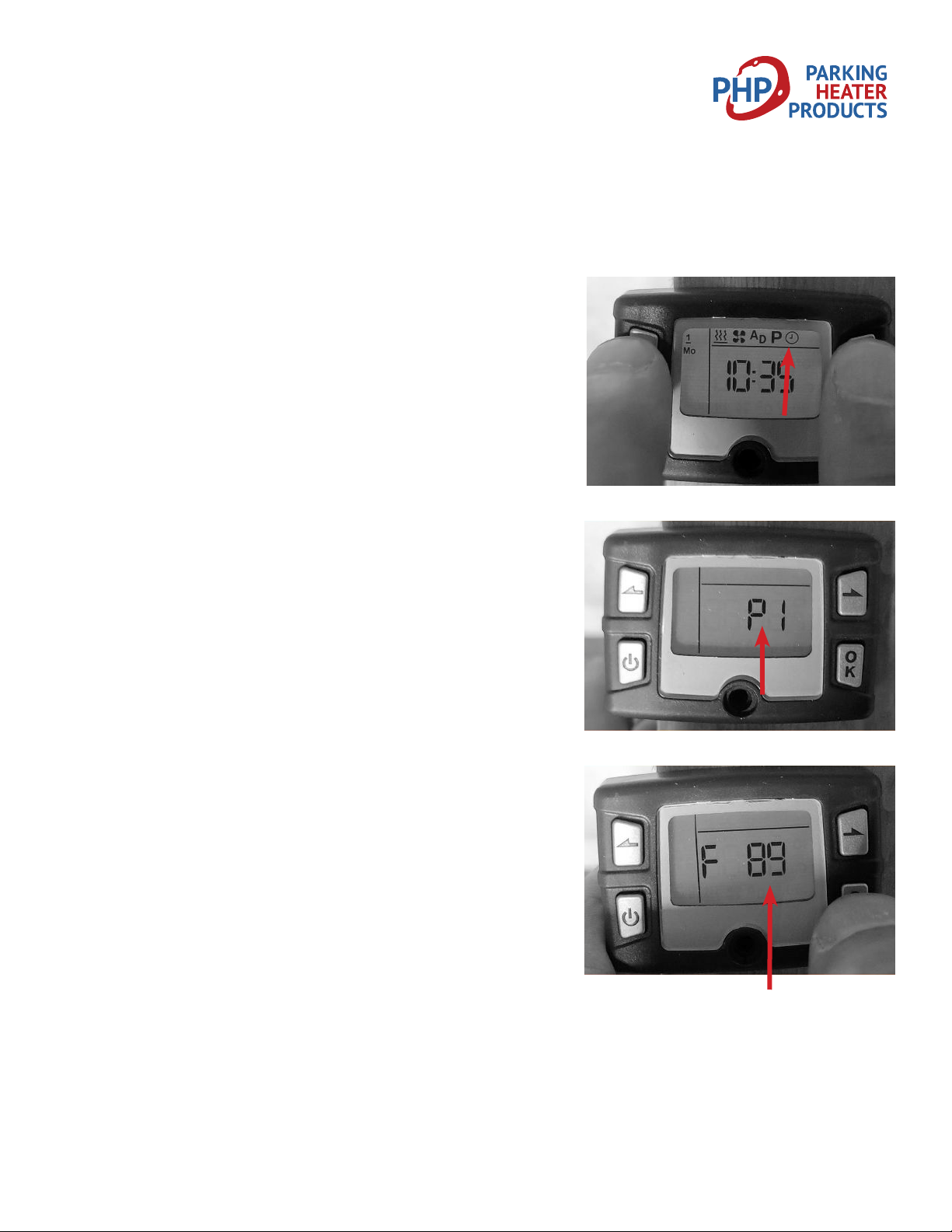
1. Press “OK”
Icons Displayed and heat symbol ashing
2. Press “>” or “<” repeatedly to select “Clock” Icon
Clock Icon ashes
3. Press and hold both “<” and “>” simultaneously for 3 seconds
to initiate Program mode
“P1” is displayed
4. Press “>” to toggle to“P2”
“P2” is displayed
5. Press “OK”
“F90” displayed
Fuel pump will start pulsing to prime the fuel system for 90
seconds.
6. Press “ON / O” button to switch o fuel pump priming
once fuel has reached heater.
(Automatically switches o at 90 seconds)
“F##” displays count down from 90 to 0 seconds.
Reverts to Home screen 90 second countdown
Otros manuales para 25AG
1
Tabla de contenidos


