Perreaux ECD2 Manual de usuario

ECD2
ECD2ECD2
ECD2
Compact Disc Player
Owners Manual

1
Perreaux Industries Limited makes no warranty for the use of its products, other than those
expressly contained in the warranty detailed herein. The Company assumes no responsibility for
any errors which may appear in this document, reserves the right to change products or
specifications detailed herein at any time without notice, and does not make any commitment to
update the information contained herein. No licenses to patents or other intellectual property of
Perreaux are granted by the Company in connection with the sale of Perreaux products, expressly or
by implication.
PERREAUX®is a registered trademark of Perreaux Industries Ltd.
Terms and product names in this document may be trademarks of others.

2
This page has intentionally been left blank.

3
i
iiiIntroducing the Perreaux
ECD2 Compact Disc Player
Congratulations on your Perreaux ECD2 purchase. To realise the full potentia
l
of your unit you need to appreciate all aspects of its operation.
Before installing the ECD2 into your system, read the entire manual carefully.
Endeavor to understand every detail by familiarising yourself with the controls
and features as you read. You will find it easier to install using the relevan
t
sections of this manual as a reference.
We have attempted to explain every feature and operational facet clearly an
d
concisely. In the event that something is still unclear to you, your Perreau
x
dealer will be happy to assist you further.
Read this manual, install your unit correctly and realise the sonic significance o
f
your investment in Perreaux.
Perreaux products are designed to provide the utmost in sonic realism an
d
electronic reliability with a functional yet elegant appearance that reflects th
e
care and craftsmanship applied during all stages of construction.
Features at a
Glance
àRugged build quality
àMultiple regulated power supplies
àDual 20-bit Burr Brown DAC
àHDCD decoding
àHigh speed processing with 96kHz over-sampling
àDigital output
àFull function infrared remote control
To maintain the consistently high quality that you expect from us, and we expec
t
from ourselves, Perreaux products are handcrafted.
We maintain the human-link throughout, from design and construction, throug
h
to the ultimate test, your music, your system, your ears.
Because we too listen to our products, we know that with your Perreaux you wil
l
discover many more of the musical secrets we strive to reveal.
From all of us at Perreaux Industries Limited, thank you for choosing th
e
Perreaux ECD2 compact disc player.

4
ii
iiii
ii Important Safety Instructions
Note: All safety and operation instructions should be read carefully before th
e
ECD2 is operated. Keep the Owners Manual in a safe place for futur
e
reference.
àThe ECD2 should not be used near water, for example near a bathtub,
kitchen sink, in a wet basement, near a swimming pool, etc.
àThe ECD2 should be rack mounted only in a heavy-duty rack or stand that
is recommended for audio equipment use.
àMounting to a wall or ceiling should be via a heavy-duty bracket or shelf
designed for audio equipment use.
àThe ECD2 should be situated away from heat sources such as radiators,
stoves, or other appliances that produce excessive amounts of heat.
àDO NOT place the ECD2 directly onto carpeted surfaces.
àAvoid exposing the ECD2 to extremely high or low temperatures.
àThe ECD2 should be connected to a mains power supply only of the type
described in the operating instructions, or as marked on the rear of the unit.
àDO NOT disconnect the mains earth from the system.
àThe mains power supply cord should be routed so that it is not likely to be
walked on or pinched by items placed on or against it.
àThe power cord of the ECD2 should be unplugged from the mains outlet
when the unit is to be left unused for long periods or when attempting to
connect or disconnect cables and before cleaning your unit.
àCare should be taken so that objects and/or liquids do not accidentally fall
inside the ECD2.
àPlease keep electrical equipment out of reach of children.
àPlease unplug sensitive electronic equipment during electrical storms.
àPlease replace any fuse with the value and type specified.
àAvoid operating the ECD2 with the cover removed.
àDO NOT bypass any fuse.
àDO NOT attempt to repair the ECD2. In the event of a problem, please
contact your Perreaux dealer.

5
iii
iiiiii
iii Table of Contents
i
ii
iIntroducing the Perreaux ECD2 Compact Disc Player.......................................... 3
ii
iiii
ii Important Safety Instructions.................................................................................... 4
iii
iiiiii
iii Table of Contents......................................................................................................... 5
1
11
1Unpacking and Placement......................................................................................... 6
2
22
2Instant Install................................................................................................................7
3
33
3Front Panel Functions................................................................................................. 8
4
44
4Rear Panel Functions ................................................................................................ 10
5
55
5Remote Control Functions ....................................................................................... 12
6
66
6Special Design Philosophies .................................................................................... 15
7
77
7Special Design Features............................................................................................ 17
8
88
8Maximising System Potential................................................................................... 18
9
99
9Care and Maintainance ............................................................................................ 19
10
1010
10 Warranty Information and Obtaining Service ..................................................... 20
11
1111
11 Extended Warranty Registration Form ................................................................. 21
12
1212
12 Faultfinding Your System ......................................................................................... 22
13
1313
13 Specifications.............................................................................................................. 27
14
1414
14 Physical Dimensions.................................................................................................. 29
15
1515
15 Contact Details........................................................................................................... 30

6
1
11
1Unpacking and Placement
The ECD2 is packaged for maximum protection. Please carefully read th
e
instructions below before proceeding to unpack the unit. Be extremely careful.
Unpacking
Procedure
à Inspect both ends of the cardboard box and open at the end without the
central staple by slitting the reinforced tape at either side.
à Fold back the flaps and tip the package on end and the inner box will
slide out.
à Lay the inner box down flat and upright, open it conventionally by
separating the top tray from the bottom.
à The product can now be removed from the bottom packaging. This will
be easier if you have someone to help you by holding the base of the
box.
à Alternately, the bottom tray and player could be tipped upside down
and the bottom packaging removed. If opened in this manner, please
ensure that you turn the contents over again.
Note: Be very careful to secure the unit if you are planning to flip the packag
e
upside down.
à Remove the two white polystyrene protectors off either side of the
player , leaving the black material covering.
à Pull back the material and remove the protective black tissue from the
front panel.
The player is now unpacked and ready for further installation.
Note: Please retain all packaging material for future transport.
Box
Contents
1 x ECD2 Compact disc player
1 x ECD2 Product manual
1 x Perreaux remote control
2 x AAA batteries
1 x Detachable AC power cord
Placing
Your ECD2
The ECD2 should generally be placed close to your amplifier, keeping th
e
interconnect cabling short.

7
2
22
2Instant Install
If you are like us, the first thing you will want to do is to play your favourit
e
piece of music through your new ECD2. The following instructions are writte
n
to enable you to achieve this as quickly as possible. These are no
t
comprehensive instructions, but are designed to enable you to play music now!
Note: Please take the time to read the ECD2 manual thoroughly as i
t
incorporates many features, which will enhance its operation.
Placement
Best results will be achieved when placed on a solid surface. DO NOT place o
n
a carpeted floor or cover the player!
Turn off associated components
This minimises the potential to damage any other components when connectin
g
your ECD2 into the system.
Connect ECD2 to amplifier
Connect the output of the ECD2 to the un-balanced (RCA) inputs at the rear o
f
your amplifier.
Note: Try to keep all interconnect cables as far from loudspeaker cables as
possible and well away from all AC mains leads.
Switch on ECD2
After checking the supply voltage compatibility with the voltage rating on th
e
ECD2 rear panel, insert the power cord-set supplied into the rear of the unit an
d
into the wall. Switch on the socket at the wall and power up the ECD2 b
y
depressing the switch on the front panel.
Switch on your amplifier
Make sure your amplifier is connected to the mains and switch it on.
Insert your favourite CD
Open the disc drawer by pressing the ‘O/C’ button and insert your favourite CD.
Press ‘PLAY’ on the ECD2
Increase the volume
Slowly increase the volume control of your amplifier to achieve a comfortabl
e
listening level.
CONGRATULATIONS!
Now that you have achieved your first objective, sit back, relax and please rea
d
the rest of the manual at your own pace, in your favourite armchair, whils
t
sipping a hot cup of coffee. You’ll find the whole experience much mor
e
pleasurable whilst listening to music.

8
3
33
3Front Panel Functions
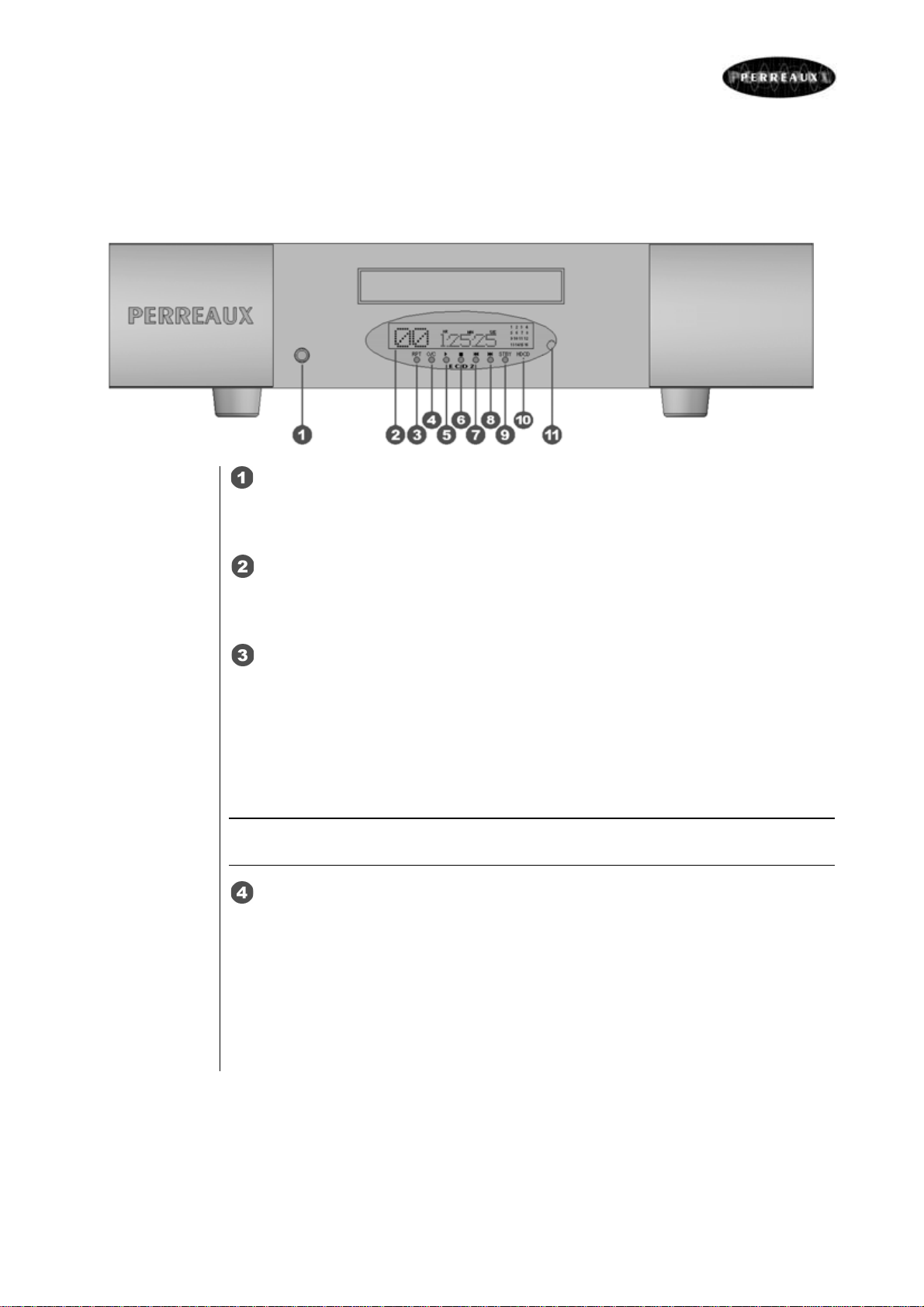
Power Switch
Depress this switch to turn power ON. Depress the switch again to turn the uni
t
OFF.
Vacuum Fluorescent Display
Display provides information regarding the status of the ECD2 and track/tim
e
information for the disc being played.
‘RPT’ Button
Allows you to repeat the current track or the entire disc continuously until th
e
feature is cancelled by pressing the RPT button or pressing ‘■’. The RPT butto
n
steps sequentially through the available options. Pressing the button onc
e
repeats the current track, displaying REPEAT 1 in the display. Pressing
a
second time repeats the entire disc, displaying REAPEAT ALL in the display.
Press a third time to cancel the REPEAT function.
Note: The REPEAT function is automatically cancelled when the disc drawer is
opened.
‘O/C’ Button
When the disc drawer is closed, pressing this button opens the drawer. To clos
e
the drawer, press the button again. Pressing ‘►’ or lightly pushing on th
e
drawer itself can also close the drawer. This can also be performed via th
e
remote control.
When the drawer is open, the display reads ‘OPEN’. When it is closed with no
disc, the display reads ‘NO DISC’. When the drawer closes with a disc inserted,
the display will show the number of tracks and the total time of the disc.

9
‘►’ Button
Press this button to start playing the disc. If the disc drawer is open, it will clos
e
automatically. The number of the track being played and the and the elapse
d
time will be shown in the display, along with the PLAY indicator.
‘■’ Button
This button stops a disc that is playing and resets the player, i.e. if play is
resumed, the disc will start over from the first track.
‘’ Button
Pressing this button returns to the beginning of the current track. Pressing twic
e
quickly in succession returns to the beginning of the previous track. The ne
w
track number is shown in the display.
‘’ Button
Pressing this button advances to the beginning of the next track. The new trac
k
number is shown in the display.
‘STBY’ Button
This button puts the ECD2 into STANDBY mode, as indicated by the gree
n
standby light. The display goes dark and the unit will not operate.
HDCD Indicator
This light will illuminate to indicate that an HDCD encoded disc is being played.
IR Sensor
This is the infrared sensor to receive commands transmitted from the remot
e
control.
Tabla de contenidos
Otros manuales de Reproductor de CD de Perreaux