
Pebble Audio RCA2RCAi Manual de usuario

RCA2RCAi
RCA2RCAi
GETTING STARTED GUIDE
STARTGUIDE
ALOITUSOPAS
HANDBUCH ERSTE SCHRITTE
www.pebbleaudio.com

2 Wireless Audio Link RCA2RCAi
Thank you
for choosing this product
from Pebble Audio.
GETTING STARTED
with Wireless Audio Link RCA2RCAi
CONTENTS
English 2
Finnish 12
Swedish 22
German 32
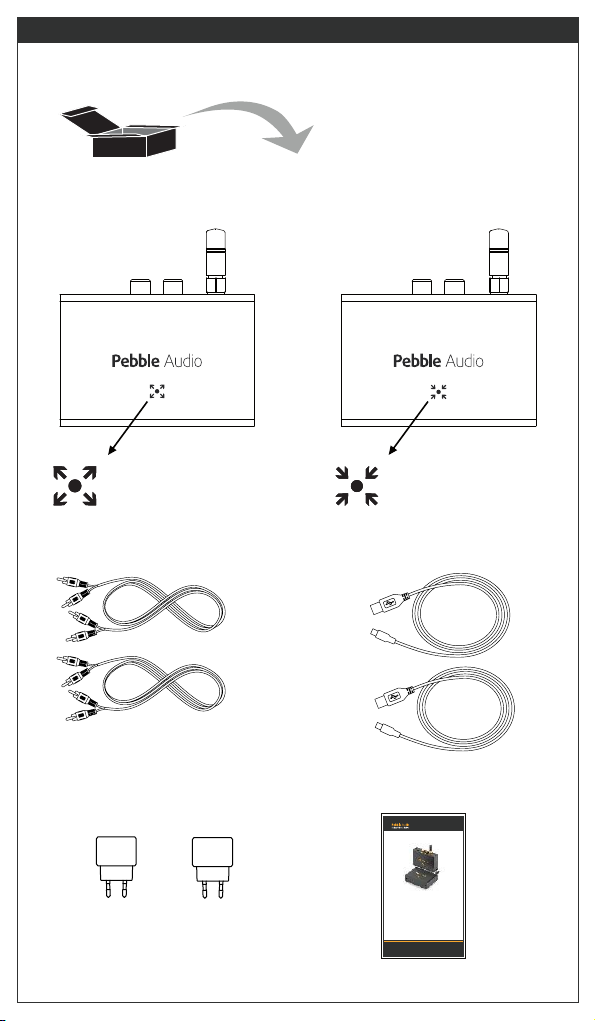
Wireless Audio Link RCA2RCAi ENGLISH 3
RCA Transmitter RCA Receiver
2 x RCA Cable
2 x USB Power Supply Getting Started Guide
RCA2RCAi
RCA2RCAi
GETTING STARTED GUIDE
STARTGUIDE
ALOITUSOPAS
HANDBUCH ERSTE SCHRITTE
www.pebbleaudio.com
2 x USB Cable

4 Wireless Audio Link RCA2RCAi
LEFT RIGHT
How to Connect the RCA Transmitter
AV Amplifier Rear Panel Interfaces
Audio Inputs +5V USB
Power
Input
RCA cabel can
be connected
e.g. to the
REAR L and R
Outputs.
USB Cable
Micro-USB
Power only
Power Supply
with USB Type A
connector for output.

Wireless Audio Link RCA2RCAi ENGLISH 5
How to Connect the RCA Receiver
LEFT RIGHT
Amplifier Rear Panel Interfaces
Audio Outputs +5V USB
Power
Input
USB Cable
Micro-USB
Power only
Power Supply
with USB Type A
connector for output.
RCA cabel can
be connected
e.g. to the
L and R inputs
of an amplifier.

6 Wireless Audio Link RCA2RCAi
Orange LED indicates the status of
both RCA Transmitter and RCA Receiver
as follows:
During normal operation both transmitter and receiver show
continuous orange light.
In case the RCA Transmitter is active but it cannot find
the RCA Receiver, RCA Transmitter’s indicator blinks.
Interpretation of the LED signal for RCA Transmitter:
No power supply connected
In active mode transmitting audio
No connection i.e. no receiver detected
2.5 s 2.5 s 2.5 s 2.5 s
Interpretation of the LED signal for RCA Receiver:
No power supply connected
In active mode receiving audio
No connection i.e no transmitter detected
LED indicator
2.5 s 2.5 s 2.5 s 2.5 s
In case the RCA Receiver is active but it cannot find
the RCA Transmitter, RCA Receiver’s indicator blinks.

Wireless Audio Link RCA2RCAi ENGLISH 7
Mounting instructions to guarantee excellent
antenna performance:
Both RCA Transmitter and RCA Receiver have an integrated
magnet that can be used to attach the device to a ferromagnetic
surface e.g. the case of an AV Amplifier.
Please note that metallic surfaces prevent radio transmission and
therefore the antenna should not reside in between two metallic
bodies. However, both transmitter and receiver can be placed on
top of an amplifier or to the side of it so that the antenna is visible.
Best transmitting on receiving conditions can be achieved when
transmitter and receiver antennas are physically oriented into the
same direction and typically upwards.
It is further recommended that transmitter and receiver are
separated at least 1.5 meters from each other and other radio
apparatus including other products from Pebble Audio.
Power Amplifier Power AmplifierAV Amplifier
AV Amplifier
RCA Transmitter
AV Amplifier
>1,5 m
RCA Receiver
Power Amplifier

8 Wireless Audio Link RCA2RCAi
Please do not touch the antennas during operation because
human body prevents radio transmission effectively.
If you plan to play audio wirelessly in a crowded room, please
mount both transmitter and receiver above people close to the
roof of the room to enable free transmission.
RCA2RCAi input and output levels are compatible with CD Players
output level and direct connection to the RCA Transmitter is allowed.
RCA2RCAi audio transmission has a constant delay of 20ms. This
delay moves the speakers effectively about 6.9 meters further
away from the AV Amplifier. You can notice this when carrying out
loudspeaker adjustments with your AV amplifier.
RCA Transmitter
CD/DVD Player

Wireless Audio Link RCA2RCAi ENGLISH 9
Troubleshooting
Symptom Possible Cause Action
Transmitter or Receiver Power supply Check power
does not switch on problem. supply
i.e. LED light is off. connections.
Audio transmission Antennas are Find a better
is interrupted in bad positions. location for both
occasionally. transmitter and
receiver using
trial and error
method.
Your smartphone Find a better location
or other device further away for
with WLAN is too your mobile phone or
close. other device with
WLAN.
Interference from Relocate you device
other 2.4GHz with Bluetooth.
devices like
Bluetooth devices
or microwave oven.
Relocate
microwave oven
or don’t use it
while listening to
music.
Both Transmitter and Transmitter and Receiver Check that both units i.e.
have not been paired.
Receiver lights are blinking.
Tranmitter and Receiver Swap Transmitter and
are at wrong locations.
Receiver.
transmitter and receiver
Both Transmitter and
Receiver are on
but no sound can be heard.
are from the same
product.

10 Wireless Audio Link RCA2RCAi
Safety information
WARNING! ELECTRIC SHOCK HAZARD: TO REDUCE THE RISK OF FIRE
OR ELECTRIC SHOCK, DO NOT EXPOSE THIS PRODUCT TO WATER.
This product shall only be used at typical room temperature in dry
interiors.
For your safety, operate the apparatus only from the low level
audio line output jack of the audio device. Listen at a reasonable
volume and take frequent listening breaks.
Refer all servicing and repair to qualified service personnel.
Clean your product using only a dry cloth and no water or liquid.
The product label can be found on the bottom of the product.
Pebble Audio Oy declares that this radio-frequency peripheral is
in compliance with the essential requirements and other relevant
provisions of Directive 1999/5/EC.
This product shall be handed over to the appropriate collection
point for the recycling of electrical and electronic equipment. For
more detailed information about recycling of this product, please
contact your local city office, your household waste disposal service
or the shop where you purchased the product.
Pebble Audio’s transmitters and receivers have an integrated
magnet and they should be kept away (min 5cm) from magnetic
cards, hard drives, pacemakers, hearing aids, mechanical watches
i.e. devices and objects that could be damaged by strong magnetic
fields.
Tabla de contenidos
Idiomas:


