
Parton PTD-400 Manual de usuario

Manual
Non contact infrared
body thermometer
[English] The patient is an intended operator
Medical Device
PTD-400
Written on : 2020 - 11
There is a possibility of radio confusion during
operation of the corresponding wireless system.
Copyright © 2020 All rights reserved.

/ Product Overview /
Purpose of Use
This product is a portable measuring device that can collect infrared
radiation energy from the human body (forehead, below ear, etc.)
through sensors to measure body temperature and manage the
information. This non-contact device is used for measurement by
placing the built-in sensor in the top part of the product within 3
cm of the site to be measured. An additional function to measure
temperature of general objects is also included.
*APP
Body temperature information can be checked through synching
mobile app after installing GC Healthcare Corporation’s “heat map”
app in Play Store for Android and in App Store for iOS.
It provides a guide based on body temperature, and you can check
the temperature status across the country with the heat map.
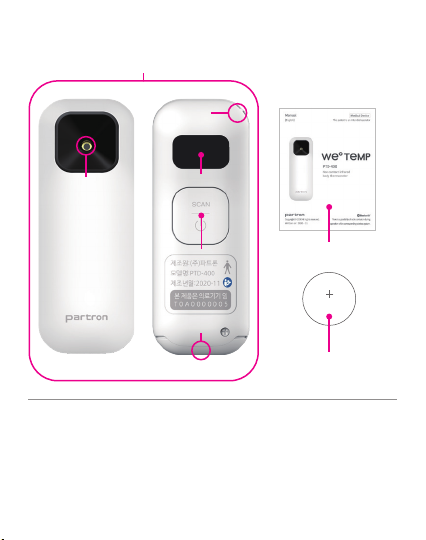
/ Product Composition - Shape and Structure /
1-1. Temperature sensing unit
1. Body (1EA) 1-5. Battery cover
1-2. Strap hole
1-4. ON / SCAN button
1 click for measurement/move
2 clicks for selection
1-3. OLED display
2 . User manual
3 . CR2032 coin battery (1EA)
1
Front Back
CR2032
1-1 1-3
1-4
1-5
1-2
3
2

/ How to Replace Battery /
- Loosen the screw at the bottom of the main body with a screwdriver,
press both gaps with your fingertips, then pull down to remove the
battery cover.
- Place the battery tting in the direction of insertion, close the cover
and screw with screwdriver.
STEP 2
STEP 1
STEP 3

*How to Insert Battery
- Insert the CR2032 battery diagonally so that the battery cover
gets stuck in a bump and press it to close.
- Battery should be inserted so that the surface without the
specication mark is facing up.
- Insert in a way that poles are facing upwards.
/ How to Use PTD-400 /
- Press the button on the main body
once briey. (“HELLO” is displayed and
power gets turned on.)
- Once the body temperature
measurement standby screen
is displayed as ( ), body
temperature measurement can be
started.
- If the device is not operated for 20
seconds, the power is automatically
turned o. (Pressing the button on the
main body for more than 2 seconds will
also turn the power o automatically.)
1. Power On / Standby / Power O
Click the
button
once
Power On Standby

3. Measuring Body Temperature / Checking Previous
Measurement Records
- Select a temperature measurement on the setting screen.
- On the standby screen, place the thermometer in the center of the
forehead above the eyebrow and press the button on the main body once.
- With vibration, numbers “3, 2, 1” will be displayed and then measurement
will be started.
- Click the button 3 times on the standby screen to enter the setting screen
- After entering the setting screen, temperature ( ) and object ( )can
be chosen by clicking twice on the measurement target icon.
2. Setting Target to be Measured (People/Object)
Click the
button 3
times
Click the
button
twice
object
temperature
Click the
button
once

- Click the button twice on the standby screen to enter the previous
measurement records.
- On the previous measurement records screen, click the button once to
start the temperature measurement.
Click the
button
twice
Click the
button
twice
*Check body temperature measurement position
before starting measurement.
3cm
- Measure at the center or end of the forehead while keeping the
thermometer with a distance of about 3 cm to avoid contact with the skin
- If the temple or forehead above the eyebrows is covered with hair or
cannot be measured, measure the center of the forehead or the back of the
ear.
- Body temperature may vary depending on the site: left and right temple,
or left and right forehead area. It is recommended that you always measure
on the higher side according to the measurement method in the manual.

- When the temperature measurement is complete, the device will be
vibrated, and the measured temperature will be displayed on the screen
*If the measured temperature is greater than 42 degrees, it will be
displayed as HIGH if less than 32 degrees, it will be displayed as LOW.
4. Display of Body Temperature
42℃ ↑ 32℃ ↓
- Select an object temperature measurement on the setting screen.
- Click once on the standby screen while maintaining the distance from the
measurement target.
- With vibration, numbers “3, 2, 1” will be displayed and then measurement
will be started.
* Object
temperature
measurement
range
0°C to less than 22°C ±3°C
22°C~ 42°C ±2°C
43°C to less than 100°C ±3°C
100°C~ 180°C ± 5°C
Click the
button
once
5. Measuring Object Temperature

1) Click the button 3 times on the standby screen to enter the setting screen.
2) Click the button once on the setting screen to enter the temperature
unit setting screen.
3) Click the temperature icon °C (or °F) twice to change the temperature
unit.
6. Changing Temperature Unit
Fahrenheit
Celsius
The standby screen will be changed to battery warning screen when there
is no residual amount and temperature data will still be displayed. (It will
remain the same until battery is completely exhausted.)
7. Battery Replacement Alarm
Standby In case of
battery
shortage
*Please remove the battery if
the device is not in use for a
long time.
Click the
button 3
times
Click the
button
twice
Click the
button
once

Error message Abnormality Solution
It will display this
message when the
room temperature is
outside the operational
temperature range of
15°C to 40°C.
- Leave the thermometer
for at least 30minutes in
the ambient temperature
environment available before
measurement.
- If the same message is
displayed afterwards, contact
the customer service center.
/ In the Event of Abnormalities /
/ Product Storage and Care /
1. As the sensor part is very sensitive, always keep it clean and not
damaged for accurate measurements.
2. Avoid re and direct sunlight and store in a place free of dust or
pollutants.
3. Store it in a place out of water.
4. Store it in a place where vibration or shock does not occur.
5. We recommend keeping the product at room temperature,
and if it is stored outside of room temperature, keep it at room
temperature for 30 minutes before use.
6. In case of sensor and case contamination, carefully wipe with a
cotton swab or alcohol cotton coated with ethylalcohol 70%
diluted solution. (Recommended to use about 20 minutes after
cleaning the sensor)
Tabla de contenidos


