Orbit 04112 Manual de usuario

PN 94894-24 rE
MODELS / MODÈLES / MODELOS
MODELLI / MODELE:
04112, 04114, 04116, 04119, 91894,
91896, 94892, 94894, 94896, 94899
USERS MANUAL
MANUEL DE L’UTILISATEUR
MANUAL DEL USUARIO
MANUALE D’USO
INSTRUKCJA OBSŁUGI
RESET
PROGRAM
RAIN DELAY

2

Table of Contents
Section 1: Get to know your timer .................4
Section 2: Installation ...........................5
Section 3: Programming with Easy-Set Logic™.......9
Section 4: Additional Features ...................11
Section 5: Reference ...........................13
ENGLISH
3
Congratulations on selecting your new
Orbit timer! With Orbit’s exclusive Easy-Set
Logic™, simple programming and setup are
combined with the latest timer technology
and versatility.
Your new timer provides convenience and
flexibility, letting you run a fully automatic,
a semi-automatic, or a manual watering
program for all your watering needs.
Although this timer is so easy to program
that you likely will not need instructions, we
recommend that you read this manual fully
before installation so that you understand all
of the advanced features.
Let the Orbit®B-hyve™Lite app take the guess
work out of programming your sprinkler timer!
Weather Alerts
THE EASY-SET LOGIC™ SPRINKLER TIMER IS NOT WIFI ENABLED. The B-hyve™
Lite app offers programming set-up and adjustment recommendations you
can manually enter to potentially improve your watering performance.
Water Audit
Programming Suggestions Zone Identity

4
A
B
C
D
E
Lock and latch
Weather Resistant Cover
Dial
Digital Display
Battery Compartment
Swing Door panel
F
RESET
PROGRAM
RAIN DELAY
Section 1: Get to know your timer
A
B
C
D
E
F

5
Buttons Function
ENTER
MANUAL
To confirm a new setting
To water manually
CLEAR To clear a setting
PROGRAM To move to different programs: A, B, and C
ARROW [ ] To skip to the next setting / watering station
or move to other programs/settings
ARROW [ ] To go back to the previous setting / watering
station or move to other programs/settings
RAIN DELAY To pause operation for 24-72 hours due
to rain or other factors
[ +] To increase a numeric setting
[ –] To decrease a numeric setting
Dial Position Function
AUTO Set Program is running
SET CLOCK Set clock time
SET DATE Year, Month, and Day
START TIME Set time to begin watering Year, Month & Day
RUN TIME Set watering duration for each station
HOW OFTEN Set frequency of watering days
BUDGET Adjust overall watering as a percentage
OFF Turn all stations/functions off
Section 2: Installation
Required Tools
• Phillips Screwdriver
• Wire Strippers
Installation Steps
1. Select a Location
2. Mount the Timer
3. Connect Valve Wires to Timer
4. Connect Electrical Power
5. Activate Battery
ENGLISH
Month
5

6
1. Select a Location
When choosing a location for your timer, consider the
following:
•Choose location near a power source (if hard wiring) or
electrical outlet (applicable only to U.S. retail timers)
•Ensure operating temperatures are not below 32° or
above 158° Fahrenheit (below 0° Celsius or above 70°
Celsius)
•Place it away from direct sunlight if possible
•Ensure at least 9” of space to the left of the sprinkler
timer box for the door to swing open after installation
•Locate the timer where there is easy access to sprinkler
wire (from valves). If mounted in an outdoor location,
shut the compartment door to keep the timer safe
from weather damage. To lock: insert the key and turn
clockwise to the locked position
Note: Sprinkler timers are weather-resistant to UL-50 and ETL®
Listings, but should not be placed in areas where continuous
water could cause damage.
2. Mount the Timer
•Use the mounting template (included) to mark the
mounting screw location on the wall. See figure 1
•Install a No. 8 screw (included) into wall in the upper
template location. Leave the screw head protruding 1/8”
(3mm) from wall. Use expanding anchors (included) in
plaster or masonry, if necessary, for a secure hold
•Slip the timer over protruding screw (using keyhole slot
in back of timer). See figure 2
•Drive a No. 8 screw through one of the two pre-formed
holes located in lower back cabinet. See figure 2
Figure 2: Hang timer on screw using keyhole
Keyhole
Pre-formed
mounting holes
No. 8 Screw
Wall
1/8"
Figure 1: Use Mounting Template (included)

7
3. Connect Valve Wires to Timer
•Strip 1/2” (12 mm) of the plastic insulation off the end of
each wire for both the timer wires and the valve wires
•Connect one wire from each valve (it doesn’t matter
which wire) to a single “Common” sprinkler wire (usually
white)
•Connect the remaining wire from each valve to a
separate colored sprinkler wire
See figure 3
Note: The maximum loading for each station/pump is 250mA, the
maximum loading for the timer is 500mA.
If the distance between the sprinkler timer and valves is under 700’
(210 m), use Orbit®sprinkler wire or 20 gauge (AWG) plastic jacketed
thermostat wire to connect the sprinkler timer to the valves. If the
distance is over 700’ (210 m), use 16 gauge (AWG) wire.
Important: All wires should be joined together using wire nuts,
solder, and/or vinyl tape. In wet environments like a valve box it is
recommended to use Orbit Grease Caps to prevent corrosion of
the connection and for protection from water infiltration.
Wiring Electric Valves
Strip 1/2” (12 mm) of plastic insulation off the end of each
individual wire. Each valve has two wires. One wire (it doesn’t
matter which one) is to be connected as the common. The
Station 1
Push tab
upward to
release wire
Strip wire
Push in
Only connect one valve to
each terminal (station)
Figure 4
To
Timer
Wire Nut
Solenoid
Common Wire
Valve
Figure 3:
Wiring Electric Valves
other valve wire is to be connected to the specific station
wire that will control that valve. The common wires for all the
valves can be connected together to one common wire going
to the controller. To avoid electrical hazards, only one valve
should be connected to each station. See figure 4
Important: The wire can be buried in the ground; however, for more
protection wires can be pulled through PVC pipe and buried under-
ground. Be careful to avoid burying the wires in locations where
they could bedamaged by digging or trenching in the future.
Your timer is equipped with the simple “push-in” terminals for
easy connection. Connect common wire to the common terminal.
Connect remaining wires to corresponding terminal locations.
ENGLISH

8
4. Connect Electrical Power
Indoor Locations – Insert the power cord into an 110V electrical
outlet.
Outdoor Locations – If a covered Ground Fault Interrupter
(GFI) outlet is available, insert the power cord into the 110 volt
outlet. If no outlet is available, the timer must have the wiring
permanently installed (*see figure 5)
•Turn off the AC power at the AC circuit breaker and
apply an appropriate safety lockout. Verify that the power
has been turned off to the installation site using an AC
voltmeter set for the correct measurement range.
•Use power feed wire of 14 gauge (AWG) minimum with
a temperature rating of 155 degrees Fahrenheit (68
degrees Celsius) or higher.
•Install the conduit and associated fittings. Connect the
AC electrical power wiring to the source by following all
the right codes and local standards.
•Connect the junction box to the Timer using a ½” nipple
(Junction box and nipple not included). [See Figure 5]
Connect the source power conduit to the entrance of the
junction box, following all the appropriate codes.
•Take the cord (running from the timer to the junction box)
from the junction box and cut it to length. Remove the
outer insulation (from cord) to expose the three wires.
•Connect the source wires to the wires extending from the
sprinkler timer.
•For USA: Take care to follow the correct color code.
Connect the Green for Ground, Black for Live, and White
for Neutral. Often the source ground may be bare copper
conductor rather than green wire.
•For Europe: Live is Brown and Neutral is Blue, there is
no ground connection required. Be sure that all wires are
connected to the proper source wire.
•Make sure all connections are made with code-approved
insulated connectors.
•Be sure to place a weatherproof gasket and lid on the
junction box.
•Turn AC power on at the AC circuit breaker.
Important: Installation Using Permanant Wiring
The sprinkler timer has a built-in transformer that must be
connected to an AC line voltage source. Check the back of the
sprinkler timer box for power requirements. Local building
and electrical codes usually require that an approved electrical
conduit and electrical fittings be used to connect exterior wall-
mounted equipment to AC power. Please check local codes. Any
permanent connection should be made by a licensed electrical
contractor in accordance with the requirements of the National
Electrical Code and other state and local codes.
This sprinkler timer has two holes at the bottom for wire access.
Use a 1/2” Nipple to connect the sprinkler timer to a standard
electrical junction box. Both connector and junction box must be
UL Listed or equivalent or comply with IEC or EN standards or
equivalent.
The wire can be buried in the ground; however, for more
protection wires should be pulled through electrical conduit and
buried underground. Be careful to avoid burying the wires in
locations where they could be damaged by digging or trenching in
the future.
Caution: Do not connect the sprinkler timer to one phase of a
three phase power system used by a pump or other electrical
equipment.
Note: For outdoor applications it is recommended that a qualified
electrician complete the installation in accordance with electrical
codes and regulations. When used outdoors this sprinkler timer is
intended for use with a Ground Fault Interrupter (GFI) protected
circuit.
1/2" Connector
Junction
Box
3 Wire
Connectors
Figure 5: Using a Junction Box

5. Activate Battery
One Lithium CR2032 battery (included) is required to retain the
program in memory during power loss. Annual replacement is
recommended.
Remove the plastic strip to activate the pre-installed battery.
(See page 12 for battery replacement)
Note: The battery alone will not operate the valves in your
sprinkler system. The sprinkler timer has a built-in transformer
that must be connected to an AC voltage source.
Section 3: Programming with
Easy-Set Logic™
A note about multiple programs
Your sprinkler timer provides the flexibility of using 3
independent programs (A,B,C). A program is where you
store all of your sprinkler settings. It consists of a group of
stations set to specific start times and run times. Multiple
programs allow you to run different valves on different days
with different run times. While many applications only require
one program (A), using multiple programs can be useful for
drip areas, newly planted lawn, or rotary sprinkler stations.
Using programs to group stations with similar water needs
will maximize irrigation efficiency.
Primary programming can be accomplished in just a few basic
steps.
Primary Programming
Press the [RESET] to clear any previous factory programming
1. Set Clock
• Turn dial to [SET CLOCK]
ENGLISH
RESET
PROGRAM
RAIN DELAY
Remove plastic
strip to activate
battery
• Press the [+/–] buttons to set the current time of day
Tip: To increase or decrease more rapidly, hold down either the
[+] or [-] buttons until the display goes into rapid advance mode.
• Press the [ ] buttons to set am/pm
• Turn dial to accept time
2. Set Date
• Turn dial to [SET DATE]
• Y/M/D will appear (blinking letter indicates selection)
•Press the [+/–] buttons to set the correct year, then
press [ENTER] or [ ]
• Press the [+/–] buttons to set the correct month, then
press [ENTER]
• Press the [+/–] buttons to set the correct date
• Turn dial to accept date
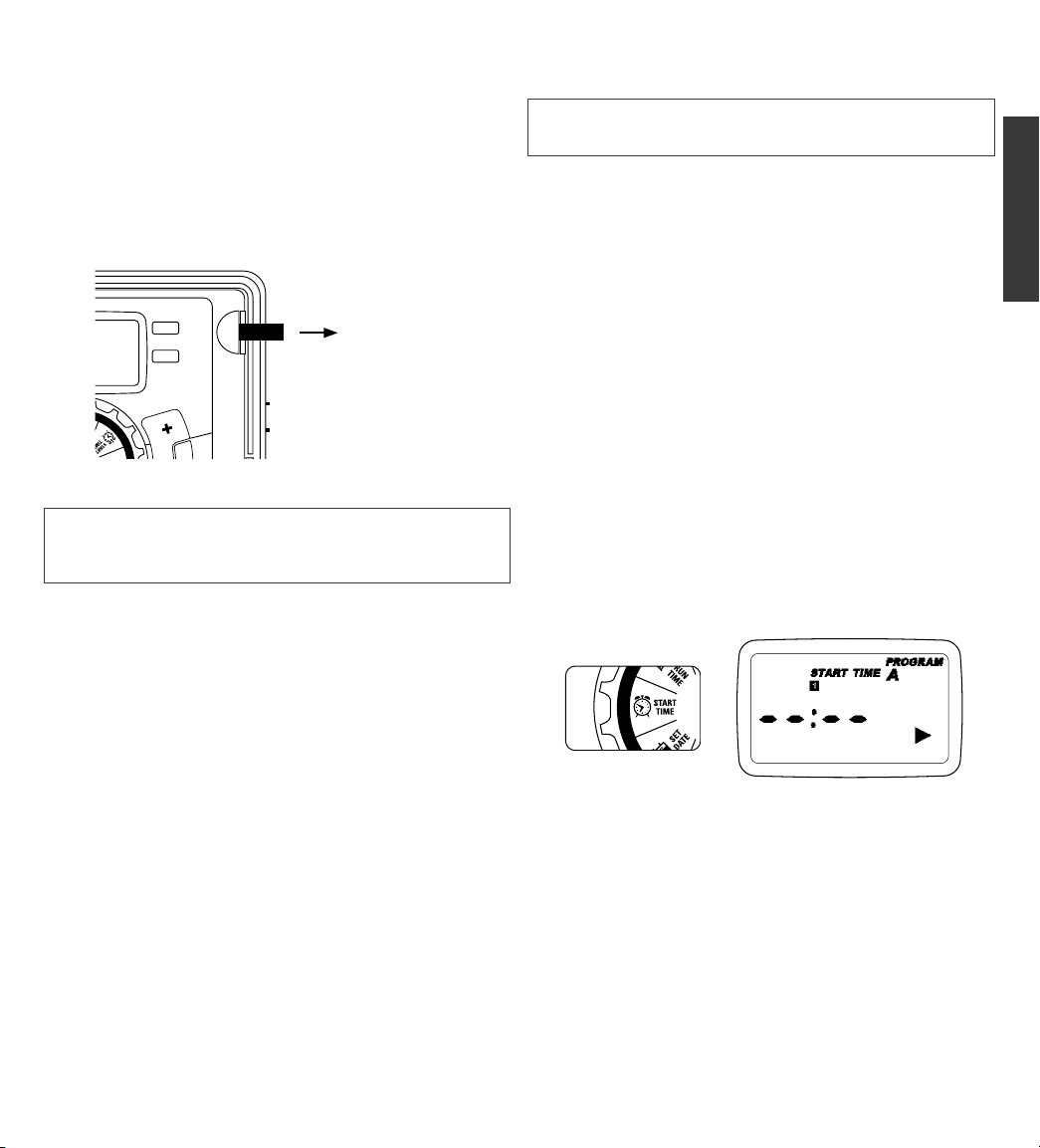
3. Start time
• Turn dial to [START TIME]
• Press the [+/–] buttons to select time you’d like your
watering to begin
(time will adjust in 15 minute increments)
The display will show
Please note that [START TIME] is the time of day that your
programmed watering starts. You can set up to 4 start times.
All stations that have a programmed run time (how long) will
run in sequence at these times
Note: Start-Time Stacking
When a start time is set before the previous program has
completed, that start time will be “stacked” or delayed, and will
start upon completion of the previous program.
9

Days of the Week
• Your dial should be set to [HOW OFTEN]
- Display will show the current program (A,B, or C)
- Press the [ ] buttons to move from one day to
another
- Press [+] or [ENTER] to select a day for watering. A
frame will appear around the selected days.
•To delete a previously entered day, press [-] or [CLEAR]
Example: Monday, Wednesday, & Friday
Intervals
• Use the [ ] buttons to move to the INTERVAL
option “INT”
•Press [+/–] buttons to select the number of days
between watering
Example: An interval of 1 will water every day; an interval
of 3 will water every 3rd day, etc.
Odd or Even Days
• Use the [ ] buttons to move to the ODD or EVEN day
watering
- Press [+] or [ENTER]
•Selecting a different option or pressing clear will erase
the previous selection
Example: Odd: 1st, 3rd, 5th, etc.
Example: Even: 2nd, 4th, 6th, etc.
Turn the dial to [AUTO] and that’s it!
You have programmed your timer!
Turn dial to [AUTO] to activate your program
Note: If your program is lost, the factory installed fail-safe pro-
gram will turn on each station every day for 10 minutes
Note: Your prior programming will not be disturbed unless
altered. Always be aware of the program you are in (A, B, or C)
when you are making changes.
Reviewing and Changing Your Program
If you want to review or change the start times, run times, or
how ofthen to water, simply follow the directions again for
that option. After reviewing or changing a watering schedule,
remember to turn the dial back to [AUTO] for automatic
operation.
Example: Bill just planted new grass seed and wants to water
three times per day. He sets START TIME 1 for 5am, START
TIME 2 for 12pm, and START TIME 3 for 5 pm.
He also sets HOW OFTEN to INT (interval) EVERY 1 DAYS (see
section 3, HOW OFTEN).
In AUTO mode the system will water 3 times per day. Once
Bill’s sod is established he can CLEAR start times 2 and 3
and return to watering just once per day.
4. Run Time
• Turn the dial to [RUN TIME]
STATION is the area that will be watered by each valve. On this
screen the RUN TIME or duration for each station is set.
•Press the [ ] to select a station and press the [+/–]
buttons to enter the watering duration for that station
•Press [ENTER] or the [ ] buttons to move to the next
station/valve, and enter watering duration for each station
5. How Often
• Turn the dial to [HOW OFTEN] - this screen allows you to
set how often to water.
There are 3 options provided:
1. Days of the week (Mon, Tues, Wed, etc.)
2. Intervals (Every “X” number of days)
3. Odd or Even Days
10
Este manual sirve para los siguientes modelos
9
Tabla de contenidos
Idiomas:
Manuales populares de Instrumento de medición de otras marcas

Endress+Hauser
Endress+Hauser Proline Promag 50 Especificaciones técnicas

Siemens
Siemens SITRANS F Coriolis FCT030 Manual de lista de piezas

KLINGER
KLINGER CMF V Series Manual de usuario

EXFO
EXFO FTB-2 Manual de operación y mantenimiento

Keysight
Keysight M8290A Manual de usuario

ADTEK
ADTEK MW-5 Manual de usuario