
Orbic Speed RC400L Manual de usuario

User guide
RC400L Mobile Hotspot

2 3

2 3
Table of Contents
Overview
Package Contents.............................................................................................................................. 4
System Requirements ........................................................................................................................ 4
About Your Mobile Hotspot ............................................................................................................. 6
Power Management ......................................................................................................................... 8
Replacing the SIM Card ................................................................................................................ 11
Using Your Mobile Hotspot
Navigating your Mobile Hotspot ..................................................................................................12
Device Information .......................................................................................................................... 15
Device Settings ................................................................................................................................16
Software Updates............................................................................................................................ 17
USB Options ....................................................................................................................................18
Managing Your Mobile Hotspot Using The Web UI
Logging In.........................................................................................................................................19
Internet Information .........................................................................................................................21
Wi-Fi Information .............................................................................................................................22
Connected Client Information.........................................................................................................22
Messages ........................................................................................................................................22
Settings ............................................................................................................................................23
Common Problems and Solutions.........................................................36
Product Specifications...........................................................................................41
Safety Information....................................................................................................44

4 5
Overview
Congratulations on your purchase
of the Verizon Mobile Hotspot RC400L.
With the Mobile Hotspot you can access 4G LTE networks for faster apps, uploads and downloads.
Connect up to 10 Wi-Fi enabled devices to the Internet at once - laptops, tablets, e-readers,
gaming consoles and more* - and experience download speeds up to
10 times faster than with Verizon’s 3G*.
The Mobile Hotspot is also backwards compatible to 3G networks,
ensuring reliable connectivity when you need it most.
Package Contents
The Verizon Mobile Hotspot RC400L package includes:
• Orbic Speed RC400L
• 3000mAh Standard Lithium Ion Battery
• Pre-installed 4G LTE SIM Card
• Charger
• USB Cable
• Brochures
System Requirements
• Compatible with all major operating systems
• Works with the latest versions of browsers, including Google Chrome®, Firefox®,
Internet Explorer®, Safari™ and Mobile Safari™.
To use Wi-Fi mode, your computer or other device needs Wi-Fi capability
and Internet browser software.
Your Mobile Hotspot must have proper data service to function.

4 5
Mobile Hotspots Internet Connection
With LTE you can get the speed you require to work efficiently outside the home or office.
You can connect to the Internet, access your corporate intranet, check your email and download
attachments at speeds that are up to 10 times faster than 3G*.
4G Mobile Broadband with LTE*
• Download: typical download speeds up to 150 Mbps.
• Upload: typical upload speeds up to 50 Mbps.
*Actual speeds depend on network coverage and network load.
Wi-Fi 802.11a/b/g/n/ac
• 802.11a uses the 5.0 GHz frequency with speeds up to 150 Mbps.
• 802.11b uses the 2.4 GHz frequency with speeds up to 150 Mbps.
Caring for your Mobile Hotspot
Like any electronic device, the Mobile Hotspot must be handled with care
to ensure reliable operation. Orbic® recommends the following guidelines:
• Protect the Mobile Hotspot from liquids, dust, and excessive temperatures.
• Do not apply adhesive labels to the Mobile Hotspot; they might cause the Mobile Hotspot
to potentially overheat and they might alter the performance of the antenna.
• Store the Mobile Hotspot in a safe place when not in use.

6 7
About your
Mobile Hotspot
1. Menu button
2. Signal status icon
3. Network mode icon
4. Wi-Fi signal icon
5. Unread message icon
6. Battery icon
7. Power button
8. USB Type-C Port
9. Battery cover
10. Cutout to remove back cover

6 7
Status Indicators
DISPLAY ICON DESCRIPTION
Black Screen
Network Signal
Strength
Activity Indicator
Wi-Fi Indicator
Messages
Connected Devices
Battery Charge
Indicator
Battery Charge
Indicator
Battery AC
Charging Indicator
The Mobile Hotspot is powered off or in sleep mode.
Tap the power button to wake up device if in sleep mode.
Network Signal Strength Indicator.
More bars indicate more signal strength.
Data is being transferred between the mobile network
and your Mobile Hotspot.
Your Mobile Hotspot Wi-Fi network in turned ON.
You have unread messages.
Shows the number of Wi-Fi devices connected
to your Mobile Hotspot.
The battery is fully charged.
The battery is critically low and the Mobile Hotspot will
shut down unless the battery is connected to the charger.
Displays when the Mobile Hotspot is connected
to the AC Charger.

8 9
Power Management
Charging Your Mobile Hotspot
IMPORTANT!
CAUTION!
To charge the battery:
Before you use your Mobile Hotspot, be sure to charge the battery for at least three hours
to ensure a full initial charge. When fully charged, the battery has up to 12 hours of life.
Before using your Mobile Hotspot, read the battery safety information in the
“Product Safety and Warranty Information” section of this guide.
(See Proper Battery Use and Disposal on page 10.)
Connect the USB end of the charger into the charging port of the Mobile Hotspot.
Plug the other end of the wall charger into the appropriate electrical outlet.
When the battery is fully charged, the battery icon will turn solid black.
Use only batteries and chargers with your Mobile Hotspot that have been approved
by Orbic® for optimal performance and safe operation.
1
2
8 9
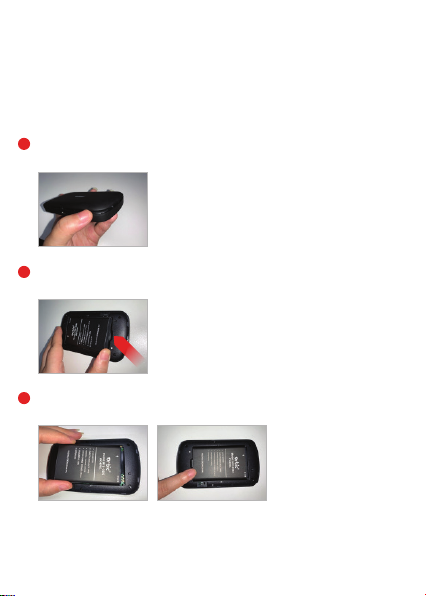
Replacing the Battery
To remove and replace the battery:
Insert your finger in the battery removal groove at the top edge of the battery cover,
then lift and remove the battery cover. Set the cover aside.
Insert your finger into the battery removal divot
and lift the battery out of the battery compartment.
Align the gold contacts on the new battery with the gold contacts
on the Mobile Hotspot and gently slide the battery into place.
1
2
3

10 11
Replacing the Battery (cont’d)
Battery Use
Handle and store batteries properly to avoid injury or damage. Most battery issues arise from improper
handling of removable battery and, particularly, from the continued use of damaged batteries.
• Do not disassemble or open crush, bend or deform, puncture or shred.
• Do not modify or remanufacture, attempt to insert foreign objects into the battery, immerse or expose to water
or other liquids, expose to fire, explosion or other hazard.
• Only use the battery for the system for which it is specified.
• Only use the battery with a charging system that has been qualified with the system per CTIA Certification Requirements
for Battery System Compliance to IEEE 1725. Use of an unqualified battery or charger may present a risk of fire,
explosion, leakage, or other hazard.
• Do not short circuit a battery or allow metallic conductive objects to contact battery terminals.
• Replace the battery only with another battery that has been qualified with the system per this standard,
IEEE-Std-1725. Use of an unqualified battery may present a risk of fire, explosion, leakage or other hazard.
• Only authorized service providers shall replace battery. (If the battery is non-user replaceable).
• Promptly dispose of used batteries in accordance with local regulations.
• Battery usage by children should be supervised.
• Avoid dropping the mobile hotspot or battery. If the mobile hotspot or battery is dropped, especially on a hard surface,
and the user suspects damage, take it to a service center for inspection.
• Improper battery use may result in a fire, explosion or other hazard.
• The maximum operating temperature is 40°C.
Note: The battery shall only be serviced by the manufacturer.
Replace the cover by setting it on the Mobile Hotspot where the notches align,
then press on the cover until it clicks into place and is flat across the entire bottom surface.
4
Cleaning and Maintenance
The Product, the battery and the charger are not waterproof. Do not use them in places with high humidity like a bathroom
and also avoid spilling any liquids on the Product, battery or charger. Use a soft cloth to clean the Product, the battery
and the charger. Do not use alcohol, diluted liquid or benzene to clean the Product.
Disposal of Product and Batteries
Follow local regulations regarding disposal of mobile devices and batteries. In some areas, the disposal of these items in
household or business trash may be prohibited. Please follow your local regulations and recycle Product if required
Batteries must be recycled or disposed of properly.
Tabla de contenidos
Otros manuales de Enrutador inalámbrico de Orbic


