
Oontz BudZ Manual de usuario

The Wireless Bluetooth
Headphones
Designed and engineered for
comfort and high quality audio by
R

Thank you very much for being an OontZ BudZ owner.
With the OontZ BudZ you can enjoy listening to your music,
videos and games and have phone calls wirelessly, with
high quality audio. We have engineered the OontZ BudZ
to provide a very comfortable fit and deliver exceptionally
clear audio with distinctive mids and highs with deep rich
bass. You can play wirelessly over Bluetooth from your
iPhone, smartphone, iPad, tablet and Bluetooth iPod.
In the Package
· 1 - OontZ BudZ Headphones
· 6 pairs -
In-Ear Cushions
(2 pairs Small, 2 pairs Medium, 2 pairs Large)
· 2 pairs - Stay in Place Ear Cushions
(1 pair Small,1 pair Large)
· 1 - USB Micro Charging Cable
· 1 - Quick Start Sheet
· 1 - OontZ BudZ Carry Case
Quick Start
- PAGE 2 -

This quick start sheet can get you listening quickly to your
OontZ BudZ. For more detailed information you can view
and download the full OontZ BudZ Guide at our website:
www.TheOontZ.com/Oontz-BudZ-Manual
The full User Guide provides additional tips on how to
make sure you have the best fit for your ears, trouble-
shooting tips if you have any questions, and the latest
updates to the Guide.
This Quick Start includes information on:
Buttons and Charging Connector
Charging your OontZ BudZ
Turning the OontZ BudZ On/OFF
Pairing and Connecting to your Bluetooth Device
Play Functions
Wireless Hands-Free Calls
Wearing the OontZ BudZ
1
2
3
4
5
7
6
- PAGE 3 -
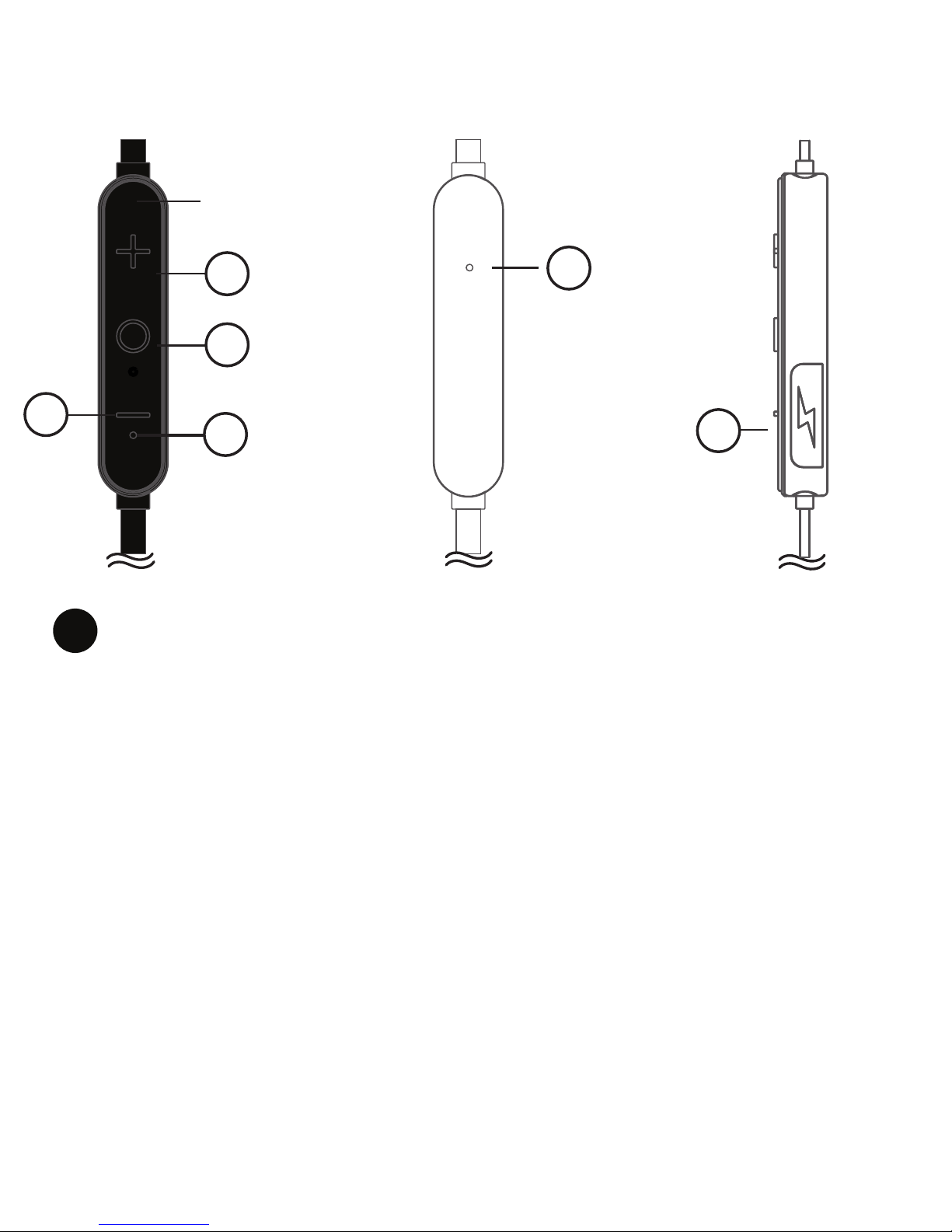
Buttons and Charging Connector
1. + Button :
Function A : Increase Volume - Press and release quickly
to increase the volume
Function B : Track Advance - Press and hold for two
seconds to advance to the next track
Function C : Reject a phone call – Press and hold down for
2 seconds to reject an incoming call
Function D : Transfer Call – Press and hold down for 2
seconds to transfer the call between OontZ BudZ and
smartphone during a call
1
- PAGE 4 -
CONTROL BAR
REAR
5
CONTROL BAR
6
CONTROL BAR
2
43
1

2. Center Button:
Function A: Power on and Power O, Press and hold for
2 seconds to turn on and 2 seconds to turn o
Function B: Pause / Play – Press and release to pause
and to play
Function C: Phone Calls – Press and release to answer a
call, press and release to end a call
Function D: Last Number Redial – Press twice to redial
the last number called
3. Bluetooth Indicator Light
4. – Button:
Function A: Decrease Volume - Press and release quickly
to decrease the volume
Function B: Track Back - Press and hold for two seconds
to go to the beginning of the track and repeat to skip
back one track
Function C: Call mute function - Press and hold for 2
seconds to mute call
5. Built-In Microphone for wireless calls
6. Micro USB Connector for charging, under rubber flap
- PAGE 5 -

Charging your OontZ BudZ
Gently open the rubber flap over the Micro USB
Connector (6) and plug in the connector end of the
included Micro USB cable. You can charge from
either a USB wall charger or a USB port on your
laptop or computer.
When charging, the Bluetooth Indicator Light (3)
Bluetooth Indicator Light (3)
The Headphones will take about 2-3 hours to charge.
2
- PAGE 6 -
When fully charged, the
will be solid red. When fully charged, the
with RED LED will be breath in and breath out.
with Red LED will solid.
Note: When battery is low, the RED LED will fast flash
.sdnoces 51 yreve stnih senot oidua ''iDiDiD dna

Turning the OontZ BudZ On/OFF
To turn on, press and hold the Center Button (2)
for two seconds. The Bluetooth Indicator Light (3)
will flash blue to indicate that the headphones
are on.
To turn o , press and hold the Center Button (2)
for more two seconds. The Bluetooth Indicator
Light (3) will flash red and blue twice and then the
OontZ BudZ will shut o .
3
23
- PAGE 7 -

Pairing and Connecting
to your Bluetooth Device
Step 1 – Turn on the OontZ BudZ by pressing and holding
the Center Button (2) for two seconds. The Bluetooth
Indicator Light (3) will flash blue quickly to indicate that
the OontZ BudZ are in pairing mode and ready to pair and
connect to your device.
Step 2 – Enable the Bluetooth function on your device and
then search/scan for the OontZ BudZ. When “OontZ BudZ”
appears on the Bluetooth device list, select it and your
device will pair and connect to the OontZ BudZ. Make sure
your device indicates that it is connected to “OontZ BudZ”
in your device list.
Step 3 – The Bluetooth Indicator Light (3) will flash blue
slowly to indicate the OontZ BudZ is paired and connected
to your device and you will hear CONNECTED audio tones.
You can now play wirelessly from your device.
4
- PAGE 8 -

Play Functions
Pause/Play: Press and release the Center Button (2)
Next Track: Press and hold the + Button (1) for 2 seconds
Previous Track: Press and hold the – Button (4) for 2
seconds to go to the beginning of the track. Press again and
hold down for 2 seconds to go to the previous track.
5
Wireless Hands-Free Calls
To answer an incoming call, press and release the Center
Button (2).
To end a call, press and release the Center Button (2).
To reject a call, press and hold the + Button (1) for 2 seconds.
To mute a call, press and hold the – Button (4) for 2 seconds.
To redial, press the Center Button (2) two times.
To transfer a call between OontZ BudZ and your
smartphone, press and hold the + Button (1) for 2 seconds.
You may also be able to use your smartphone to switch
between using Hands-Free Calls and your smartphone .
6
- PAGE 9 -

call will keep on online.
the 'DoDo' audio tone output when headphone is linkloss
transmission range,
the key "+" and "- " together for 4 seconds to enter pairing mode
and the 'Pairing' audio tone hints.
To Pairing
Other interesting functions in headphone
, When headphone is connecting, press and hold
To SiRri in some smart phone, ,
Press '+ Button (1)' and , When headphone is connecting,
' Center (2)' button together to enter Siri
To Conference call by three parties
press the 'Center (2)' button to pick up the new call, and previous
When headphone is speaking and a new call is coming, double
To Linkloss due to transmission distance over range
To reconnecting
, When headphone is disconnecting and within
Double press 'Center (2)' button for 2 times
to reconnect last smart phone.
- PAGE 10 -
and 'Di' audio tone hints.
Otros manuales para BudZ
1
Tabla de contenidos


