
OKAYLIGHT PM90 Manual de usuario

1.Quick start
Pm90 powermeter
2.Advanced setting
3.Check the data
5.Battery replacement
6.Safe use
7.Specs and maintanence
8.Toubleshootings
1) set system time
2) connect to appliance
3) check the power data
4) Manually turn on/off switch
1) Turn on/off the back light
2) Currency select
3)
4)
Set local power tarrif
Set GHG(Green House Gas) coefficient
5) Countdown setting
6) Overload setting
1) Value button
2) Display button
4.History data
1) Check data from graphic
2) Read accurate data

Quick Start
VALUE/+ DISPLAY/- SET/OK HISTORY
RESET
1. Set system time
Pre ss a nd h ol d bu tt on SET
for 3 s ec .
VALUE/+ DISPLAY/- SET/OK HISTORY
RESET
VALUE/+ DISPLAY/- SET/OK HISTORY
RESET
Pre ss + /- b ut to n to
swi tc h ti me s ys te m(12hr and 24hr)
VALUE/+ DISPLAY/- SET/OK HISTORY
RESET
VALUE/+ DISPLAY/- SET/OK HISTORY
RESET
Pres s OK to NEX T menu
Pre ss + /- b ut to n to
set h ou r
VALUE/+ DISPLAY/- SET/OK HISTORY
RESET
VALUE/+ DISPLAY/- SET/OK HISTORY
RESET
Pres s HISTO RY to cyc le choo se
Hour /Mi nut e/S econ ds
Pre ss + /- b ut to n to
set m in ut e an d se conds
VALUE/+ DISPLAY/- SET/OK HISTORY
RESET
VALUE/+ DISPLAY/- SET/OK HISTORY
RESET
Pres s OK to NEX T menu
Pre ss O K 10 t im es t o
qui te s et ti ng m od e
Finished Quick setting ,
ready to use!
1
Quick Start
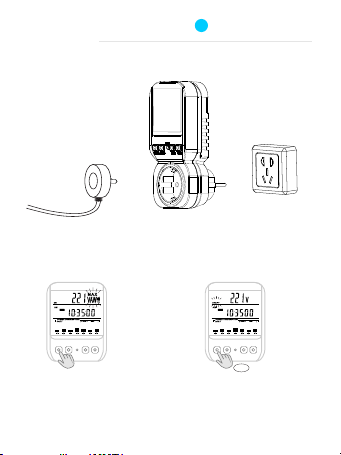
2. Plug Pm90 into outlet, connect appliance to Pm90
Plug the Pm90 into outlet
VALUE/+ DISPLAY/- SET/OK HISTORY
RESET
3. Check the on-going data on PM90
connect appliance to Pm90
Briefly press VALUE button to
cycle switch the data displayed
Votage/Current/Wattage/
Max Current/Max Wattage
Frequency/Cos phi
4. Switch on/off the output
VALUE/+ DISPLAY/- SET/OK HISTORY
RESET
Press and hold VALUE button for
3 seconds to turn ON / OFF the switch
Hol d!
1

Advanced setting
1. Turn on/off back light
the button cell is designed to maintain the RTC(Real-Time-Clock) chipset inside the Pm90
Please note that back light consumes much more energy than RTC chipset itself, so we set a
switch to turn off the back light if back light is not necessary during cell power supply. Please
be advised that turning off the back light will expand battery life sharply.
VALUE/+ DISPLAY/- SET/OK HISTORY
RESET
VALUE/+ DISPLAY/- SET/OK HISTORY
RESET
Pres s OK to NEX T menu
Pre ss a nd h ol d th e set
but to n en te r se tting mode
TIME SETTING
(refer to Quick set)
2
1
VALUE/+ DISPLAY/- SET/OK HISTORY
RESET
VALUE/+ DISPLAY/- SET/OK HISTORY
RESET
Pre ss + /- b ut to n to switch the BL(backlight) on / off status *
* it’ s hi gh ly r ec om mended not to turn on the back light, if it’s not very necessary,Leave the power energy to
mai nt ai n th e RT C po wer supply.
VALUE/+ DISPLAY/- SET/OK HISTORY
RESET
Pres s OK to NEX T menu

Advanced setting
3. Set local power tarrif
You can use Pm90 easily to know your spend on the appliance just with a simple setting.
under this menu you will be allow to set 2 different power rates base on different time period
e.g. the power tariff in your area follows the table below, do the setting as following steps
VALUE/+ DISPLAY/- SET/OK HISTORY
RESET
VALUE/+ DISPLAY/- SET/OK HISTORY
RESET
Pres s OK, adv ance to t ariff 1 t ime set ting
Set R AT E 1 va lu e
Pre ss H IS TO RY b ut ton to
swi tc h be tw ee n the 4 digits
2
VALUE/+ DISPLAY/- SET/OK HISTORY
RESET
Pre ss + /- b ut to ns to change the value
fro m 0~ 9, a ft er c or rectly enter your
tar if f, p re ss O K to advance.
Tariff 1 Day 8:00~18:00 0.177 ponds/kwh
Tariff 2 Night 18:00~8:00 0.127 ponds/kwh
2. Currency select
Pm90 provide you different currency unit for power cost calculation
VALUE/+ DISPLAY/- SET/OK HISTORY
RESET
in RA TE 1 me nu , pr es s
his to ry b ut to n 5 ti mes
VALUE/+ DISPLAY/- SET/OK HISTORY
RESET
Pre ss + /- b ut to ns to select your
loc al c ur re nc y sy mb ol
* NOT E: t he c ur re nc y symbol is
sel ec ta bl e und er R AT E1 m en u onl y

Advanced setting
VALUE/+ DISPLAY/- SET/OK HISTORY
RESET
VALUE/+ DISPLAY/- SET/OK HISTORY
RESET
Pres s OK, adv ance to t ariff 2 t ime set ting
Set R AT E 2 va lu e
Pre ss H IS TO RY b ut ton to
swi tc h be tw ee n the 4 digits
2
VALUE/+ DISPLAY/- SET/OK HISTORY
RESET
Pre ss + /- b ut to ns to change the value
fro m 0~ 9, a ft er c or rectly enter your
tar if f, p re ss O K to advance.
VALUE/+ DISPLAY/- SET/OK HISTORY
RESET
Set t ar if f 2 ti me
Pre ss H IS TO RY b ut to n to
swi tc h be tw ee n the 4 digits
VALUE/+ DISPLAY/- SET/OK HISTORY
RESET
Pre ss + /- b ut to ns to change the value
fro m 0~ 9, a ft er c or rectly enter tariff
tim e, p re ss O K to a dvance to next menu.
VALUE/+ DISPLAY/- SET/OK HISTORY
RESET
Pres s OK, ent er next m enu
VALUE/+ DISPLAY/- SET/OK HISTORY
RESET
Set t ar if f 1 ti me
Pre ss H IS TO RY b ut to n to
swi tc h be tw ee n the 4 digits
VALUE/+ DISPLAY/- SET/OK HISTORY
RESET
Pre ss + /- b ut to ns to change the value
fro m 0~ 9, a ft er c or rectly enter tariff
tim e, p re ss O K to a dvance.
VALUE/+ DISPLAY/- SET/OK HISTORY
RESET
Pres s OK, adv ance to t ariff 2 s ettin g

Advanced setting
4. Set GHG(Green House Gas) coefficient
Pm90 can provide you the co² emission value by calculating base on the power consumption of
the appliance.
Enter the carbon emission factor in the following process in setting menu
* the carbon emission factor vary in different area, typically value: 0.883 kgco²/Kwh
VALUE/+ DISPLAY/- SET/OK HISTORY
RESET
VALUE/+ DISPLAY/- SET/OK HISTORY
RESET
Pres s OK, adv ance to n ext men u
Pre ss H IS TO RY b ut ton to
swi tc h be tw ee n the 4 digits
2
VALUE/+ DISPLAY/- SET/OK HISTORY
RESET
Pre ss + /- b ut to ns to change the value
fro m 0~ 9.
Congrats!
you finished the power tariff setting, the appliance power spend will precisely
calculate base on the data you entered.

Advanced setting
5. Countdown setting
In Pm90 you can set a count down base on time, power, and spend!
VALUE/+ DISPLAY/- SET/OK HISTORY
RESET
VALUE/+ DISPLAY/- SET/OK HISTORY
RESET
Pres s OK, adv ance to n ext men u
If th e ti me c ou nt do wn runs
out o f ne ve r se t before, it shows
OFF o n di sp la y, p re ss +/-
to in it ia te i t
2
VALUE/+ DISPLAY/- SET/OK HISTORY
RESET
Pre ss H IS TO RY b ut to n to switch
bet we en t he 6 d ig its
time count down
Time count down: set a count down time to switch off the appliance
Power consumption count down: set a target power consumption to switch off the appliance
Spend count down: set a target spend to switch off the appliance
Pre ss + /- b ut to ns to change the value
fro m 0~ 9, a ft er c orrectly enter ,
pre ss O K to a dv an ce .
VALUE/+ DISPLAY/- SET/OK HISTORY
RESET
Power count down
VALUE/+ DISPLAY/- SET/OK HISTORY
RESET
VALUE/+ DISPLAY/- SET/OK HISTORY
RESET
Spend count down
do th e sa me o pe ra tion as
tim e co un t do wn , se t the
pow er c ou nt do wn
do th e sa me o pe ra tion as
tim e co un t do wn , se t the
spe nd c ou nt do wn
VALUE/+ DISPLAY/- SET/OK HISTORY
RESET
Pres s OK, adv ance to n ext men u
VALUE/+ DISPLAY/- SET/OK HISTORY
RESET
Pres s OK, adv ance to n ext men u

Advanced setting
6. Overload setting
VALUE/+ DISPLAY/- SET/OK HISTORY
RESET
Pre ss + /- t o ch oo se the OVERLOAD
mod e, i n Am pe re o r Watts
2
Pre ss H IS TO RY b ut ton to switch
bet we en t he 4 d ig its
Pre ss + /- b ut to ns to change the value
fro m 0~ 9, a ft er c orrectly enter ,
pre ss O K to a dv an ce .
VALUE/+ DISPLAY/- SET/OK HISTORY
RESET
VALUE/+ DISPLAY/- SET/OK HISTORY
RESET
NOT E:
1)o nc e th e ov er lo ad i s triggered, the beeper inside will beep for alarm, and switch will be turned off.
2)t he a dj us ti ng r ange for Pm90 on Ampere is 0~16A , if you the value to be 0, means no overload alarm and
swi tc h pr ot ec ti on p rocess
3)y ou c an s et b ot h cu rrent and wattage overload alarm, the alarm and switch will trigger the first arrived overload
VALUE/+ DISPLAY/- SET/OK HISTORY
RESET
Pres s OK, adv ance to n ext men u
Congrats!
you finished all the advanced setting!
now get protections on your appliance.

Check the data
1. Value button
3
VALUE/+ DISPLAY/- SET/OK HISTORY
RESET
Briefly press VALUE button to
cycle switch the data displayed
on top area
Voltage
Current
Wattage
Max Current
Max Wattage
Frequency
Cos phi
On-going volt
current
power
Peak current
Peak power
AC frequency
Power factor
On-going
On-going
2. Display button
VALUE/+ DISPLAY/- SET/OK HISTORY
RESET
Briefly press DISPLAY button to check the system data on middle area
System time
VALUE/+ DISPLAY/- SET/OK HISTORY
RESET
Total power consumption
Tariff rate running
Display
VALUE/+ DISPLAY/- SET/OK HISTORY
RESET
Total working time
Tabla de contenidos
Manuales populares de Instrumento de medición de otras marcas


Endress+Hauser
Endress+Hauser Proline Promag 50 Especificaciones técnicas

Siemens
Siemens SITRANS F Coriolis FCT030 Manual de lista de piezas

KLINGER
KLINGER CMF V Series Manual de usuario

EXFO
EXFO FTB-2 Manual de operación y mantenimiento

Keysight
Keysight M8290A Manual de usuario

ADTEK
ADTEK MW-5 Manual de usuario