Novalynx 255-704-B Manual de usuario

DOC 255-704-B UM 20210419
255-704-B
User Manual
255-704-B Evaporation Logger
with
255-100 Analog Output Evaporation Gauge
Phone (530) 823-7185

NovaLynx Corporation
255-704-B Page 2 April 2021
Receiving and Unpacking
Carefully unpack all components and compare to the packing list. Notify NovaLynx Corporation
immediately concerning any discrepancy. Inspect equipment to detect any damage that may have
occurred during shipment. In the event of damage, any claim for loss must be filed immediately with
the carrier by the consignee. Damages to equipment sent via Parcel Post or UPS require the consignee
to contact NovaLynx Corporation for instructions.
Returns
If equipment is to be returned to the factory for any reason, call NovaLynx between 8:00 a.m. and 4:00
p.m. Pacific Time to request a Return Authorization Number (RA#). Include with the returned
equipment a description of the problem and the name, address, and daytime phone number of the
sender. Carefully pack the equipment to prevent damage or additional damage during the return
shipment. Call NovaLynx for packing instructions in the case of delicate or sensitive items. If packing
facilities are not available take the equipment to the nearest Post Office, UPS, or other freight service
and obtain assistance with the packaging. Please write the RA# on the outside of the box.
Warranty
NovaLynx Corporation warrants that its products are free from defects in material and workmanship
under normal use and service for a period of one year from the date of shipment from the factory.
NovaLynx Corporation's obligations under this warranty are limited to, at NovaLynx's option: (i)
replacing; or (ii) repairing; any product determined to be defective. In no case shall NovaLynx
Corporation's liability exceed product's original purchase price. This warranty does not apply to any
equipment that has been repaired or altered, except by NovaLynx Corporation, or that has been
subjected to misuse, negligence, or accident. It is expressly agreed that this warranty will be in lieu of
all warranties of fitness and in lieu of the warranty of merchantability.
Address
NovaLynx Corporation
431 Crown Point Circle, Suite 120
Grass Valley, CA 95945-9531 USA
Phone: (530) 823-7185
Email: nova@novalynx.com
Website: www.novalynx.com
Copyright © 1988-2021 by NovaLynx Corporation

NovaLynx Corporation
255-704-B Page 3 April 2021
CONTENTS
1 FORWARD ....................................................................................................................................................................... 4
2 INTRODUCTION ............................................................................................................................................................... 4
3 SPECIFICATIONS .............................................................................................................................................................. 4
4 COMPUTER SYSTEM REQUIREMENTS ............................................................................................................................. 5
5 INSTALLATION ................................................................................................................................................................. 5
5.1 Connections ............................................................................................................................................................ 5
5.2 Float and Chain Installation .................................................................................................................................... 6
5.3 Software Installation ............................................................................................................................................... 6
5.4 Logger Settings ........................................................................................................................................................ 8
5.5 Offset Calibration (optional) ................................................................................................................................. 11
5.6 Field Calibration (optional) ................................................................................................................................... 11
6 OPERATION ................................................................................................................................................................... 12
6.1 Start Logging ......................................................................................................................................................... 12
6.2 Upload Data .......................................................................................................................................................... 13
6.3 Water Level Management .................................................................................................................................... 14
7 MAINTENANCE .............................................................................................................................................................. 14
8 BATTERY REPLACEMENT ............................................................................................................................................... 15
9 TEMPERATURE SENSORS (optional) .............................................................................................................................. 15
10 EVAPORATION GAUGE CALIBRATION CHECKUP ....................................................................................................... 16

NovaLynx Corporation
255-704-B Page 4 April 2021
1 FORWARD
Thank you for purchasing NovaLynx products. NovaLynx has been designing and manufacturing
weather instruments since 1988. NovaLynx represents several well-known brands of quality
manufacturers, including Gill Instruments, RM Young, Kipp & Zonen, and Vaisala. It is our hope that our
products will meet all your monitoring requirements.
2 INTRODUCTION
The 255-704-B Evaporation Logger is designed to record the output of an analog evaporation gauge
(NovaLynx 255-100). The logger displays the current water level in the evaporation pan, along with
logging status, battery status, and memory consumption. The logger stores up to 1.9 million
measurements with 16-bit resolution.
The logger is protected by a waterproof enclosure that is strapped to the outside of the evaporation
gauge. The clear cover on the enclosure must be removed and a USB cable connected in order to read
data out of the logger. The PC or Mac compatible software manages the logger and includes graphing
and export functions.
Optional air and water temperature sensors can be connected to the logger to record temperature
readings along with the pan water level. The logger calculates minimum, maximum, average, and
standard deviation statistics.
3 SPECIFICATIONS

NovaLynx Corporation
255-704-B Page 5 April 2021
4 COMPUTER SYSTEM REQUIREMENTS
PC: Windows 10, 8, 7, XP
Mac: OSX Ver 10.11.x,10.10.x, 10.9.x
Java Runtime Environment (JRE): 1.7.0_17 and above (32-bit or 64-bit on Windows)
Software required: 195-BHW-KIT (Includes Software on CD and 6' USB Cable)
5 INSTALLATION
The 255-704-B Evaporation Logger and 255-100 Analog Output Evaporation Gauge are often ordered
together. When ordered at the same time, the logger is mounted on the gauge and pre-wired, saving
time for the installer.
Retrofitting the logger to an existing evaporation gauge is straightforward. The
enclosure is fitted with a large band clamp, which must be opened and passed around
the body of the evaporation gauge (photo). Adjust the height so that the logger does
not interfere with the cover of the gauge, and tighten the band.
5.1 Connections
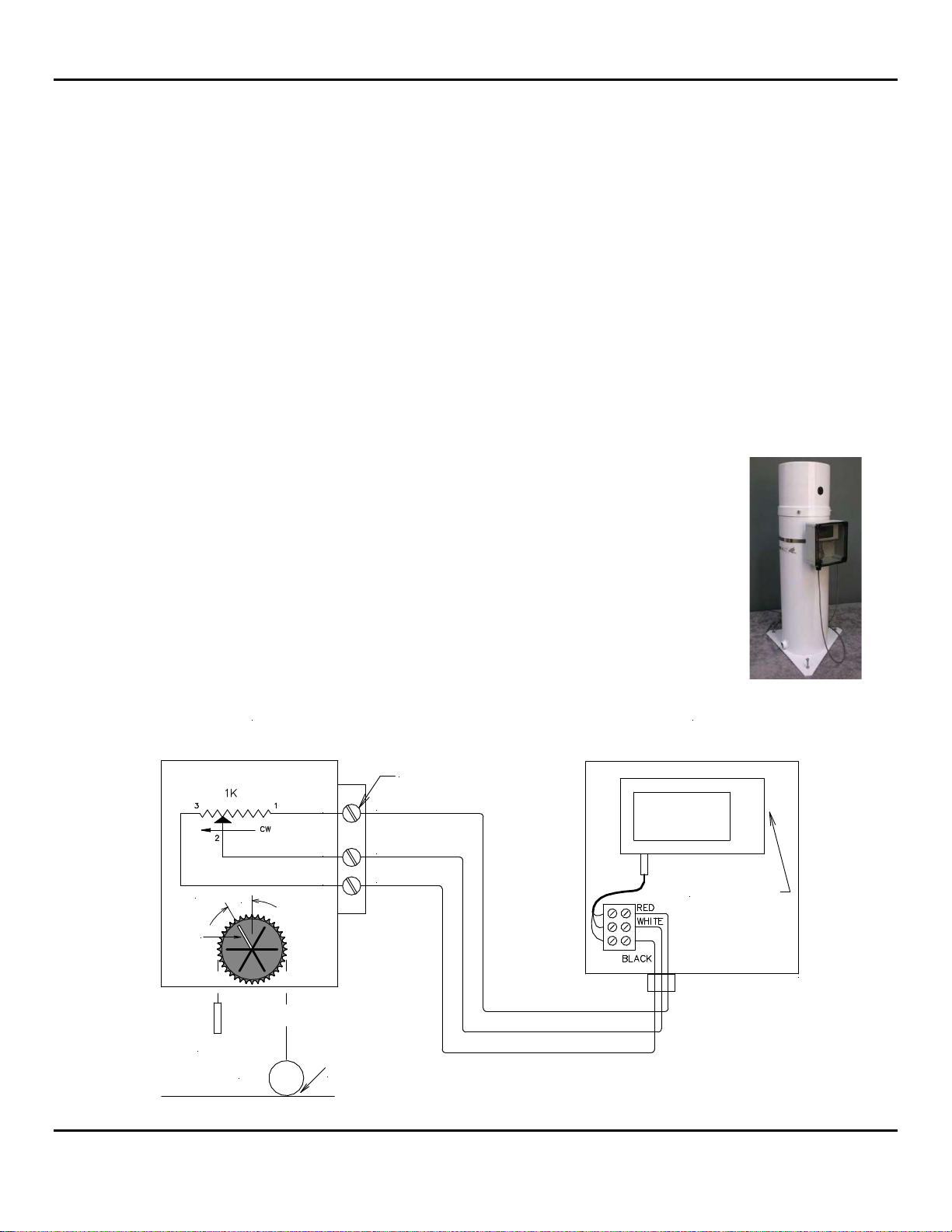
Route the cable from the evaporation gauge into the cord grip on the bottom of the
logger enclosure and tighten the cord grip. Connect the wires to the terminal strip
provided, matching the color of the wires to the colors painted on the terminal strip.
255-100 ANALOG OUTPUT
EVAPORATION GAUGE
Top Terminal
255-704-B EVAPORATION
DATA LOGGER
USB Connector
RED (+Vreg)
WHITE (Signal)
BLACK (Gnd)
1
2
3
DWG 890-0086-02
Counter-
weight
Float Float Touching Bottom
of Evaporation Gauge
30°
White
Pointer
11:00 o'clock

NovaLynx Corporation
255-704-B Page 6 April 2021
5.2 Float and Chain Installation
The 255-100 Analog Output Evaporation Gauge measures water level in the evaporation pan by means
of a float and chain that turns a precision potentiometer housed at the top of the gauge. The sprocket
and chain must be synchronized so that the full range of the potentiometer is utilized without entering
the electrical dead band of the potentiometer.
Install the evaporation gauge according to the instructions in the user manual. Connect the gauge to
the evaporation pan but do not fill the pan with water. Level the gauge. Remove the four screws that
hold the evaporation gauge cover to the body and set the cover aside.
IMPORTANT: Be careful when removing the packing material not to hit the sprocket, because that
might damage the potentiometer. Do not attempt to remove the float from the body of the sensor.
Chain Installation Using the Pointer
1. Make sure the gauge is empty of water.
2. Turn the sprocket until the white pointer is at the
11:00 o'clock position (30 degrees to left).
3. Lift the chain until all the slack is taken up, but the
float is still resting on the bottom of the gauge. Drape
the chain over the sprocket so that the float is on the
right and the counterweight is on the left.
5.3 Software Installation
HOBOware software is required to operate the logger. The software and user manual are on the CD
provided with NovaLynx 195-BHW-KIT. The kit includes a USB cable. If your computer does not have a
CD drive, download the software and user manual here:
https://www.onsetcomp.com/products/software/hoboware/
https://www.onsetcomp.com/files/manual_pdfs/12730-AD%20HOBOware%20User%27s%20Guide.pdf
Install HOBOware_Free_Setup.exe onto the computer before connecting to the logger.
The first time HOBOware runs, the Setup Assistant feature will open to allow the following selections:
(If the Setup Assistant window does not appear, select File / Preferences / to open the HOBOware
Preferences window, then click the Setup Assistant button.)
Device Type ~ Select USB devices.
Unit System ~ Select US (inches) or SI (millimeters).
Data Assistant ~ Select Linear Scaling Assistant.
Counter-
weight
Float
Float Touching Bottom
of Evaporation Gauge
DWG 880-0002-02
30°
White Pointer
11:00 o'clock

NovaLynx Corporation
255-704-B Page 7 April 2021
Connect the logger to the computer:
1. Loosen the screws at the four corners of the clear plastic cover on the enclosure and remove
the cover.
2. The logger is magnetically attached to a metal plate fastened to the back of the enclosure. To
access the USB connector which is on the right side of the logger, pull gently on the plastic tab
protruding from the right side of the logger.
3. Connect the USB cable to the mini USB input port on the logger. Connect the other end of the
cable to the computer.
4. Look at the status ribbon at the bottom of the HOBOware program
window (below). At first, the status will indicate "No devices
connected". Within a minute, the status should update and show "1
device connected". If the logger is not detected, make sure the logger
is powered (the battery indicator is in the upper right corner of the
LCD screen). Disconnect/reconnect the USB cable.
Status Ribbon
Software Navigation:
The commonly used functions are associated with program icons. The same functions are accessible
using the drop-down menus above the icons. View the Help dropdown menu for information on using
HOBOware.
Program Icons
Launch device
Readout device
Device status
Stop device
Select device
Set default unit system

NovaLynx Corporation
255-704-B Page 8 April 2021
5.4 Logger Settings
Click the "Launch device" icon to retrieve the logger settings.
The 255-704-B Evaporation Logger has been pre-programmed to read Channel #1 as water level in the
evaporation pan. The logger will be programmed either in inches or millimeters, depending on the
order specification. The example below is in inches.
5. Please verify the settings on your logger.
6. Click the button marked "Scaling (1)…".
7. The Data Assistants window will open (screenshot, next page).

NovaLynx Corporation
255-704-B Page 9 April 2021
8. Make sure the "Ev Pan Level" series is highlighted, then click "Edit"
9. The Linear Scaling Assistant window will open. Please verify the settings on your logger.
NOTE: The generic calibration shown above does not take into account the amount of water required
to raise the float off the bottom of the gauge. If desired, an offset can be applied or a field calibration
can be performed to scale the logger to actual water depth (Section 5.5 or 5.6).

NovaLynx Corporation
255-704-B Page 10 April 2021
10. After you have verified the settings, click "Cancel" (or "Update" if changes were made) to exit
from the Linear Scaling Assistant window. Click "Done" on the Data Assistants page to close it.
Click "Cancel" to close the "Launch Logger" window.
11. Click the "Device status" icon to open the Status window (below). Note the battery level and
memory used, to ensure there is enough power and memory available for your next logging
session.
12. Set the Screen Refresh Interval to one second. You will see the evaporation gauge readings
presented in two ways:
Number 1 Voltage is the pan level expressed in volts.
Number 5 Ev Pan Level is the calibrated pan level, expressed in inches or millimeters.
Click "OK" or "X" to close the window.
Tabla de contenidos