Nokia 5710 XpressAudio Manual de usuario

Nokia 5710 XpressAudio
Gebruikergids
Uitgawe 2022-09-04 af-NA

Nokia 5710 XpressAudio Gebruikergids
Indeks
1 Meer oor hierdie gebruikersgids 4
2 Om te begin 5
Keysandparts.......................................... 5
Setupandswitchonyourphone................................ 7
Chargeyourphone ....................................... 10
Keypad .............................................. 11
Usetheearbuds ......................................... 11
3 Calls, contacts, and messages 13
Calls................................................ 13
Contacts ............................................. 13
Sendmessages ......................................... 14
4 Personalize your phone 15
Changetones........................................... 15
Change the look of your home screen . . . . . . . . . . . . . . . . . . . . . . . . . . . . . 15
Addshortcuts .......................................... 15
5 Kamera 16
Photosandvideos........................................ 16
6 Bluetooth 17
Bluetooth®connections .................................... 17
7 Clock, calendar, and calculator 18
Alarmclock............................................ 18
Calendar ............................................. 18
Calculator............................................. 18
8 Empty your phone 19
Restorefactorysettings .................................... 19
© 2022 HMD Global Oy. Alle regte voorbehou. 2

Nokia 5710 XpressAudio Gebruikergids
9 Produk- en veiligheidsinligting 20
Foryoursafety.......................................... 20
Emergencycalls ......................................... 22
Sienomnajoutoestel...................................... 23
Herwin............................................... 24
Deurgehaalde wieldrom-simbool . . . . . . . . . . . . . . . . . . . . . . . . . . . . . . . . 24
Battery-enlaaier-inligting ................................... 24
Kleinkinders ........................................... 26
Mediesetoestelle ........................................ 26
Geïmplanteerde mediese toestelle . . . . . . . . . . . . . . . . . . . . . . . . . . . . . . 26
Gehoor .............................................. 26
Protect your device from harmful content . . . . . . . . . . . . . . . . . . . . . . . . . . 27
Voertuie.............................................. 27
Plekke met potensiaal vir ontploffing . . . . . . . . . . . . . . . . . . . . . . . . . . . . . 27
Sertifiseringsinligting (SAR) . . . . . . . . . . . . . . . . . . . . . . . . . . . . . . . . . . 27
Meer oor digitale regtebestuur . . . . . . . . . . . . . . . . . . . . . . . . . . . . . . . . . 28
Copyrightsandothernotices.................................. 29
© 2022 HMD Global Oy. Alle regte voorbehou. 3

Nokia 5710 XpressAudio Gebruikergids
1 Meer oor hierdie gebruikersgids
Belangrik: Vir belangrike inligting oor die veilige gebruik van jou toestel en battery, lees
die inligting oor “Vir jou veiligheid” en “Produkveiligheid” in jou gedrukte gebruikersgids of
by www.nokia.com/support voordat jy die toestel gebruik. Om uit te vind hoe om jou nuwe
toestel te begin gebruik, lees die gedrukte gebruikersgids.
© 2022 HMD Global Oy. Alle regte voorbehou. 4

Nokia 5710 XpressAudio Gebruikergids
2 Om te begin
KEYS AND PARTS
Your phone
This user guide applies to the following models: TA-1504, TA-1488, TA-1498, TA-1482, TA-
1496.
1. Earbud compartment cover
2. Loudspeaker
3. Camera
4. Flash
5. Loudspeaker
6. USB connector
7. Call key
8. Left selection key
9. Volume down/Camera zoom out key
10. Volume up/Camera zoom in key
11. Earpiece
12. Fast forward key (music, radio, videos)
13. Play/Pause/Stop key (music, radio, videos)
14. Rewind key (music, radio, videos)
© 2022 HMD Global Oy. Alle regte voorbehou. 5

Nokia 5710 XpressAudio Gebruikergids
15. Right selection key
16. Power/End key
17. Scroll key
Do not connect to products that create an output signal, as this may damage the device. Do
not connect any voltage source to the audio connector. If you connect an external device
or headset, other than those approved for use with this device, to the audio connector, pay
special attention to volume levels. Parts of the device are magnetic. Metallic materials may be
attracted to the device. Do not place credit cards or other magnetic storage media near the
device, because info stored on them may be erased.
Some of the accessories mentioned in this user guide, such as charger, headset, or data cable,
may be sold separately.
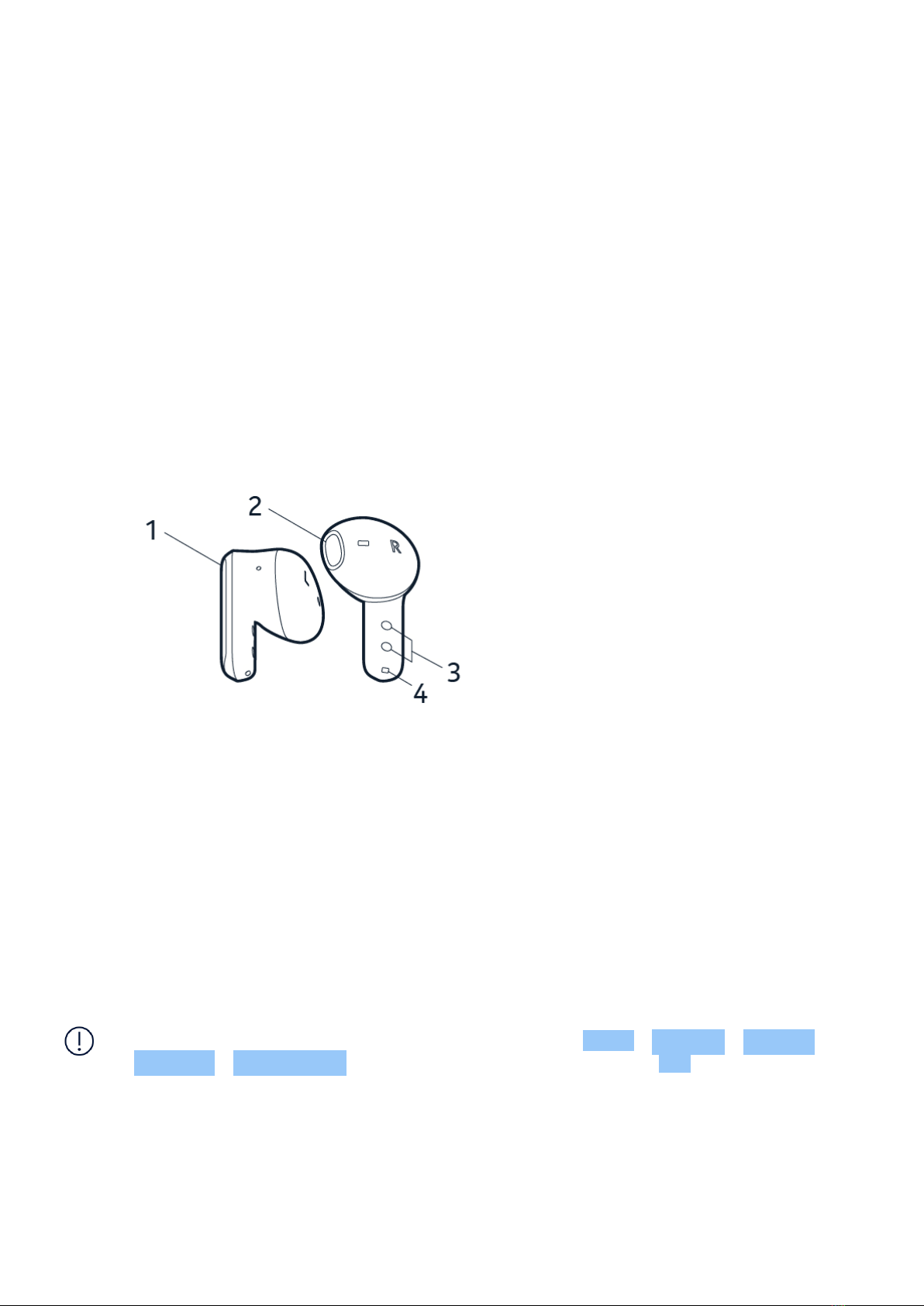
Earbuds
1. Touch switch
2. Ear tip
3. Charging connectors
4. Microphone
To purchase spare earbuds, you can contact your retailer or Nokia Phones Care Center, please
find the nearest one here: https://www.nokia.com/phones/en_in/support/care-center-locator.
Note: You can set the phone to ask for a security code to protect your privacy and personal
data. The pre-set code is 12345. To change the code, select Menu > Settings > Security
> Keyguard > Security code , enter the new code, verify it, and select OK . Note, however,
that you need to remember the code, as HMD Global is not able to open or bypass it.
© 2022 HMD Global Oy. Alle regte voorbehou. 6

Nokia 5710 XpressAudio Gebruikergids
SET UP AND SWITCH ON YOUR PHONE
Nano-SIM
Important: This device is designed to be used with a nano-SIM card (see figure) only. Use of
incompatible SIM cards may damage the card or the device, and may corrupt data stored on
the card.
Note: Switch the device off and disconnect the charger and any other device before removing
any covers. Avoid touching electronic components while changing any covers. Always store
and use the device with any covers attached.
Open the back cover
1. Put your fingernail in the small slot at the bottom of the phone, lift and remove the cover.
2. If the battery is in the phone, lift it out.
© 2022 HMD Global Oy. Alle regte voorbehou. 7

Nokia 5710 XpressAudio Gebruikergids
Insert the SIM card
1. Slide the SIM card holder towards the top of the phone and open it up.
2. Place the SIM card in the slot.
3. Close down the holder, and slide it towards the bottom of the phone to lock it in place.
Insert the second SIM
1. If you have a dual-SIM phone, slide the SIM card holder of the SIM2 slot to the right and
open it up.
2. Place your second SIM in the slot.
3. Close down the holder, and slide it to the left to lock it in place.
Both SIM cards are available at the same time when the device is not being used, but while one
SIM card is active, for example, making a call, the other may be unavailable
Wenk: Om uit te vind of jou foon 2 SIM-kaarte kan gebruik, sien die etiket op die
verkoophouer. As daar 2 IMEI-kodes op die etiket is, het jy ’n dubbel-SIM foon.
© 2022 HMD Global Oy. Alle regte voorbehou. 8

Nokia 5710 XpressAudio Gebruikergids
Insert the memory card
1. Slide the memory card holder to the left and open it up.
2. Place the memory card in the slot.
3. Close down the holder and slide it to the right to lock it in place.
4. Put back the battery.
Tip: Use a fast, up to 32 GB microSD memory card from a well-known manufacturer.
Close the back cover
1. Slide down the earbud compartment cover.
2. Slide the top part of the back cover into place.
© 2022 HMD Global Oy. Alle regte voorbehou. 9

Nokia 5710 XpressAudio Gebruikergids
3. Press the back cover down.
4. Slide up the earbud compartment cover.
Switch on the phone and connect the earbuds
1. To switch your phone on, press and hold the power key.
2. To switch on the earbuds, take them out from their compartment.
3. On your phone, select Menu > Earbuds > TWS connect , switch on TWS connect and
select Devices found > Nokia XpressAudio Earbuds .
CHARGE YOUR PHONE
Charge the battery and the earbuds
1. Plug the charger into a wall outlet.
2. To charge the earbuds with your phone, slide down the earbud compartment cover, and
place the earbuds in their slots. Slide up the cover.
3. Connect the charger to the phone. If the battery is completely discharged, it may take
several minutes before the charging indicator is shown on the phone screen. When the
earbuds are charging, the red indicator light on the earbuds is on and goes off once fully
charged.
4. When done, unplug the charger from the phone then from the wall outlet.
Tip: You can use USB charging when a wall outlet is not available. The efficiency of USB
charging power varies significantly, and it may take a long time for charging to start and the
device to start functioning.
© 2022 HMD Global Oy. Alle regte voorbehou. 10
Otros manuales para 5710 XpressAudio
6
Tabla de contenidos
Idiomas: