
NiteRay Electronic Q516 Manual de servicio

Q516 Administrator Guide
NiteRay Electronic Co.,Limited
Add: 36, Taoyuan Road, Huangtian, Xixiang, Baoan, Shenzhen, Guangdong, China.
Tel: 86-755-29589259 / 86-13751001835 Fax:86-755-29084287 Email: sales5@niteray.com
Q516 SIP Door Phone
Administrator Guide

Q516 Administrator Guide
NiteRay Electronic Co.,Limited
Add: 36, Taoyuan Road, Huangtian, Xixiang, Baoan, Shenzhen, Guangdong, China.
Tel: 86-755-29589259 / 86-13751001835 Fax:86-755-29084287 Email: sales5@niteray.com
Quick Specification
Features:
Fully Waterproof stainless steel case.
Metal wire drawing process aluminium alloy face plate.
Touch Keypad, with back light.
Hidden RFID Card reader.
Relay to connect to door lock , NO/NC relay mode.
Relay time adjustable.
Use SIP protocol, Easy to deploy.
Directly call to preset telephone.
Volume control.
Hight quality conversation voice.
Full Duplex intercom.
Auto Answer , Auto hand down.
Powerful Web management.
Auto Provision via FTP,TFTP.
Datasheet:
Ethernet Port
10/100mbps
Protocol
SIP
Power
PoE IEEE 802.3af, 48V
Adapter:12V1A
Network
Static IP, DHCP, PPPoE, VPN(L2TP/OpenVPN),
NAT,STUN,VLAN
Audio Codec
G.711A/U, G.722, G.723.1, G.726-32, G.729AB
Operation Conditions
0~40 ℃
Relative humidity
20%-85%, non-condensing
Dimensions (mm)
32 *100*160
Weight(Main Body)
585g
Packing weight
1KG
Keypad
Touch keypad with light
RFID
125KHz
Relay
NO and NC
Mounting hole pitch
Horizontal: 60mm; Perpendicular: 115mm

Q516 Administrator Guide
NiteRay Electronic Co.,Limited
Add: 36, Taoyuan Road, Huangtian, Xixiang, Baoan, Shenzhen, Guangdong, China.
Tel: 86-755-29589259 / 86-13751001835 Fax:86-755-29084287 Email: sales5@niteray.com
Hardware Description:
1
Indicator
Flash while powering up, Lights up during conversation
2
OK key
Use it to end password entry; Press for 5seconds to broadcast IP
3
Mic
Microphone
4
Keypad
Touch keypad for password entry, Phone number entry.
Has hidden RFID card Reader inside.
5
Speaker
Waterproof Speaker
6
Bell button
Bell button/DSS key
7
Mounting hole
Mounting hole for hardware installation
8
Network
interface
RJ 45 Network interface
9
Wire in hole
Knock off this sheet to let Door lock cable in
Q516 Administrator Guide
NiteRay Electronic Co.,Limited
Add: 36, Taoyuan Road, Huangtian, Xixiang, Baoan, Shenzhen, Guangdong, China.
Tel: 86-755-29589259 / 86-13751001835 Fax:86-755-29084287 Email: sales5@niteray.com
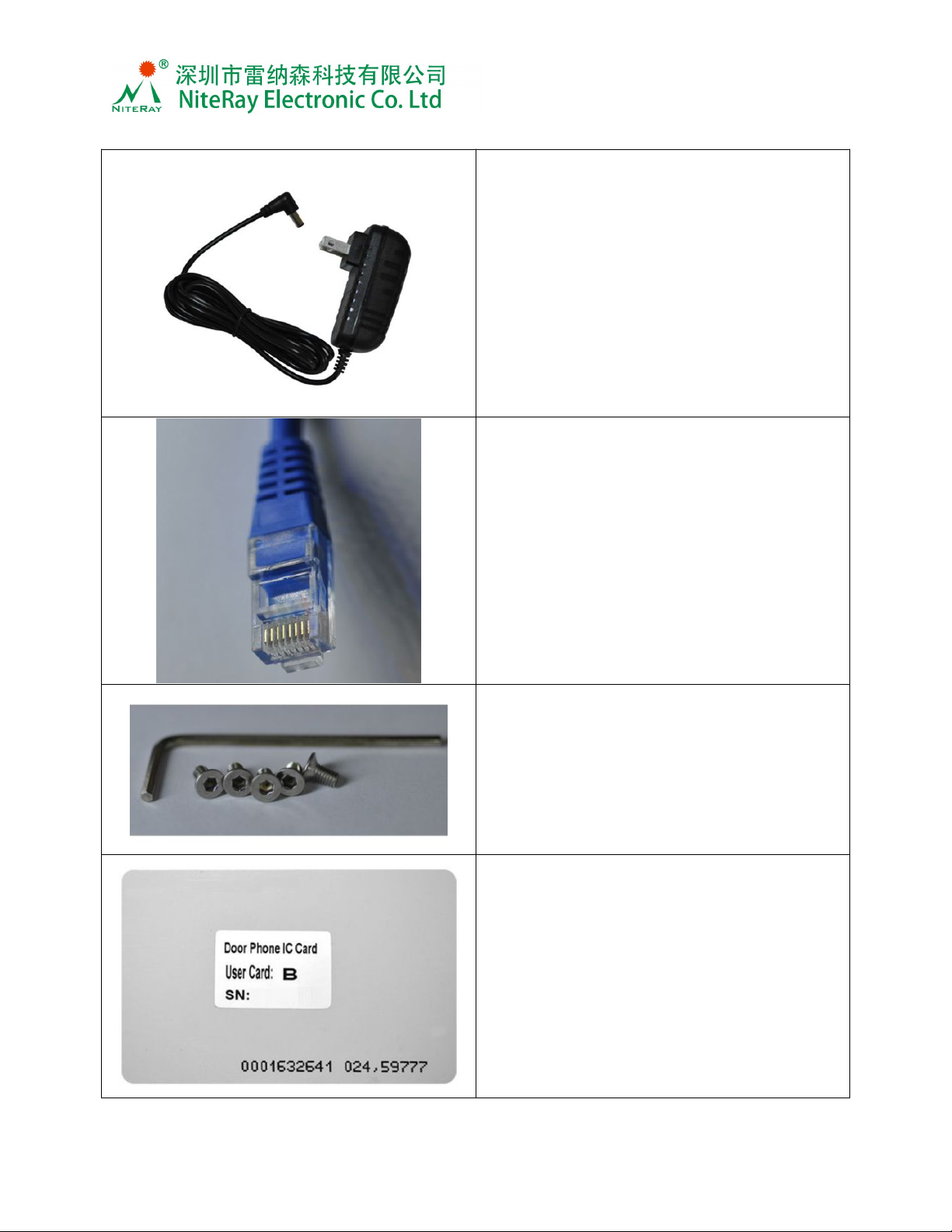
Accessories:
Adapter
AC input 100-240V,50/60 Hz
DC output 12V 1.5A
Plug 5.5*2.5MM,length 10.5mm
Inside positive
Cable length 1900mm
CAT5 Ethernet cable
Compatible with IEEE 802.3af 48V PoE
standard
Security screw and driver
125KHz RFID card

Q516 Administrator Guide
NiteRay Electronic Co.,Limited
Add: 36, Taoyuan Road, Huangtian, Xixiang, Baoan, Shenzhen, Guangdong, China.
Tel: 86-755-29589259 / 86-13751001835 Fax:86-755-29084287 Email: sales5@niteray.com
Log in
The door phone has a web manage interface, all configurations will be set on it.
(Remark:The default network mode of the door phone is DHCP, if you are using Stitac IP
or PPPoE in your system, you could connect it to a DHCP server/router to set the
network firstly and set the network and other configurations, then plug it into your current
system.)
1. Get the door phones IP
There 2 ways to get the IP address of the door phone:
A.Log in your Router/DHCP server and see in DHCP client list, you would find the door
phone in the list. The mac ID label on the main board would help to find it easier.
B. Press the ‘#’ key and hold for over 5
seconds, the door phone will broadcast the IP address automatically.
2. Log in
On the web browser, fill in the IP address
and press enter, the page will turn to the
door phone’s manage interface.
Log in with
User name: admin;
Password: admin.
Quick set up with wizard
You could set up the door phone with the wizard, it will help you to set the door phone
up step by step.

Q516 Administrator Guide
NiteRay Electronic Co.,Limited
Add: 36, Taoyuan Road, Huangtian, Xixiang, Baoan, Shenzhen, Guangdong, China.
Tel: 86-755-29589259 / 86-13751001835 Fax:86-755-29084287 Email: sales5@niteray.com
Network settings
In Network tab, WAN tab, you could set up the network settings of the door phone,
select the suitable one according to you network condition. Click ‘Apply’ after change
the values.
1. DHCP:
Default mode of the door phone network is DHCP, the door phone will get IP
address from your router automatically.
2. Static IP:
Set up the Static IP Address, please fill the form as your network administrator
Requires.
Q516 Administrator Guide
NiteRay Electronic Co.,Limited
Add: 36, Taoyuan Road, Huangtian, Xixiang, Baoan, Shenzhen, Guangdong, China.
Tel: 86-755-29589259 / 86-13751001835 Fax:86-755-29084287 Email: sales5@niteray.com
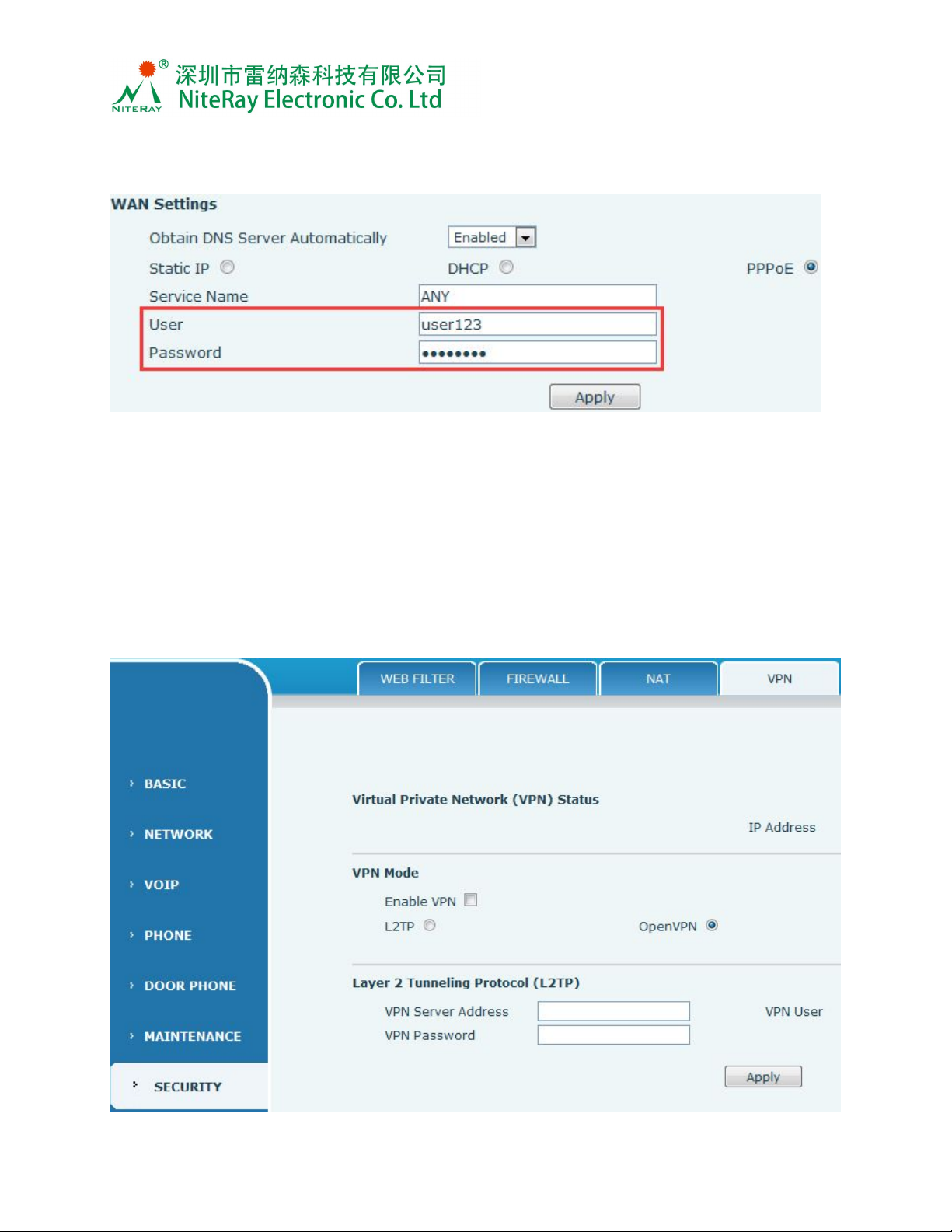
3. PPPoE:
Set up the PPPoE register informations, please note that, the user and password
are the account and password your ISP provide to you.
4. Proxy:
In some network conditions, you might need to set up the Proxy or using a VPN.
For Proxy please refer to “VoIP settings”, you could set up the proxy details in the VoIP
basic setting form.
5. VPN (virtual private network ):
In ‘SECURITY’->VPN tab, Enable VPN, and select the right VPN protocol you are
currently using, fill in the your VPN server address, user , password and then click
‘Apply’.

Q516 Administrator Guide
NiteRay Electronic Co.,Limited
Add: 36, Taoyuan Road, Huangtian, Xixiang, Baoan, Shenzhen, Guangdong, China.
Tel: 86-755-29589259 / 86-13751001835 Fax:86-755-29084287 Email: sales5@niteray.com
VoIP settings
1.Basic settings:
a) Fill in the Registration information in the left part of the form, select ‘Enable
Registration’ and then click’Apply’.
b) If you need to use a proxy server, please fill the proxy information in the right
part of the form.
2.Codec settings
Normally you do not need to set the codecs, the phone will use a suitable one. But
for some reasons, like network bandwidth limit, or SIP server requirement, you
could set this up accordingly.
Select a codec,use to add to enable list, use to remove.
Use and to adjust the codec list.
Click ‘Apply’.

Q516 Administrator Guide
NiteRay Electronic Co.,Limited
Add: 36, Taoyuan Road, Huangtian, Xixiang, Baoan, Shenzhen, Guangdong, China.
Tel: 86-755-29589259 / 86-13751001835 Fax:86-755-29084287 Email: sales5@niteray.com
3. STUN
You could set up STUN if your server request.
Phone settings:
1. Audio settings
a) Set the codec sequence
b) Set the door phone ring type
c) Set the mic input and speaker output volume
d) Set the Codec hardware gain if the sound is low

Q516 Administrator Guide
NiteRay Electronic Co.,Limited
Add: 36, Taoyuan Road, Huangtian, Xixiang, Baoan, Shenzhen, Guangdong, China.
Tel: 86-755-29589259 / 86-13751001835 Fax:86-755-29084287 Email: sales5@niteray.com
2. Feature settings
The door phone is set to Auto answer, when you have incoming call to this door
phone, it will answer the call automatically, if you do prefer to answer the call by
hand, please deselect ‘Enable Auto Answer’.
Door phone settings
1.Function Key setting tab is to set up the Bell button function.
A. If you need to use the keypad to entry a phone number and call out, please set
the DSS key 1 to ‘Key Event’, Sub type select ‘OK”, then click ‘Apply’.
B. If you need the bell button use as a bell key, when people press on it,the door
phone will directly call to a phone/ring group/intercom group, please set the DSS Key 1
to Hot key mode, then fill Number 1 with the phone number, then click ‘Apply’.
Tabla de contenidos
Otros manuales de Sistema de intercomunicación de NiteRay Electronic


