OPERATOR’S MANUAL FOR THE BULLET BLENDER®
SETUP
Place the Bullet Blender®on a stable,
level lab bench. Plug the AC power supply
cord connector into the AC Input Receptacle
on the back of the Bullet Blender®and then
insert the plug into a wall outlet. You should
see lights on the time setting flash for several
seconds, indicating that the unit is receiving
power. It is now set up.
OPERATION
To use your BBX-or BBY- series Bullet
Blender®lift open the cover, insert the
appropriate tubes, and close the cover. For
BBX24 models (BBX24 and BBX24B) place
up to 24 closed 1.5mL to 2.0mL
polypropylene high quality snap-top (e.g.
Eppendorf®Safe-Lock) microcentrifuge
tubes containing samples into the sample
plate, and close the cover. When using
2.0mL tubes we recommend using at least 2
tubes per homogenization cycle. For the
screw-cap BBX24 models (BBX24W and
BBX24BW), use 1.5ml conical,
polypropylene Corning or Axygen tubes
(other tubes may work, but we can not assure
good results with them). For the Bullet
Blender Storm (BBY24M), use 1.5mL
Eppendorf®Safe-Lock tubes. In the Bullet
Blender®Blue 5 (BBX5MB), load up to 12
5mL Axygen brand transport tubes. The snap
caps on the microcentrifuge tubes must be on
securely. The threads on all screw-cap
tubes must be dry and the caps must be
screwed on very tightly. Do not operate a
Bullet Blender®loaded with any empty
tubes, as this may result in breakage of the
tubes. If their use is necessary, “blank” tubes
should be filled partially with water. For
best results, the tubes should be evenly
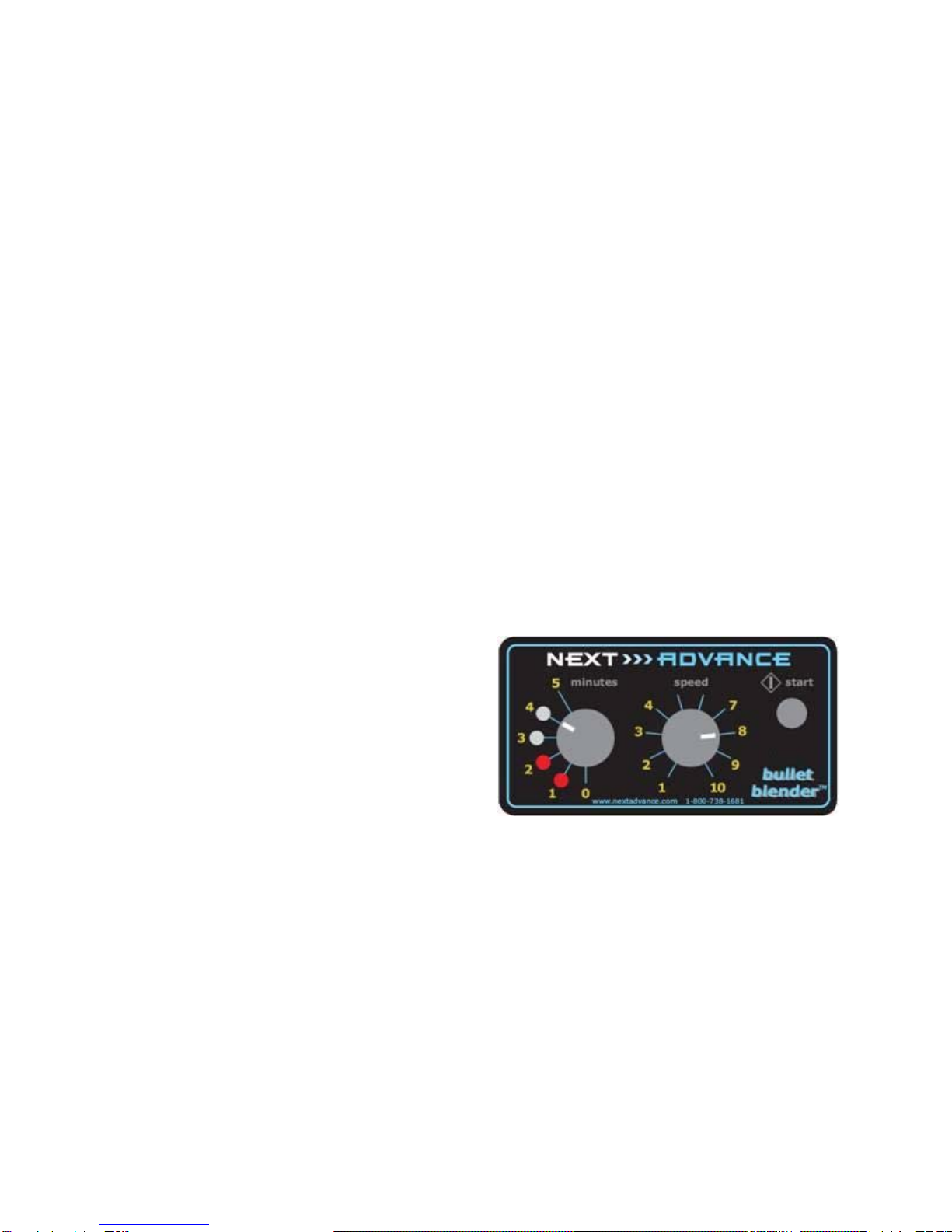
spaced. Set the duration, in minutes, and the
speed to the desired value. Push the start
button. As each minute passes, another LED
will light up. On the BLUE and BBY
models, the air cooling will continue for half
a minute post-homogenization.
Do not operate with the cover open.
There will be excess noise, your samples will
not be properly processed and the tubes may
be knocked entirely out of the instrument
potentially causing injury.
If you turn the “minutes” knob to “0”, the
instrument will stop.
Example:
The figure above shows the Bullet
Blender®set to run for 4 minutes at a speed
of 8, after running for 2 minutes. To operate,
press the “START” button. After the first
minute, the LED light by the number 1 will
light up. After the second minute, the second
LED light by the number 2 will light up.
And so on. At the settings shown above,
after 4 minutes, the Bullet Blender®will
stop. In the Blue versions, the words “Air
Cooling™” will light up in blue during
BBmanual_CE_v121111 NEXT >>> ADVANCE 4