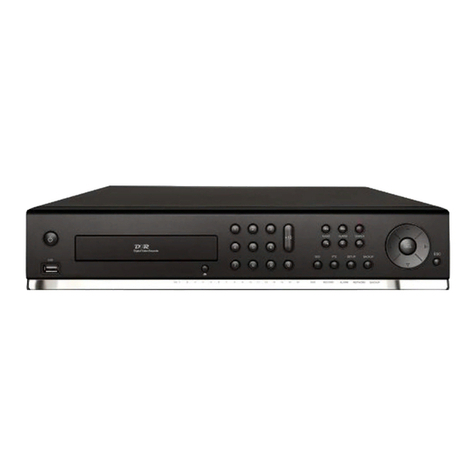
Nadatel SDVR-4300 Manual de usuario

USER GUIDE
4 Channel MPEG-4 Triplex
Digital Video Recorder
(Ver. 1.1)
About this user guide
Before installing and using this unit, please read this user guide carefully.
The specifications and information are subject to change without notice for quality improvement.

Safety Precautions
Explanation of Graphical Symbols
This symbol indicates the presence of important operating and
maintenance (servicing) instruction in the literature accompanying the
product.
This symbol indicates the presence of unprotected ”dangerous voltage”
within the product’s enclosure that may be of sufficient magnitude to
constitute a risk of electric shock to persons.
Cautions
This product has multiple-rated voltages (110v and 220v).
See installation instructions before connecting to the power supply.
This product uses a Lithium battery.
To avoid of risk of explosion, do not replace the battery on the main board by anything other
than a Lithium battery. Dispose of used batteries according to the manufacturer’s instructions.
This equipment and all communication wirings are intended for indoor use only.
To reduce the risk of fire or electric shock, do not expose the unit to rain or moisture.
2

Warnings
Installation and servicing should be performed only by qualified and experienced personnel.
Power off the DVR when connecting cameras, audio or sensor cables.
The manufacturer is not responsible for any damage caused by improper use of the product or
failure to follow instructions for the product.
The manufacturer is not responsible for any problems caused by or resulting from the user
physically opening the DVR for examination or attempting to fix the unit. The manufacturer may not
be held liable for any issues with the unit if the warranty seal is removed.
3

Contents of DVR package
The package contains the main unit and its components as specified below. When you purchase
the unit, please check to ensure the components specified below are included.
DVR Set
Client Software CD
(Including Manual)
Remote Controller
Battery1.5V (AAA x 2EA)
Adaptor and Power cable
IDE HDD Cable
HDD Screws and Rubber rings
4

Compatible HDD Models
COMPANY MODEL SIZE RPM BUFFER INTERFACE
HDS728080PLAT20 80 GB 7200 RPM 2 M E-IDE
HDS721680PLAT80 82 GB 7200 RPM 8 M E-IDE
HDT722516DLAT80 160 GB 7200 RPM 8 M E-IDE
HDT722516DLAT80 164 GB 7200 RPM 8 M E-IDE
HDS722525VLAT80 250 GB 7200 RPM 8 M E-IDE
HDT722525DLAT80 250 GB 7200 RPM 8 M E-IDE
HDT725025VLAT80 250 GB 7200 RPM 8 M E-IDE
HDT725032VLAT80 320 GB 7200 RPM 8 M E-IDE
HITACHI
HDS725050KLAT80 500 GB 7200 RPM 8 M E-IDE
MAXTOR 6L300R0 300 GB 7200 RPM 16 M E-IDE
SP0822N 80 GB 7200 RPM 2 M E-IDE
SAMSUNG SP1604N 160 GB 7200 RPM 2 M E-IDE
WD1600BB-22GUA0 160 GB 7200 RPM 2 M E-IDE
WD2000BB-00GUA0 200 GB 7200 RPM 8 M E-IDE
WD2500BB-00KEA0 250 GB 7200 RPM 8 M E-IDE
Western Digital
WD5000AAKB 500 GB 7200 RPM 16 M E-IDE
ST3400-15ACE 40 GB 7200 RPM 2 M E-IDE
ST3800-12ACE 80 GB 7200 RPM 2 M E-IDE
ST31200-25ACE 120 GB 7200 RPM 2 M E-IDE
ST31600-22ACE 160 GB 7200 RPM 2 M E-IDE
ST3300820ACE 300 GB 7200 RPM 8 M E-IDE
ST3300831ACE 300 GB 7200 RPM 8 M E-IDE
ST3400832ACE 400 GB 7200 RPM 8 M E-IDE
ST3400820ACE 400 GB 7200 RPM 8 M E-IDE
ST3500641A 500 GB 7200 RPM 16 M E-IDE
ST3750840ACE 750 GB 7200 RPM 8 M E-IDE
Seagate
ST3750640A 750 GB 7200 RPM 16 M E-IDE
5

Specifications
INPUT 4 composite BNC (NTSC/PAL) – 1.0Vp-p
1 composite BNC (NTSC/PAL) – 1.0Vp-p
VIDEO
OUTPUT (Selectable)
1 VGA
ALARM INPUT & OUTPUT 4 & 1
OS RTOS
COMPRESSION MPEG-4
VIDEO FORMAT NTSC PAL
RESOLUTION 352x240, 704x480 352x288, 704x576
RECORDING SPEED MAX. 120fps/4CH(352x240/CH)
MAX. 30fps/4CH(704X480/CH)
MAX. 100fps/4CH(352x288/CH)
MAX. 25fps/4CH(704X576/CH)
MODE Manual, Motion, Sensor, and Schedule
RECORD
METHOD By Resolution, fps & Quality
MULTI TASK TRIPLEX Record, playback and transfer
CONTROL UNIT IR Type Remote Control and Front keys
SERIAL PORT CONSOLE 1 RS-232C
DYNAMIC IP Supported by DDNS
LAN PORT 1 10/100-base T Ethernet
NETWORK
FUNCTIONS Live, Search, P/T/Z/F
HDD CAPACITY 1EA Max. 750GB
NETWORK Still Image & Video dataBACKUP
USB STICK Still Image & Video data
ADAPTOR Input: AC100-240V, 50/60Hz, 3AELECTRONICAL
SPECIFICATION CONSUMPTION About 25W
TEMPERATURE 5°C ~ 40°C
HUMIDITY 30% ~ 90%
ENVIRONMENTAL
SPECIFICATION
SIZE
DIMENSION 340(W) X 250(D) X 60(H)mm
6

INDEX
1. FRONT PANEL AND REMOTE CONTROLLER...........................................................10
2. REAR PANEL AND CONNECTIONS............................................................................12
3. SETTING UP THE DVR.................................................................................................13
3-1. Setup - Main Screen................................................................................................................................13
3-2. Setup – Live Mode...................................................................................................................................15
3-3. Setup – Recording Mode........................................................................................................................16
3-3-1. Motion Zones......................................................................................................................................17
3-3-2. Recording Schedules .........................................................................................................................18
3-4. System......................................................................................................................................................19
3-5. Network ....................................................................................................................................................22
3-5-1. Ports ...................................................................................................................................................23
3-5-2. Network types.....................................................................................................................................24
3-5-2-1. LAN..................................................................................................................................................24
3-5-2-2. DHCP ..............................................................................................................................................24
3-5-2-3. ADSL (PPPOE)................................................................................................................................25
3-6. Storage .....................................................................................................................................................26
4. LIVE & SEARCH...........................................................................................................28
4-1. Live Window.............................................................................................................................................28
4-2. SEARCH window.....................................................................................................................................30
4-2-1. EVENT Search ...................................................................................................................................30
4-2-2. TIME LINE Search..............................................................................................................................31
4-2-3. GO TO ................................................................................................................................................32
4-2-4. GO FIRST...........................................................................................................................................32
4-2-5. GO LAST............................................................................................................................................32
4-2-6. LOG List..............................................................................................................................................32
7

4-2-7. ARCHIVE Search ...............................................................................................................................33
4-3. Playback mode ........................................................................................................................................34
5. ARCHIVING AND BACKUP..........................................................................................35
5-1. Archiving Still images or Video..............................................................................................................35
5-2. Backup still images or videos on USB memory stick .........................................................................36
5-3. Playing backup file..................................................................................................................................36
6. NETWORK – BY AN EXCLUSIVE VIEWER.................................................................37
6-1. Overview...................................................................................................................................................37
6-2. Minimum PC requirements.....................................................................................................................38
6-3. Installing the program.............................................................................................................................38
6-4. Live viewer...............................................................................................................................................39
6-5. Search and Playback Viewer..................................................................................................................41
6-5-1. Backup................................................................................................................................................42
6-6. PC System configuration........................................................................................................................42
6-6-1. General...............................................................................................................................................42
9-6-2. Site......................................................................................................................................................43
9-6-3. Event...................................................................................................................................................43
9-6-4. Record................................................................................................................................................44
9-6-5. Disk.....................................................................................................................................................44
7. NETWORK – BY AN WEB-BROWSER VIEWER.........................................................45
7-1. Download Web Brower Viewer and Connection ..................................................................................45
7-2. Main Features ..........................................................................................................................................46
7-2-1. Live.....................................................................................................................................................46
7-2-2. Search and Playback..........................................................................................................................47
8

APPENDIX ........................................................................................................................48
1. How to register DDNS (Dynamic Domain Name Server) ........................................................................48
1-1. Setting of NETWORK Setup menu.........................................................................................................48
1-2. Checking Mac address on the rear panel of DVR and Registration No.............................................48
1-3. Registration at DDNS..............................................................................................................................49
2. Network access using Domain name .......................................................................................................51
9

1. Front Panel and Remote controller
The following information will help you operate the front panel controls.
Figure 1.1 Front panel
Table 1.1. Front LED and Port
Name Description
POWER LED light is on when power is applied to the system.
HDD LED light is on when the system is recording video data.
USB port There is a USB port located on the left side of the front panel. This USB port is used to
archive footage into a USB storage device. (USB 2.0 connector)
10
Tabla de contenidos
Otros manuales de DVR de Nadatel