
Mynah F250 Manual de usuario

F250 Precision Thermometer Driver
Programmable Serial Interface Card
Series 2
USER MANUAL
Rev. P1.10
July 29, 2004
DeltaV is a trademark of Emerson Process Management, Inc © Emerson Process Management, Inc. 1998, 1999.
All rights reserved.
Printed in the U.S.A.
While this information is presented in good faith and believed to be accurate, MYNAH Technologies does not
guarantee satisfactory results from reliance upon such information. Nothing contained herein is to be construed as
a warranty or guarantee, express or implied, regarding the performance, merchantability, fitness or any other matter
with respect to the products, nor as a recommendation to use any product or process in conflict with any patent.
MYNAH Technologies reserves the right, without notice, to alter or improve the designs or specifications of the
products described herein.

POWERFUL SOLUTIONS FOR DIGITAL PLANTS
MYNAH Technologies ▪504 Trade Center Blvd ▪Chesterfield, MO 63005 ▪Telephone (636)681-1555 ▪Fax (636) 681-1660
www.mynah.com
1
1 INTRODUCTION
1.1 Scope
This document is the User Manual for the F250 Precision Thermometer driver firmware for
the Emerson Process Management (EPM) DeltaV Control System; it provides information
required to install, configure, and maintain the driver firmware on the DeltaV Series 2
Programmable Serial Interface Card (PSIC). The reader should be familiar with EPM’s
DeltaV PSIC and connected F250 Precision Thermometer devices.
The section Document Format briefly describes the contents of each section of this manual.
System Specifications outlines hardware and software requirements for the F250 Precision
Thermometer Driver (P1.10) firmware. This driver is not available for Series 1 serial cards.
1.2 Document Format
This document is organized as follows:
Table 1
Introduction Describes the scope and purpose of this document.
Theory of Operation Provides a general functional overview of the F250
Precision Thermometer Driver.
Downloading Firmware Describes downloading procedures for the F250
Precision Thermometer Driver firmware on to the
DeltaV PSIC.
Configuration Information Describes procedures and guidelines for configuring
the DeltaV PSIC.
Operational Check Provides tips and assistance to ensure PSIC is
properly setup and configured.
DeltaV–Field Device Electrical
Interface
Describes the electrical interface between DeltaV
and the F250 Precision Thermometer device. Also
describes the cable pin assignments for RS-232 and
RS-422/485 communications.
Technical Support Describes who to call if you need assistance.
Example
Describes how to configure a device with input and
output datasets.

POWERFUL SOLUTIONS FOR DIGITAL PLANTS
MYNAH Technologies ▪504 Trade Center Blvd ▪Chesterfield, MO 63005 ▪Telephone (636)681-1555 ▪Fax (636) 681-1660
www.mynah.com
2
1.3 System Specifications
The following table lists the minimum system requirements for the F250 Precision
Thermometer Driver:
Table 2
Firmware F250 Precision Thermometer Driver Firmware
(P1.10)
Protocol Compatibility F250 Mk II Precision Thermometer Operators
Handbook. F250-14-002 Issue 6
Software Requirements DeltaV System Software (Release 6.3.2 or later)
installed on a hardware-appropriate Windows PC
configured as a ProfessionalPlus for DeltaV
Serial Interface Port License (VE4102)
Minimum DeltaV Hardware
Requirements
FRSI DeltaV Serial Interface Series 2, Hardware PN:
12P2506X022
FRSI DeltaV M3, M5, MD or Series 2 MD Controller,
Power Supply and 2 wide controller carrier
FRSI 8 wide I/O card carrier

POWERFUL SOLUTIONS FOR DIGITAL PLANTS
MYNAH Technologies ▪504 Trade Center Blvd ▪Chesterfield, MO 63005 ▪Telephone (636)681-1555 ▪Fax (636) 681-1660
www.mynah.com
3
2 THEORY OF OPERATION
The Programmable Serial Interface Card (PSIC) has 2 ports which can be configured for
RS-232, RS-422/RS-485 Half Duplex or RS-422/RS-485 Full Duplex communications
with external devices. For communications with the F250 Precision Thermometer devices,
any mode may be used. The driver supports only one F250 device per port. Specifically,
the devices cannot be multi-dropped.
The DeltaV Serial Card Driver functionality will be as follows.
1. The driver will be flashed into the PSIC.
2. The driver will run in Master mode only and be responsible for sending commands to
the F250 units. The F250 will respond with temperature reading information, which will be
reported to DeltaV in dataset registers.
3. The two ports of the PSIC work independently, each connected to a single F250 unit.
The following shows PSIC connectivity with F250 Precision Thermometer devices.

POWERFUL SOLUTIONS FOR DIGITAL PLANTS
MYNAH Technologies ▪504 Trade Center Blvd ▪Chesterfield, MO 63005 ▪Telephone (636)681-1555 ▪Fax (636) 681-1660
www.mynah.com
4

POWERFUL SOLUTIONS FOR DIGITAL PLANTS
MYNAH Technologies ▪504 Trade Center Blvd ▪Chesterfield, MO 63005 ▪Telephone (636)681-1555 ▪Fax (636) 681-1660
www.mynah.com
5
3 Downloading the firmware
The driver software distribution comprises 15 files, distributed on a CD. These files
must be copied to the DeltaV directory on your ProPlus Workstation. The path is:
\DeltaV\ctl\ProgSerial\F250
Note that you will have to create the \F250 subdirectory. The following files will be copied:

POWERFUL SOLUTIONS FOR DIGITAL PLANTS
MYNAH Technologies ▪504 Trade Center Blvd ▪Chesterfield, MO 63005 ▪Telephone (636)681-1555 ▪Fax (636) 681-1660
www.mynah.com
6
After copy completion, you are ready to program (or upgrade) the Programmable Serial Card
with the supplied custom driver software. The steps are as follows:
1. Click on the Start button and select DeltaV-> Installation-> Controller Upgrade Utility as
shown below, and the following dialog will appear:
2. Choose Upgrade I/O Modules from the drop down menu and click Next.

POWERFUL SOLUTIONS FOR DIGITAL PLANTS
MYNAH Technologies ▪504 Trade Center Blvd ▪Chesterfield, MO 63005 ▪Telephone (636)681-1555 ▪Fax (636) 681-1660
www.mynah.com
7
3. The above dialog will appear, listing all the available Controllers in your network. From
this dialog, select the appropriate Controller and then Click Next.
4. The following dialog will appear, listing all the I/O modules in your selected Controller.
The shown list of I/O modules is an example only. Your list will be different.
POWERFUL SOLUTIONS FOR DIGITAL PLANTS
MYNAH Technologies ▪504 Trade Center Blvd ▪Chesterfield, MO 63005 ▪Telephone (636)681-1555 ▪Fax (636) 681-1660
www.mynah.com
8
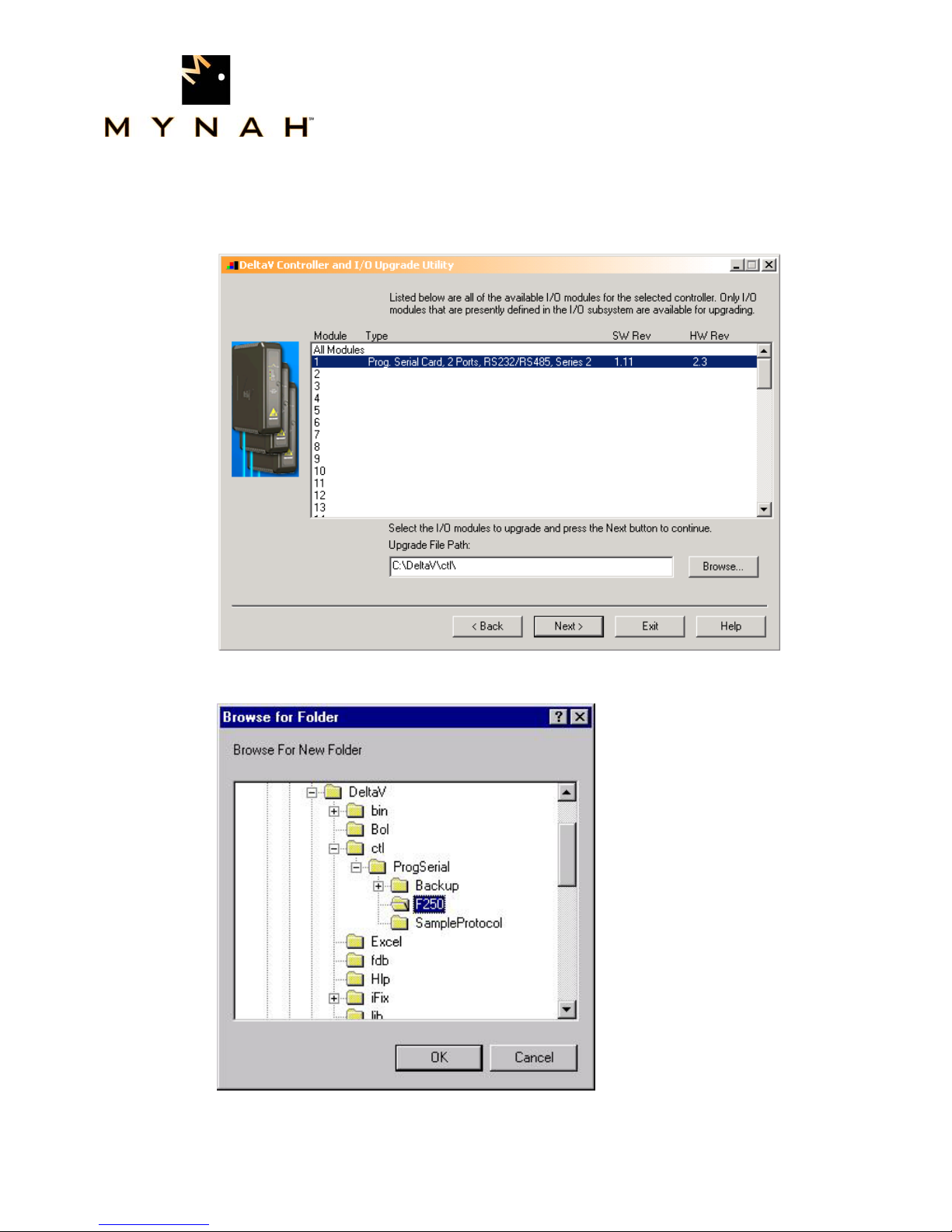
Note: The first time a standard Serial card is upgraded to the F250 Precision
Thermometer Driver, the dialog will be as shown below. When upgrading an existing
Programmable Serial Card, skip Steps 4, 5 and 6, and go to Step 7.
5. Click the Browse button and select the DeltaV path as shown below, and then click Ok.
Note that the disk drive could be C or D.

POWERFUL SOLUTIONS FOR DIGITAL PLANTS
MYNAH Technologies ▪504 Trade Center Blvd ▪Chesterfield, MO 63005 ▪Telephone (636)681-1555 ▪Fax (636) 681-1660
www.mynah.com
9
6. Select the I/O module again as shown below and then click Next. Go to Step 9.
7. If you are upgrading an existing Programmable Serial Card, the dialog will be as shown
below. From this dialog, select the Programmable Serial Card I/O Module in the list.
Tabla de contenidos
Otros manuales de Tarjeta de red de Mynah

Manuales populares de Tarjeta de red de otras marcas


3Com
3Com EtherLink 3C509B Manual de usuario

TRENDnet
TRENDnet TEG-PCITX Manual de usuario

Cisco
Cisco MC16E Manual de usuario

Delta Electronics
Delta Electronics Braking Modules VFDB Series Manual de usuario

TwinMOS
TwinMOS Booming Manual de usuario

Dialogic
Dialogic Media Board DM/V1200BTEPEQ Manual de usuario

Buffalo
Buffalo AirStation WLI-PCM-L11GP Manual de usuario

National Instruments
National Instruments NI 9234 Manual de usuario

Hama
Hama 49276 Manual de usuario

Linksys
Linksys WCF54G - Wireless-G Compact Flash Card Manual de operación

Compaq
Compaq Wireless LAN 100 Manual de usuario

Bose
Bose PowerMatch Dante Manual de usuario