
myGekko SLIDE 2 Manual de usuario

SLIDE 2
Technical manual
SLIDE 2
Technical manual

2
Table of contents
1 Safety and warranty.........................................................................3
2 General.............................................................................................. 5
3 Technical data.................................................................................. 7
3.1 COM Port 1.....................................................................................9
3.2 COM Port 2.....................................................................................9
3.3 LAN................................................................................................10
3.4 USB................................................................................................10
3.5 Digital input...................................................................................11
3.6 Digital output................................................................................ 11
3.7 Audio Line Out..............................................................................12
4 Assembly........................................................................................ 13
4.1 Accessories for SLIDE 2..............................................................14
4.2 Cavity wall installation.................................................................15
5 Configuration.................................................................................. 16
6 Network Settings............................................................................17
7 Device settings...............................................................................18
7.1 Display...........................................................................................18
7.2 Slider buttons............................................................................... 18
7.3 VoIP station.................................................................................. 19
7.3.1 Video Settings.............................................................20
7.3.2 Ringtone Setting..........................................................21
8 List of Connections........................................................................22
9 Notes...............................................................................................23

3
1 Safety and warranty
These reliable devices are built according to the current rules of technology.
They were tested and left the factory in perfect condition.
However, there are residual risks. Read and follow the safety instructions to
avoid hazards.
Ekon GmbH assumes no liability for damages caused by non-observance of
safety instructions.
Used safety
instructions
The following notes indicate special hazards when handling devices or provide
useful hints:
Hints in these boxes are general tips on text that will be highlighted.
NOTE
The signal word Note indicates useful tips and recommendations for the
efficient handling of the product.
CAUTION
Health damage/Property damage
The respective warning symbol in conjunction with the signal word Caution
indicates a danger that can lead to slight (reversible) injury or material dam-
age.
WARNING
Serious damage to health
The respective warning symbol in conjunction with the signal word Warning
indicates an imminent danger, that can lead to death or serious (irreversible)
injuries.
DANGER
Danger to life/Serious damage to health
The respective warning symbol in conjunction with the signal word Danger
identifies an imminent danger that leads to death or serious (irreversible)
injuries.
Safety information Safety instructions for the product described in this document are listed below.
Please note these when using the product.

4
DANGER
Electrical Voltage!
Danger to life and fire due to electrical voltage
Inside the device are unprotected live components. Observe the VDE regu-
lations. Disconnect all cables to be installed and take precautions against
unintentional switching on. Do not operate the device if damaged. Decom-
mission the device or system and secure it against unintentional operation
if it can be assumed that safe operation is no longer guaranteed.
CAUTION
Device damage due to external influences!
Moisture and contamination of the equipment can destroy the equipment.
Protect devices from moisture, dirt and damage during transport, storage
and operation.
Warranty The device is intended solely for proper use. Any improper modification or non-
observance of the operating instructions invalidates any warranty or guarantee
claim. After unpacking, the device must be inspected immediately for mechan-
ical damage. If there is damage in transit, the supplier must be informed im-
mediately. The device may only be operated as a fixed installation, ie only when
installed and after completion of all installation and commissioning work, and
exclusively in the environment provided for this purpose. Ekon GmbH shall not
be liable for changes to standards after publication of the operating instruc-
tions.

5
2 General
The myGEKKO SLIDE 2 is a display controller for the implementation of all
areas of modern building control.
The combination of numerous complex control algorithms with a user-friendly
and easy-to-understand interface enables the visualization and operation of
the various building functions. All adjustments can be made by the customer
directly on the display. The configuration and commissioning is carried out
directly via the myGEKKO SLIDE and via the already installed software. Com-
missioning takes place via the IO configuration or the parameterization level.
Programming skills are not necessary for this.
The myGEKKO SLIDE is equally suitable for use in private as in business.
Functions
n1 x 8.4" touch screen with 16 million colors
n9 x LED touch fields
n2 x integrated speakers
n1 x integrated microphone
n3 x USB ports (2 x on the bottom, 1 on the back)
n1 x brightness sensor internally
n1 x internal temperature sensor
n1 x RS485
n1 x RS485/RS232
n1 x LAN (RJ45)
n1 x Line Out

6
Clever technology The myGEKKO SLIDE is the mouthpiece between you and your house. You
can operate, control, and optimize all systems centrally. You always have an
overview of your entire house and can intervene directly.
The display, as well as the pushbuttons, are equipped with the capacitive touch
technology. This makes the operation of heating, ventilation, shading, and
lighting even more intuitive and easier.
Clear user
interface
The myGEKKO SLIDE is the mouthpiece over which you can survey and operate
all the technology in the house. The unified, intuitive user interface allows you
to individually personalize lighting, shading, ventilation, electrical appliances,
as well as heating, irrigation and music systems without technical support, as
well as to create time clocks and scenarios. Via the trend display you can read
the daily or weekly course of the individual systems and the energy consump-
tion. You will receive accurate information about consumption and costs and
can react immediately accordingly.
Human - House -
Technology
Teamwork with
learning effect
With myGEKKO you get a system that you understand and with which it is easy
to gain experience. The touch operation, the flexible configuration, and the
transparent presentation of the events motivate you to actively deal with your
house. You will learn about your house through testing and testing, receive di-
rect feedback, gain your own experience and enjoy working with myGEKKO.
The more you deal with the topic of home technology, the more feedback you
receive, and the better you will get to know the individual systems and will
thus have a wealth of knowledge after some time. Start with simple adjust-
ments such as setting the light and shade. Thus, by optimizing the settings
step by step and adding new functions, you can become the expert for your
entire home.
Holistic concept
For your home
The myGEKKO SLIDE is a compact controller with a user-friendly user inter-
face and numerous stored control algorithms. Complex controls such as dou-
ble pump control, air conditioning and enthalpy control can be implemented
as well as light and shade control. For the installer, myGEKKO offers numer-
ous interfaces for different installation and media bus systems. Whether e.g.,
Modbus, myGEKKO, Enocean, or KNX, the optimal type of network can be cho-
sen depending on the conditions of the building and the user. In addition to
the interfaces for the various installation buses, myGEKKO includes numerous
device interfaces. Their task is to integrate the devices of different, renowned
manufacturers into the control system. The devices thus become an integral
part of the entire home and building control.

7
3 Technical data
Parameters Value
Housing Glass
Color White
Assembly Cavity wall, concealed
Dimensions (WxHxD) 220 x 320 x 20 mm
Weight ca. 1.5 kg
Operating temperature +10°C to +35°C
Storage temperature -20°C to 50°C
Ambient humidity Max. 65% rh (without condensation)
Operating life Continuous operation
Power supply 24 V DC
Sleep energy 180 mA
Power consumption display 170 mA
Power consumption 9 x LED
buttons
120 mA
Power consumption max. 1400 mA @ 24V DC
Display size 8.4”
Operation Capacitive touch surface
9 LED fields with quick control and
Display resolution 800 x 600 Pixel
Color Resolution 16 million
Pixel error 2
Audio interface 2 x integrated speakers
1 x integrated microphone
Interfaces 1 x LAN (RJ45)
1 x Line Out
1 x RS485/RS232 (COM Port 1)
1 x RS485 (ComPort 2)
2 x USB 500 mA bottom
1 x USB 500 mA backside
1 x DI 24V DC
1 x DO 24V DC
Sensors 1 x internal temperature sensor
1 x brightness sensor internally
Protection class IP20

8
Parameters Value
Degree of soiling 2
EMC CE according to 2004/108/EC
Certifications EN60529
EN60664
EN62262
EN55022
EN55024
EN61000-6-2
EN60730-1
EN60950-1
Connection
9
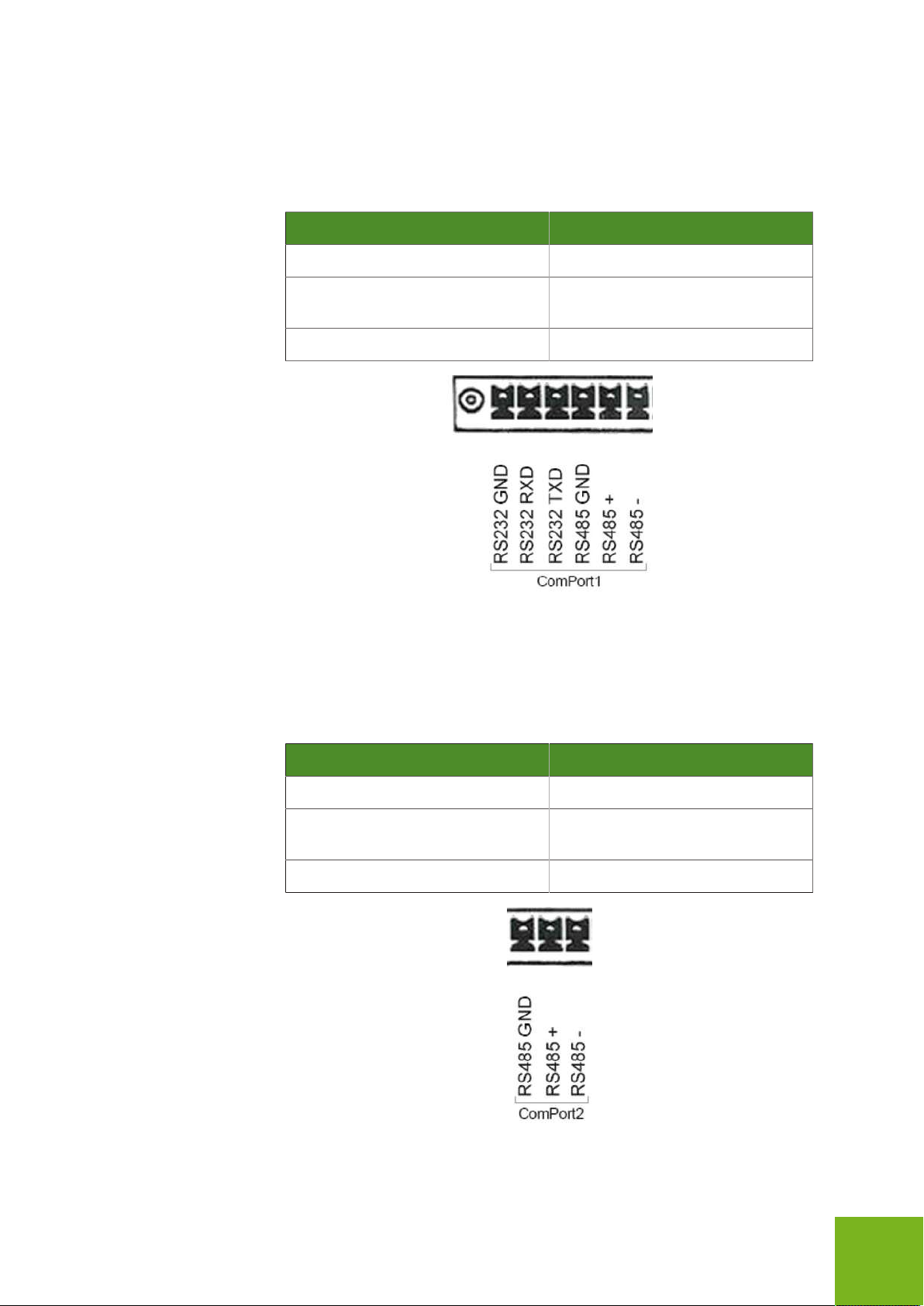
3.1 COM Port 1
The COM Port 1 can be used as RS232 OR as RS485 interface. All myGEKKO
compatible RS485 devices can be connected.
Parameters Value
Interface RS485 or RS232
Baud rate 9,600, 19,200, 38,400, 57,600 and
115,200
Parity adjustable
3.2 COM Port 2
The COM Port 2 is an RS485 interface at the myGEKKO. All myGEKKO com-
patible RS485 devices can be connected.
Parameters Value
Interface RS485
Baud rate 9,600, 19,200, 38,400, 57,600 and
115,200
Parity adjustable

10
3.3 LAN
The myGEKKO can be connected to the network via the LAN interface
Parameters Value
Ethernet type 10/100 base T
3.4 USB
The myGEKKO SLIDE 2 has 2 USB interfaces with 500 mA each at the bottom.
At the back there is another USB interface with 500 mA available.
Parameters Value
USB Type USB A
Voltage 5V
Current max. 500 mA/USB port
Tabla de contenidos
Otros manuales de Controladores de myGekko


