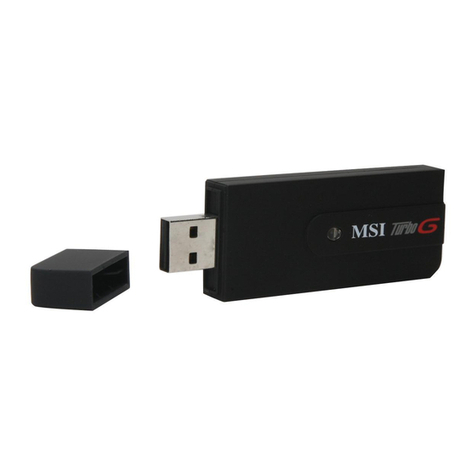
MSI US54EX Manual de usuario

© 2008 MICRO-STAR INT’L CO. LTD. All rights reserved.
r
r
r
r
r
ig
i
ig
g
ht
ht
ht
ht
ht
s
s
s
s
s
s
s
re
re
re
re
r
se
s
se
se
se
e
r
r
rv
v
v
v
v
v
rv
v
r
r
rv
r
r
v
v
rv
rv
rv
rv
NETWORK
N
N
E
E
T
T
W
W
O
O
R
R
K
K
WLAN 11g US54EX
USB Stick
Kabellos und sicher surfen
Die besonders einfache Installation und die sichere WPA2
Funkverschlüsselung sorgen für den perfekten WLAN-Surfspaß!
Schnellinstallationsanleitung

COPYRIGHT & TRADEMARKS
Specifications are subject to change without notice.
Other brands and product names are trademarks or registered trademarks of their
respective holders.
No part of the specifications may be reproduced in any form or by any means or used to
make any derivative such as translation, transformation, or adaptation without permission
from MSI Technology GmbH Copyright © 2008 MSI Technology GmbH All rights
reserved.

FCC STATEMENT
This equipment has been tested and found to comply with the limits for a class B digital
device, pursuant to part 15 of the FCC Rules. These limits are designed to provide
reasonable protection against harmful interference in a residential installation.
This equipment generates, uses and can radiate radio frequency energy and, if not
installed and used in accordance with the instructions, may cause harmful interference to
radio communications. However, there is no guarantee that interference will not occur in a
particular installation. If this equipment does cause harmful interference to radio or
television reception, which can be determined by turning the equipment off and on, the
user is encouraged to try to correct the interference by one or more of the following
measures:
¾Reorient or relocate the receiving antenna.
¾Increase the separation between the equipment and receiver.
¾Connect the equipment into an outlet on a circuit different from that to which the
receiver is connected.
¾Consult the dealer or an experienced radio/TV technician for help.
This device complies with Part 15 of the FCC Rules. Operation is subject to the following
two conditions:
(1) This device may not cause harmful interference.
(2) This device must accept any interference received, including interference that may
cause undesired operation.
Changes or modifications to this unit not expressly approved by the party responsible for
compliance could void the user's authority to operate the equipment.
FCC RF Radiation Exposure Statement:
This equipment complies with FCC RF radiation exposure limits set forth for an
uncontrolled environment. This device and its antenna must not be co-located or
operating in conjunction with any other antenna or transmitter.
“To comply with FCC RF exposure compliance requirements, the antenna used for this
transmitter must be installed to provide a separation distance of at least 20 cm from all
persons and must not be co-located or operating in conjunction with any other antenna
or transmitter”.
IMPORTANT NOTE:
FCC Radiation Exposure Statement :
This device has been tested for compliance with FCC RF Exposure (SAR) limits in the
typical laptop computer configuration and this device can be used in substantially similar
laptop computers with side mounted PCMCIA slots. This device cannot be used with
handheld PDAs (personal digital assistants) or other portable host devices. This device
and its antenna must not be co-located or operated in conjunction with any other
antenna or transmitter.

CE Declaration of Conformity
For the following equipment: US54EX
Is here with confirmed to comply with the requirements set out in the Council Directive on
the Approximation of the Laws of the Member States relating to Electromagnetic
Compatibility (89/336/EEC), Low-voltage Directive (73/23/EEC) and the Amendment
Directive (93/68/EEC), the procedures given in European Council Directive 99/5/EC and
89/3360EEC.
The equipment was passed. The test was performed according to the following
European standards:
¾EN 300 328 V.1.4.1 (2003)
¾EN 301 489-1 V.1.4.1 (2002) / EN 301 489-17 V.1.2.1 (2002)
¾EN 60950-1: 2001
European standards dictate maximum radiated transmit power of 100mW EIRP and
frequency range 2.400-2.4835GHz; In France, the equipment must be restricted to the
2.4465-2.4835GHz frequency range and must be restricted to indoor use.

Package Contents............................................................................................................. 1
Chapter 1: Introduction...................................................................................................... 2
1.1 Overview of the product..................................................................................... 2
1.2 Features ............................................................................................................ 2
1.3 LED Status ........................................................................................................ 2
Chapter 2: Installation Guide............................................................................................. 3
2.1 Software Installation .......................................................................................... 3
2.1.1 Overview ................................................................................................. 3
2.1.2 Software Installation for Windows 2000................................................... 3
2.2 Hardware Installation......................................................................................... 6
2.3 Uninstall Software.............................................................................................. 6
2.3.1 Uninstall the driver software from your PC .............................................. 6
2.3.2 Uninstall the utility software from your PC............................................... 6
Chapter 3: Configuration ................................................................................................... 7
3.1 Profile ................................................................................................................ 7
3.1.1 Add or Edit a Configuration Profile .......................................................... 8
3.2 Link Status....................................................................................................... 10
3.3 Site Survey .......................................................................................................11
3.4 Statistics .......................................................................................................... 12
3.5 Advanced ........................................................................................................ 12
3.6 About............................................................................................................... 13
3.7 An
example for application .............................................................................. 13
Appendix A: Specifications.............................................................................................. 15
Appendix B: Glossary...................................................................................................... 16
Appendix C: Contact Information .................................................................................... 18

US54EX 54M Wireless USB Adapter User Guide
- 1 -
Package Contents
The following contents should be found in your box:
¾One US54EX USB Wireless Adapter
¾One USB extension cable
¾Quick Installation Guide
¾One US54EX Wireless Adapter Resource CD, including:
•Utility and Drivers
•User Guide
•Other Helpful Information
Note: If any of the listed contents is damaged or missing, please contact the retailer from
whom you purchased the US54EX Wireless Adapter for assistance.

US54EX 54M Wireless USB Adapter User Guide
- 2 -
Chapter 1: Introduction
1.1 Overview of the product
The MSI US54EX USB Wireless Adapter gives you the flexibility to install your PC or
notebook PC in the most convenient location available, without the cost of running the
network cables.
Its auto-sensing capability allows high packet transfer up to 54Mbps for maximum
throughput, or dynamic range shifting to lower speeds due to distance or operating
limitations in an environment with a lot of electromagnetic interference. It can also
interoperate with all 11Mbps wireless (802.11b) products. Your wireless communications
are protected by up to 128-bit WEP and WPA encryption, so your data stays secure.
1.2 Features
¾Complies with IEEE802.11g, IEEE802.11b standards
¾Supports WPA data security, IEEE802.1x authentication, TKIP/AES encryption,
64/128-bit WEP encryption
¾Supports 54/48/36/24/18/12/9/6Mbps or 11/5.5/3/2/1Mbps wireless LAN data
transfer rates
¾Provides USB interface
¾Supports Ad-Hoc and Infrastructure modes
¾Supports roaming between access points when configured in Infrastructure mode
¾Eases configuration and provides monitoring information
¾Supports Windows 98SE, Me, 2000, XP32, XP64, Vista32, Vista64
¾Internal Antenna
1.3 LED Status
The LED on the top of this card indicates Link/Act status. It blinks at green light when
sending and receiving data.

US54EX 54M Wireless USB Adapter User Guide
- 3 -
Chapter 2: Installation Guide
2.1 Software Installation
2.1.1 Overview
The Adapter’s Setup Wizard will guide you through the installation procedure for
Windows 98SE, Me, 2000, XP32, XP64, Vista32, and Vista64.The Setup Wizard will
guide you install the Utility and drivers.
If you install the hardware before the software, you will be prompted “Found New
Hardware Wizard”, click the Cancel button, and run the Setup Wizard program on the
CD-ROM.
The Setup steps for Windows 98SE, Me, 2000 and XP are very similar. The following
setup steps are for windows 2000.
2.1.2 Software Installation for Windows 2000
1. Insert the Resource CD into your CD-ROM drive, click the Start button and choose
Run. In the field that appears, enter F:\Setup.exe (if “F” is the letter of your CD-ROM
drive), figure 2-1 should then appear.
2. You can click the Cancel button to end the installation on the Preparing Setup
screen, figure 2-1. Otherwise, the Setup Wizard will display a screen similar to that
shown in figure 2-2 after a moment.
Figure 2-1 Preparing Setup
3. To continue, click the Next button on the screen, figure 2-2. Click the Cancel button
to end the Installation.

US54EX 54M Wireless USB Adapter User Guide
- 4 -
Figure 2-2 Start Setup
4. Click Browse to change the destination location for the software in figure 2-3. Click
Next to continue the Installation. Click Back to return to the previous page, or click
Cancel to end the Installation.
Figure 2-3 Choose Destination Location
5. While files are copying, you will see a warning box shown in figure 2-4. Please
select YES to continue installation. Our drivers have been tested thoroughly, and are
able to work with the operating system.

US54EX 54M Wireless USB Adapter User Guide
- 5 -
Figure 2-4 Windows 2000 Warning Box
6. After the files have been successfully copied, the screen in figure 2-5 will appear.
Click the Finish button to finish the wizard.
Figure 2-5 Finish
7. After installing the software, Please plug the adapter into your PC. If you need
instructions as to how to do this, please refer to section 2.2 Hardware Installation. If
you have plugged it into you PC already, please un-plug it and plug it back in. The
OS will automatically detect the adapter and automatically setup the driver for the
adapter. If it does not, please follow the setup steps to finish the driver installation.
After installing the driver successfully, you should see an icon, or , appear in
your system tray.
Tabla de contenidos
Idiomas:
Otros manuales de Adaptador de MSI

MSI
MSI BToes Manual de usuario

MSI
MSI ePower 200AV Manual de usuario

MSI
MSI UB11B MS-6823 Manual de usuario

MSI
MSI US54G Manual de usuario

MSI
MSI EC14H Manual de usuario

MSI
MSI UB11B MS-6823 Manual de usuario

MSI
MSI UB11BM Manual de usuario

MSI
MSI Btones 2.0 XMicro Series Manual de usuario

MSI
MSI HomePlug ePower 200AV+ Manual de usuario

MSI
MSI Star Key Manual de usuario

MSI
MSI US54SE Manual de usuario

MSI
MSI US60G Manual de usuario

MSI
MSI MS-6970B Manual de usuario

MSI
MSI MEGA ePower 1000HD Manual de usuario

MSI
MSI EC14H Manual de usuario

MSI
MSI US54G Manual de usuario

MSI
MSI BToes Manual de usuario

MSI
MSI US60SE Manual de usuario

MSI
MSI US60G Manual de usuario

MSI
MSI AX1800 Manual de usuario