
MshOt ML41 Series Manual de usuario

Guangzhou Micro-shot Technology Co., Ltd
ML41
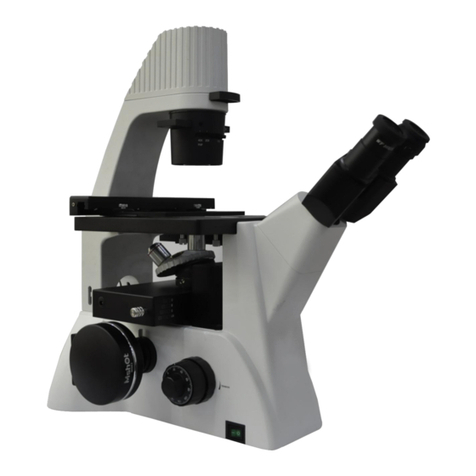
Biological microscope
User manual
Website:www.m-shot.com
Tel:0086-20-38262481

Biological microscope ML41

ML41 biological microscope user manual
Website
:
Welcome to use ML41 biological microscope!
ML31 series biological microscope is widely used at biology and medical university laboratory,
medical treatment and public health, scientific study instrument, etc.
This unit is a precision optical instrument. Our product has been design to provide the highest level of
safety, however, improper operation or negligence in following the instructions in this manual may cause
personal injuries and property losses. In order to ensure your safety, prolong the life of this unit and
maintain it properly, please read this manual carefully before operating this unit.
Safety Reminder
1. Be sure to turn off the power switch and remove the power cord before installing this unit,
replacing the bulb or fuse, plugging and unplugging the power supply.
To prevent electric shock or fire, be sure to turn off the power switch and remove the power cord
before installing this unit, replacing the bulb or fuse, plugging and unplugging the power supply.
2. Do not disassemble
Except the removable parts mentioned herein, no part of this unit shall be removed, otherwise the
performance of this unit may be reduced, or may cause an electric shock, injury or damage to this
unit. Please contact the supplier if any fault occurs.
3. Input voltage
Check if the input voltage is consistent with your local voltage supply. If not, do not operate this
unit and contact the supplier. Improper input voltage may cause a short circuit or fire thereby
causes damage to this unit.
4. Use specific bulb, fuse and power cord
Use of an improper bulb, fuse or power cord may cause damage or fire to this unit. Any extended
power cord used must be grounded (PE).
5. Protect this unit from high temperatures, dampness and foreign objects
To prevent short circuit or any other fault, do not expose this unit to any high temperatures or
dampness environment for a prolonged period of time. A suitable operating environment is
designated at a temperature of 5°C-35°C, and relative humidity of 20%-80% (at 25°C). If water splashes on this unit,
turn off the power switch and remove the power cord immediately, and then wipe the water off with dry cloth. When any
foreign object enters or drips onto this unit, please stop operating the unit and contact the supplier.
6. Heat of light source
The lighting bulb generates high temperatures during operation. Do not touch the collector lens or
lamp box when the lamp is illuminated, and do not touch the bulb within 10 minutes after the
lamp goes out due to high temperatures arising from operation. When replacing the bulb, make sure it has cooled down
!
Warning!
!
Warning!
!
Warning!
!
Warning!
!
Warning!
!
Warning!

ML41biological microscope user manual
:
www.m-shot.com
properly (the lamp should be off for at least 10min).
★To prevent burn, do not touch the bulb when the lamp is illuminated or within 10min after it goes out.
★To prevent fire, do not place any fibrous product, paper, flammable or explosive material (e.g., gasoline,
petroleum ether, alcohol) near the halogen lamp housing or mercury lamp housing.
7. Coarse/fine focusing knobs
This unit employs a coarse/fine coaxial focusing mechanism. Do not turn the left/right coarse/fine
focusing knob in the opposite direction. When the objectives lifting device reaches the limit of
motion, do not continue to turn the coarse focusing knob, otherwise the focusing mechanism may be damaged.
8. Storage place
This unit is a precision optical instrument, and improper operation or storage may cause damage or
its precision may be adversely affected. Consider the following when selecting a storage place:
※Avoid placing the unit under direct sunlight, directly under interior lighting or any other bright place.
※A suitable operating environment is designated at a temperature of 5°C-35°C, and relative humidity of 20%-80% (at
25°C). Do not expose this unit to high temperatures, dampness or dust for a prolonged period of time, otherwise mist
or mold may develop or dust may deposit on the lens, thus cause damage to this unit and shortening its life.
9. Installation of bulb
Do not touch the glass surface of the bulb directly with bare hands. When mounting the bulb, wear
gloves or wrap it with cotton material.
※Wipe off any dirt on the surface of the bulb with a clean cotton fabric dipped in alcohol. If the dirt is
not thoroughly removed, it would etch the surface of the bulb weakening its brightness and shortening its life.
※Mount the bulb with care to avoid slipping off or injuries to your fingers.
※When replacing the bulb, make sure its contact is intact. If its contact is damaged, the bulb may be disabled or
short-circuited.
※When replacing the bulb, the feet should be inserted into the holder as deeply as possible. If the feet are not
tightly inserted, the bulb may go out or short circuit.
10. Instrument handling
This precision optical instrument is heavy and should be handled with care. Strong impact and
rough handling are strictly prohibited, it may cause damage to this unit.
11. Environmental protection
Please dispose the wastes from the packaging and operation of this unit by category such as
cartoon, foam, plastic, bulb and etc. Do not discard the damaged mercury lamp carelessly in order
to avoid creating environmental pollution.
!
Warning!
Caution!
Caution!
Caution!


ML41biological microscope user manual
:
www.m-shot.com
Content
Ⅰ. Attention.........................................................................................................................7
Ⅱ. Product characteristic......................................................................................................9
1.Name of each part...............................................................................................................................................................9
2. Installation of complete machine......................................................................................................................................11
Ⅲ.Instructions.....................................................................................................................13
Ⅳ.Specifications..................................................................................................................17
Ⅴ.Common Troubleshooting............................................................................................19

ML41 biological microscope user manual
Website
:
Ⅰ. Attention
1. Do not disassemble
Please do not disassemble the detachable parts not mentioned in this manual. If the
instrument is found to be faulty, please find an experienced professional to repair it or
contact the manufacturer directly.
2. Check the voltage
(1) The rated input voltage is marked on the microscope base. Note that the local power
supply voltage must be consistent with it. If the microscope is used under non rated
voltage, it will be seriously damaged.
(2) The power supply socket shall be provided with grounding wire.
3. Handling and placement
(1) Turn off the power switch before handling the instrument.
(2) Working environment requirements:
Room temperature: 0 ° C ~ 40 ° C
Maximum relative humidity: 85%
(3) Avoid placing the instrument under direct sunlight or room light. The bright
environment will affect the imaging quality of the specimen.
(4) Avoid placing the microscope in a dusty environment. When the microscope is not in
use, it should be covered with a dust cover.
(5) The microscope should be placed flat without vibration.
4. Operate with care
(1) Microscope is a kind of precision optical instrument. Strong vibration and hard
operation will cause serious damage to the instrument. Pay special attention not to force


Tabla de contenidos
Otros manuales de Microscopio de MshOt

MshOt
MshOt MF43-N Manual de usuario

MshOt
MshOt MF53-N Manual de usuario
MshOt
MshOt MF52-N Manual de usuario

MshOt
MshOt MZ62 Manual de usuario

MshOt
MshOt MF52-N Manual de usuario

MshOt
MshOt TP R200 Guía

MshOt
MshOt MI-BGU-LED IX50 Manual de usuario

MshOt
MshOt MF-UV-LED Manual de usuario

MshOt
MshOt MZX81 Manual de usuario

MshOt
MshOt MF31 Series Manual de usuario


