MicroKopter NaviCtrl 2.1 Manual de usuario

en/NaviCtrl_2.1
12
LotharF
MikroKopter.de

Contents
1 NaviCtrl V2.1..............................................................................................................................................1/16
2 Mounting / Connections.............................................................................................................................2/16
3 Connection ext. compass............................................................................................................................3/16
4 Settings in the KopterTool.........................................................................................................................4/16
5 Calibrate Compass......................................................................................................................................5/16
6 Videos...........................................................................................................................................................7/16
7 Check the calibration..................................................................................................................................8/16
8 Sat-Fix........................................................................................................................................................10/16
9 Dynamic PositionHold..............................................................................................................................11/16
10 Beeps........................................................................................................................................................12/16
11 Softwareupdate and Functionality Tests..............................................................................................13/16
12 Micro SD-card.........................................................................................................................................14/16
12.1 SETTINGS.INI.........................................................................................................................14/16
12.2 Presentation of the flight data in Google Earth.........................................................................14/16
13 NMEA......................................................................................................................................................15/16
14 Error Codes.............................................................................................................................................16/16
en/NaviCtrl_2.1
i

1 NaviCtrl V2.1
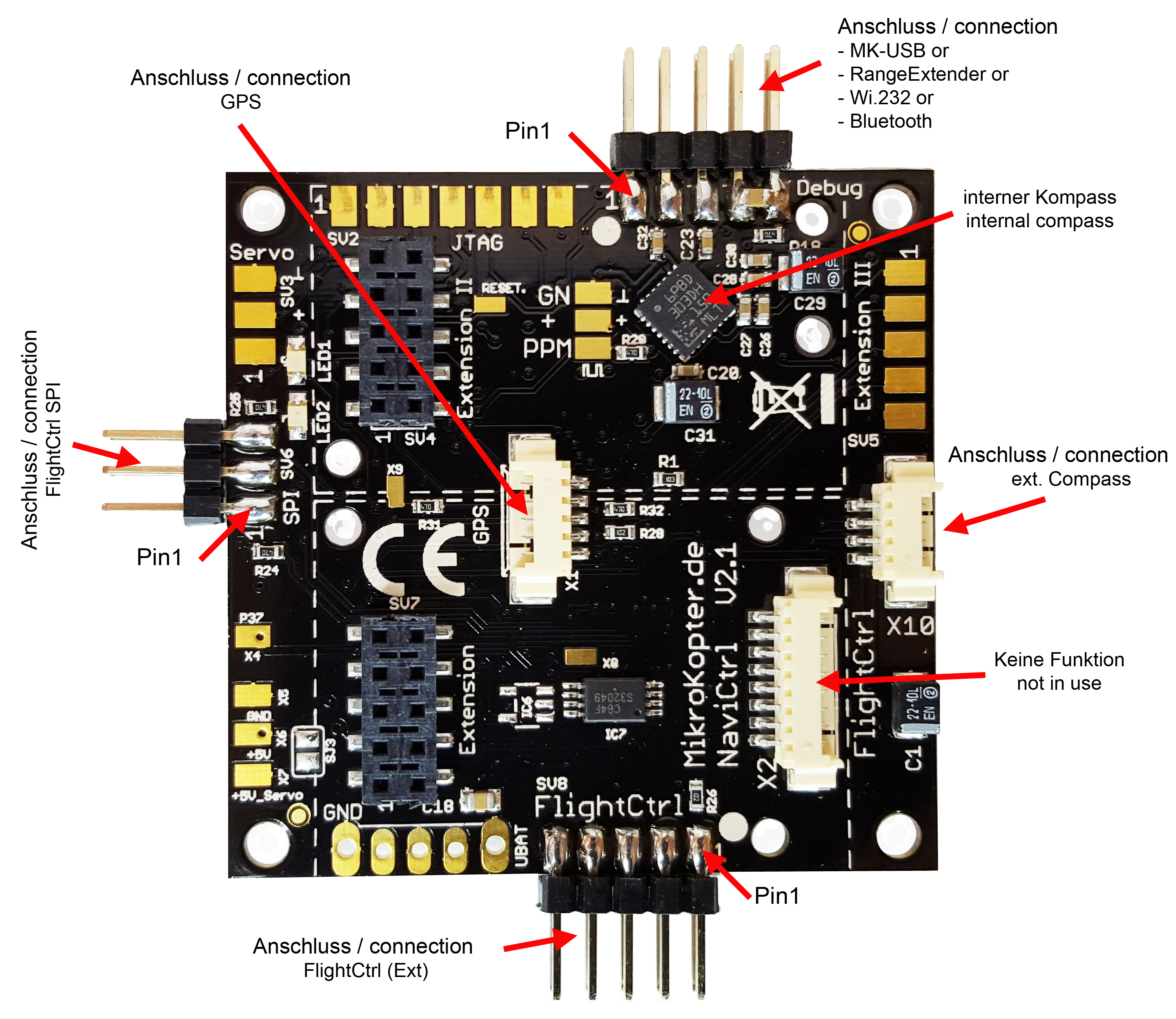
The NaviCtrl is an additional module for the FlightCtrl. On the MikroKopter you use the NaviCtrl together
with the MKGPS as a navigation unit.
With the navigation unit you can use functions like PositionHold, ComingHome, CareFree, FollowMe or a
Waypoint fly.
(All functions of the MikroKopter are described here: Functions)
The NaviCtrl V2.1 includes an integrated compass module and a connector for an external compass module.
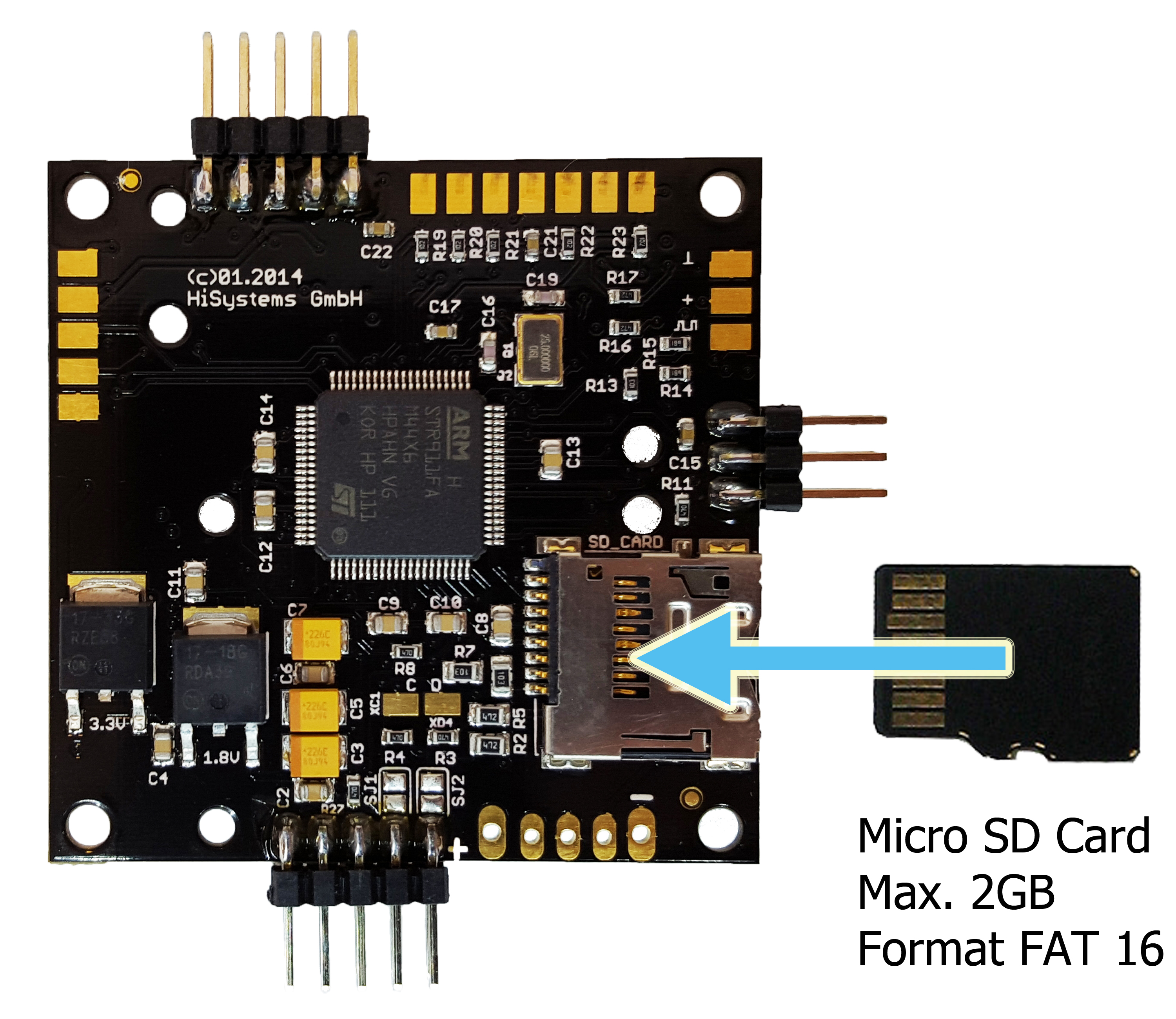
On the NaviCtrl board is also a Micro-SD card socket. Here you can insert an micro SD card (max. 2GB /
FAT16).
During flight the LOG files of the Kopter will be saved on this micro SD card.
After the flight you can take a look on the recorded data in the LOG file (if required) wit our program
GPX-Viewer.
Informations for the GPX Viewer can be found here: GPX-Viewer
1/16


4 Settings in the KopterTool
When the navigation unit is mounted on your copter you need 2 free channels on your transmitter that you can
use the functions.
The first channel can be used with a 3way switch and the second with a 2way switch on your transmitter.
With the 3-way switch you use the GPS functions:
Switch position OFF = GPS off• Switch position center = PositionHold• Switch position center ON = ComingHome•
With the 2-way switch you use the GPS functions:
Switch position OFF = CareFree off• Switch position ON = CareFree on•
Both channes mus also be set under "Easy Setup" -> GPS Mode Control and Carefree control.
4/16

5 Calibrate Compass
The compass (and the GPS) is needed for the automated control of the MikroKopter.
Therefore a new compass must be calibrated once for a proper function.
If the compass has not been calibrated, compass and GPS supported features can not be used and you can not
start the copter.
An error message (error 31) is then displayed via the telemetry.
A recalibration of the compass is usually only necessary when the Kopter fly under the "PositionHold"
function in circles at a remote location.
The calibration
Please note
Calibrate the copter outside, far away from magnetic influences!
During the calibration you have to turn the copter completely around the axis.
The following applies: If you calibrate the compass precisely, the copter will fly perfectly.
If the copter is flying in circles (with activated function PositionHold and in an altitude above houses and trees), you better calibrate
the compass new.
When you have problems after the calibration (e.g. an err22), a magnetic problem on your copter can be the
problem.
Informations for the "magnetic error" can be found here:: MagnetError
The calibration will be done in 5 steps:
Step Funktion Beispielansicht /
Funktion
Switch ON the Transmitter and connect the Copter with the Lipo.
Step 1
Initiate compass
calibration
Nick down
(and hold)
then
Throttle up + Yaw left
(The Kopter beeps 1x)
5/16

Step 2
Start Calibration Pull Nick down 1x
(The Kopter beeps 2x and the clicking starts)
Calibration of the X-Axis
(Nick-Axis)
The Kopter with the front
(Arrow direction of the FlightCtrl)
pointing to the South or North,
then
rotate the Kopter a couple times completely over the
Nick-Axis until the buzzer stops with the clicking.
Rotate the Kopter Rotate the Kopter by 90°.
The clicking starts again.
Calibration of the Y-Axis
(Roll-Axis) Rotate the Kopter a couple times completely over the
Roll-Axis until the buzzer stops with the clicking.
Step 3
Finish the calibration of
the X and Y-Axis
Pull Nick 1x down
(The Kopter beeps 3x)
Step 4
Start calibration of the
Z-Axis (Yaw-Axis)
Pull Nick 1x down
(The Kopter beeps 4x and the clicking starts)
Calibration of the Z-Axis
INFO: Here it doesn't matter if the Kopter shows with the
X or Y-Axis towards South (North).
Rotate the Kopter a few times completely over the Roll- or
Nick-Axis until the buzzer stops with the clicking.
Step 5
Finish the calibration of
the Z-Axis.
Pull Nick 1x down
The Kopter confirms it with 2 beeps
Now that the Kopter "beeped" 2x after a successful calibration that part is done.
en/NaviCtrl_2.1 11/28/20 13:29:24
6/16

6 Videos
7/16

7 Check the calibration
You can now check the calibration of the compass in the KopterTool or also with a suitable transmitter.
Please do this also outside, far away from magnetic influences!
Here you have to check two values:
MAG (or Field) = This should be around 100%• Inclination (Incl) = This should be nearly the same value as the one in brackets•
IMPORTANT:
To see the right values you have to calibrate the Gyros first (throttle up + yaw left).
Without calibration you will still see 100% and no Inclination.
Check via KopterTool
Here you use:
a MK_USB or a wireless connection between Copter and Computer
+
•
you have calibrate the Gyros (throttle up + yaw left).•
In the main window of the KopterTool click the button [NaviCtrl].
Under the virtual display klick the red arrow (left or right) until the window "Magnetic Field" displayed.
The value for "Field" must be around 100% and the value for Inclination around the value you see in brackets.
(If the value for "Field" (or for "Inclination") is ~10%-15% higher/lower then 100%, recalibrate the compass)
Check via HoTT transmitter
8/16
Tabla de contenidos
Manuales populares de Unidad de control de otras marcas

Festo
Festo Compact Performance CP-FB6-E Manual de lista de piezas

Elo TouchSystems
Elo TouchSystems DMS-SA19P-EXTME Manual de usuario

JS Automation
JS Automation MPC3034A Manual de usuario

JAUDT
JAUDT SW GII 6406 Series Guía rápida

Spektrum
Spektrum Air Module System Manual de usuario

BOC Edwards
BOC Edwards Q Series Manual de usuario