
MGP Instruments DOSISYS LDM 210 Manual de usuario
DOSISYS
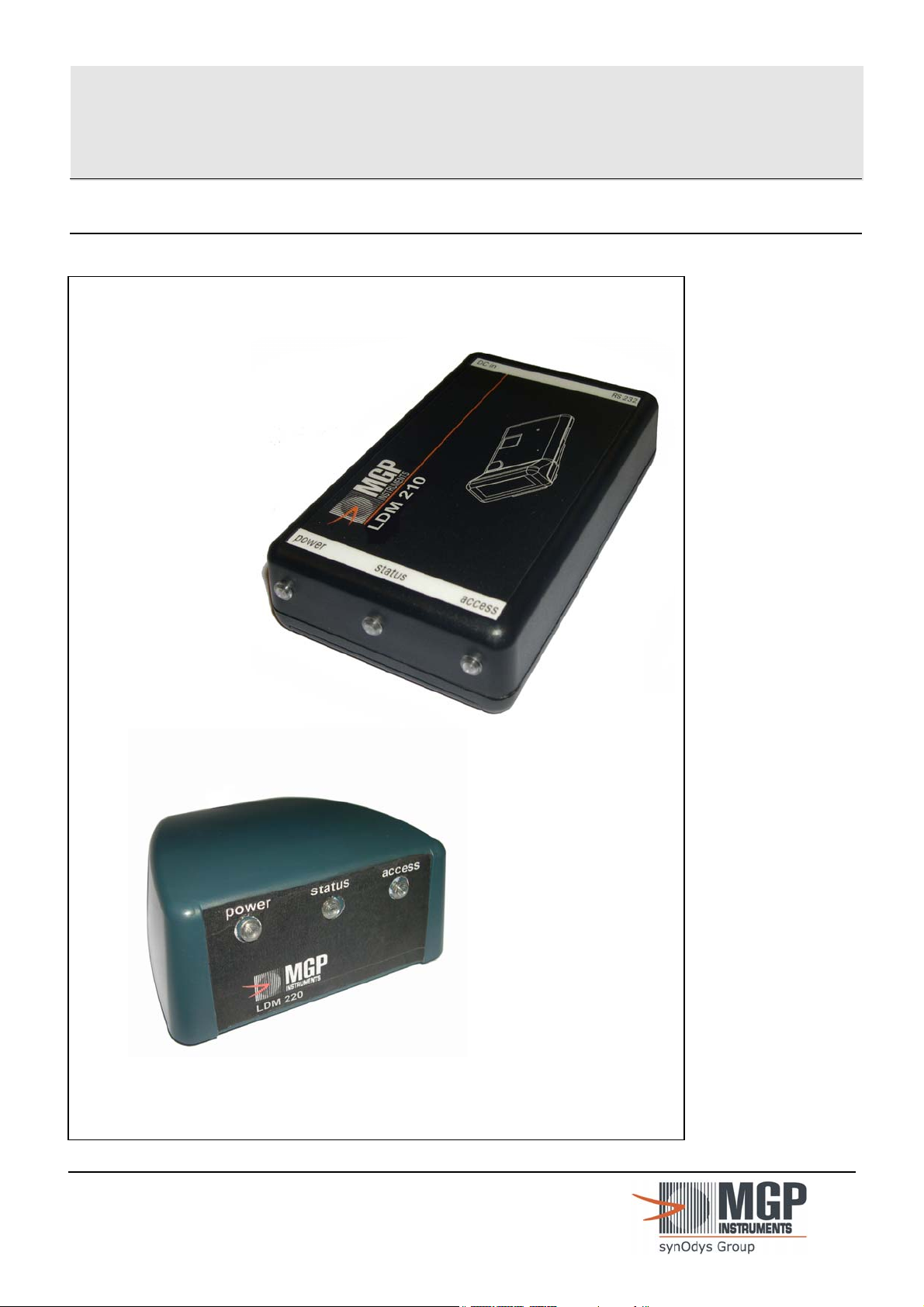
LDM 210 - LDM 220 Hands Free Reade
r
User
Manual
128569B

LDM 210 - LDM 220
Publication, translation and reproduction total or partial of this
document is strictly forbidden without authorization
MGP Instruments recommends that any work to be done
while the instrument is powered should be done by qualified
and authorized personnel.
128569B I
Publication, traduction et reproduction totales ou partielles de ce document sont rigoureusement interdites, sauf autorisation écrite de nos services.
The publication, translation or reproduction, either partly or wholly, of this document is not allowed without our written consent. Format 112175C

LDM 210 - LDM 220 Table of updates
Table of updates
R
e
v
Date Issued by Reason for
modification
Pages modified
A OCTOBER 28, 2003 J. PEREZ/S. LOPEZ Edit and Translation to
English.
ALL
B DECEMBER 16, 2003 J. PEREZ Wrong configuration of the
two jumpers SS2 and SS3.
§3-1-2, page 13
§6-1-1, page 29
Replacing of "ort"
translation by "range"
translation.
§4-5, page 25
II 128569B
Publication, traduction et reproduction totales ou partielles de ce document sont rigoureusement interdites, sauf autorisation écrite de nos services.
The publication, translation or reproduction, either partly or wholly, of this document is not allowed without our written consent. Format 112175C

Table of contents LDM 210 - LDM 220
Table of contents
1. General ...........................................................................................................................1
1.0 Purpose........................................................................................................................... 1
1.1 Of this document ............................................................................................................. 1
1.2 Nomenclature.................................................................................................................. 1
1.3 Presentation of the LDM 210 – LDM 220........................................................................ 1
2. Description - Functionality............................................................................................3
2.1 Description of the LDM 210............................................................................................. 3
2.1.1 LDM 210 dosimeter reader ................................................................................ 3
2.1.2 Power supply...................................................................................................... 5
2.1.3 Identification label .............................................................................................. 6
2.2 Description of the LDM 220............................................................................................. 6
2.2.1 LDM 220 dosimeter reader ................................................................................ 7
2.2.2 Identification label in the face of the LDM 220 ................................................... 8
2.3 Operation ........................................................................................................................ 9
2.3.1 Normal Operating Mode..................................................................................... 9
2.3.2 Test Mode. ....................................................................................................... 10
2.3.3 The Digital Input/Output TOR........................................................................... 10
3. Installation and start-up ..............................................................................................11
3.1 LDM 210 and LDM 220 Configuration........................................................................... 12
3.1.1 Location of jumpers:......................................................................................... 12
3.1.2 Operating Modes (SS2 et SS3)........................................................................ 13
3.1.3 OPERATIONNAL Mode ................................................................................... 14
3.2 Installation of the USB driver for the LDM 220 .............................................................. 15
3.2.1 For WINDOWS 2000........................................................................................ 15
3.2.2 For WINDOWS XP........................................................................................... 17
4. Operation......................................................................................................................21
4.1 Recommendation of use ............................................................................................... 22
4.1.1 LDM210 22
4.1.2 LDM220 22
4.2 Operating significance of the lights ............................................................................... 23
4.3 Example of status indicators with DOSIMASS/ DOSIMED / DOSIFAST ...................... 23
4.4 Reader usage................................................................................................................ 24
4.4.1 DOSIMASS Software ....................................................................................... 24
4.4.2 DOSIMED or DOSIFAST Software .................................................................. 24
4.4.3 Other Software ................................................................................................. 24
4.5 Troubleshooting Guide .................................................................................................. 25
5. Preventive Maintenance..............................................................................................27
128569B III
Publication, traduction et reproduction totales ou partielles de ce document sont rigoureusement interdites, sauf autorisation écrite de nos services.
The publication, translation or reproduction, either partly or wholly, of this document is not allowed without our written consent. Format 112175C

LDM 210 - LDM 220 Table of contents
6. Corrective Maintenance ..............................................................................................29
6.1 Operating TEST Modes................................................................................................. 29
6.1.1 Operating Modes (SS2 et SS3)........................................................................ 29
6.1.2 Test Mode ........................................................................................................ 29
6.1.3 AGC amplifier test Mode .................................................................................. 29
6.1.4 Autonomous test Mode .................................................................................... 29
6.2 Start-up of Maintenance Modes .................................................................................... 30
6.2.1 REMOTE DOWNLADING AND PROGRAMING Mode.................................... 30
6.2.2 TESTS Mode.................................................................................................... 31
6.2.3 Reader in "TESTS" mode................................................................................ 32
7. Spare parts, options ....................................................................................................35
7.1 Spare Parts for the LDM 210......................................................................................... 35
7.2 Spare Parts for the LDM 220......................................................................................... 35
7.3 Software ........................................................................................................................35
8. Technical Characteristics ...........................................................................................37
8.1 Mechanical Characteristics of the LDM 210.................................................................. 37
8.2 Mechanical Characteristics of the LDM 220.................................................................. 37
8.3 Electrical Characteristics of the LDM 210 ..................................................................... 37
8.4 Electrical Characteristics of the LDM 220 ..................................................................... 38
8.5 LDM 210 Serial Link...................................................................................................... 38
8.6 LDM 220 USB link......................................................................................................... 38
8.7 Environmental Conditions LDM 210 and LDM 220 ....................................................... 38
8.8 Input/output digital DIO LDM 210 and LDM 220 ........................................................... 39
8.9 Dosimeter link with LDM 210 and LDM 220 .................................................................. 40
9. Glossary .......................................................................................................................41
IV 128569B
Publication, traduction et reproduction totales ou partielles de ce document sont rigoureusement interdites, sauf autorisation écrite de nos services.
The publication, translation or reproduction, either partly or wholly, of this document is not allowed without our written consent. Format 112175C

Table of figures LDM 210 - LDM 220
Table of figures
Figure 1 : Presentation of the LDM 210 reader .................................................................................2
Figure 2 : Presentation of the LDM 220 reader .................................................................................2
Figure 3 : LDM 210 Assembly Description ........................................................................................3
Figure 4 : Description of the LDM 210 enclosure and PCB..............................................................4
Figure 5 : Description of the LDM 210 power pack ...........................................................................5
Figure 6 : LDM 210 Identification and presentation labels ................................................................6
Figure 7 : LDM 220 Assembly Description ........................................................................................6
Figure 8 : LDM 220 enclosure and PCB Description.........................................................................7
Figure 9 : Identification and front face labels for the LDM 220 ..........................................................8
Figure 10 : LDM 210 and LDM 220 Block Diagram............................................................................9
Figure 11 : Location of jumpers for the configuration of the LDM 210...............................................12
Figure 12 : Location of jumpers for the configuration of the LDM 220...............................................13
Figure 13 : View of the reader LDM 210 – LDM 220 .........................................................................21
Figure 14 : Recommendation of use - LDM210.................................................................................22
Figure 15 : Recommendation of use - LDM220.................................................................................22
Figure 16 : Reader LDM 210 – LDM 220 ..........................................................................................24
128569B V
Publication, traduction et reproduction totales ou partielles de ce document sont rigoureusement interdites, sauf autorisation écrite de nos services.
The publication, translation or reproduction, either partly or wholly, of this document is not allowed without our written consent. Format 112175C

LDM 210 - LDM 220 Table of figures
Blank Page
VI 128569B
Publication, traduction et reproduction totales ou partielles de ce document sont rigoureusement interdites, sauf autorisation écrite de nos services.
The publication, translation or reproduction, either partly or wholly, of this document is not allowed without our written consent. Format 112175C

General LDM 210 - LDM 220
1. General
1.1 Purpose Of this document
This document provides all the information necessary for the use, configuration and
maintenance of the hands free readers models LDM 210 and LDM 220.
1.2 Nomenclature
Symbols "" and "" :
These symbols are used for the descriptions and details:
The symbol "" corresponds to the first level of detail.
The symbol "" corresponds to the second level of detail.
For legibility purpose these symbols are aligned vertically.
1.3 Presentation of the LDM 210 – LDM 220
These hands free readers allow centralized dosimetry software (DOSIMASS, DOSIMED
or DOSIFAST) to communicate with a DMC 2000 and SOR family dosimeter.
The dosimeter reader LDM 210 exists in two versions:
with power supply.
with power supply and optional battery.
The dosimeter reader LDM 220 is connected to the USB port.
128569B 1
Publication, traduction et reproduction totales ou partielles de ce document sont rigoureusement interdites, sauf autorisation écrite de nos services.
The publication, translation or reproduction, either partly or wholly, of this document is not allowed without our written consent. Format 112175C
LDM 210 - LDM 220 General
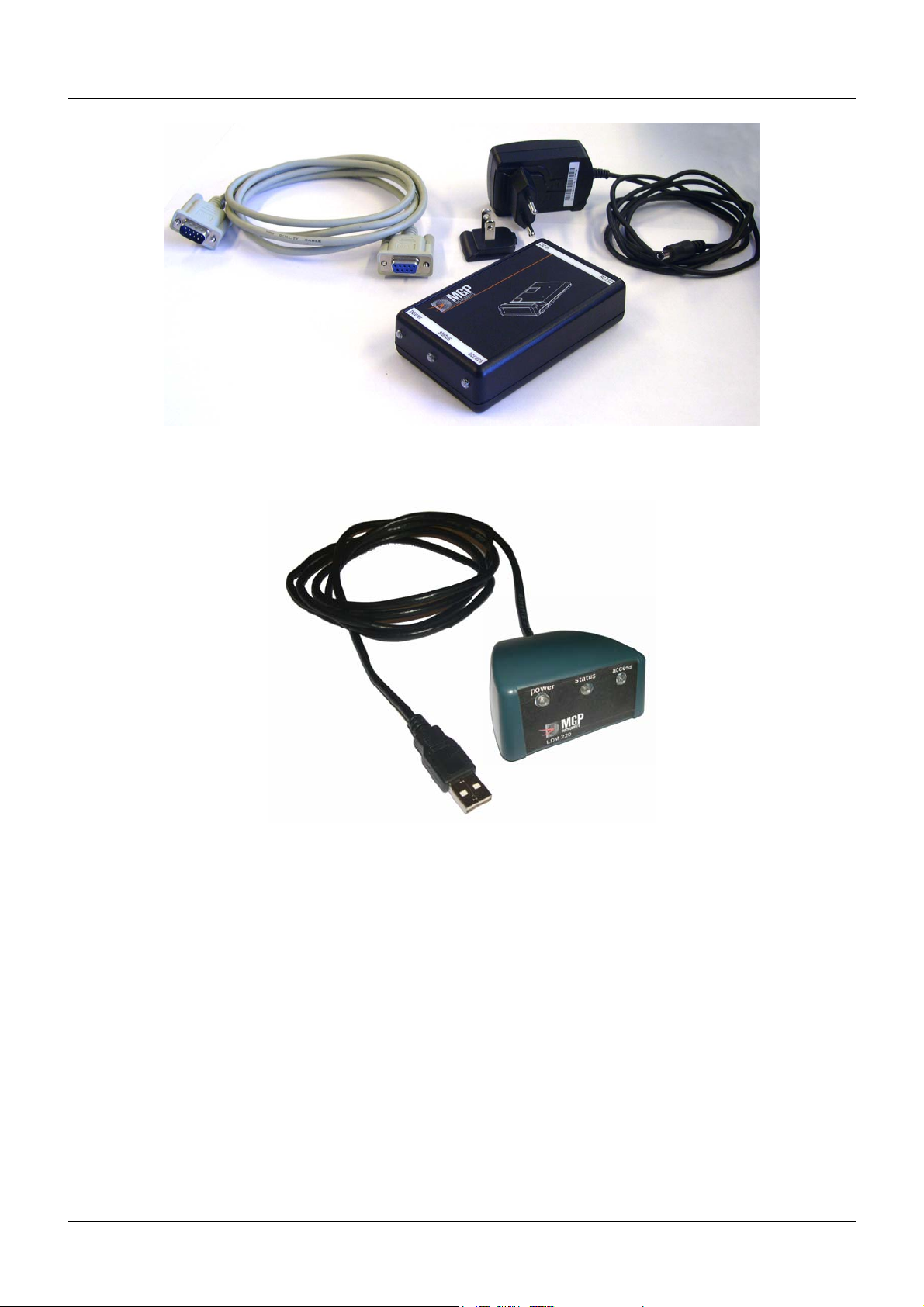
Figure 1 : Presentation of the LDM 210 reader
Figure 2 : Presentation of the LDM 220 reader
2 128569B
Publication, traduction et reproduction totales ou partielles de ce document sont rigoureusement interdites, sauf autorisation écrite de nos services.
The publication, translation or reproduction, either partly or wholly, of this document is not allowed without our written consent. Format 112175C
Este manual sirve para los siguientes modelos
1
Tabla de contenidos
Otros manuales de Instrumento de medición de MGP Instruments


Manuales populares de Instrumento de medición de otras marcas


Endress+Hauser
Endress+Hauser Proline Promag 50 Especificaciones técnicas

Siemens
Siemens SITRANS F Coriolis FCT030 Manual de lista de piezas

KLINGER
KLINGER CMF V Series Manual de usuario

EXFO
EXFO FTB-2 Manual de operación y mantenimiento

Keysight
Keysight M8290A Manual de usuario

ADTEK
ADTEK MW-5 Manual de usuario