METZ CONNECT | Im Tal 2 | 78176 Blumberg | Germany | Phone +49 7702 533-0 | Fax +49 7702 533-433
Distributed by RIA CONNECT GmbH and BTR NETCOM GmbH
Mounting instruction see www.metz-connect.com
7. Mounting
Power down the equipment
Mount the module on standard rail (TH35 per IEC 60715 in
junction boxes and/or on distribution panels).
Installation
Electric installation and device termination shall be done by
qualified persons only, by respecting all applicable
specifications and regulations.
The module can be aligned without interspace. Use the jumper
plug to connect bus and supply voltage when the modules are
mounted in series.
The maximum quantity of modules connected in line is limi-
ted to 15 or to a maximum power consumption of 2 Amps
(AC or DC) per connection to the power supply. For any
similar block of additional modules a separate connection
to the power supply is mandatory.
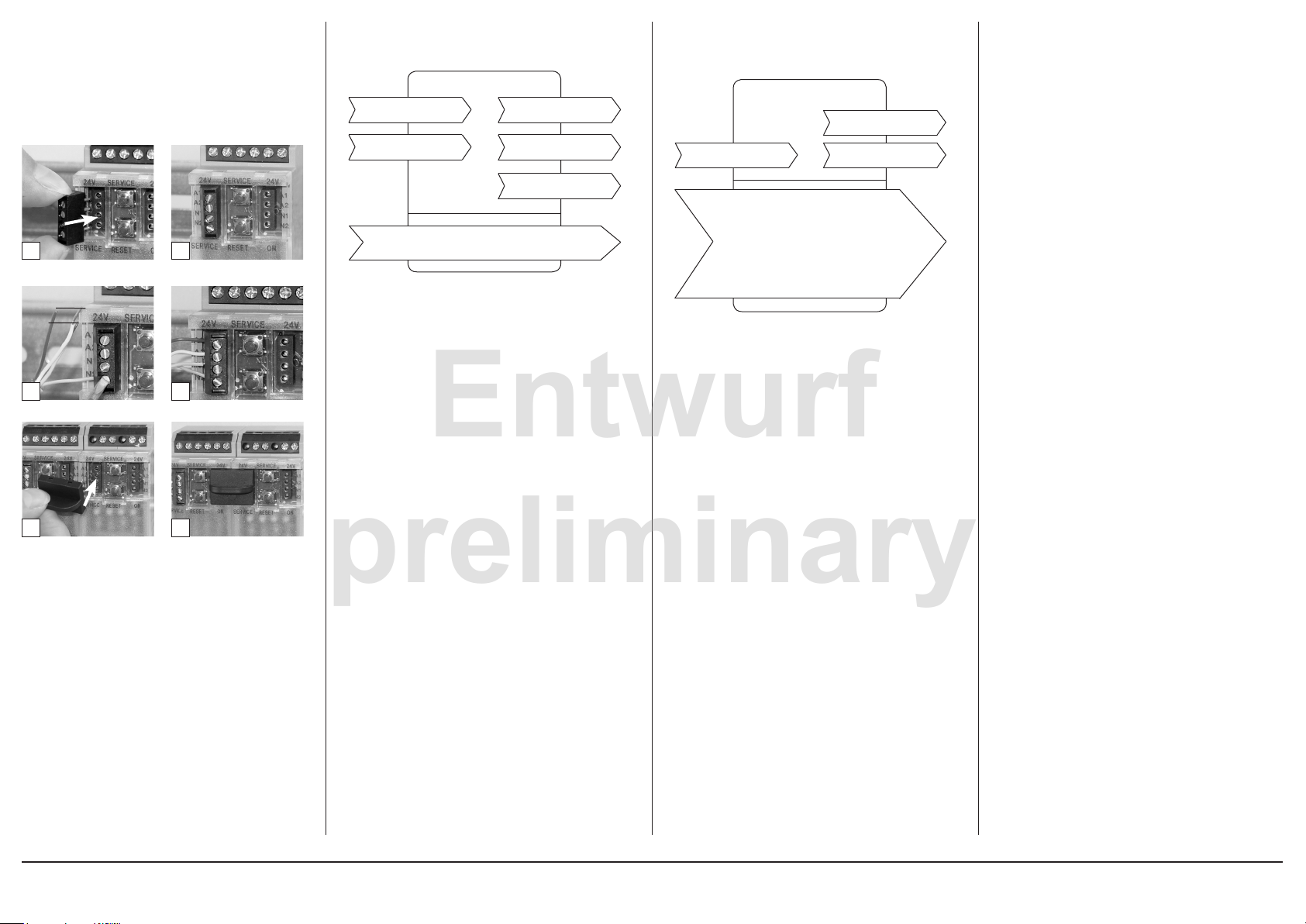
Plug in the terminal block for bus connection
Connect the cable for bus supply
Mounting in series
5 mm
1 2
3 4
5 6
8. Software Description Continuation Software Description
Utility Meter Functional Block
Node Object
Node Object
nviRequest
SNVT_obj_request
nvoStatus
SNVT_obj_status
nvoFileDirectory
SNVT_address
nviTimeSet
SNVT_time_stamp
SCPTmaxSendTime
SCPTminSendTime
nvoTime
SNVT_time_stamp
SCPTmaxSendTime
This configurable attribute defines the maximum period up to the
automatic sending of the output network variables (heartbeat).
Format: 0.0
Preset value: 60.0 = 60 s
SCPTminSendTime
This configurable attribute defines the minimum period for the
change of output network variables.
Format 0.0
Preset value: 1.0 =1 s
nviRequest SNVT_obj_request
Processes system queries, e.g. enabled, disabled, ...
nviTimeSet SNVT_time_stamp
Allows clock time adjustment.
The module is equipped with a real time clock with a power
reserve of 24 hours.
Format: year/month/day hour:minute:second
e.g.: 2007/3/22 12:7:0
nvoStatus SNVT_obj_status
Provides the device status
nvoFileDirectory SNVT_obj_status
Allows direct read/write access to the memory.
nvoTime SNVT_time_stamp
This output variable releases the internal time of the device.
Format: year/month/day hour:minute:second
e.g.: 2007/3/22 12:7:8
Utility Meter Functional Block
nvoMeterVal
SNVT_reg_val_ts
nvoHistVal
SNVT_reg_val_ts
nviHistTime
SNVT_time_stamp
SCPTlocation
SCPTnumDigits
ConstSCPTobjMajVer
ConstSCPTobjMinVer
SCPTpulseValue
SCPTbaseValue
SCPTinvrtOut
nvoMeterVal::SCPTsndDelta
nvoMeterVal::SCPTinvrtOut
nviHistTime SNVT_time_stamp
With the indication of this time stamp a value rounded down to
the next period is requested that has to be read by the network
output variable nvoHistVal. If this value is not available, the value
is provided with the next earlier time stamp.
The configuration attribute SCPTtimePeriod defines this period.
nvoHistVal restores the standard value after one minute. This is
the value of the first day of the previous month at midnight (e.g.
1.3.2007 00:00)
nvoMeterVal SNVT_reg_val_ts
The value is edited as per the information contained in SCPT-
pulseValue and SCPTbaseValue and updated in the network in
accordance with the configuration attributes SCPTsndDelta,
SCPTmaxSendTime and SCPTminSendTime.
Format: value unit decimal places status
register status time stamp
e.g.: 0 RVU_KWH 2 0 0 0/0/0 0:0:0
0 =value
RVU_KWH = unit
2 = decimal places
0 = status
0 = ok
1 = time has changed during period
2 = failure in the system or reset
4 = voltage breakdown within the period
8 = illegal value
0 = register status 0=inactive 1=active
0/0/0 0:0:0 = time stamp
e.g.: 10323 RVU_KWH 2 0 1 2007/3/22 12:37:55
resulting value = 103.23 kWh
Continuation Software Description
nvoHistVal SNVT_reg_val_ts
This variable can read and provide either the requested value
or the historical standard value. The value is prepared in ac-
cordance with the information contained in the variables SCPT-
pulseValue und SCPTbaseValue.
See also variable nviHistTime.
Prescribed network poll output variable
Format: value unit decimal places status
register status time stamp
e.g.: 0 RVU_KWH 2 0 0 0/0/0 0:0:0
0 value
RVU_KWH = unit
2 = decimal places
0 = status
0 = ok
1 = time has changed during period
2 = failure in the system or reset
4 = voltage breakdown within the period
8 = illegal value
0 = register status 0=inactive 1=active
0/0/0 0:0:0 = time stamp
e.g.: 8323 RVU_KWH 2 0 1 2007/3/22 12:28:0
SCPTlocation
Allows to indicate an identifier with 30 characters.
SCPTnumDigits
Provides the number of digits of the meter. This attribute keeps
the indication the same even in case of an overrun of the meter.
Format: 0
Preset value: 7, e.g.: 12345.67
The meter readout is reset to zero in case of changes.
ConstSCPTobjMajVer
This number is increased by one if the network interface of the
functional block changes.
Preset value: 2
ConstSCPTobjMinVer
This number is increased by one if the network interface remains
unchanged but the functional block shows a different behavior.
Preset value: 1
SCPTpulseValue
Is needed to prepare a pulse value in a meter readout.
Format: multiplier divisor
Preset value: 1 1
NvoMeterVal =
= (“number of pulses“ * “multiplier“ * 10^“nr_decimals“) /
“divisor“
e.g.: 1 100
33 * 1 * 10^2 / 100 = 33
The meter readout is reset to zero in case of changes.
SCPTbaseValue
Regulates an initial meter readout.
Format: value unit decimal places
e.g.: 123 RVU_KWH 2
123 numerical value of the initial meter readout
RVU_KWH: unit kWh
2 decimal places
Resulting initial meter readout: 1.23 kWh.
Unit and decimal places have to comply with the unit and
decimal places of the variable SCPTsndDelta otherwise no
values are issued! The meter readout is reset to zero in case
of changes.