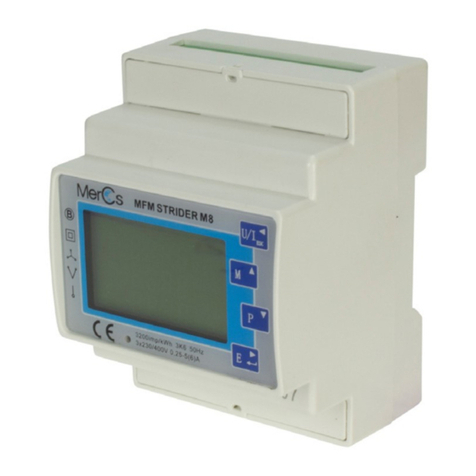
MerCs Strider M6 Manual de usuario

02 4047 0777 www.mercs.com.au02 4047 0788
MerCs Pty Ltd, 55 Pendlebury Rd, Cardi, NSW, 2285, Australia | 2018 V1.1
• Measures kWh Kvarh, KW, Kvar, KVA, P, F, PF, Hz, dmd, V, A, THD, etc.
• Bi-directional measurement IMP & EXP
• Two pulse outputs
• RS485 Modbus
• Din rail mounting 35mm
• 1/5A CT connection
• Better than Class 1 / B accuracy
• 2pcs 3p4w meters and 6pcs 1p2w
Features
MerCs Strider M6
User Manual
ME-PM-63OMCT-2C
A pulse output indicates real-time energy measurement. An RS485 output allows remote monitoring from another display or a computer.
The Unit can measure and display electronic information of
multi-channels:
The unit has password-protected set-up screens for:
Unit Characteristics
• L-N voltage and THD% (total harmonic distortion) of all phases
• Line Frequency
• Currents, Current demands and current THD% of all phases
• Power, maximum power demand and power factor
• Active energy imported and exported
• Reactive energy imported and exported
• Changing password
• Supply system selection 1phase2wire, 3phase 4wires
• CT Ratio (1 to9999 )
• PT ratio (1 to 9999)
• Demand Interval time
• Reset for demand measurements
• Pulse output duration
Introduction
SDM630MCT-2C measures and displays the characteristics of two three phase four wires circuits
or 6 single phase circuits, including voltage, frequency, current, power and active and reactive
energy, imported or exported. Energy is measured in terms of kWh, kVArh. Maximum demand
current can be measured over preset periods of up to 60minutes. In order to measure energy, the
unit requires voltage and current inputs in addition to the supply required to power the product.
The requisite current input(s) are obtained via current transformers (CT).
This meter can be congured to work with a wide range of CTs, giving the unit a wide range of
operation. Built-in interfaces provide pulse and RS485 Modbus RTU outputs. Conguration is
password protected.

02 4047 0777 www.mercs.com.au02 4047 0788
MerCs Pty Ltd, 55 Pendlebury Rd, Cardi, NSW, 2285, Australia | 2018 V1.1
MerCs Strider M6 ME-PM-63OMCT-2C
Current Transformer Primary Current
Pulse output
RS485 Serial – Modbus RTU
The unit can be congured to operate with CT ratio between Pri-
mary Current and Secondary Current. The secondary CT has two
options: 1A / 5A
This provides 2 pulse outputs referring the energy consumption of two circuits. Both pulse outputs are congurable. The pulse width for active
energy can be set from the Set-up menu.
This uses an RS485 serial port with Modbus RTU protocol to pro-
vide a means of remotely monitoring and controlling the Unit.
Set-up screens are provided for setting up the RS485 port.
1 2 3
The rst screen lights all display
segments and can be used as a display
check
The second screen indicates the rmware
installed in the unit and its build number.
Next the unit performs a self-test and in-
dicates if the test passes.
Start-up Screens
After a short delay, the screen will display active energy measurements.
1 2 3 4
Selects the Voltage and Current
display screens
In Set-up Mode, this is the “Left”
or “Back” button.
Select the Frequency and Pow-
er factor display screens
In Set-up Mode, this is the “Up”
button
Select the Power display
screens
In Set-up Mode, this is the
“Down” button
Select the Energy display
screens
In Set-up mode, this is the “En-
ter” or “Right” button
Measurements
The SDM630MCT-2C measures all important electrical parameters, which is shown on the LCD display and approachable via RS485. On the front
panel there are four sensitive buttons and four LED indicators.
The buttons operate as follows:

02 4047 0777 www.mercs.com.au02 4047 0788
MerCs Pty Ltd, 55 Pendlebury Rd, Cardi, NSW, 2285, Australia | 2018 V1.1
MerCs Strider M6 ME-PM-63OMCT-2C
There are four LED indicators on the front panel , namely C1, C2, Pulse1 and Pulse2.
The unit can measures and displays data of two three phase circuits: C1 circuit and C2 circuit. If C1 LED shows, that means the reading on the LCD
are for C1 circuit. While C2 is there, it means the measurements on the LCD are for C2 circuit.
The default display after the meter is power on, the LCD show “C1” circuit information. The way to shift “C1” circuit information to “C2” circuit in-
formation is by pressing the “Down” button. If the meter are showing “C2”, and the user want to shift it to be “C1” circuit, Then he shall keep
pressing the “UP” button.
(Circuit 1) (Circuit 2)
Voltage and Current
Each successive pressing of the button selects a new range:
1 Phase to neutral voltages
2Current on each phase
3Phase to neutral voltage THD%
4Current THD% for each phase

02 4047 0777 www.mercs.com.au02 4047 0788
MerCs Pty Ltd, 55 Pendlebury Rd, Cardi, NSW, 2285, Australia | 2018 V1.1
MerCs Strider M6 ME-PM-63OMCT-2C
1 2 3 4
Frequency
Power factor (total) Power factor of each phase Max. Power demand Max. Current demand
Frequency and Power Factor and Demand
Each successive pressing of the button selects a new range:
Power
Each successive pressing of the button selects a new range:
1-1 nstantaneous active power (kW)
1-2 Instantaneous reactive power (kVAr)
1-3 Instantaneous Volt-amps (KVA)
2Total kW, kVAr, kVA

02 4047 0777 www.mercs.com.au02 4047 0788
MerCs Pty Ltd, 55 Pendlebury Rd, Cardi, NSW, 2285, Australia | 2018 V1.1
MerCs Strider M6 ME-PM-63OMCT-2C
Energy Measurements
Each successive pressing of the button selects a new range:
1Total active energy in kWh
2-1 C1-L1 kwh
2-2 C1-L2 kwh
2-3 C1-L3 kwh
3-1 Imported active energy in kWh
3-2 Exported active energy in kWh

02 4047 0777 www.mercs.com.au02 4047 0788
MerCs Pty Ltd, 55 Pendlebury Rd, Cardi, NSW, 2285, Australia | 2018 V1.1
MerCs Strider M6 ME-PM-63OMCT-2C
4Total reactive energy in kVAh
5-1 C1-L1 kVarh
5-2 C1-L2 kVarh
5-3 C1-L3 kVarh
6-1 Imported reactive energy in kVArh
6-2 Exported reactive energy in kVArh

02 4047 0777 www.mercs.com.au02 4047 0788
MerCs Pty Ltd, 55 Pendlebury Rd, Cardi, NSW, 2285, Australia | 2018 V1.1
MerCs Strider M6 ME-PM-63OMCT-2C
Setting Up
To enter set-up mode, pressing the button for 3 seconds, until the password screen appears.
Setting up is password-protected so you must enter the correct password (default ‘1000’) before processing. If an incorrect password is entered, the
display will show: PASS Err
To exit setting-up mode, press repeatedly until the measurement screen is restored.
Set-up Menu Structure
Change password
CT Set the value of the CT ratio
nnnn
nnnn
4-digit number – default ‘1000’
4-digit number 0001~9999.

02 4047 0777 www.mercs.com.au02 4047 0788
MerCs Pty Ltd, 55 Pendlebury Rd, Cardi, NSW, 2285, Australia | 2018 V1.1
MerCs Strider M6 ME-PM-63OMCT-2C
PT set the value of PT Ratio
DIT Demand Integration Time
This is the period in minutes over which the current and power readings are integrated for maximum demand measurement. Options are:
5 , 10, 15, 30 and 60minutes.
Nnnn 4-digit number 0001~9999
Some menu items, such as password and CT, require a four-digit number entry while others, such as supply system, require selection from a number
of menu options.
Set-up Entry Methods
1. Use the and buttons to select the required item from the menu shown in section 4.1. selection does not roll over between bottom
and top of list
2. Press to conrm your selection
3. If an item ashes, then it can be adjusted by the and buttons. If not, there maybe a further layer.
4. Having selected an option from the current layer, press to conrm your selection. The SET indicator will appear.
5. Having completed a parameter setting, press to return to a higher menu level. The SET indicator will be removed and you will be able
to use the and buttons for further menu selection.
6. On completion of all setting-up, press repeatedly until the measurement screen is restored.
Menu Option Selection
When Setting up the unit, some screens require the entering of a number. In particular, on entry to the setting up section, a password must be
entered. Digits are set individually, from left to right. The procedure is as follows:
Number Entry Procedure

02 4047 0777 www.mercs.com.au02 4047 0788
MerCs Pty Ltd, 55 Pendlebury Rd, Cardi, NSW, 2285, Australia | 2018 V1.1
MerCs Strider M6 ME-PM-63OMCT-2C
1. The current digit to be set ashes and is set using the and buttons
2. Press to conrm each digit setting. The SET indicator appears after the last digit has been set.
3. After setting the last digit, press to exit the number setting routine. The SET indicator will be removed.
Change Password
1Use the and to choose the change
password option
2-1
Press the to enter the change password routine.
The new password screen will appear with the rst
digit ashing.
2-2
Use and to set the rst digit and
press to conrm your selection. The next
digit will ash.
2-3 Repeat the procedure for the remaining three digits.
3After setting the last digit, SET will show.
Press to exit the number setting routine and return to the Set-up menu. SET will be removed

02 4047 0777 www.mercs.com.au02 4047 0788
MerCs Pty Ltd, 55 Pendlebury Rd, Cardi, NSW, 2285, Australia | 2018 V1.1
MerCs Strider M6 ME-PM-63OMCT-2C
DIT Demand Integration Time
1
From the set-up menu, use and buttons
to select the dIT option. The screen will show the cur-
rently selected integration time.
2-1 Press to enter the selection routine. The current
time interval will ash
2-2 Use and buttons to select the time
required.
3Press to conrm the selection. SET indicator
will appear.
This sets the period in minutes over which the current and power readings are integrated for maximum demand measurement. The options are: 5,
10,15 30,60 minutes
Press to exit the dIT selection routine and return to the menu.
DIT Demand Integration Time
Este manual sirve para los siguientes modelos
1
Tabla de contenidos
Otros manuales de Instrumento de medición de MerCs
Manuales populares de Instrumento de medición de otras marcas

Endress+Hauser
Endress+Hauser Proline Promag 50 Especificaciones técnicas

Siemens
Siemens SITRANS F Coriolis FCT030 Manual de lista de piezas

KLINGER
KLINGER CMF V Series Manual de usuario

EXFO
EXFO FTB-2 Manual de operación y mantenimiento

Keysight
Keysight M8290A Manual de usuario

ADTEK
ADTEK MW-5 Manual de usuario