
MegaLite DECO Series Manual de usuario

USER MANUAL
Table of Contents
Safety Information 2
What Is Included 2
Specifications 3
Main Power Connection 4
DMX-512 Connection 4
Output Connection 5
Control Board 6
DMX Profile 7
Size & Weight 8
Cleaning & Maintenance 9
Parts List 9
Warranty 10
Customer Support 11

Check that the unit has not been damaged during transport
Protection Against Fire
1. Maintain a minimum of 1 foot distance from any type of flame.
2. Do Not install the unit too close to a heat source.
3. Make sure cables are properly secured away from movement.
4. Maximum surface operating temperature is 135°F
5. Unit must not be left on for long periods of time.
Protection Against Electrical Dangers
1. Disconnect power before servicing.
2. For connection to main power supply proceed to page 4.
3. This unit must be earthed. (electronically grounded)
4. Do not expose unit to rain or moisture.
5. The Unit must be installed in a well ventilated area.
6. Be sure ventilation slots are not blocked.
Protection Against Mechanical Hazards
1. Unit surface may reach high temperature. Allow about 5 minutes after powering the unit before
moving.
2. When positioning unit make sure it is securely mounted.
3. Do not mount unit directly above any person.
2
What is Included
1pc Deco Driver CV1
1pc 5 Pin Screw Terminal Block
1pc 2 Pin Screw Terminal Block
1pc User Manual

3
Specifications
Part Numbers
Fixture
5061– Deco Driver CV1
Mechanical Specifications
Fastening System: Tear Drop Wall Mount
Display: Digital
Power Connection: Cable Mounted to Edison head.
Housing: Black Painted
DMX Connection: 5 Pin XLR & RJ45 in and out (optional 3 pin available)
Output Connection: 5 pin Screw terminal & RJ45 output
Electrical Specifications
Power Input: 110-240VAC 5.9A 50/60 Hz
Output: 1
Power Per Output 96W
Wire Class: Class 2 Wiring
Ballast: Electronic: Mean Well RD-125
Output: 24V
Drive Method: Constant Voltage
Fuse: F2AL 250V (5X20mm)
Protocol: DMX 512
DMX 5 Modes:
1 Channel Mode Dimmer
2 Channel Mode Warm White, Cool White
3 Channel Mode R, G, B
4 Channel Mode R, G, B, W
7 Channel Mode Dimmer R, G, B, W, Strobe, Macro
Operating Mode: 21 Pre Programs, Stand alone via display
Control & Programming

4
Main Power Connection
Caution!
1. Do not connect fixture to a dimmer system.
2. This unit has Auto switching power supply. It will respond to 110V or 220V automatically
3. This unit must be earthed. (electronically grounded)
4. Replace fuse only with the specified type and rating.
The occupation of the connection-cable is as follows:
DMX-512 Connection
The fixture is equipped with 5 pin XLR Sockets and RJ45 for DMX input and output. The sockets are wired in parallel.
Only use a shielded twisted pair cable designed for RS-485 and 5 pin XLR or RJ45 plugs and connectors in order to
connect the controller with the driver or the driver with another.
DMX 5 Pin —Input / Output Or RJ45 8 Pin— In / Output
1. Ground
2. Signal (-)
3. Signal (+)
1
3
2
4
5
This fixture is equipped with an electronic power supply that will let the unit operate from 100V to 240V from 50Hz to 60Hz
Cable (USA) Cable (EU) Pin 110V
Black Brown
White
Green
Light Blue
Yellow/Green
Live
Neutral
Ground
L
N
220V
L
L
1. Signal (+)
2. Signal (-)
7&8. Ground
1 Signal +
2 Signal -
3 N/A
4 N/A
5 N/A
6 N/A
7 Ground
8 Ground
12V Sensor By-pass
Once the Deco Drive CV1 receives a 12V input signal all dimmer channels will go to a full position and by pass DMX
Control. Once 12V signal is removed the DMX Control will be reengaged to original settings
.
12V input signal
5
Output Connection
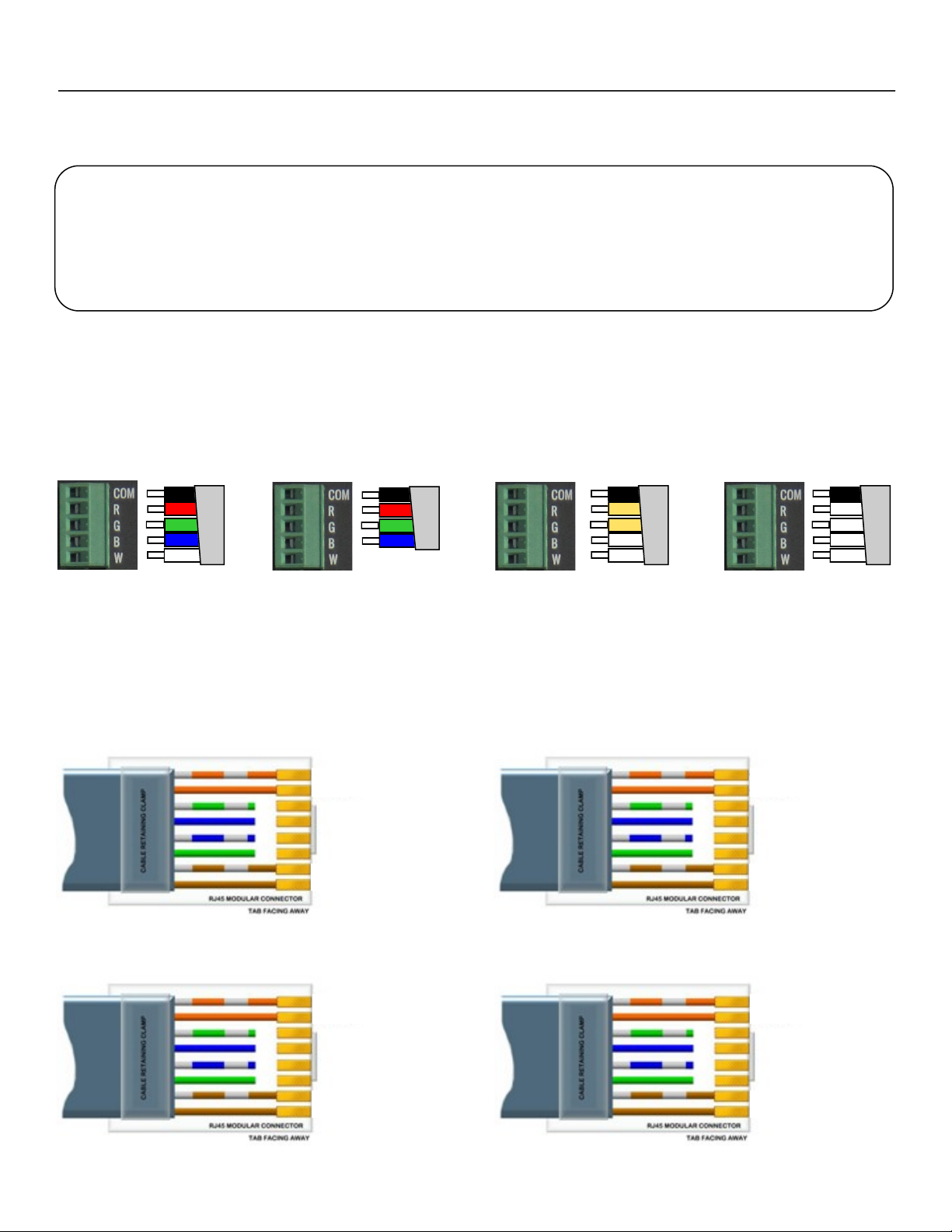
Deco Driver CV1 is designed to be used as a driver for Constant Voltage lighting fixtures. There are many fixtures a
Deco Driver can control . The Deco Lighting fixture manual will give you the information with power link limitations and
control type for that unit.
4 Ch Fixtures
DMX Control Mode
4 or 7CH
3 Ch Fixtures
DMX Control Mode
3 CH
2 Ch Fixtures
DMX Control Mode
2 CH
1 Ch Fixtures
DMX Control Mode
1 CH
Fixtures that require RJ45 connection will connect the input cables to RJ45 Output.
Pin1 Red-
Pin 2 24V+
Pin 3 Green-
Pin 4 24V+
Pin 5 Blue-
Pin 6 24V+
Pin 7 Warm White-
Pin 8 24V+
4 Ch Fixtures
DMX Control Mode
4 or 7CH
Pin1 Red-
Pin 2 24V+
Pin 3 Green-
Pin 4 24V+
Pin 5 Blue-
Pin 6 24V+
Pin 7 N/A
Pin 8 N/A
3 Ch Fixtures
DMX Control Mode
3 CH
Pin1 Warm White-
Pin 2 24V+
Pin 3 Warm White-
Pin 4 24V+
Pin 5 Cool White-
Pin 6 24V+
Pin 7 Cool White-
Pin 8 24V+
2 Ch Fixtures
DMX Control Mode
2 CH
Pin1 White-
Pin 2 24V+
Pin 3 White-
Pin 4 24V+
Pin 5 White-
Pin 6 24V+
Pin 7 White-
Pin 8 24V+
1 Ch Fixtures
DMX Control Mode
1 CH
Important Information!
1. Maximum Cable distance of 100ft before voltage drop. (voltage drop will cause intensity drop)
2. All fixtures connected together must be same type (do not connect Multiple Color, Variable
White or Single Color fixtures in the same output)
3. Must use Cat 6A, 24 AWG or thicker to connect the fixture and fixture to fixture. (not included)
Use Cat6 A AWG 24 or thicker cable for cable connection with RJ45 connections. Ca-
bles exceeding 100ft will have voltage drop. Voltage drop will result in intensity drop.
Fixtures that require Strip Cable connection will connect the input cables via 5Pin Screw terminal.
Use 20AWG cable or thicker for connections. Cables exceeding 100ft will have volt-
age drop. Voltage drop will result in intensity drop.

6
Control Board
DMX: DMX mode allows you to set the DMX
operational mode and start channel.
Press Enter use the Up / Down button to select
your operating mode. Each lighting fixture will
have a different operating mode. Consult the
fixture’s manual or fixture label to determine the
operating mode. Press Enter, DMX Address will
then be highlighted, use the Up / Down button to
select the fixtures start address. Start address
should match your controller’s start address
channel. Press Enter to confirm your settings.
Auto: Auto mode allows you to access the
pre-built auto function for control. Press Enter
use the Up / Down button to select the pre pro-
gram fixture look. Programs 01 to 18 are single
scene programs and programs 19 to 21 are
chase programs. Press Enter once you have
decided on the scene or chase. For programs
19-21 use the Up/Down buttons to adjust the
chase speed. Press Enter to confirm the fixture
setting.
Manual: Manual mode allows you to man-
ually control the intensity via the control display
without the need for a DMX controller. Press
Enter to select the dimmer output you would like
to adjust . Use the Up/Down keys to select the
dimmer intensity. There is many Deco Fixtures
that can be controlled via a Deco Driver. Please
Consult your Deco Lighting fixtures Manual to
see what values are active. Press Enter to con-
firm the setting. (Note for Variable White fixtures
the R with correspond to Warm White and the B
will correspond to Cool White all other dimmers
must be off.)
Lock Display: The display for the Deco Driver factory setting is lock screen function to unlock the display press and hold
the Menu & Enter for 3 seconds. To relock press and hold the Menu & Enter for 3 seconds
Channel Mode: Select fixture operating
mode CH01, CH02, CH03, CH04 and
CH07
DMX Address: Select fixture start chan-
nel from 001 to 512. (dependent on
DMX controllers patch)
DMX Signal Indicator: This LED display
will light once DMX Signal is received
from the controller.
Ch01 Fixtures= Intensity
Ch02 Fixtures= Warm White
Ch03 Fixtures= Red
Ch04 Fixtures= Red
Ch01 Fixtures= Intensity
Ch02 Fixtures= Warm White
Ch03 Fixtures= Green
Ch04 Fixtures= Green
Ch01 Fixtures= Intensity
Ch02 Fixtures= Cool White
Ch03 Fixtures= Blue
Ch04 Fixtures= Blue
Ch01 Fixtures= Intensity
Ch02 Fixtures= Cool White
Ch03 Fixtures= set to 000
Ch04 Fixtures= Warm White
Slave: This function allows the fixture to
operate the same way as the master. Driver units
must be connected via DMX cable
Auto programs 01 to 18 are single scene looks.
Auto programs 19 to 21 are multiple chase looks.
That can also have the speed of the chase adjusted
from 01 to 10.

7
DMX Profile
Deco CV1 1 Channel Mode
DMX Channel Function Description Value Init
1Dimmer LED Intensity 0-255 255
Deco CV1 2 Channel Mode
DMX Channel Function Description Value Init
1LED Color Warm White LED Intensity 0-255 255
2LED Color Cool White LED Intensity 0-255 255
Deco CV1 3 Channel Mode
DMX Channel Function Description Value Init
1LED Color Red LED Intensity 0-255 255
2LED Color Green LED Intensity 0-255 255
3LED Color Blue LED Intensity 0-255 255
Deco CV1 4 Channel Mode
DMX Channel Function Description Value Init
1LED Color Red LED Intensity (all outputs) 0-255 255
2LED Color Green LED Intensity (all outputs) 0-255 255
3LED Color Blue LED Intensity (all outputs) 0-255 255
4LED Color White LED Intensity (all outputs) 0-255 255
Deco CV1 7 Channel Mode
DMX Channel Function Description Value Init
1Dimmer Dimmer 0 to 100% 0-255 255
2LED Color Red LED Intensity (all outputs) 0-255 255
3LED Color Green LED Intensity (all outputs) 0-255 255
4LED Color Blue LED Intensity (all outputs) 0-255 255
5LED Color White LED Intensity (all outputs) 0-255 255
No Function 0-1
6Strobe Strobe (slow to fast) 2-127 0
Random Strobe (slow to fast) 128-255
No Function 0-1
7Macro Color Fade (slow to fast) 2-127 0
Color Chase (slow to fast) 128-255

8
Size & Weight
Fixture Size 11 15/16" X 5 7/8" X 2 1/8"
Fixture Packaged 14” X 6.5" X 2.75"
Net Weight 3.75lb
Gross Weight 4.75lb
11 15/16”
10 3/8”
5 7/8”
2 1/8”

Cleaning and Maintenance
Installation Maintenance: The operator has to make sure that the unit is operating safely and has the installations and
electronics checked by an expert every 2 years.
The following points have to be considered during the inspection:
1) All screws used for installing the device or part of the device have to be tightly connected and must not be corroded.
2) There must not be any deformations on the housing, fixation and installation spots (rack, suspension, trussing).
3) The electronic power supply cables must not show any damages, material fatigue (e.g. porous cables) or sediments.
Further instructions depending on the installation spot and usage have to be adhered by a skilled installer and any
safety problems have to be removed.
4) Ventilation ports must be clear of any debris.
5) Inner ventilation power supply fan must be clear of any debris
9
Rigging the Fixture
Caution!
1. The installation must be carried out by an authorized dealer or trained professional.
2. Unit may cause severe injures if you have doubts concerning the safety do not install.
3. Unit is to be 24inches away from flammable materials (decoration material)
4. Installation location must have adequate air flow.
When rigging a unit it is very important that you follow common safety procedures. Rigging requires extensive experi-
ence including but not limited to calculating working loads, material being used and periodic safety inspections. If you
lack these qualifications, do not attempt the installation yourself, instead use a professional structural rigger.
When rigging the unit always be secured with a secondary safety attachment. The installation location of the Fixture has
got to be built in the way that it can hold 10 times the weight for 1 hour without any failures. Installation should be
checked at least one time a year by a skilled person.
Parts List
5061PCBMAI MAIN PCB / DISPLAY
5061PCBDRI DRIVER PCB
5060PCBDMX5 5 PIN DMX PCB
5060PCBDMX3 3 PIN DMX PCB
5061POW POWER SUPPLY
5060FUS F5AL 250V 5X20MM FUSE
5060CON5SC 5 PIN SCREW TERMINAL
5060CON2SC 2 PIN SCREW TERMINAL
5061SWI ON / OFF SWITCH

10
Otros manuales para DECO Series
1
Este manual sirve para los siguientes modelos
2
Tabla de contenidos
Otros manuales de Controladores de MegaLite


