Maytronics Dolphin M600 Manual de usuario

8180002
User Instructions
EN
Maytronics Dolphin robotic pool cleaner
M600 / ZENIT 60 / ACTIVE X6 / ACTIVE ULTIMATE

1
M600 / ZENIT 60 / ACTIVE X6 / ACTIVE ULTIMATE Robotic Pool Cleaner |User Instructions
M600 / ZENIT 60 / ACTIVE X6 / ACTIVE ULTIMATE
Robotic Pool Cleaner
User Instructions
EN
Contents
1. INTRODUCTION ......................................................................................................................................................2
2. SPECIFICATIONS .....................................................................................................................................................2
3. WARNINGS AND CAUTIONS ..............................................................................................................................2
3.1 Water conditions ...........................................................................................................................................3
3.2 Important: Setting up the Wi-Fi® ..........................................................................................................3
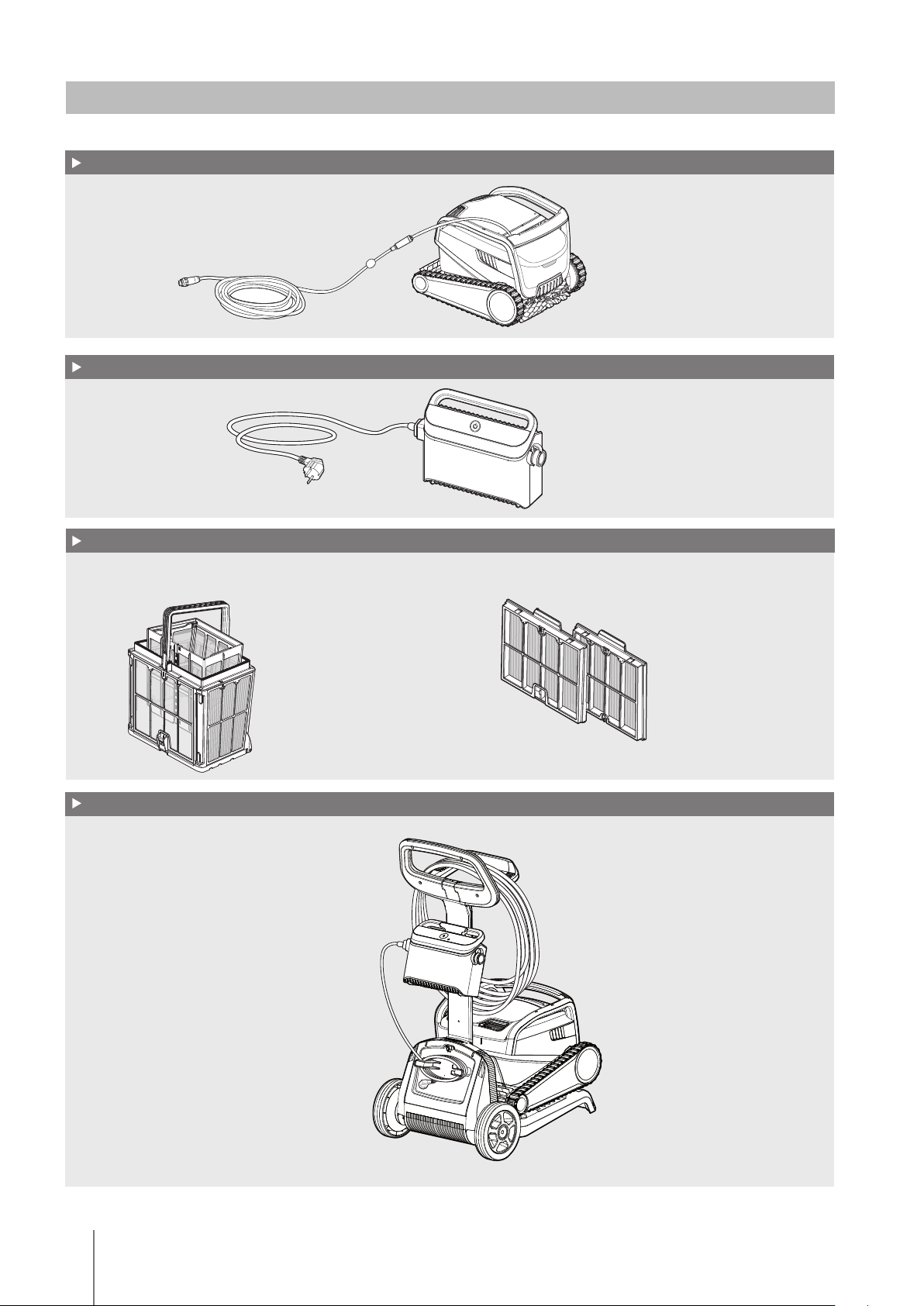
4. ROBOTIC POOL CLEANER PARTS ................................................................................................................... 4
5. USING THE ROBOTIC POOL CLEANER ............................................................................................................5
5.1 Setup ..................................................................................................................................................................5
5.2 Placing the Robotic Pool Cleaner into the pool ............................................................................. 6
5.3 Connecting the Robotic Pool Cleaner to your smart device (Phone or tablet) ............... 6
5.4 Operating the Robotic Pool Cleaner without using your smart device ...............................7
5.5 Using the power supply............................................................................................................................7
5.6 Robotic Pool Cleaner indicator lights ..................................................................................................7
5.7
Removing the Robotic Pool Cleaner from the pool
...................................................................... 8
6. CARE AND MAINTENANCE................................................................................................................................ 9
6.1
Cleaning after use - Removing and cleaning the dual filter baske
t............................................9
6.2
Periodic filter cleaning - Recommended at least once a month
.............................................10
6.3
Cleaning the impeller
.................................................................................................................................11
6.4
Periodic general maintenance - Recommended at least once a week
.................................. 12
7. OFFSEASON STORAGE...................................................................................................................................... 12
8. TROUBLESHOOTING ........................................................................................................................................... 13

2M600 / ZENIT 60 / ACTIVE X6 / ACTIVE ULTIMATE Robotic Pool Cleaner |User Instructions
1. INTRODUCTION
Thank you for purchasing a Maytronics Robotic Pool Cleaner.
We are sure that your Maytronics Robotic Pool Cleaner will provide you with reliable, convenient, and
cost-effective pool cleaning, to enhance your pool’s hygiene.
Robotic Pool Cleaners by Maytronics deliver advanced cleaning technologies, exceptional ease of use,
long-lasting performance, and simple maintenance. You and your family will be free to enjoy your
swim with full confidence that your pool is completely clean.
2. SPECIFICATIONS
Motor protection: IP 68
Minimum depth: 0.80m / 2.64ft
Maximum depth: 5m / 16.4ft
3. WARNINGS AND CAUTIONS
IMPORTANT SAFETY INSTRUCTIONS
READ AND FOLLOW ALL INSTRUCTIONS
Please adhere strictly to the following WARNINGS:
Take the Robot Pool Cleaner out of the pool before allowing people to enter the pool.
When examining the Robot Pool Cleaner, disconnect the main power supply.
Ensure that children do not attempt to access Robot Pool Cleaner while it is operating.
Keep the Robot Pool Cleaner out of the reach of children or persons with reduced physical,
sensory or mental capabilities, or lack of experience and knowledge, unless they have been
given supervision or instruction.
Only an original power cable must be used, at all times. Replaced by a Robot Pool Cleaner
certified technician, in case of need to avoid hazard.
The unit must be connected only to a supply circuit that is protected by a ground-fault circuit
interrupter (GFCI). This GFCI should be tested on a routine basis. To test the GFCI, push the test
button. The GFCI should interrupt power. Push the reset button. Power should be restored. If
the GFCI fails to operate in this manner, the GFCI is defective. If the GFCI interrupts power to the
power unit without the test button being pushed, a ground current may be flowing, indicating
the possibility of an electric shock. Do not use the power unit. Disconnect the power unit and
contact the manufacturer for assistance.
Digital Power supply
Input: 100-240V / 50-60Hz 2A
Output: <30 VDC
IP 54
WARNING
WARNING
WARNING
WARNING
WARNING
WARNING

3
M600 / ZENIT 60 / ACTIVE X6 / ACTIVE ULTIMATE Robotic Pool Cleaner |User Instructions
To reduce the risk of electric shock replace damaged cord immedietely.
Do not use extension cord to connect unit to electric supply; provide a properly located outlet.
Please ensure that the following PRECAUTIONS are implemented:
Operator should keep hands away from driving belt mechanism.
Position the Caddy and power supply at least 3.5m/12ft from pool’s edge – during operation.
For continued protection against possible electric shock, the power supply unit should be placed
at least 11cm/4in above ground.
When lifting the Robot Pool Cleaner, take care to prevent back injury.
Do not bury cord – locate cord to minimize abuse from lawn mowers, hedge trimmers and other
equipment.
This Robot is for use with permanently installed pools. Do not use with storable pools.
A permanently installed pool is constructed in or on the ground or in building such that it cannot
be readily disassembled for storage and reassembled to its original integrity.
3.1 Water Conditions
Use the Robotic Pool Cleaner in the following water conditions:
Chlorine Maximum 4 ppm
pH 7.0 -7. 8
Temperature 6-34°C / 43-93°F
NaCl Maximum 5000 ppm
3.2 Important: Setting up the Wi-Fi®
To assist you with tips, product updates, and communication with the Dolphin support team, you have
to be connected to the Wi-Fi®.
Please make sure that you have the following:
1. Your home Wi-Fi® network covers the pool area.
2. Your Wi-Fi® router has a sufficient signal strength near the location of the power supply.
3. Ensure that your smart device (phone or tablet) have a Wi-Fi® connectivity.
In case you have a weak signal strength, please use a Wi-Fi® extender.
Note: The robot’s power supply supports 2.4GHz Wi-Fi® frequency only.
WARNING
CAUTION
CAUTION
CAUTION
CAUTION
CAUTION
CAUTION

4M600 / ZENIT 60 / ACTIVE X6 / ACTIVE ULTIMATE Robotic Pool Cleaner |User Instructions
4. ROBOTIC POOL CLEANER PARTS
Robotic Pool Cleaner
Filtration
Power supply
Caddy kit
Start the season with the net filters for large debris then use ultra-fine filters for daily use.
* The net filters are assembled in the filter basket.

5
M600 / ZENIT 60 / ACTIVE X6 / ACTIVE ULTIMATE Robotic Pool Cleaner |User Instructions
5. USING THE ROBOTIC POOL CLEANER
5.1 Setup
Before using the Robotic Pool Cleaner for the first time, perform the following steps:
Position the power supply
at approximately the middle of the
long side of the pool, at least at a
distance of 3.5m /12ft.
Unwind the cable and stretch it out completely so that it
has no kinks.
Attach the floating cable to the power supply:
Insert the cable with the notch on the connector (1),
lined up with the groove in the socket on the power
supply, and turn clockwise (2).
Plug in the power supply and
leave it in the OFF position.
3.5m/12 ft.
11cm/4 in
5.1.4
5.1.25.1.1
5.1.3
1
2

6M600 / ZENIT 60 / ACTIVE X6 / ACTIVE ULTIMATE Robotic Pool Cleaner |User Instructions
5.2 Placing the Robotic Pool Cleaner into the pool
Place the Robotic Pool Cleaner in the pool.
Release it and let it sink to the floor of the pool.
Make sure that the floating cable is free of any obstacles.
5.2.1
5.3 Connecting the robot to your smart device (Phone or tablet)
Please follow these simple steps:
1. Download the MyDolphin™ Plus App to your smart device (phone or tablet) from
Google Play or the App Store .
2. Activate Bluetooth® and Wi-Fi® on your smart device (phone or tablet).
3. During the initial connection to the robot, the smart device must be connected to your home
Wi-Fi® network (Please see section 3.2).
4. Activate the MyDolphin™ Plus App on your smart device.
5. Scan the QR code on the side of the power supply, and follow the instructions.
After completing the set-up, you will have access to advanced features, troubleshooting tips, and
additional programing options.

7
M600 / ZENIT 60 / ACTIVE X6 / ACTIVE ULTIMATE Robotic Pool Cleaner |User Instructions
5.4 Operating the Robotic Pool Cleaner without using your smart device
Press the power button to turn the robot ON.
The Robotic Pool Cleaner will now operate until it has reached the end of the cleaning cycle.
5.5 Using the power supply
Your power supply is designed to provide you with the most advanced
features to improve your experience.
• A single on/off button for an easy operation.
• LED indicators for the advanced features.
LED indications table:
5.6 Robotic Pool Cleaner indicator lights
Light Indication
Blue blinking
Normal operation of the Robotic Pool Cleaner
Green blinking
Remote-Control or Smartphone communicate
with the Robotic Pool Cleaner
Red constant
Robot error. Check the Troubleshooting section
for solutions.
If none of the solutions solve the issue,
contact your dealer to check the Robotic Pool
Cleaner.
5.6.1
Indicator lights
Indicator lights.
Lights display Meaning
Blue circle Blinks 4 times Occur after connecting the power-supply to the
power outlet.
Blue connectivity light is consistent Bluetooth® connected
Green and Blue connectivity lights
blink alternately
Pairing process is ongoing
Green connectivity light is on Wi-Fi® connected to home network

8M600 / ZENIT 60 / ACTIVE X6 / ACTIVE ULTIMATE Robotic Pool Cleaner |User Instructions
Place the Robotic Pool Cleaner on the side of the pool
and let the water drain out.
Use the floating cable to pull the Robotic Pool Cleaner to the side of the pool.
Use the handle to remove the robot from the pool.
CAUTION
DO NOT PULL THE POOL CLEANER FROM THE POOL USING THE CABLE.
5.7.3
5.7.2
Turn OFF and unplug the power supply.
5.7.1
5.7 Removing the Robotic Pool Cleaner from the pool
WARNING

9
M600 / ZENIT 60 / ACTIVE X6 / ACTIVE ULTIMATE Robotic Pool Cleaner |User Instructions
Upon opening the filter cover,
the handle will lift independently.
Open the filter cover.
Clean the filter basket with a hose.Open the latch to
release the bottom lid.
Lift the basket.
Make sure the power supply is switched o and unplugged.
We highly recommend cleaning the filter basket after each cleaning cycle.
Note: Do not let the filter panels dry out before cleaning.
6.1 Cleaning after use - Removing and cleaning the dual filter basket
click!
6.1.1 6.1.2
1
2
6.1.3 6.1.4 6.1.5
6. CARE AND MAINTENANCE
WARNING
Otros manuales para Dolphin M600
3
Este manual sirve para los siguientes modelos
7
Tabla de contenidos
Otros manuales de Aspiradora de Maytronics

Maytronics
Maytronics MyDolphin Manual de usuario

Maytronics
Maytronics CLASSIC 8+ Manual de usuario

Maytronics
Maytronics Dolphin Explorer Classic 9 Manual de usuario

Maytronics
Maytronics Dolphin M600 Manual de usuario

Maytronics
Maytronics Dolphit Mass 13 Manual de usuario

Maytronics
Maytronics MCC6 Manual de usuario

Maytronics
Maytronics Dolphin WAVE 300 XL Manual de usuario

Maytronics
Maytronics Dolphin Basic 11 Manual de usuario

Maytronics
Maytronics MBC8-UNI Manual de usuario

Maytronics
Maytronics Dolphin Wave Instrucciones de funcionamiento