
Marantz RX9001 Manual de usuario

Model RX9001 User Guide
Serial Extender
ENGLISH
FRANÇAIS
ESPAÑOL
RX9001_SG_EFS.qxd 29-03-2007 16:28 Pagina 1

Concept and realisation of the Guide:
Concept et réalisation du guide :
Concepto y realización de la Guía:
Human Interface Group, De Regenboog 11, 2800 Mechelen (Belgium)
www.higroup.com
3104 205 3444.1
WARNINGS
• Do not expose the equipment to rain or moisture.
• Do not remove the cover from the equipment.
• No naked flame sources, such as lighted candles, should be placed on the equipment.
• No objects filled with liquids, such as vases, shall be placed on the equipment.
AVERTISSEMENTS
• Ne pas exposer l’appareil à la pluie ni à l’humidité.
• Ne pas essayer de retirer le boîtier de l’appareil.
• Ne placer aucune source de flamme nue, comme une bougie allumée, sur l’appareil.
• Aucun objet rempli de liquide, un vase par exemple, ne doit être placé sur l’appareil.
ADVERTENCIAS
• No exponga el equipo a la lluvia ni a la humedad.
• No extraiga la tapa del equipo.
• No deben colocarse sobre el equipo elementos con fuego, por ejemplo velas encendidas.
• No se deben colocar sobre el aparato recipientes que contengan líquidos, como por ejemplo
jarrones.
EN
FR
ES
RX9001_SG_EFS.qxd 29-03-2007 16:28 Pagina 2

ENGLISH
RX9001 User Guide
FRANÇAISESPAÑOL
RX9001 User Guide
RX9001_SG_EFS.qxd 29-03-2007 16:28 Pagina 3

1
RX9001 User Guide
RX9001 User Guide
Contents
Before You Start.........................................................................................................2
Unpacking the Extender..............................................................................................3
Installing the Extender................................................................................................4
Mounting the Extender in a Rack ...............................................................................4
Connecting the Extender to External Equipment ............................................................5
Attaching the Extender to Infrared Controlled A/V equipment ....................................5
Using the Sensor Inputs .....................................................................................6
Connecting to Relay-controlled Equipment .............................................................7
Connecting to Serial Equipment ...........................................................................7
Connecting to a Lutron RadioRa Lighting System.....................................................8
Inserting a Multimedia Server in the Network.........................................................9
Connecting the Extender to the Network .....................................................................9
Using the Extender ............................................................................................9
Configuring the Extender...................................................................................10
Support....................................................................................................................12
Troubleshooting ....................................................................................................12
What Do the LEDs Indicate? ............................................................................. 12
Finding the Exact Location of an A/V component’s IR Receiver..................................13
Operating A/V components with the Extender .......................................................13
Resetting the Extender .....................................................................................13
Firmware Update...................................................................................................13
Specifications ..........................................................................................................15
IFU Approbation / Safety Content RX9001......................................................................i
FCC Compliancy.......................................................................................................i
RX9001_SG_EFS.qxd 29-03-2007 16:28 Pagina 4

ENGLISH
2
RX9001 User Guide
Before You Start
The Serial Extender is an important element of the RC9001 System and makes it possible to
control A/V equipment via RF in the entire house. In addition, it can be connected to A/V equipment
via RS232 and allows you to use power sensing for reliable power on/off switching. You can also
use it to control drapes and projector lifts, for example.
In order to use the Extender in a Wireless Network:
•Install the Extender: connect it to a router and external equipment, like a TV or receiver.
•Configure the Extender: connect it to the PC and use the Configuration Tool.
The Extender is used in a network with a Wireless Access Point and/or a router, as illustrated
below.
RX9001_SG_EFS.qxd 29-03-2007 16:28 Pagina 5
3
RX9001 User Guide
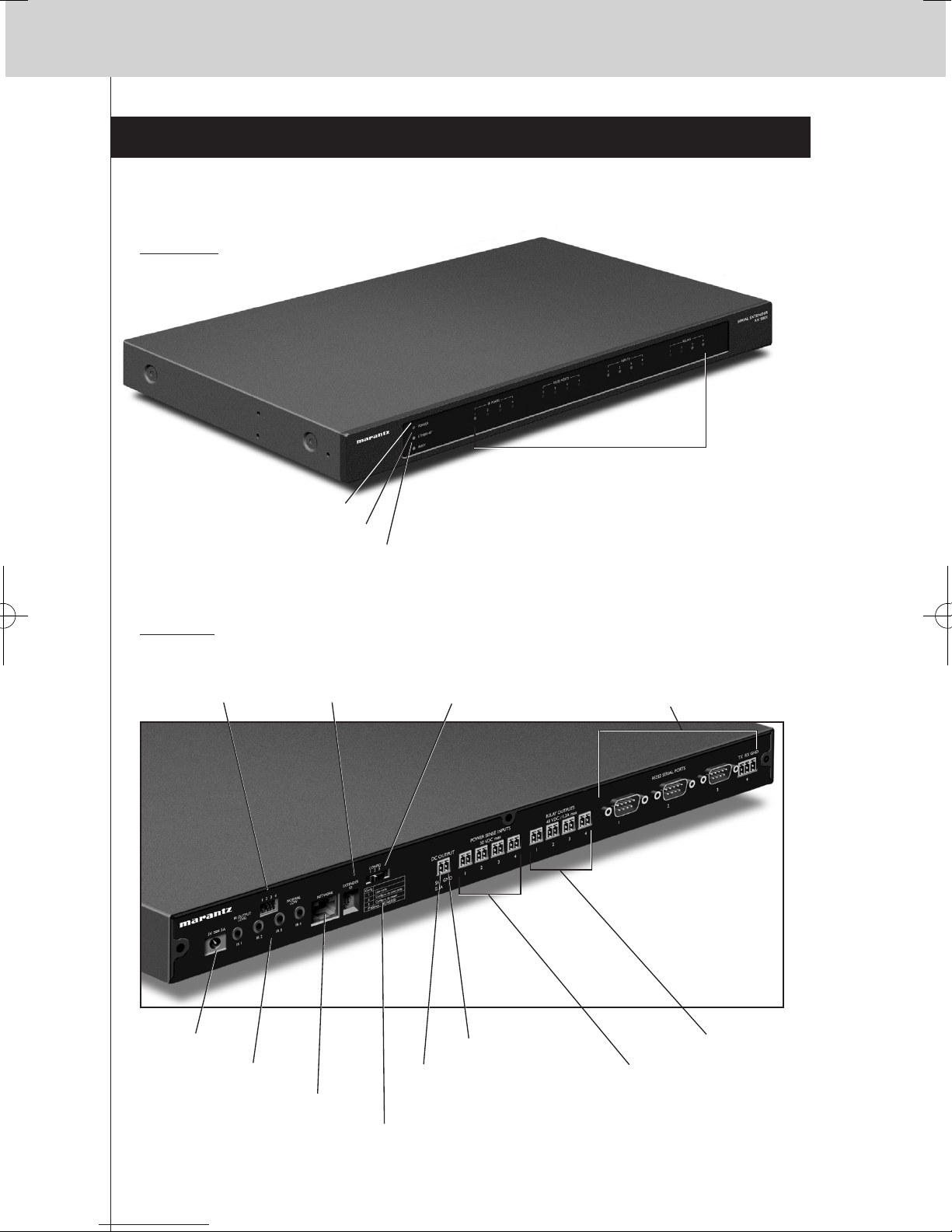
Unpacking the Extender
Serial Extender
Front Panel
Configuration
switch
Power input
4 IR ports
4 dipswitches for
the IR outputs
Extender ID
switch
Ethernet input (RJ45)
4 Power sense inputs
4 Relay outputs
5V DC output
Grounding
4 RS232 ports –
3 DB9 connectors and
one 3-pin connector
4 groups of 4 LEDs each for the
• IR ports;
• Serial (RS232) ports;
• Sensor inputs;
• Relay outputs.
Power LED
Ethernet LED
Busy LED
Back Panel
IP address
RX9001_SG_EFS.qxd 29-03-2007 16:28 Pagina 6

ENGLISH
4
RX9001 User Guide
Installing the Extender
Mounting the Extender in a Rack
Warning Keep the Extender away from heat sources such as amplifiers.
Mounting Kit
2 Dual IR Emitters 2 Mini-jack IR Cables
Power Adapter Configuration Cable
Crossed Ethernet cable
x2x6 x4x4x4
Fit the mounting plate
on the Extender with
the screws.
Attach the Extender
to a rack, using the
screws, washers and
nuts.
RX9001_SG_EFS.qxd 29-03-2007 16:28 Pagina 7

5
RX9001 User Guide
Connecting the Extender to External Equipment
The Extender can be connected to external equipment through the various outputs on the back
panel.
Warning Make sure that the equipment is always turned off before connecting it to the Extender.
Attaching the Extender to Infrared Controlled A/V equipment
For the Extender to transmit an IR signal, you need to connect it to the A/V component via the IR
Output on the back of the Extender. In contrast to previous Marantz Extenders, the RX9001 has no IR
blaster.
To connect the Extender to infrared controlled A/V equipment, use one of the following cables
enclosed with the Extender:
• a Dual IR emitter;
-or-
• a mini-jack IR cable.
Insert the mini-jack in the Extender
and attach an emitter to the infrared
display of the infrared controlled
device.
Insert one mini-jack in the
Extender and the other in the
infrared controlled device.
Adjusting the Power Level of the IR Outputs
At the back of the Extender there are 4 dipswitches, one for each IR output. Use these dipswitches
to reduce the power level of the Dual IR emitters and the mini-jack cables.
This is useful when you suspect that the IR signal is too strong for the receiving A/V component, or
when you connect the IR port to an external IR-bus system.
RX9001_SG_EFS.qxd 29-03-2007 16:28 Pagina 8

ENGLISH
6
RX9001 User Guide
Using the Sensor Inputs
When the Control Panel sends out a macro to switch multiple A/V components on or off, discrete
codes are normally used to ensure the state of the component. In some cases, only toggle codes are
available: one command toggles between the on and off state, and there is no separate command
for switching the component on and switching it off. In this event, the system may get out of sync.
This problem can be solved by using power sensing:
• A power sensor connected to an A/V component can detect whether it is switched on or off.
By connecting the power sensor to the Extender, this information is subsequently transmitted to
the Extender.
• Some A/V components, such as receivers, have mini-jack outputs specifically for this purpose.
These mini-jack outputs can be connected to the power sense inputs on the Extender.
• For video sources, video sensor modules can be used.
Make sure that you create the specific power sensing commands in the action list of
Wizz.it Ex.
Note Sensor modules are not delivered with the Extender, but most available modules are
compatible with the Extender. The power sense inputs are triggered by a voltage input
between 5V and 30V.
Use this wiring
solution if the
sensor module’s
output provides a
voltage level.
Use this wiring
solution if the
sensor module is
powered by the
Extender (the output
is a relay).
Use standard wiring and
Phoenix connectors.
RX9001_SG_EFS.qxd 29-03-2007 16:28 Pagina 9

7
RX9001 User Guide
Use a serial cable.
Connecting to Relay-controlled Equipment
Use standard wiring and Phoenix
connectors.
Connecting to Serial Equipment
There are two ways to connect serial equipment to the Extender:
Note For most A/V components a standard female to male or female RS232 cable can be used.
RX9001_SG_EFS.qxd 29-03-2007 16:29 Pagina 10
Otros manuales para RX9001
1
Tabla de contenidos
Otros manuales de Extensor de Marantz


