
Lloyd 402 Flexion Elevation Manual de usuario


CONTENTS
OPERATIONS PAGE
Safety and Maintenance.......................... 1 - 2
Head Rest Cushion................................. 3 - 8
Chest Cushion......................................... 9
Manual & Automatic Drops...................... 10 - 11
Pelvic Height Adjustment........................ 12
Foot Pedal Control.................................. 12
Electronic Height Adjustment (EHA)....... 13 - 14
Ankle Rest............................................... 15
PARTS / ASSEMBLY PAGE
Stationary Frame..................................... 16
Elevation Frame...................................... 17
Tilt Head Cushions.................................. 18
Deluxe Head Cushions........................... 19
PARTS / ASSEMBLY PAGE
Tilt Head I-Frame Assembly.................... 20
Deluxe Head I-Frame Assembly............. 21
Adjustable Chest Cushion....................... 22
Deluxe Chest Spring Breakaway............ 23
Adjustable Pelvic Cushion..................... 24
Ankle Rest Assembly................................... 25
Adjustable Height Ankle Rest.................. 26
Hydraulics Assembly............................... 27
Hydraulics Auto Drops............................ 28
Electrical.................................................. 29
Electrical - EHA & Auto Drops................. 30
Straight Drop Head................................. 31-32
Forward Motion Drop Head..................... 33-34
CBP Tilt Chest......................................... 35-36
CBP Drop Chest....................................... 37-38
Drop Chest.............................................. 39-40
Drop Pelvic.............................................. 41-42
Table Serial Number
02-08

WELCOME!!
Lloyd Table Company, a proud supporter of today’s chiropractors, has established the finest line of chiroprac-
tic tables in the world. Table products unique in versatility and function, designed to meet your needs.
Concerned for a safe working and treatment environment, Lloyd Table Company asks that you follow the safe-
ty tips below.
*Be aware of Caution and Warning labels posted throughout the table before operating
any functions.
*Everyone operating the table needs to read the manual and familiarize themselves
with all its functions before operating the table with patient on it.
*A patient should never be unattended, when lying on the table. NEVER LEAVE A
PATIENT ON THE TABLE UNATTENDED!
*The patient should be positioned at or near the center of the table with arms on the
armrest cushions.
*There should be no more than one operator at the controls.
*Check the tension on all drops before adjusting the patient. (See Page 7)
SAFETY
Page 1

MAINTENANCE
The following steps should be performed on a regular basis to maintain your Lloyd table in a smooth operating
condition and to assure its long life and top quality appearance.
*An initial inspection and periodic future inspections should be made to insure that nuts
and bolts have not loosened in shipping or during daily operations.
*Your Lloyd table should be lubricated every six months. Parts to be lubricated are all
pivot points, and metal to metal sliding mechanisms.
(DO NOT LUBRICATE FRICTION LOCKS)
*The cushions should be cleaned daily with a mild soap & warm water solution to
remove body oils. Rinsed & dried
*Chrome parts should be cleaned on a weekly basis for appearance.
*The hydraulic fluid recommended for the pump, is a lubriplate HO1 hydraulic oil, and
*Perform periodic inspections for oil leaks or drips.
Page 2

The following sections provide explanations on the operation of your Lloyd table. All references to right and
left, will be in relationship to your view, as you face table from the foot end. All references to the front will
refer to the head end of the table. Those to the rear will refer to the foot end.
Head Cushion
The head cushion is designed to provide a multitude of positions & operations through our Add On Paper
(AOP), Deluxe Headpiece and optional Total Dimension FlexionTM Headpieces.
Paper Hanger #2
Lock Handle #1
To raise the tilting headpiece:
1 Lift on the bottom front edges of the cushion.
2 Release when desired height is obtained, the cushion will automatically lock into position.
To lower the tilting headpiece:
1 Support the corner edge of the cushion.
2 Lift the Locking Handle (#1) to release.
3 Gently lower the cushion to the desired height.
4 Release the Lock Handle (#1) and then the cushion to lock.
Tilting Head Adjustment
Page 3
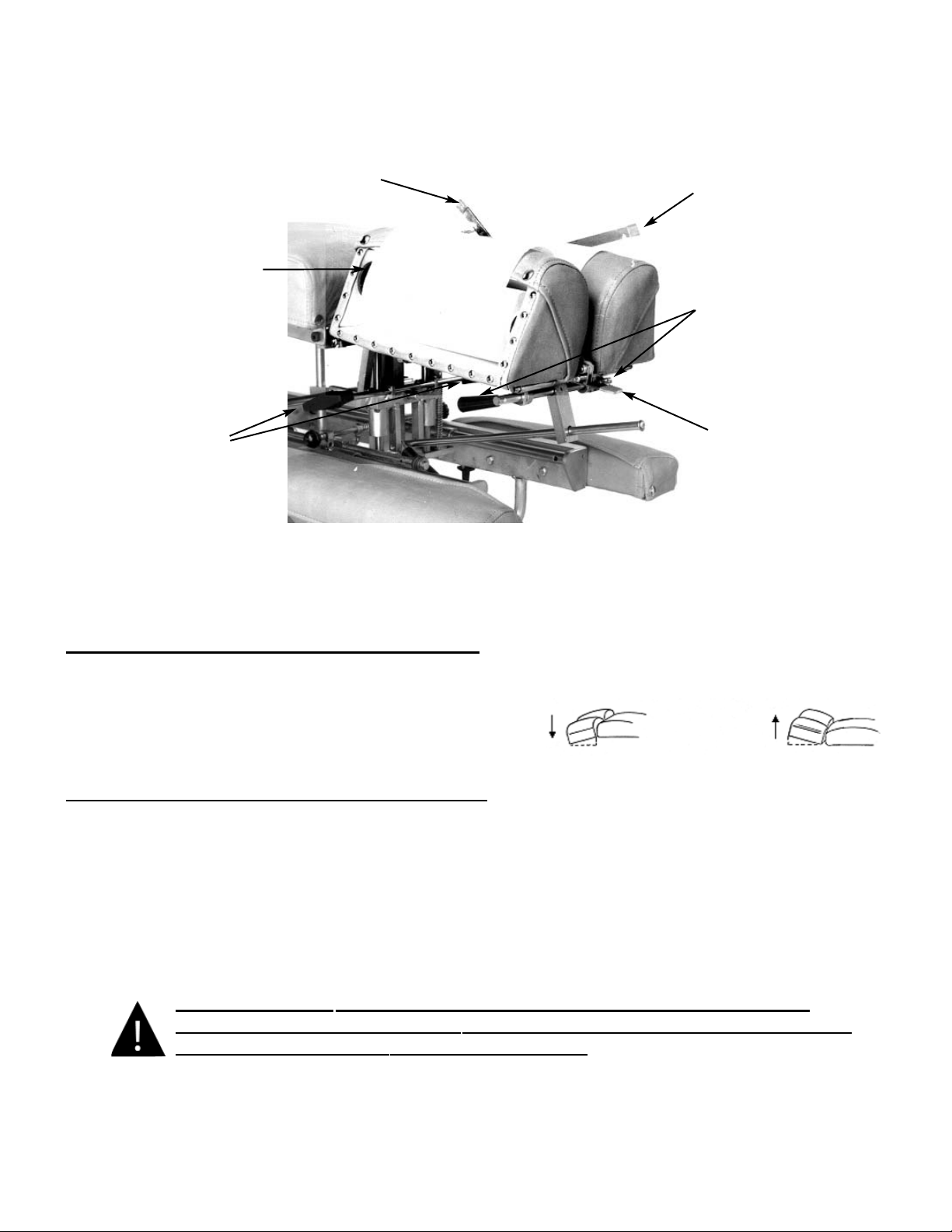
#5 Center Bar
#4 Paper Hanger
#2 Elevation Knob
#3 Face Opening
Lever
#1 Tilting Lock Handle
#6 Paper Cutting Bar
To Raise the tilting feature on the Deluxe Headpiece:
1. Lift on the bottom front edges of the cushion
2. Release at the desired height, the cushion will
automatically lock into position.
To Lower the tilting feature on the Deluxe Headpiece:
1. Support the front corner edge of the cushion.
2. Lift the Locking Handle (No. 1) to release
.
3. Gently lower the cushion to the desired height.
4. Release the lock handle first and then the cushion to lock.
WARNING: TO AVOID INJURIES WHEN RAISING OR LOWERING HEAD
CUSHIONS, BE SURE TO HAVE A PROPER HOLD ON THE CUSHION BEFORE
RELEASING THE ELEVATING HANDLE (NO. 2).
Page 4
Deluxe Headpiece

Deluxe Headpiece
To Elevate the Head Cushion
1. The head cushion is assisted by a gas shock in raising the cushion. With a hand
supporting the head cushion, turn the Elevation Knob (No. 2) on either side of the table
upward to unlock. When the desired height is determined simply release the Elevation Knob
(No. 2) to lock.
To Lower the Head Cushion
1. Turn the Elevation Knob upward to unlock. While unlocked push down on the cushion to
lower. When the desired height is determined simply rotate the Elevation Knob (No. 2)
down to lock.
Face Opening Adjustment
1. The Head Cushion’s face opening can be opened or closed to adjust for comfort with the Face
Opening Lever (No. 3). By Pushing slightly down on the Face Opening Lever, slide cushions to
adjust opening. The Face Opening Lever must be released in one of eight positions to lock the
cushions in place.
Paper Roll
The paper roll mounts conveniently inside the right-hand cushion.
Replacing the Paper Roll
1. Remove the paper hanger tension rod (No. 4) by compressing ends of the rod horizontally.
This will allow you to slide one end out, to remove the paper roll tube.
2. Slide a new paper roll on the tension rod so that it rolls off the bottom side. Compress the rod
ends horizontally and set inside the head cushion.
3. Swing the Center Bar (No. 5, Page 4) and Outside Cutting Bar (No. 6, Page 4) up. Route
paper over the cushions and down between the two outside cutting bars. Return both bars to
their original position.
4. Trim the paper by supporting the paper cutting bar with one hand and pulling the paper up
along the bar’s edge.
Page 5

Deluxe Head with Drops
#7 Cocking Handle
#8 Tension Knob
#9 Selector Knob
(Right Side of Table)
Operating the Straight / Toggle Drop:
CAUTION: THE DROP CUSHION TENSION SHOULD BE CHECKED AND TESTED
BEFORE ADJUSTING A PATIENT.
NOTE - DROP SHOULD BE IN DOWN / DEACTIV
ATED POSITION BEFORE MOVING
SELECTOR KNOB (NO. 9) IN OR OUT.
1. To engage the Straight / Toggle Drop head, pull the selector knob (No. 9) out about
half an inch.
2. Push down on the Cocking Handle (No. 7) until the head cushion toggle drop is activated .
3. Once cocked, test the drop by pushing down on the cushion. If the cushion drops easily or too
hard, adjust the tension with the Tension Knob (No. 8).
Operating The Tension Knob:
1. The tension is adjusted by turning the tension knob (No. 8) in a clockwise and counterclock-
wise direction.
A. Clockwise - Increases tension
B. Counterclockwise - Decreases tension
Operating the Forward Motion Drop:
CAUTION: THE DROP CUSHION TENSION SHOULD BE CHECKED AND TESTED
BEFORE ADJUSTING A PATIENT.
NOTE - DROP SHOULD BE IN DOWN / DEACTIVATED POSITION BEFORE MOVING
SELECTOR KNOB (NO. 9) IN OR OUT.
1. The Selector Knob (No. 9) is to be pushed in, to engage the forward motion drop.
2. Push down on the Cocking Handle (No. 7) until the head cushion forward motion drop is
activated.
3. Once cocked, test the drop by pushing down on the cushion, and adjust the tension.
Page 6

Forward & Straight / Toggle Drop Operation Instructions
CAUTION: THE DROP CUSHION TENSION SHOULD BE CHECKED AND TESTED
BEFORE ADJUSTING A PATIENT.
NOTE - DROP SHOULD BE IN DOWN / DEACTIVATED POSITION BEFORE MOVING
SELECTOR KNOB (NO. 1) IN OR OUT.
1. To engage the Straight / Toggle Drop head, pull the selector knob (No. 1) out about
half an inch.
2. Push down on the Cocking Handle (No. 2) until the head cushion is cocked into its top
position.
3. Once cocked, test the drop by pushing down on the cushion. If the cushion drops too easily or
too hard, adjust the tension with the Tension Knob (No. 9).
Operating The Tension Knob:
1. The tension is adjusted by turning the tension knob (No. 9)
in a clockwise and counterclockwise direction.
A. Clockwise - Increases tension
B. Counterclockwise - Decreases tension
Operating the Forward Motion Drop:
1. The Selector Knob (No. 1) is to be pushed in, to engage the forward motion drop.
2. Push down on the Cocking Handle (No. 2) to raise the drop cushion to its cocked position.
3. Once cocked, test the drop by pushing down on the cushion. If the cushion drops too easily or
too hard, adjust the tension with the Tension Knob (No. 9).
Optional - Total Dimension Flexion HeadTM
Left Side
#1 Selector Knob
#2 Cocking Handle
#4 Traction Release
Knob
#3 Lateral Side Bending
Release Knob
#8 Flexion Assist
Handle
#6 Rotation
Release Knob
#5 Flexion / Tilt
Knob
Page 7
#9 Tension
Knob
Right Side
#7 Face Opening
Lever
Otros manuales para 402 Flexion Elevation
1
Este manual sirve para los siguientes modelos
1
Tabla de contenidos
Otros manuales de Equipo médico de Lloyd

Lloyd
Lloyd COSMIC III Manual de usuario

Lloyd
Lloyd ACTIVATOR 906HS Manual de usuario

Lloyd
Lloyd GALAXY ULTIMATE Manual de usuario

Lloyd
Lloyd GALAXY McMANIS HYLO Manual de usuario

Lloyd
Lloyd Galaxy 908HS Manual de usuario

Lloyd
Lloyd GALAXY 900HS Manual de usuario

Lloyd
Lloyd 402 Flexion Elevation Guía de aplicación


