
Libtor T260S Series Manual de usuario

T260S Series Router
User Manual
Shenzhen Libtor Technology Co., Ltd Page 1 of
47
Add: Room 608, Building A Hongshengyuan Industrial Zone,No.339 Bulong Road, Bantian
Street Office, Longgang District, Shenzhen City, Guangdong Province.
Web:http:www.libtor.com Tel: 86-755-28345166-807 Mobile:86-130 5804 9855
Mail: sales@szlbt.net
T260Sseries Router
user manual
Product Version
Page
V1.3
Product name:
T260S
Total:47
T260S series router user
manual
The manual is suitable for the following model :
Model
Product type
T260S-A1
WCDMA/HSDPA/HSUPA/HSPA+/GSM/GPRS/EDGE
WIFI router
T260S-B1
CDMA/EVDO WIFI router
T260S-DE1
TD-LTE/FDD-LTE/WCDMA
/TD-SCDMA/GSM/GPRS/EDGE WIFI router
T260S-DE2
TD-LTE/FDD-LTE/WCDMA
/TD-SCDMA/WVD0/CDMA20001X/GSM WIFI router

T260S Series Router
User Manual
Shenzhen Libtor Technology Co., Ltd Page 2 of
47
Add: Room 608, Building A Hongshengyuan Industrial Zone,No.339 Bulong Road, Bantian
Street Office, Longgang District, Shenzhen City, Guangdong Province.
Web:http:www.libtor.com Tel: 86-755-28345166-807 Mobile:86-130 5804 9855
Mail: sales@szlbt.net
T260S-D
FDD-LTE/TDD-LTE/WCDMA/TD-SCDMA/GSM router
T260S-E
FDD-LTE/TDD-LTE/WCDMA/TD-SCDMA/GSM router
T260S-GW1
FDD-LTE/WCDMA/HSDPA/HSPA+/GSM/GPRS/EDGE
router
Copyright owned and kept by Shenzhen Libtor Technology Co., Ltd
(2008-2017).
Any Company and Individual mustn’t use and copy the part and complete
content and broadcast in any form without permission from company.
Trade mark declaration
SHENZHEN LIBTOR TECHNOLOGY CO.,LTD
Address:
Room 608, Building A, Hongshengyuan Industrial Zone,
No.339 Bulong Road, Bantian Street Office, Longgang
District, Shenzhen
Website:
www.libtor.com/www.industrialm2mrouter.com
Tel:
0755-28345166-807
Fax:
+86-130 5804 9855
Email:

T260S Series Router
User Manual
Shenzhen Libtor Technology Co., Ltd Page 3 of
47
Add: Room 608, Building A Hongshengyuan Industrial Zone,No.339 Bulong Road, Bantian
Street Office, Longgang District, Shenzhen City, Guangdong Province.
Web:http:www.libtor.com Tel: 86-755-28345166-807 Mobile:86-130 5804 9855
Mail: sales@szlbt.net
LIBTOR and Other LIBTOR trademarks are owned and controlled by Shenzhen
LIBTOR Technology Co., ltd
The Trademark and Registered trademark mentioned above are owned by
related person.
Notice
Regarding to product version updating and the other reasons, this file’s
content will be updating based on research and development results .It is
only used for instruction unless otherwise stipulated .All declarations,
information and suggestions included in this files can’t make up with any
forms of guarantee.
Contents
Chapter 1: Product specification....................................................... 5
1.1 Product description...................................................................6
1.2 Connector description................................................................ 6
Chapter 2 Setting preparation........................................................ 11
2.1 connecting equipment.............................................................. 11
2.1.1 Set computer ‘s IP address..........................................11
2.1.2 Connection by WIFI....................................................... 11
2.1.3 Confirm computer connection with router.................12

T260S Series Router
User Manual
Shenzhen Libtor Technology Co., Ltd Page 4 of
47
Add: Room 608, Building A Hongshengyuan Industrial Zone,No.339 Bulong Road, Bantian
Street Office, Longgang District, Shenzhen City, Guangdong Province.
Web:http:www.libtor.com Tel: 86-755-28345166-807 Mobile:86-130 5804 9855
Mail: sales@szlbt.net
2.2. Router login................................................................................13
2.3 Enter web setting........................................................................14
Chapter 3 Working mode................................................................... 15
3.1 3G/4G wireless router mode.....................................................17
3.2 Wire connection standard router mode................................. 18
3.2.1 Static internet connection mode..................................18
3.2.3 PPPOE internet connection way................................... 19
3.3 Wireless AP+ Customer end bridge mode........................... 19
3.4 wireless AP+ Customer end mode.......................................... 19
Chapter 4.................................................................................................20
4.1 Wireless safety............................................................................ 23
4.1.1 Open system...................................................................... 24
4.1.2 WPA.....................................................................................25
4.1.3 WPA-PSK............................................................................ 25
4.1.4 WPA2-PSK.......................................................................... 27
4.1.5 WPAPSKWPA2PSK........................................................... 27
Charpter5 System service.................................................................. 28
5.1 Virtual service..............................................................................29
5.2 Serial Port.....................................................................................29
5.3 SMS service............................................................................... 307

T260S Series Router
User Manual
Shenzhen Libtor Technology Co., Ltd Page 5 of
47
Add: Room 608, Building A Hongshengyuan Industrial Zone,No.339 Bulong Road, Bantian
Street Office, Longgang District, Shenzhen City, Guangdong Province.
Web:http:www.libtor.com Tel: 86-755-28345166-807 Mobile:86-130 5804 9855
Mail: sales@szlbt.net
Chapter 6 Admin...................................................................................28
6.1 Equipment function.................................................................. 28
6.2 Software updating......................................................................28
6.3 Default to factory value............................................................ 29
6.4 Password management............................................................ 29
Supplement............................................................................................ 34
T260S Serial Port manual specification ........................................ 34
T260S as customer end and realize serial data transmission.... 36
T260S is used as server and realize remote data transmission.41
The use of T260S Virtual Server (port mapped)...........................38
Chapter 1: Product specification
T260S industrial wireless router communication products
which are based on 3G and 4G internet requirements and
developed by Shenzhen Libtor Technology co., ltd. They are mainly
applied for data transmission of industrial users and support for
transparent data transmission, picture transmission , equipment
monitoring and Wireless router internet functions.
T260S use 32 bit processor , it can process protocols and a
large amount of data with a high speed . It also can match with

T260S Series Router
User Manual
Shenzhen Libtor Technology Co., Ltd Page 6 of
47
Add: Room 608, Building A Hongshengyuan Industrial Zone,No.339 Bulong Road, Bantian
Street Office, Longgang District, Shenzhen City, Guangdong Province.
Web:http:www.libtor.com Tel: 86-755-28345166-807 Mobile:86-130 5804 9855
Mail: sales@szlbt.net
many types of industrial module for 3G /4G
internet .(3G:WCDMA/EVDO/TD-SCDMA, 4G:TD-LTE/FDD-
LTE ) .Providing 10/100M Ethernet network interface ,WIFI wireless
connector ,serial port ,USB connector for connecting many kinds
of terminal equipments .
Supporting Web configuration, easy management and remote
message control .
1.1 Product description
1.2 Connector description
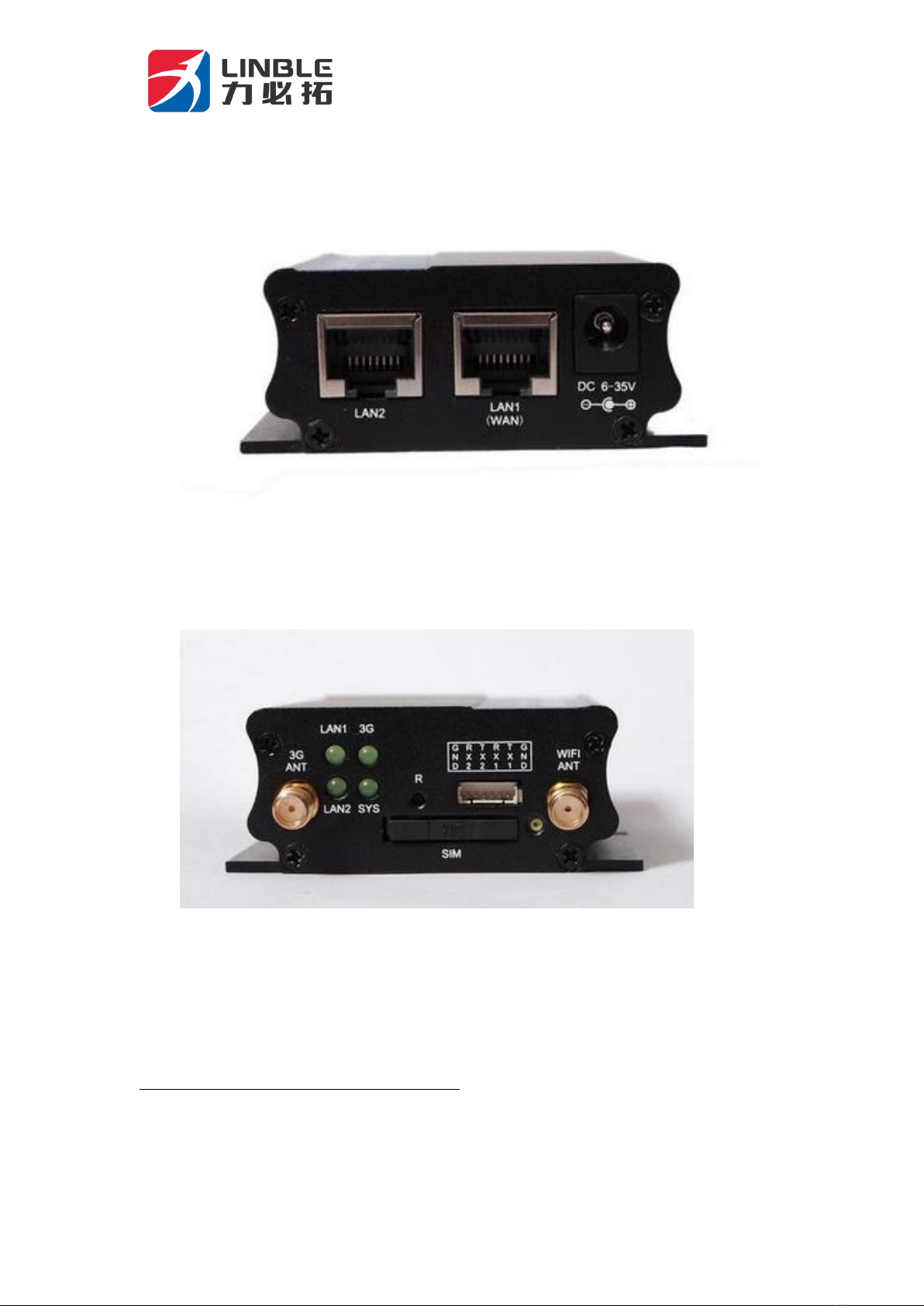
A Side
T260S Series Router
User Manual
Shenzhen Libtor Technology Co., Ltd Page 7 of
47
Add: Room 608, Building A Hongshengyuan Industrial Zone,No.339 Bulong Road, Bantian
Street Office, Longgang District, Shenzhen City, Guangdong Province.
Web:http:www.libtor.com Tel: 86-755-28345166-807 Mobile:86-130 5804 9855
Mail: sales@szlbt.net
B side
A side :

T260S Series Router
User Manual
Shenzhen Libtor Technology Co., Ltd Page 8 of
47
Add: Room 608, Building A Hongshengyuan Industrial Zone,No.339 Bulong Road, Bantian
Street Office, Longgang District, Shenzhen City, Guangdong Province.
Web:http:www.libtor.com Tel: 86-755-28345166-807 Mobile:86-130 5804 9855
Mail: sales@szlbt.net
1.LAN1/LAN2 :Standard RJ45 connector ;LAN1 can be used as
WAN port in the standard router mode.
2.DC Power connector: use 2.1mm round head power connector,
Inner ”+” Outer:”-“,the Voltage Output is 6-35V,the power is
larger than 10W.
B side:
1、3G/4G/WIFI antenna connector: Sub Miniature A (outer part is
helical and the inner part is hole connector)
2.Indicator :
LAN1/LAN2:The LAN1/LAN2 indicator light is on normally
when wire internet connect with LAN1/LAN2 port . The indicator
light will be flashing sometimes when data flow come through.
SYS light: SYS light will be on when power is connected .It flashes
slowly when system starts normally. It flashes quickly when press
reset button .
3G/4G light: It flashes quickly when dial(bridge connection AP) in
3G/4G or WIFI bridge connection mode. It will be on normally
when connect successfully.
3.R (reset) button : Press this button for 5 seconds when it is in
open state , SYS light will be flashing quickly, restart . After that ,
Reset successfully.
4. Serial port connector: 2 mm 4 Pin connector. From left to Right
is GDN/TX/RX/DC+, DC+ can be used as power output and power
input.

T260S Series Router
User Manual
Shenzhen Libtor Technology Co., Ltd Page 9 of
47
Add: Room 608, Building A Hongshengyuan Industrial Zone,No.339 Bulong Road, Bantian
Street Office, Longgang District, Shenzhen City, Guangdong Province.
Web:http:www.libtor.com Tel: 86-755-28345166-807 Mobile:86-130 5804 9855
Mail: sales@szlbt.net
5. SIM card slot : self locked slot, the card slot will be popped up
when long press yellow button on the right
Indicator state specification
Name
State
Description
System
light(SYS)
Constant
light
Constant light when power supplied, It
shows power supply is normal.
Flash
slowly
The light state will change from
constant light to flash slowly which it
takes about ten seconds when
connect electricity
Flash
quickly
The SYS light will flash quickly when
press reset button for 5 seconds. Then
system will restart later.
3G/4G
Indicator
Constant
light
Connection successful
Flash
slowly
Normal connection
Power off
No connection
LAN1、
LAN2 light
Constant
light
Already connected RJ45 port
Power off
light
Disconnect RJ45 port

T260S Series Router
User Manual
Shenzhen Libtor Technology Co., Ltd Page 10 of
47
Add: Room 608, Building A Hongshengyuan Industrial Zone,No.339 Bulong Road, Bantian
Street Office, Longgang District, Shenzhen City, Guangdong Province.
Web:http:www.libtor.com Tel: 86-755-28345166-807 Mobile:86-130 5804 9855
Mail: sales@szlbt.net
Reset button use method
SYS light (SYS) will be flashing quickly when long press RESET
button, the system resets successfully when router restarting.
Serial port’s usage
T260S only open UART1 as the RS232 serial port . Serial port
connector listed from left to right : GND/TX/RX/DC+, We only
use GND/TX/RX when transmission. We can connect this serial
port with the serial port of 5 feet, 2 feet,2 feet separately in
computer . Then it will create a serial port communication. DC+ is
the connector of input and output for power .( Such as :The
output is 12 voltage when supply 12 voltage power, or it also can
supply equipment power by this port)
Power connector :
T260S offer 2.1 mm standard circle hole direct current supply The
electrodes are divided into positive pole and negative pole .Power
supply voltage ranged from 6 to 35 voltage .We suggest using 12
voltage to supply power.
Antenna connector
T260S has two SMA antenna connectors which the outer part is
spiral and the inner part is hole . It responds to 3G/4G/4G. WIFI
Este manual sirve para los siguientes modelos
7
Tabla de contenidos


