LG K4 LTE Manual de usuario

User guide. MFL69707701 (1.0)
This booklet is made from 98% post-consumer recycled paper.
This booklet is printed with soy ink. Printed in China
User guide.
Guía del usuario.

Copyright©2016 LG Electronics, Inc. All rights reserved.
LG and the LG logo are registered trademarks of LG Corp.
All other trademarks are the property of their respective
owners.

1
Important Customer Information
Before you begin using your new phone
Included in the box with your phone are separate information leaflets.
These leaflets provide you with important information regarding your new
device. Please read all of the information provided. This information will
help you to get the most out of your phone, reduce the risk of injury, avoid
damage to your device, and make you aware of legal regulations regarding
the use of this device.
It’s important to review the Product Safety and Warranty Information guide
before you begin using your new phone. Please follow all of the product
safety and operating instructions and retain them for future reference.
Observe all warnings to reduce the risk of injury, damage, and legal
liabilities.

2
Important Customer Information...............................................1
Table of Contents .......................................................................2
The Basics...................................................................................5
Phone Overview.................................................................................................... 5
Help ........................................................................................................................7
Setting Up Your Phone ........................................................................................ 8
Removing the Battery and SIM Card ................................................................10
Inserting and Removing a Memory Card...........................................................11
Charging Your Phone ..........................................................................................12
Optimizing Battery Life ......................................................................................13
Turning Your Phone On and Off ........................................................................15
Your Google Account .......................................................................................... 17
Anti-Theft Guide .................................................................................................18
Touch Screen .......................................................................................................19
Getting to Know the Home Screen ..................................................................20
Apps: How to View, Open, and Switch .............................................................26
Capturing a Screenshot.....................................................................................33
Phone’s Status Icons .........................................................................................34
Managing Notifications .....................................................................................36
Setting Your Lock Screen ..................................................................................38
Connecting to Networks and Devices .................................... 41
Wi-Fi.....................................................................................................................41
Wi-Fi Direct ........................................................................................................42
Bluetooth.............................................................................................................42
PC Connections with a USB Cable ..................................................................43
PC Connections with a USB Cable for Mac OS X Users ..............................44
Calls .......................................................................................... 45
Placing and Ending Calls ..................................................................................45
Answering or Rejecting Calls............................................................................48
Working with the Recent Tab ............................................................................50
Calling Your Contacts.........................................................................................52
Options During a Call ........................................................................................53
Managing Multiple Calls....................................................................................53
Table of Contents

3
Table of Contents
Communication ....................................................................... 55
Contacts..............................................................................................................55
Messaging............................................................................................................61
Email....................................................................................................................65
Entertainment .......................................................................... 68
Camera................................................................................................................68
Gallery ................................................................................................................. 73
Music ................................................................................................................... 78
Tools.......................................................................................... 82
Capture+ .............................................................................................................82
Clock....................................................................................................................84
Calculator............................................................................................................85
Calendar..............................................................................................................86
Voice Recorder ................................................................................................... 87
File Manager.......................................................................................................89
Google Apps .......................................................................................................90
Settings .................................................................................... 92
WIRELESS NETWORKS...................................................................................92
DEVICE................................................................................................................ 97
PERSONAL ...................................................................................................... 102
SYSTEM ............................................................................................................... 106
Safety....................................................................................... 110
Consumer Information About Radio Frequency Emissions.......................... 112
Consumer Information on SAR .......................................................................117
FCC Hearing-Aid Compatibility (HAC) Regulations for Wireless Devices.. 118
Caution: Avoid potential hearing loss. ........................................................... 120
TIA Safety Information.................................................................................... 122
Safety Information ........................................................................................... 125
FDA Consumer Update ................................................................................... 129

4Table of Contents
Specifications ..........................................................................141
FAQ ..........................................................................................142
LIMITED WARRANTY STATEMENT ....................................148
Index ........................................................................................155

5
The Basics
Phone Overview
Front View
Proximity/Ambient
light sensor
Earpiece
Front camera
Power/Lock button
Back button Recent apps button
Home button
NOTES sAll screen shots in this guide are simulated. Actual displays may vary.
sInstructions to perform tasks in this guide are based on the default settings and may
change depending on the mode and software version on your phone.
1. Earpiece Lets you hear callers and automated prompts.
2. Back button Returns to the previous screen. Also closes pop-up items,
such as menus, dialog boxes and the on-screen keyboard.
3. Proximity/Ambient light sensor Senses proximity toward other objects
(such as your head) so that tap commands are not accidentally activated
during a call or when carried inside a pocket.
It also employs an ambient sensor which measures the surrounding light
and adjusts the LCD brightness to provide a vivid screen.
NOTE Don't block the sensor or near the sensor to avoid problems with the touch screen.
4. Front camera Use to take pictures and record videos of yourself. You
can also use this for video chatting. Keep it clean for optimal
performance.
5. Power/Lock button Press to turn off the screen backlight and lock the
screen, or turn the screen backlight back on. Press and hold to turn the
phone on/off, restart it, and activate/deactivate Airplane mode.

6The Basics
6. Recent apps button Displays recently used applications. If you touch
and hold this key, it opens a menu of available options.
7. Home button Returns to the Home screen from any screen.
Rear View
Back camera Flash
Volume button(s)
Speaker
Back cover
cutout
8. Back camera Use to take photos and record videos. Keep it clean for
optimal performance.
9. Back cover cutout Use to remove the back cover for access to the
battery, the SIM card slot, and the microSD card slot.
10. Speaker Use to listen to audio (e.g., music, videos, sound clips,
speakerphone, etc.) from the rear speaker instead of the earpiece.
11. Flash Brightens up the captured image or recorded video when you
turn on the flash.
12. Volume button(s) Press to adjust the ringer, the media volumes, or the
in-call volume during a call. They also access shortcuts when enabled in
the Settings menu.
TIPS sWith the screen backlight off (asleep), you can press either of the Volume button(s)
twice quickly to activate the Camera app.
sWith the screen unlocked, press both of the Volume button(s) at the same time to
open the Capture+ app to write a memo.

7
The Basics
Top and Bottom Views
USB/Charging port
Microphone
Headset jack
Microphone
13. Microphone Transmits your voice to the other caller. It's also used for
voice-activated functions.
14. Headset jack Allows you to plug in an optional headset for convenient,
hands-free conversations. You can also plug in headphones to listen to
music.
15. USB/Charging port Allows you to connect the phone and the USB
cable for use with the charger adapter, or other compatible accessories.
16. Microphone Transmits your voice to the other caller. It's also used for
voice-activated functions.
Help
The Help app allows you to quickly and conveniently view information
about your phone, including how-to videos, Icon glossary, etc.
To access Help, tap the Home button >
the Apps icon >
Help .

8The Basics
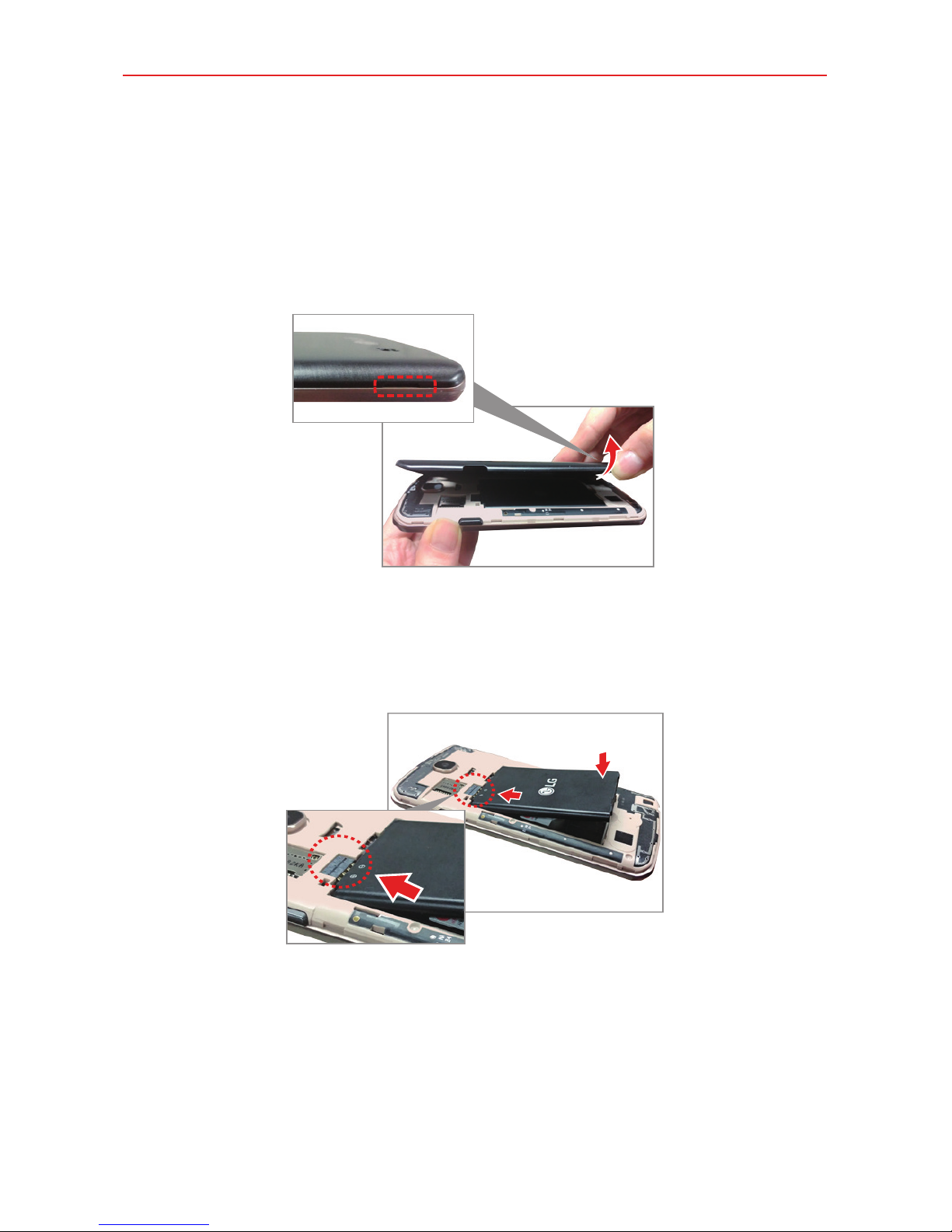
Setting Up Your Phone
Step 1. Remove the Back Cover
With the phone facing down, insert your fingernail into the cutout located
on the lower left of the back cover and lift the cover up gently.
Step 2. Insert the Battery
Insert the battery, making sure the gold contacts line up. Press down gently
to secure it.
Tabla de contenidos
Otros manuales de Teléfono móvil de LG
Manuales populares de Teléfono móvil de otras marcas

Blackbe;rry
Blackbe;rry Q10 Manual de usuario

Blackbe;rry
Blackbe;rry Bold 9900 Manual de usuario

Blackbe;rry
Blackbe;rry STORM 9500 - VERSION 5.0 Manual de usuario

ISAFE MOBILE
ISAFE MOBILE IS655.2 Manual de usuario

Blackbe;rry
Blackbe;rry CURVE 8300 - SMARTPHONE Manual de usuario

Blackbe;rry
Blackbe;rry 8707 - VERSION 4.1 Manual de usuario