
Leadtek TeVue Manual de usuario

TeVue
User's Manual

TeVue User's Manual
Version A
May 2004 P/N: W0500869
TeleFone TV Network, LLC
Telephone number: 212 5019000
Address: TeleFone TV Network, LLC
750 Lexington Ave
New York, NY 10022

Table of Contents
1 Getting Started ...................................................... 1
2 Getting to Know Your ............................... 3
3 Installation ............................................................ 8
Overview ........................................................................ 1
Feature highlights ........................................................... 1
What's in the package ..................................................... 2
Front view ....................................................................... 3
Rear view ........................................................................ 4
Using remote control ...................................................... 5
Installing the unit ............................................................ 8
Using external devices .................................................. 11
4 Making a Call ....................................................... 12
5 Making Adjustments .......................................... 14
Before making a video call ........................................... 12
Making a video call ...................................................... 13
Using OSD menus ........................................................ 14
Reviewing IPs ................................................................ 15
Configuration .................................................................. 16
Password Checking .......................................................... 16
Phone Setup ...................................................................... 17
Network Setup .................................................................. 18
Bandwidth Setup ............................................................... 19
Advanced Setup ................................................................ 20
Firmware Update .............................................................. 23
Configuration Changed ..................................................... 26
TeVue

Table of Contents
Error messages in bootup sequence .............................. 36
Other problems ............................................................. 39
Phonebook ....................................................................... 27
Change Password ............................................................ 33
Restore factory settings ................................................... 34
Add ................................................................................... 27
Search ............................................................................... 28
InBox ................................................................................ 31
OutBox ............................................................................. 32
6 OSD Menu Tree ................................................... 35
7 Trouble Shooting ................................................ 36
8 FCC Statement ................................................... 40
Error messages in dialing sequence .............................. 38

Overview
Feature highlights:
TeVue is designed to avoid complicated installation. And with the buttons on
the remote control, you are able to access the user-friendly on screen display
menu (OSD), easily control the functions and make adjustments.
has a built-in high quality CCD camera. Images are transmitted
through the Internet at up to 24 frames per second (fps) .
While making a video call, you can enjoy the brilliant real-time color images
of yourself, your correspondents or both. If you do not want your image to
display on the caller or receiver's screen, 's private mode can do just
that.
is fully compliant with H.323 international standards for video
communication. It can be used with any videophone that are compatible with
this standard.
Broadband IP address videophone
Connect the other videophone by simply entering the IP address/number*
Friendly and easy operation through remote control
Phonebook dialing function
2 A/V inputs & 1 A/V output for additional video/audio input and
video/audio output
Up to 24 frames per second video display (@ CIF resolution)
Video selectable and picture image up to VHS quality
Echo-cancellation and no delay high quality audio
TeVue
(@ CIF resolution)
TeVue
TeVue
Built-in high quality CCD camera
1Getting Started
*Note: To dial numbers, TeVue must work in conjunction
with additional accessories, such as the H.323 Gatekeeper.
TeVue User's Manual 1

Audio/Video Cable
Power Adapter
Ethernet Cable
User's Manual
What's in the package?
Please unpack the product package with caution; inspect
the Items closely. If you find any damaged item, please
contact your local distributor immediately. Also, please keep
the box and packing material for future use in the event of
future shipments.
Power Cord
TeVu e
TeVue x1
Remote Control x1
User's Manual x1
Microphone x1
Microphone Extension
Cable x 1
Power Adapter x1
Power Cord x1
Ethernet Cable (RJ-45) x1
Audio/Video Cable x1
23
456
789
0
1
VOL
#
VOL
OK
S
H
A
R
P
F
A
S
T
Y0400033
., !;
PQRS TUV
STILL
ABC DEF
PRIVACY
GHI JKL MNO
VIEW
WXYZ
CAMERA
MUTE IN-BOX OUT-BOX
PHONEBOOKCLEAR
Remote Control Microphone
MIC
VIDEO POWER
Microphone
Extension
Cable
2
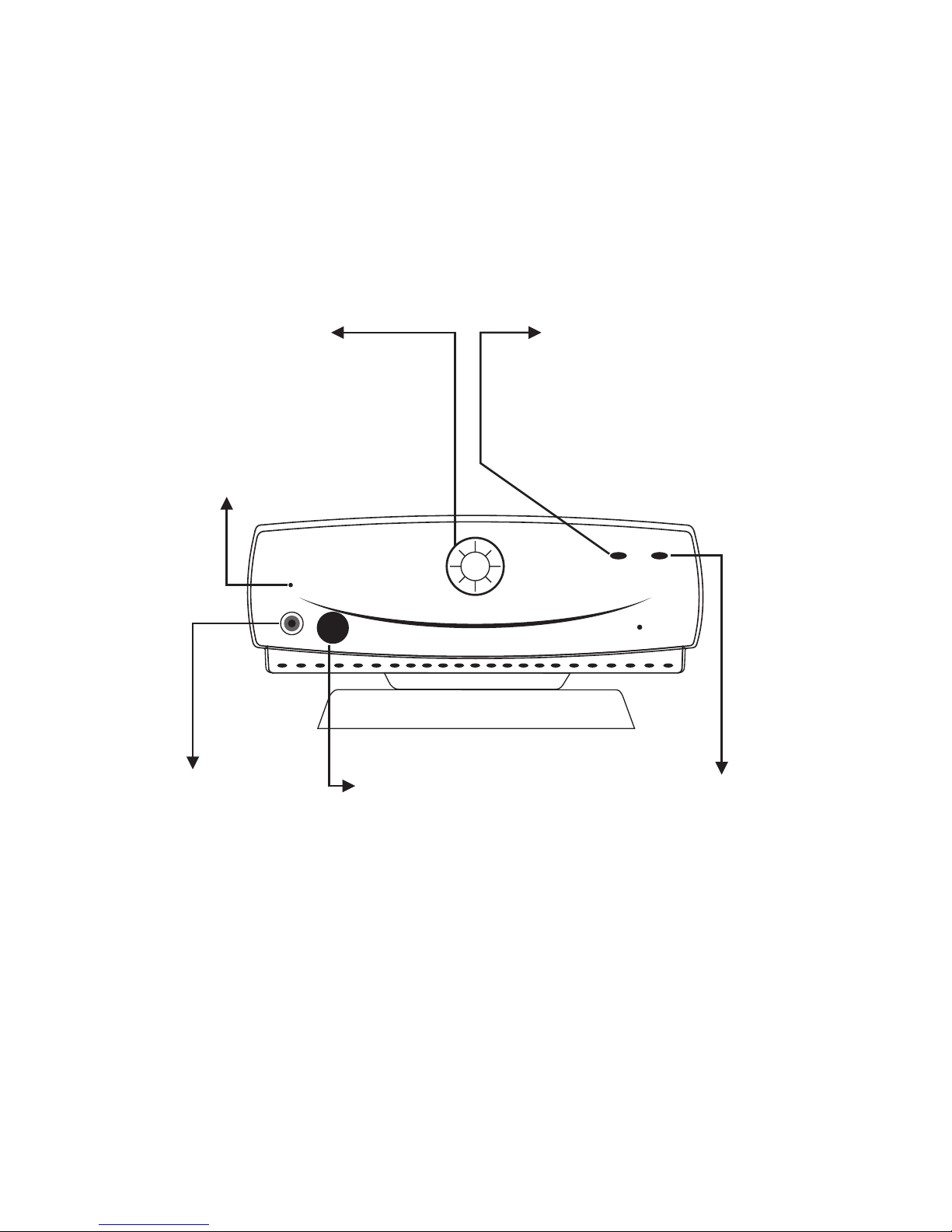
2Getting to Know Your TeVue
Front view
CCD Camera:
The input source of
local video image. This
is a mini built-in CCD
camera.
Power Indicator:
Lights green when the
power is on.
Video Indicator:
Lights orange when the main
unit is in video transmission.
When TeVue is in audio mute
(see p. 6), the video indicator
blinks.
Microphone
Connector:
You need to
connect the
external
microphone here
in order to input
voice.
Remote Control
Signal Receiver:
Receives the infrared
signal from the remote
control. When using
the remote control,
please aim at this
receiver.
Buzzer
MIC
VIDEO POWER
TeVue User's Manual 3

Rear view
COM
(reserved)
DC IN
Connect to the
DC output of
power adapter
A/V Input 1
Audio and
Video input
connector 1
WAN
Ethernet
connector
Power Switch
For turning
on/off the power
ON
COM
OFF
POWER
WAN
AV OUT AV IN2 AV IN1
Audio
Video
LINK
LINK
Network
activity
indicator
A/V Output
Audio and
Video output
connector
A/V Input 2
Audio and
Video input
connector 2
4

Using remote control
1. Number keys
2.
3. Mute
4. Clear
5. IN-BOX
6. Left arrow
7. Vol -
8. On-hook / Off-hook
9. Still
10. Privacy
11. View
12. #
13. OUT-BOX
14. Camera
15. Phonebook
16. Vol +
17. Right arrow
18. OK
VOL
VOL
OK
S
H
A
R
P
F
A
S
T
Y0400033
23
456
789
0
1
#
., !;
PQRS TUV
ABC DEF
GHI JKL MNO
WXYZ
CLEAR
MUTE IN-BOX OUT-BOX
PHONEBOOK
CAMERA
VIEW
PRIVACY
STILL
@
F
A
S
T
S
H
A
R
P
The "FAST" and "SHARP" on and are
not applicable in this product.
TeVue User's Manual 5

Used with OSD menus; to move
the cursor left or to go back to
the previous menu. During a
video call, used to reduce the
incoming video bit rate.
OK: Used with OSD menus; to
pop up the OSD menu, to enter
the sub menu, or to confirm the
selection. During a video call,
related to the "Allow Remote
Control" option (see page 17).
Used with OSD menus; to move
the cursor right or to enter the sub
menu. During a video call, used to
raise the incoming video bit rate.
Used with OSD menus; to move the
cursor up. During a call, to turn the
volume of the speakerphone up.
Used with OSD menus; to
move the cursor down.
During a call, to turn the
volume of the
speakerphone down.
VOL
VOL
OK
S
H
A
R
P
F
A
S
T
Still:
To freeze the video image of
yourself so that the other party
can have a clearer display.
STILL
Camera:
To switch between the built-in
CCD camera and external
cameras connected to TeVue.
CAMERA
MUTE
Mute:
During a video call, this button
is used to mute the audio so that
you will not be heard by the
other party on the phone.
VIEW
View:
To select how local and remote
video is displayed on the screen.
The options are: Remote, PIP
upper-left, PIP lower-left, PIP
upper- right, PIP lower-right,
Local. And it switches in that
sequence.
CLEAR
Clear: To go back to the
previous menu, or to function as
Backspace when you input letters
or numbers. During a video call,
to refresh the screen should
artifacts appear due to temporary
network traffic congestion.
To dial phone numbers, must work in conjunction
with additional accessories, such as the H.323 Gatekeeper.
TeVue
Cursor Panel
Hot Keys
PHONEBOOK
Phonebook:
To bring out the phonebook
menu. See page 27.
PRIVACY
Privacy:
Stop sending your image to the
other side so that you will not be
seen by the person you talk to.
IN-BOX
IN-BOX:
To bring out the menu that
contains the numbers of the 10
last received calls.
OUT-BOX
OUT-BOX:
To bring out the menu that
contains the numbers of the 10
last dialed calls.
Using remote control (cont.'d)
6
Tabla de contenidos
Otros manuales de Sistema de conferencias de Leadtek


Manuales populares de Sistema de conferencias de otras marcas

Kramer
Kramer VIA GO Manual de usuario

AVT
AVT MAGIC AC1 Go Manual de usuario

ProSoft Technology
ProSoft Technology AN-X4-AB-DHRIO Manual de usuario

Sony
Sony PCS-I150 Manual de usuario

Middle Atlantic Products
Middle Atlantic Products VTC Series Manual de usuario

Prentke Romich Company
Prentke Romich Company Vanguard Plus Guía


