Larsen & Brusgaard LogTrackII Manual de usuario

LogTrackII Operating manual
Rev. 0.9


Larsen & Brusgaard LogTrackII Operating manual
Contents
1. Introduction.................................................................................................................................................4
2. Important: Jump Testing............................................................................................................................6
3. System Requirements..................................................................................................................................6
4. Package Contents.........................................................................................................................................7
5. Description...................................................................................................................................................8
6. Powering ON................................................................................................................................................9
7. Main Window.............................................................................................................................................10
8. Standby Mode............................................................................................................................................11
9. Jump Mode.................................................................................................................................................12
10. Start / Stop logging..................................................................................................................................13
11. Changing Trigger Altitudes....................................................................................................................14
12. Recorded pages........................................................................................................................................15
14. Download data.........................................................................................................................................15
15. Delete data................................................................................................................................................15
16. Resetting the LogTrackII........................................................................................................................16
17. Battery replacement................................................................................................................................17
18. LogTrackII Driver Installation Windows 7 / Windows 7 X64............................................................18
19. LogTrackII Driver Installation Vista / Vista X64................................................................................22
20. LogTrackII Driver Installation XP / XP64...........................................................................................24
21. LogTrackIIII Analysis Software............................................................................................................32
22. Specifications............................................................................................................................................33
Tuesday, May 18, 2010 Page 3

Larsen & Brusgaard LogTrackII Operating manual
1. Introduction
The LogTrackII Data Logger is a very small, thin, low power, easy to use device for
measuring barometric pressure, altitude and g-Force data.
LogTrackII can be set to activate/deactivate at different trigger altitudes and can automatically
store up to 100 separate jumps or up to 8 hours of recording time without any user input.
This ultra low power consumption device is specifically designed for skydiving, canopy
flight-testing, and other pressure relevant environments and applications.
LogTrackII comprises a +/-16 g-force, 3-axis high-resolution accelerometer data recorder.
LogTrackII is the perfect data logger where G forces need to be examined relative to
barometric pressure and altitude.
Among the features are:
•+/-16 g-force, 3-axis high-resolution accelerometer
•Barometric pressure sensor
•Large storage capacity (up to 8 hours recording time)
•Durable rubberized coating
•Super-thin curved design
•USB port for connection to PC using LogTrackII Data Analysis software
•Long lasting easy to find batteries
•On/off mode
•Built-In mounting holes for various pilot placements.
Tuesday, May 18, 2010 Page 4

Larsen & Brusgaard LogTrackII Operating manual
Using the LogTrackII Data Analysis software, recorded data can be downloaded to a PC. All
information logged by the unit can be displayed in a fast, clean and concise charting format
and can be archived for later data research and comparison.
Tuesday, May 18, 2010 Page 5

Larsen & Brusgaard LogTrackII Operating manual
2. Important: Jump Testing
Larsen & Brusgaard strongly recommends users of LogTrackII to make some practice test
jumps with the LogTrackII before using it for specific project related tests.
This way the users can familiarize themselves with the LogTrackII unit and the LogTrackII
PC software before spending time and money on business specific tests.
The LogTrackII may be put anywhere on the skydiver’s body. However, the closer the unit is
placed to the torso the more accurate the g-force measurements will be.
Based on many test jumps, Larsen & Brusgaard does not recommend placing the LogTrackII
on the hand or the arm due to movements and differences in air pressure. Different hand/arm
positions will not accurately record G-force data or the area of actual canopy opening
(deployment).
Placing the LogTrackII on the helmet will give more reliable data, but again, the head can
also make movements and result in inaccurate readings of G-force data and the area of actual
canopy opening (deployment).
3. System Requirements
Windows XP/XP64, Vista/Vista x64, Windows 7/Windows 7 x64
CD-ROM drive
One unoccupied USB port on your PC
Tuesday, May 18, 2010 Page 6

Larsen & Brusgaard LogTrackII Operating manual
4. Package Contents
Unpack the package and inspect all the items carefully.
If any of the items are damaged or missing or if you have any questions please contact
Larsen & Brusgaard.
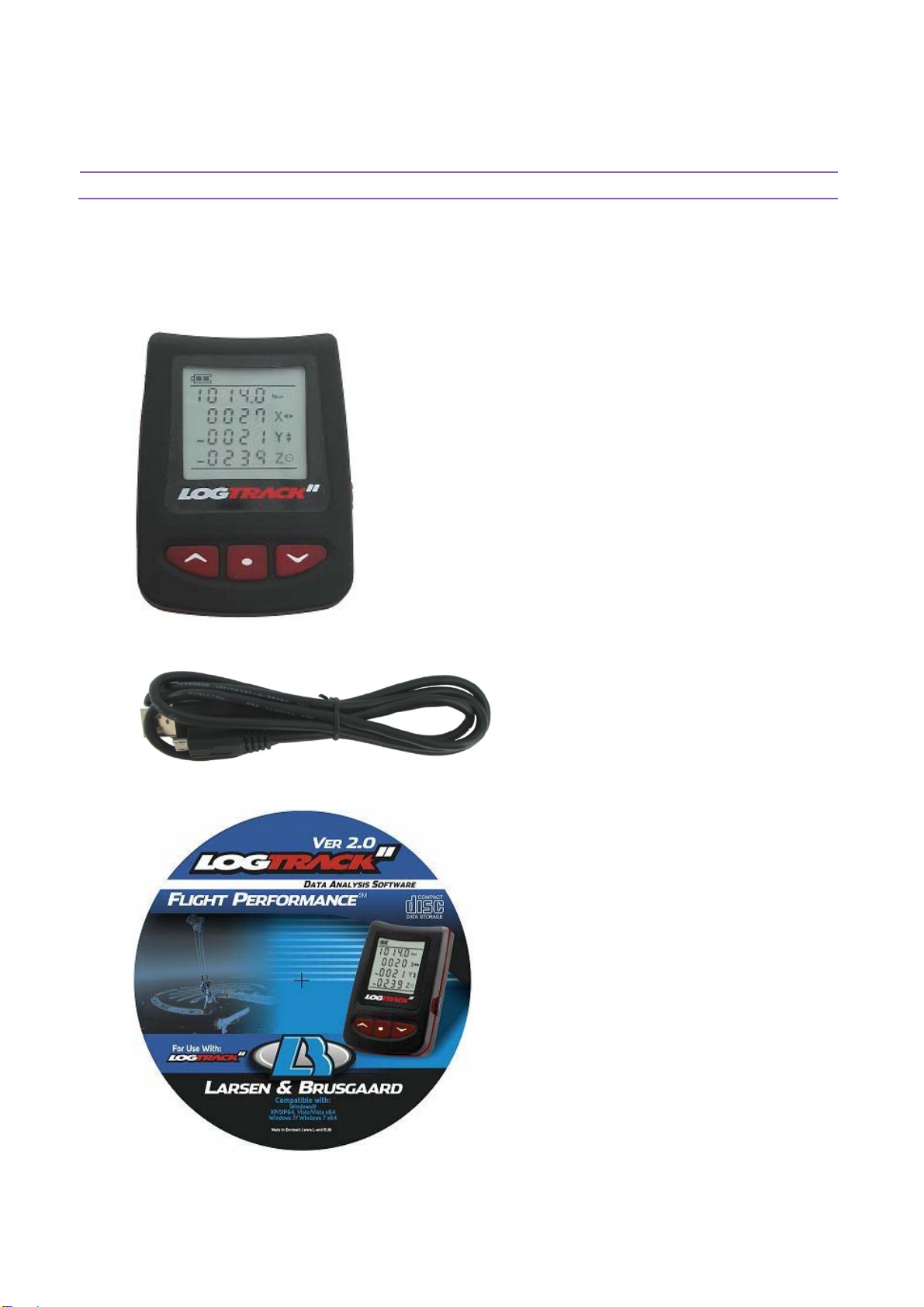
LogTrackII device:
100cm Micro-USB to USB cable for desktop PC
LogTrackII Data Analysis software PC CD-ROM
Tuesday, May 18, 2010 Page 7

Larsen & Brusgaard LogTrackII Operating manual
5. Description
1. LCD display
2. Left button
3. Middle button
4. Right button
5. Micro USB jack
Tuesday, May 18, 2010 Page 8

Larsen & Brusgaard LogTrackII Operating manual
6. Powering ON
The LogTrackII has been powered OFF prior to shipping from our factory. To power ON,
press and hold any key until the LogTrackII beeps, then release the button.
The LogTrackII runs a self-test and displays all icons:
It then displays the firmware version number together with L&B factory reference numbers,
Note:
If factory ID 1 is not 229 and if factory ID 2 is not 31 the unit is defective and must be
returned to L&B.
It then switches to a screen display referred to as the “Main Window”
Tuesday, May 18, 2010 Page 9

Larsen & Brusgaard LogTrackII Operating manual
7. Main Window
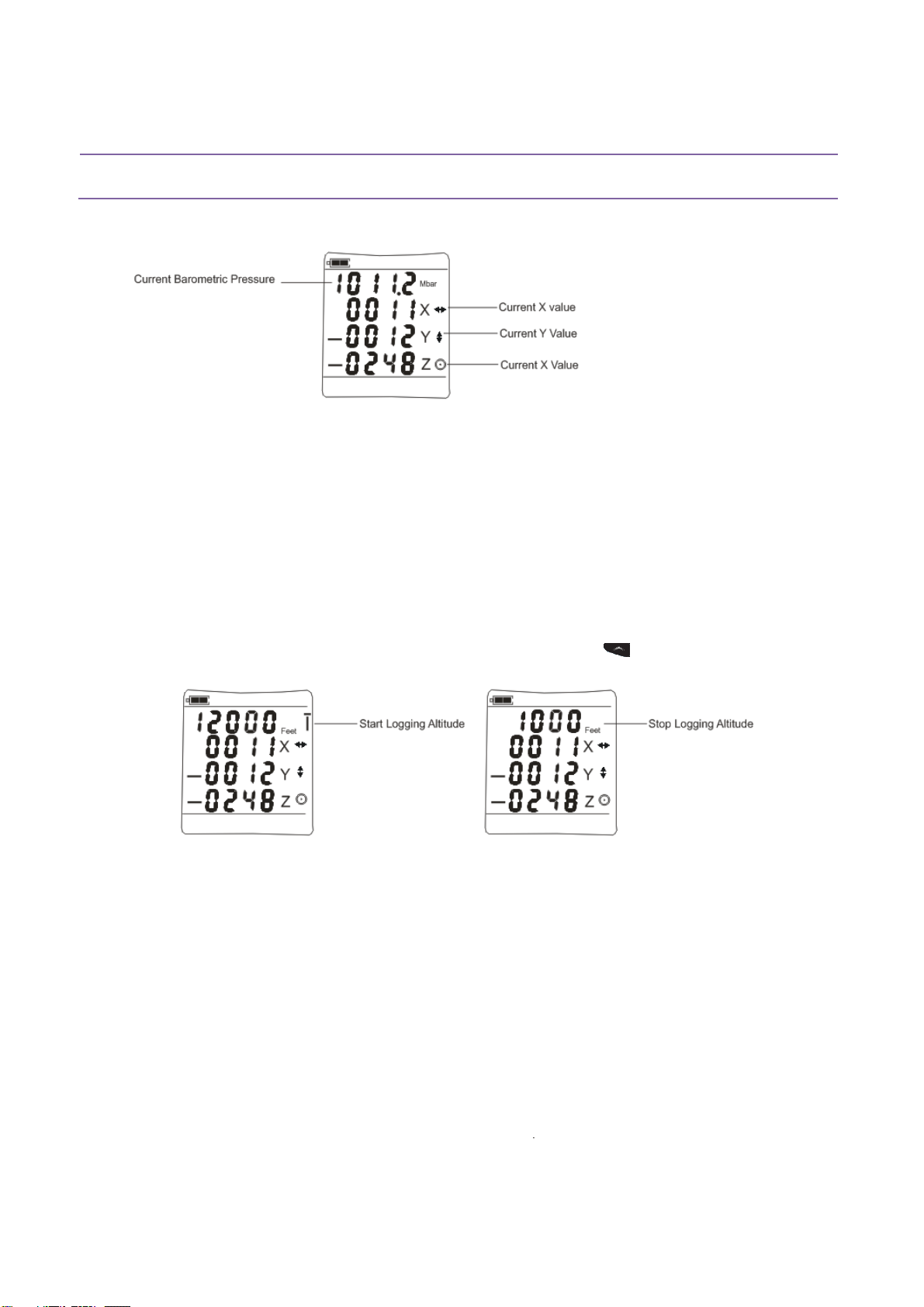
This window consists of the following:
Current Barometric Pressure:
This is also the “Ground Level” pressure when calculating the altitude after take-off
Current X, Y and Z value:
The values are “bit” values where 1 bit = 4mg
In the LogTrackII Data Analysis software all recorded 3-axis acceleration data are
shown as g-Force values within the range +/- 16g
To view the Start/Stop logging trigger altitudes, press and hold .
LogTrackII will switch between the start and stop logging trigger altitude heights.
In this screen example LogTrackII will automatically start logging at 12000 feet and stop
logging at 1000 feet.
To change the altitudes or switch to feet/meters please read section:
“Change Trigger Altitudes”
NOTE:
If no button has been pressed within 30 seconds LogTrackII will return to “Standby Mode”
(showing Current Barometric Pressure, Date, Time, seconds and Device ID)
To enter the Main window from Standby Mode, press
Tuesday, May 18, 2010 Page 10
Tabla de contenidos