LaCie Hub Manual de usuario

Quick Install Guide


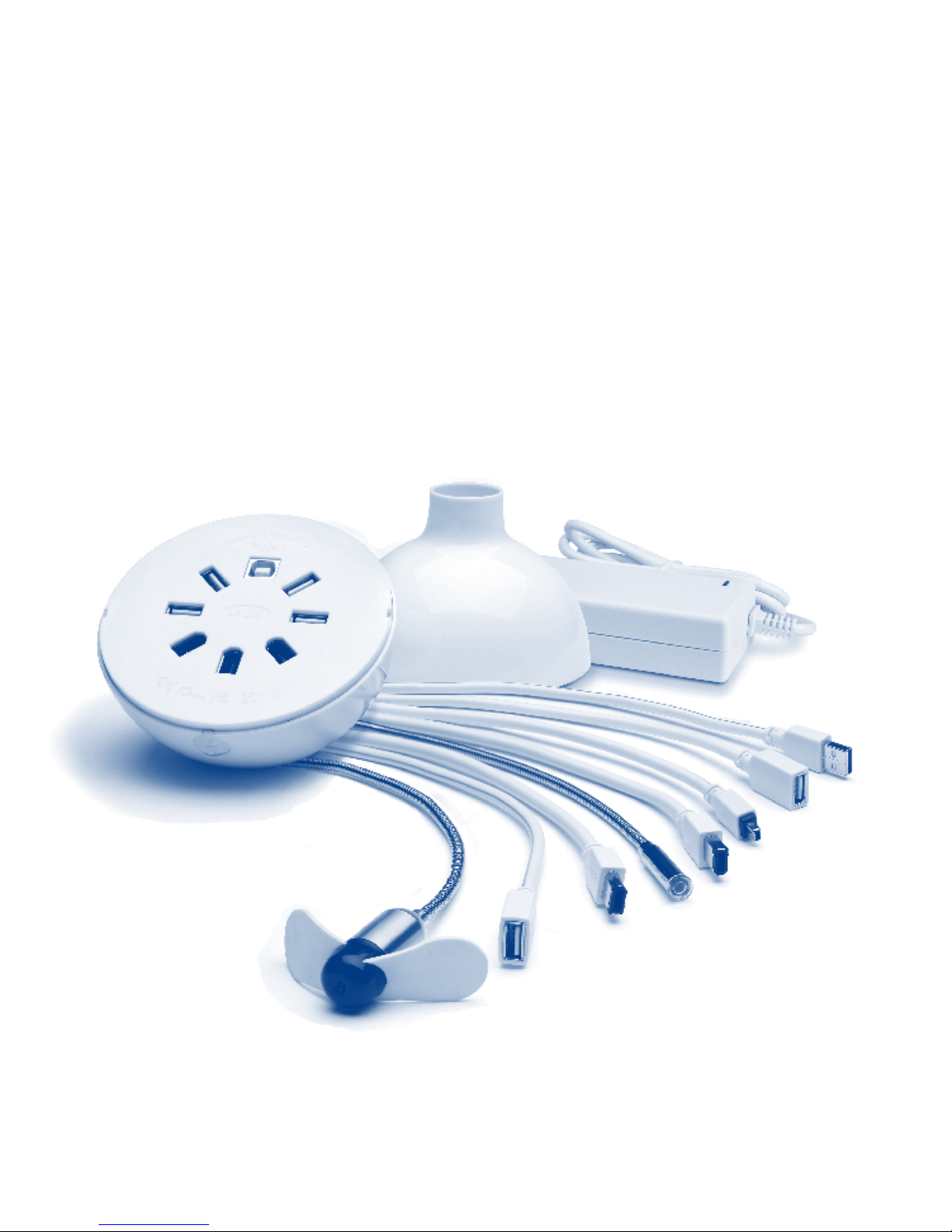
box content
LaCie Hub
5 flexible Hi-Speed USB 2.0 cables
1 Hi-Speed USB 2.0 extension cable
3 flexible FireWire 400 cables
Protect your investment –
register for free technical support:
www.lacie.com/register
1 FireWire 400 extension cable
USB fan
USB light
Power supply kit

Connect the USB uplink cable (A) or
FireWire 400 uplink cable (B) to the
Hub. Connect the other end of the
uplink cable to your computer.
NOTE: If you don’t have a FireWire 400
port on your computer and you only plug
the USB 2.0 uplink cable into your
computer, your Hub’s FireWire 400 ports
will be disabled.
Make sure there are available Hi-Speed USB 2.0 and/or FireWire 400
ports on your computer and that the computer is turned on.
Disengage your Hub’s top cover by
twisting it to the left. Remove the cover.
1
2
3
WHITE
VIOLET
GREEN
RED
YELLOW
ORANGE
BLUE
PINK
TO DEVICE
TO COMPUTER
A
B
USB A
MALE
USB B
MALE
USB A
FEMALE
MINI USB
MALE
FIREWIRE
6-PIN MALE
FIREWIRE
6-PIN FEMALE
FIREWIRE
4-PIN MALE
POWER SUPPLY PORT
WHITE
VIOLET
GREEN
RED
YELLOW
ORANGE
BLUE
PINK
TO DEVICE
TO COMPUTER
A
B
USB A
MALE
USB B
MALE
USB A
FEMALE
MINI USB
MALE
FIREWIRE
6-PIN MALE
FIREWIRE
6-PIN FEMALE
FIREWIRE
4-PIN MALE
POWER SUPPLY PORT

When the Hub is properly connected, the power LED will come on (one LED
for USB and one LED for FireWire 400, depending on the type of connection).
Connect the provided cables to your Hub, as needed, to connect your devices.
4
5
WHITE
VIOLET
GREEN
RED
YELLOW
ORANGE
BLUE
PINK
TO DEVICE
TO COMPUTER
A
B
USB A
MALE
USB B
MALE
USB A
FEMALE
MINI USB
MALE
FIREWIRE
6-PIN MALE
FIREWIRE
6-PIN FEMALE
FIREWIRE
4-PIN MALE
POWER SUPPLY PORT

Feed the cables through the hole in the cover; place the cover on the Hub
and twist the cover to the right to lock it in place.
Connect and use your USB and FireWire 400 devices.
NOTE: If you plug too many bus-powered devices (such as 2.5” USB hard drives)
into your Hub, it may not provide sufficient power to operate all your devices. In this
case, you will need to use the included external power supply.
NOTE: To increase your Hub’s stability, we suggest bending one or two interface
cables level with your work surface.
7
6
WHITE
VIOLET
GREEN
RED
YELLOW
ORANGE
BLUE
PINK
TO DEVICE
TO COMPUTER
A
B
USB A
MALE
USB B
MALE
USB A
FEMALE
MINI USB
MALE
FIREWIRE
6-PIN MALE
FIREWIRE
6-PIN FEMALE
FIREWIRE
4-PIN MALE
POWER SUPPLY PORT

FR Contenu du coffret
LaCie Hub, 5 câbles semi-rigides USB 2.0 Hi-Speed, 1 rallonge USB 2.0 Hi-Speed,
3 câbles semi-rigides FireWire 400, 1 rallonge FireWire 400, ventilateur USB, lampe USB,
kit d’alimentation
Procédure d'installation
1. Assurez-vous qu'un port USB 2.0 Hi-Speed et/ou FireWire 400 est disponible sur
l'ordinateur, et veillez à ce que celui-ci soit sous tension.
2. Désengagez le capot du Hub en le faisant tourner vers la gauche. Retirez le capot.
3. Reliez le câble de connexion USB (A) et/ou FireWire 400 (B) au Hub. Branchez l'autre
extrémité du câble à l'ordinateur.
REMARQUE : Si l'ordinateur ne dispose pas d'un port FireWire 400, le fait de
brancher uniquement le câble USB 2.0 à l'ordinateur ne fera pas fonctionner les ports
FireWire 400 du Hub.
4. Une fois le Hub correctement relié, les voyants d'alimentation s'allument (un voyant pour
l'interface USB et un autre pour l'interface FireWire 400, selon le type de connexion).
5. Connectez les câbles fournis au Hub, de manière à relier vos périphériques.
6. Faites passer les câbles par le trou du capot ; replacez le capot sur le Hub et
refermez-le en le tournant vers la droite.
7. Vos périphériques USB et FireWire 400 sont prêts à être utilisés.
REMARQUE : Le fait de brancher sur le Hub un nombre trop important de périphériques
alimentés par le bus (par exemple des disques durs 2,5" USB) peut rendre l'alimentation
des périphériques insuffisante. Le cas échéant, utilisez l'alimentation externe fournie avec
l'appareil.
REMARQUE : Afin d'accroître la stabilité du Hub, il est conseillé de ramener un ou deux
câbles d'interface au niveau de votre plan de travail.

IT Contenuto della confezione
LaCie Hub, 5 cavi Hi-Speed USB 2.0 flessibili, 1 cavo di prolunga Hi-Speed USB 2.0,
3 cavi FireWire 400 flessibili, 1 cavo di prolunga FireWire 400, ventola USB, luce USB,
kit con alimentatore
Procedura d'installazione
1. Verificare che ci siano porte Hi-Speed USB 2.0 e/o FireWire 400 libere sul computer
e che il computer sia acceso.
2. Sganciare la copertura superiore dell'hub LaCie Hub ruotandola verso sinistra
e rimuoverla.
3. Collegare il cavo di uplink USB (A) o FireWire 400 (B) all'hub LaCie Hub. Collegare
l'altra estremità del cavo di uplink al computer.
NOTA: se il computer non dispone di porte FireWire 400 e si collega il cavo di
uplink USB 2.0 solo al computer, le porte FireWire 400 dell'hub verranno
disabilitate.
4. Se l'hub Hub è collegato correttamente, il LED dell'alimentazione si accende (un LED
per l'interfaccia USB e un LED per l'interfaccia FireWire 400), a seconda del tipo di
connessione usata).
5. Collegare i cavi forniti all'hub Hub a seconda del tipo di periferica che si desidera
usare.
6. Inserire i cavi nel foro della copertura, rimontare la copertura sull'hub Hub e
ruotarla verso destra per fissarla in posizione.
7. Collegare e accendere le periferiche USB e FireWire 400.
NOTA: se si collegano troppe periferiche alimentate dal bus (come le unità disco USB da
2,5"), è possibile che l'hub Hub non sia in grado di fornire la potenza necessaria per
alimentarle tutte. In questo caso è necessario usare l'alimentatore esterno fornito con
l'hub.
NOTA: per rendere l'hub Hub più stabile, è consigliabile piegare uno o due cavi di
interfaccia e allinearli con la superficie di lavoro.

DE Packungsinhalt
LaCie Hub, 5 flexible Hi-Speed USB 2.0-Kabel, 1 Hi-Speed USB 2.0-
Verlängerungskabel, 3 flexible FireWire 400-Kabel, 1 FireWire 400-Verlängerungskabel,
USB-Lüfter, USB-Leuchte, Netzteilsatz
Einrichtung Schritt für Schritt
1. Stellen Sie sicher, dass Ihr Computer eingeschaltet ist und über freie Hi-Speed
USB 2.0- und/oder FireWire 400-Anschlüsse verfügt.
2. Lösen Sie die obere Abdeckung des Hub, indem Sie sie nach links drehen.
Entfernen Sie die Abdeckung.
3. Schließen Sie das USB-Uplink-Kabel (A) oder das FireWire 400-Uplink-Kabel (B) an
den Hub an. Schließen Sie das andere Ende des Uplink-Kabels an Ihren Rechner an.
HINWEIS: Wenn Ihr Computer keinen FireWire 400-Anschluss hat und Sie nur das
USB 2.0-Uplink-Kabel an den Computer anschließen, sind die FireWire 400-
Anschlüsse des Hub deaktiviert.
4. Wenn der Hub richtig angeschlossen ist, leuchten die Strom-LEDs auf (je eine LED
für USB und FireWire 400, je nach Verbindungsart).
5. Schließen Sie die im Lieferumfang enthaltenen Kabel nach Bedarf an den Hub an,
um Ihre Geräte anzuschließen.
6. Führen Sie die Kabel durch die Aussparung in der Abdeckung. Platzieren Sie die
Abdeckung auf dem Hub und drehen Sie sie nach rechts in die richtige Position.
7. Nun können Sie Ihre USB- und FireWire 400-Geräte anschließen und verwenden.
HINWEIS: Wenn Sie zu viele Geräte anschließen, die über den Bus mit Strom versorgt
werden (wie 2,5-Zoll-USB-Festplatten), kann der Hub möglicherweise nicht alle Geräte mit
ausreichend Strom versorgen. In diesem Fall benötigen Sie das im Lieferumfang
enthaltene externe Netzteil.
HINWEIS: Um die Stabilität des Hub zu verbessern, empfiehlt es sich, ein oder zwei
Schnittstellenkabel so zu biegen, dass sie parallel zur Arbeitsfläche verlaufen.

ES Contenido del paquete
LaCie Hub, 5 cables flexibles Hi-Speed USB 2.0, 1 cable alargador Hi-Speed USB 2.0, 3
cables flexibles FireWire 400, 1 cable alargador FireWire 400, ventilador USB, luz USB,
kit de alimentación
Guía de instalación
1. Asegurarse de que haya puertos Hi-Speed USB 2.0 y/o FireWire 400 disponibles en
el ordenador y de que el ordenador esté encendido.
2. Soltar la tapa superior de la unidad Hub girándola hacia la izquierda.
Extraer la tapa.
3. Conectar el cable de enlace ascendente USB (A) o el cable de enlace ascendente
FireWire 400 (B) a la unidad Hub. Conectar el otro extremo del cable de enlace
ascendente al ordenador.
NOTA: Si no dispone de puerto FireWire 400 en el ordenador y sólo enchufa en él
el cable de enlace ascendente USB 2.0, los puertos FireWire 400 de la unidad Hub
se deshabilitarán.
4. Cuando la unidad Hub esté conectada correctamente, el LED de encendido se
iluminará (un LED para USB y otro LED para FireWire 400, dependiendo del tipo
de conexión).
5. Conectar los cables suministrados a la unidad Hub, según se requiera, para
conectar sus dispositivos.
6. Pasar los cables a través del orificio de la tapa, colocar la tapa sobre la unidad Hub
y girarla hacia la derecha para bloquearla en su sitio.
7. Conectar y utilizar los dispositivos USB y FireWire 400.
NOTA: Si enchufa demasiados dispositivos alimentados desde bus (como discos duros
USB de 2,5 pulgadas) a la unidad Hub, es posible que éste no suministre suficiente
energía para hacer funcionar todos los dispositivos. En este caso, necesitará utilizar la
fuente de alimentación externa incluida.
NOTA: Para aumentar la estabilidad de la unidad Hub, le sugerimos que doble uno o
dos cables de interfaz nivelados con la superficie de trabajo.
Otros manuales para Hub
1
Tabla de contenidos
Otros manuales de Cambiar de LaCie