Kraun KR.KA Manual de usuario

ADSL2/2+ Modem Router
ADSL2/2+ Modem RouterADSL2/2+ Modem Router
ADSL2/2+ Modem Router
Guida d'utente
User Guide
Cod. KR.KA

ADSL2/2+ Modem Router
www.kraun.it
2
Copyright Statement
KRAUN
®
is a registered trademark of CDC Group. All other brands or product names are
trademarks or registered trademarks of their respective companies. The pictures of the
products are indicative and under no circumstances binding.
KRAUN
®
è un marchio registrato del Gruppo CDC. Tutti i nomi, marchi e marchi registrati
riportati appartengono ai legittimi proprietari. Le immagini del prodotto sono indicative e non
vincolanti.
Dichiarazione di conformità sintetica
Ai sensi dell’art. 2 comma 3 del D.M. 275 del 30/10/2002
Si dichiara che questo prodotto è conforme alle normative
vigenti e soddisfa i requisiti essenziali richiesti dalle direttive
2004/108/CE, 2006/95/CE e 1999/05/CE
quando ad esso applicabili.
Short Declaration of conformity
We declare this product is complying with the laws
in force and meeting all the essential requirements
as specified by the directives
2004/108/CE, 2006/95/CE and 1999/05/CE
whenever these laws may be applied

ADSL2/2+ Modem Router
www.kraun.it
3
CONTENTS
Chapter 1. Overview .............................................................................. 4
1.1 Product Introduction ........................................................................... 4
1.2 Product Features ............................................................................... 4
1.3 Supporting Protocol ........................................................................... 4
1.4 Data Encapsulation ............................................................................ 4
Chapter 2. Hardware Installation .......................................................... 5
2.1 ADSL Router Connection .................................................................. 5
2.2 USB Installation ................................................................................. 6
Chapter 3. Web Management Configuration ....................................... 7
3.1 Network Configuration of Your Computer .......................................... 7
3.2 Verifying the Connection .................................................................... 9
3.3 Logging in to the Router .................................................................... 10
Chapter 4 Quick Installation ................................................................. 12
4.1 Configure PPPoE ............................................................................... 12
4.2 Configure PPPoA ............................................................................... 14
4.3 Configure MER .................................................................................. 15
4.4 Configure IPoA .................................................................................. 18
Chapter 5. Configuration ....................................................................... 20
5.1Device Information .............................................................................. 20
5.2Advanced Settings .............................................................................. 21
5.2.1 WAN ................................................................................................ 21
5.2.2 LAN ................................................................................................. 29
5.2.3 NAT ................................................................................................. 29
5.2.4 Security ........................................................................................... 37
5.2.5 Routing ............................................................................................ 41
5.2.6. DNS ............................................................................................... 43
5.2.7 DSL ................................................................................................. 45
5.3 DHCP ................................................................................................. 46
5.4 System Tool ....................................................................................... 47
5.4.1 Settings ........................................................................................... 47
5.4.2 System Log ..................................................................................... 48
5.4.3 Internet Time ................................................................................... 50
5.4.4 Access Control ................................................................................ 50
5.4.5 Software Update ............................................................................. 53
5.4.6 Save/Reboot ................................................................................... 52
Chapter 6 Appendix ............................................................................... 54
Troubleshooting ....................................................................................... 54
FAQ .......................................................................................................... 54

ADSL2/2+ Modem Router
www.kraun.it
4
Chapter 1. Overview
1.1. Introduction
KR.KA ADSL2+ Modem Router complies with ADSL, ADSL2 and ADSL2+
standards, supporting up to 24Mbps downstream rate and 1Mbps upstream
rates. It supports multiple network protocols and provides NAT Router and
Bridge functions. In addition, the intelligent software, Setup Wizard, can
assist you to access the Internet quickly and easily.
1. 2. Features
• Provides up to 24Mbps downstream rate and 1Mbps upstream rate
• Supports DHCP, NAT, IGMP, ICMP, ARP
• One 10/100M Auto-Negotiation RJ-45 Ethernet port for network
adapter, Hub and Switch connectivity
• One RJ-11 port and Voice Splitter included
• One USB port for easy configuration
• Provides Web-based management and firmware upgrade
• Complies with ADSL, ADSL2 and ADSL2+ standards
• Provides NAT Router and Bridge functions
• Compatible with all mainstream DSLAM (CO)
• Provides PPPOE, PPPOA, CLIP protocols
• Supports firewall and hacker attack prevention
• Supports Internet Multimedia
• Provides static and dynamic routes
• Setup Wizard support for fast and easy configurations
1.3. Protocols
Supports full-rate ADSL2+ standard
• ANSI T1. 413 Issue 2
• ITU-T G. 992. 1 (G.Dmt)
• ITU-T G. 992. 2 (G.Lite)
• ITU-T G. 992. 3
• ITU-T G. 992. 5
1.4. Data Encapsulation
• Supports RFC 1483 Bridge, RFC 1483 Router
• Supports Classical IP over ATM (RFC 1577)
• Supports PPP over ATM(RFC 2364)
• Supports PPP over Ethernet (RFC 2516)

ADSL2/2+ Modem Router
www.kraun.it
5
Chapter 2. Hardware Installation
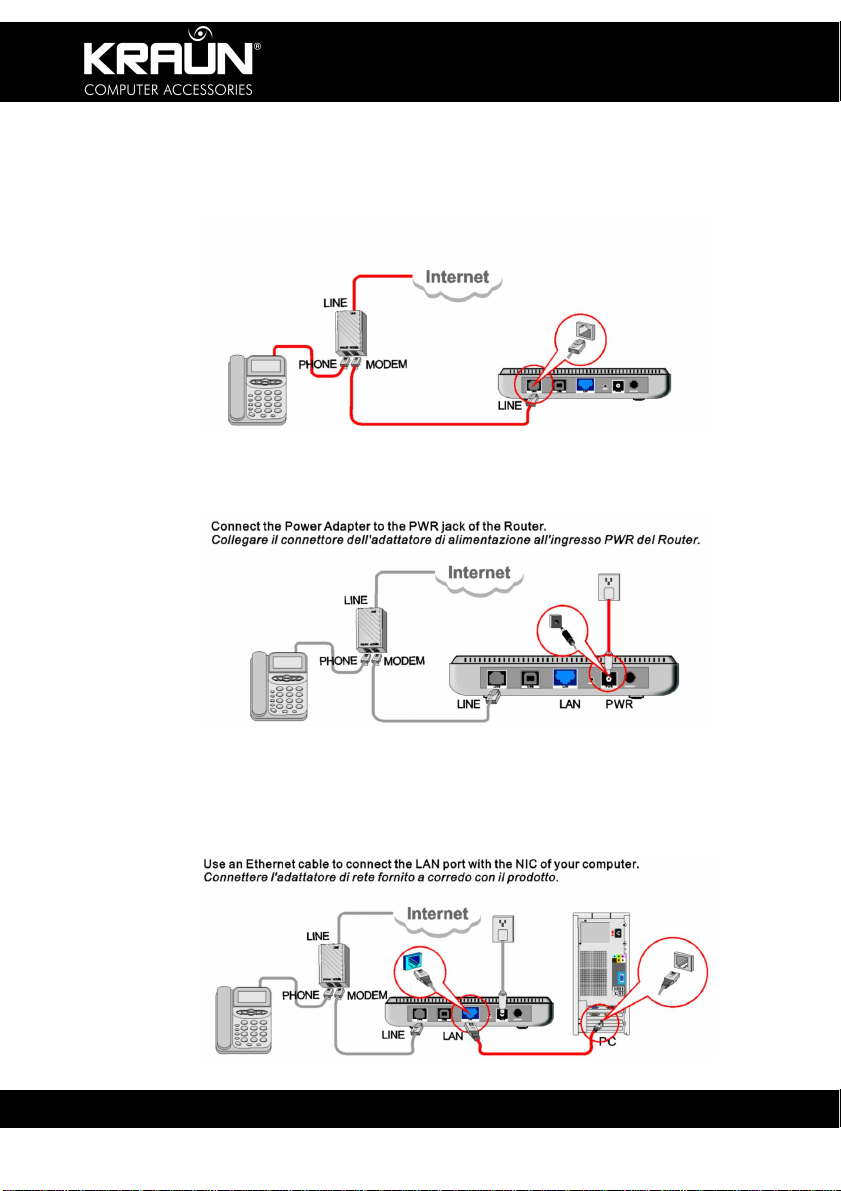
2.1. ADSL Router Connection
1. Connect one end of the telephone line to the LINE port of the
KR.KA modem Router and the other end to the MODEM port of the
voice splitter.
2. Connect the power adapter to the PWR port of the KR.KA.
3. Use an Ethernet cable to connect the LAN port with the NIC of your
computer.

ADSL2/2+ Modem Router
www.kraun.it
6
2.2. USB Installation
To connect the device to the USB interface of the computer, please follow
the steps below:
1. Connect to the USB port of the KR.KA through a USB cable.
2. Connect the other end of the cable to the USB port of your PC.
3. Insert the CD-ROM into the CD-ROM drive of your PC. If the Installer
does not start automatically, navigate to the Setup program and
double-click the Setup Icon. Follow the on-screen instructions.

ADSL2/2+ Modem Router
www.kraun.it
7
Chapter 3. Web Management Configuration
3.1. Network Configuration of Your Computer
1. On the desktop of your
computer, right-click “My
Network Places”, and then
select “Properties” in the
shortcut menu.
2. In the window that appears,
right-click “Local Area
Connection”, and then
select "Properties”.

ADSL2/2+ Modem Router
www.kraun.it
8
3. In the pop-up dialog box, check
“Internet Protocol (TCP/IP)” and
then click “Properties”.
4. In the window that appears, select
“Obtain an IP Address automatically
(O)” or “Use the following IP
Address (S)”.
a. When “Obtain an IP Address
automatically (O)” is selected, the
window is as shown in the right
figure. 6
b. “Use the following IP Address”:
IP Address: 192.168.1.XXX
(XXX range 2 ~ 254)
Subnet Mask: 255.255.255.0
Default gateway: 192.168.1.1
DNS server: Enter the local DNS
server address (if you don’t know,
check with your ISP) or the router IP
Address as the DNS server.
Click “OK” to submit the settings.
And then click “OK” in the “Local
Area Connection Properties”
window.

ADSL2/2+ Modem Router
www.kraun.it
9
3.2. Verifying the Connection
Select “Start→Programs →Accessories→Command Prompt”.
Enter at the Command Prompt: ping 192.168.1.1
If the resulting screen shows a result similar to the above, the
connection between your computer and the router is OK.

ADSL2/2+ Modem Router
www.kraun.it
10
3.3. Logging in to the Router
1. Open the web browser, and enter “http://192.168.1.1” in the
address field, and then press Enter.
2. In the pop-up login window, enter the user name (“admin”) and
password (“admin”), and click “OK”.
Note: Factory default: User name: admin, Password: admin
Tabla de contenidos
Otros manuales de Enrutador de red de Kraun
Manuales populares de Enrutador de red de otras marcas

NETGEAR
NETGEAR FS526T - Switch Manual de usuario

Korenix
Korenix JetNet 5710G Series Manual de usuario

Automated Logic
Automated Logic ZN551 Manual del propietario

Cisco
Cisco ASR 1000 Series Manual del operador

EnGenius
EnGenius ESR-9710 Manual de usuario

Cisco
Cisco 805 Series Instrucciones de funcionamiento y seguridad