
KoamTac SLED-MSRIC Manual de usuario


SLED-MSRIC
Quick Guide
See Reference Manual for more detailed information.
Visit store.koamtac.com to purchase additional KDCs and accessories.
QG_SLED-MSRIC_20210728 p1
Contents
Product Introduction ............................................................................................................................................. 2
1.1 SLED-MSRIC Diagram ................................................................................................................................... 2
1.2 How to turn on and off .................................................................................................................................. 2
Assembly Manual................................................................................................................................................... 3
2.1 How to Assemble into KDC470..................................................................................................................... 3
2.2 How to Assemble into SKXPro/5 .................................................................................................................. 5
Operation............................................................................................................................................................... 7
3.1 Micro USB Port............................................................................................................................................... 7
3.2 LED Indicator.................................................................................................................................................. 7
Useful Special Barcodes........................................................................................................................................ 8
4.1 MSR (Magnetic Stripe Reader)...................................................................................................................... 8
4.2 ICCR (IC Card Reader) ................................................................................................................................... 9
4.3 MSRIC Firmware Upgrade Port (Only for SKX-SLED-MSRIC) ..................................................................... 9
Usage.................................................................................................................................................................... 10
5.1 Using other Developed Applications with free SDK – Android/iOS........................................................ 10
Product Specifications......................................................................................................................................... 11

SLED-MSRIC
Quick Guide
See Reference Manual for more detailed information.
Visit store.koamtac.com to purchase additional KDCs and accessories.
QG_SLED-MSRIC_20210728 p2
Product Introduction
The SLED-MSRIC is a companion module for the KDC470 and the SKXPro/5. It provides features like a
magnetic card reader (MSR) and IC card reader (ICCR).
1.1 SLED-MSRIC Diagram
1.2 How to turn on and off
The SLED-MSRIC does not have its own power system. The power is supplied by the KDC470 or the SKXPro/5
(via the XCover Pro/5 Phone).
1. To power on or off a KDC470, simultaneously press the SCAN and DOWN buttons for 3 seconds. The
KDC will beep when turned ON or OFF. The KDC will sound a long beep when it is ready to use.
SLED-MSRIC
Quick Guide
See Reference Manual for more detailed information.
Visit store.koamtac.com to purchase additional KDCs and accessories.
QG_SLED-MSRIC_20210728 p3
2. Regarding the SKXPro/5, you must first power on the phone. To power on the XCover Pro/5, press and
hold the SIDE key for a few seconds. To power off the XCover Pro/5, press and hold the VOLUME
DOWN and SIDE key simultaneously or alternatively, open the notification panel and tap the power
icon.
To locate the SCAN button, DOWN button, or other keys on the phone, reference the product diagram
found in the Quick Guide for the KDC470 or SKXPro/5.
Assembly Manual
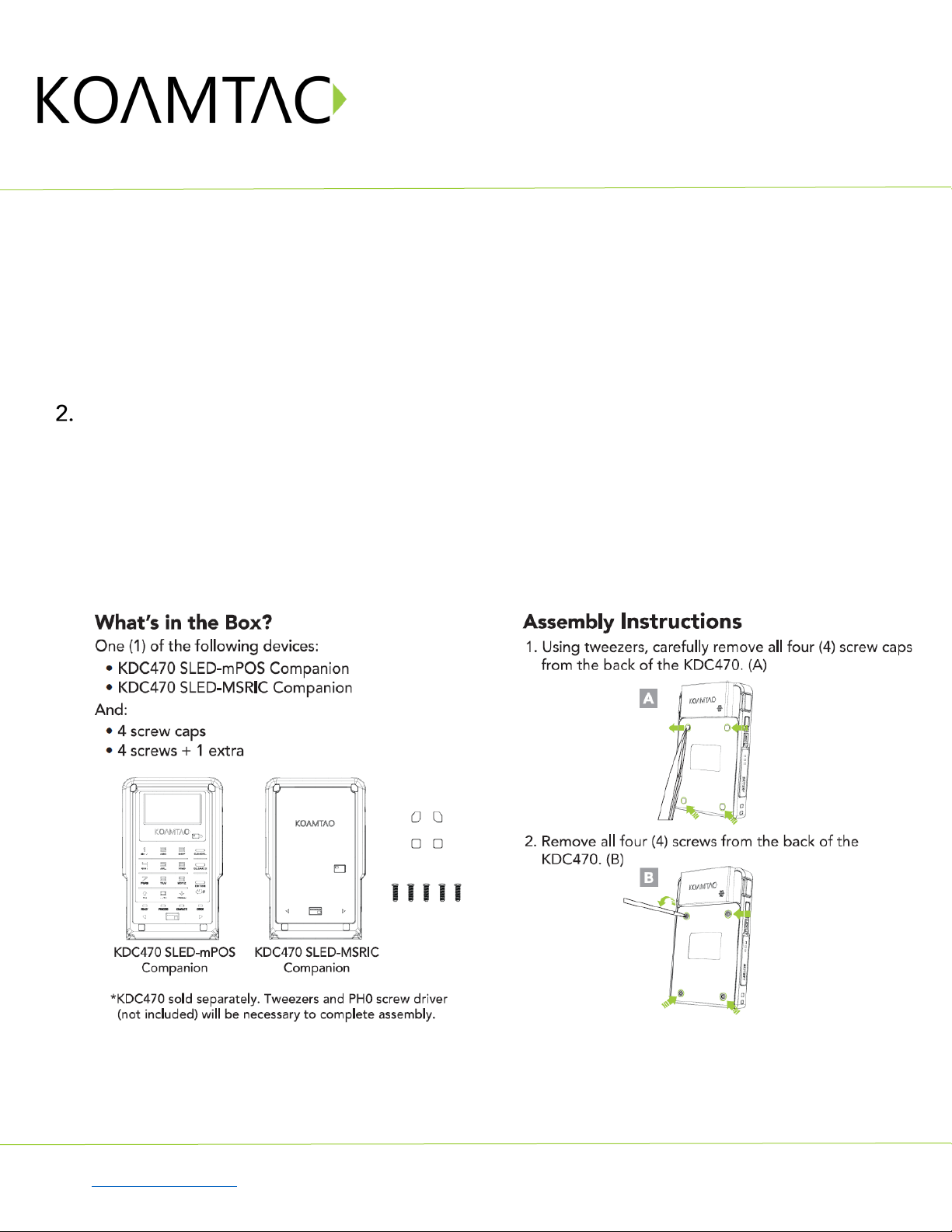
The SLED-MSRIC can be assembled and attached to KDC470 or SKXPro/5. For more detailed information,
please refer to the SLED-MSRIC assembly manual. (The images shown below display the SLED-mPOS
companion for demonstration purposes).
2.1 How to Assemble into KDC470


SLED-MSRIC
Quick Guide
See Reference Manual for more detailed information.
Visit store.koamtac.com to purchase additional KDCs and accessories.
QG_SLED-MSRIC_20210728 p7
Operation
3.1 Micro USB Port
The SLED-MSRIC has its own USB port on the side.
For KDC470 (KDCSLED-MSRIC), the port is used to upgrade the MSRIC firmware.
For SKXPro/5 (SKXSLED-MSRKC), the port is used to upgrade the MSRIC firmware and used for the data
communication with SKXPro/5 and with XCover Pro/5 phone.
3.2 LED Indicator
The SLED-MSRIC has one set of LEDs (two LEDs) on the front.
If the IC Card is inserted and read successfully, the LED turns green. If the reading is failed, it turns red.
If the magnetic card is swiped and read successfully, the LED stays lights green for 0.3 seconds and if not, it
says in red for 0.3 seconds.
For KDC470 (KDCSLED-MSRIC), the port is used to upgrade the MSRIC firmware.

SLED-MSRIC
Quick Guide
See Reference Manual for more detailed information.
Visit store.koamtac.com to purchase additional KDCs and accessories.
QG_SLED-MSRIC_20210728 p8
Useful Special Barcodes
There are several useful special barcodes to configure the SLED-MSRIC.
4.1 MSR (Magnetic Stripe Reader)
Enable MSR Power
Disable MSR Power
Enable Use Track1
Disable Use Track1
Enable Use Track2
Disable Use Track2
Enable Use Track3
Disable Use Track3
MSR Card Type = ISO
MSR Card Type = Other 1

SLED-MSRIC
Quick Guide
See Reference Manual for more detailed information.
Visit store.koamtac.com to purchase additional KDCs and accessories.
QG_SLED-MSRIC_20210728 p9
MSR Card Type = AAMVA
MSR Card Type = JIS 2
4.2 ICCR (IC Card Reader)
Enable ICCR Power
Disable ICCR Power
IFD Number
Config Number
4.3 MSRIC Firmware Upgrade Port (Only for SKX-SLED-MSRIC)
Enable SLED USB MODE
(To upgrade MSRIC firmware)
Disable SLED USB MODE
(To access SKX/Phone))
Tabla de contenidos
Manuales populares de Unidad de control de otras marcas

Festo
Festo Compact Performance CP-FB6-E Manual de lista de piezas

Elo TouchSystems
Elo TouchSystems DMS-SA19P-EXTME Manual de usuario

JS Automation
JS Automation MPC3034A Manual de usuario

JAUDT
JAUDT SW GII 6406 Series Guía rápida

Spektrum
Spektrum Air Module System Manual de usuario

BOC Edwards
BOC Edwards Q Series Manual de usuario


