
KNX GIRA 5110 00 Manual de usuario
Product documentation
Issue:
14.11.2022
51103300
RF/TP media coupler/repeater
Order no. 5110 00

Table of Contents
RF/TP media coupler/repeater | Order no. 5110 00 | 51103300 Page 2 of 42
Table of Contents
1 Information on the product ................................................................................................3
1.1 Product catalogue.................................................................................................. 3
1.2 Function ................................................................................................................. 3
1.3 Device components ............................................................................................... 4
1.4 Device generations ................................................................................................ 4
1.5 Update capability ................................................................................................... 5
1.6 Technical data........................................................................................................ 6
1.7 Accessories............................................................................................................ 6
2 Safety instructions.............................................................................................................7
3 Mounting and electrical connection...................................................................................8
4 Commissioning................................................................................................................10
5 Application programs ......................................................................................................14
6 Scope of functions...........................................................................................................15
7 Notes on software ...........................................................................................................16
8 Function ..........................................................................................................................17
8.1 Function as media coupler................................................................................... 17
8.2 Function as repeater............................................................................................ 23
8.3 LED display.......................................................................................................... 27
8.4 Configuration lock ................................................................................................ 28
8.5 Parameters for media coupler configuration........................................................ 30
9 Safe-state mode..............................................................................................................38
10 As-delivered state ...........................................................................................................40

Information on the product | Product catalogue
RF/TP media coupler/repeater | Order no. 5110 00 | 51103300 Page 3 of 42
1Information on the product
1.1 Product catalogue
Product name: RF/TP media coupler/repeater
Use: System device
Design: Installation
Art.-no. 5110 00
1.2 Function
Media and segment couplers are the link between a specific KNX RF environment
(RF = Radio Frequency) and a wired KNX TP installation (TP = Twisted Pair).
With regard to the routing property of telegrams, media and segment couplers func-
tion like standard TP backbone/line couplers. This means that RF devices can com-
municate with TP devices via a media and segment coupler or (with additional IP
backbone couplers) with IP devices and vice versa. Media couplers possess filter
settings and filter tables. The exact function of the device is determined by the selec-
ted parameterization and by the physical address.
Optionally, the device can additionally or alternatively work as a repeater. A repeater
repeats the radio telegrams received in its RF line by retransmitting them immedi-
ately. This allows an extension of the range of a KNX RF installation, meaning that it
is possible to position RF devices as required in a building, even in the case of diffi-
cult transmission and reception conditions.
The media and segment coupler is a device which allows the media type RF on the
lower-level line and the media type TP on the higher-level line. The media and seg-
ment coupler can be configured and commissioned with the ETS version 5 or higher.
The segment coupler functionality is supported from ETS version 6.0.5. The device is
powered via a KNX TP bus connection (KNX voltage supply unit) or alternatively, via
a suitable external DC voltage supply unit in repeater operation.

Information on the product | Device components
RF/TP media coupler/repeater | Order no. 5110 00 | 51103300 Page 4 of 42
1.3 Device components
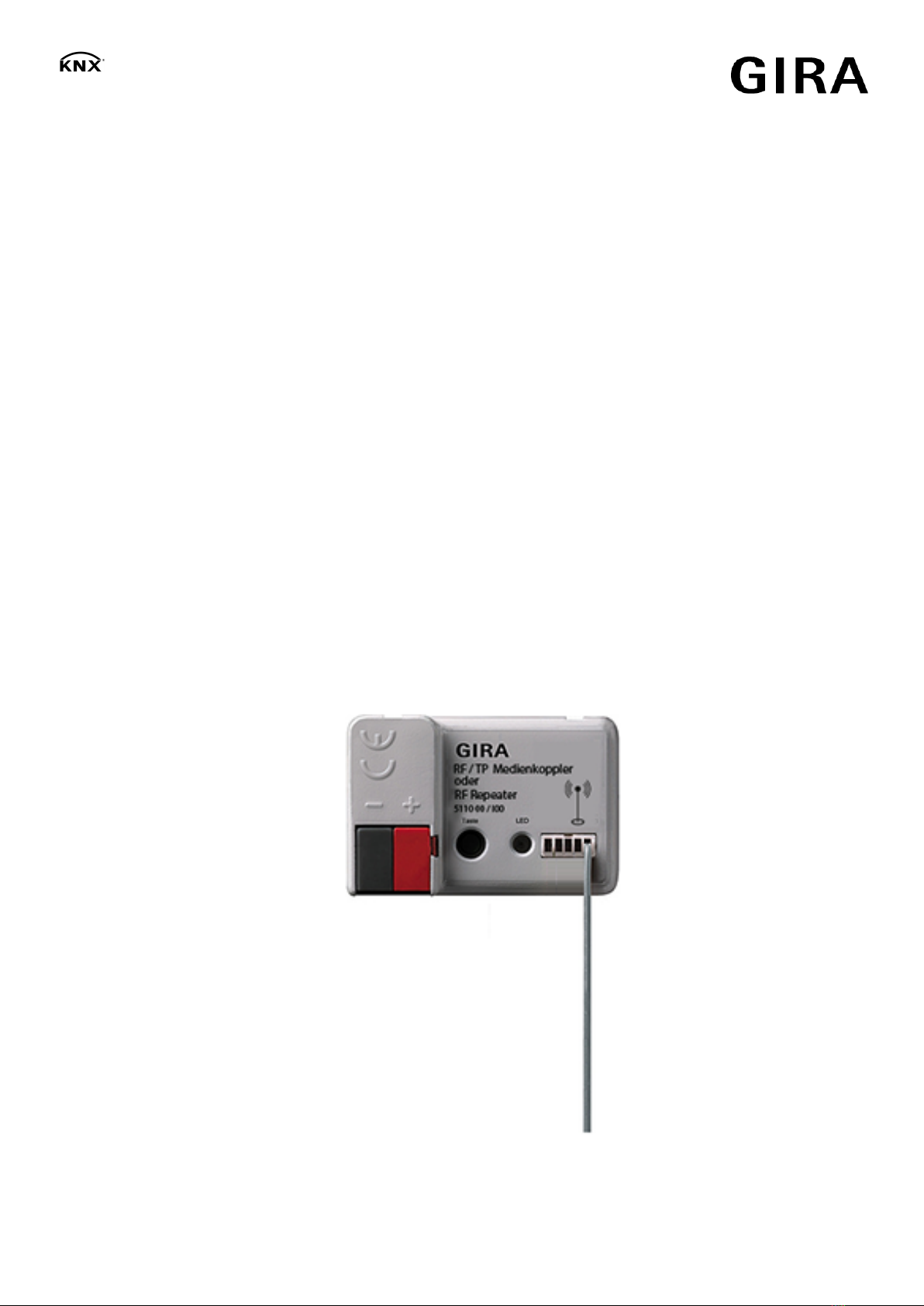
Image1: Device components
(1) KNX connection (TP)
(2) Programming button
(3) Status LED
Red lit up: Prog. mode
Red flashing quickly: Filter function deactivated
Red flashing slowly: Safe-state mode active
Yellow flashing: telegram traffic
Yellow lit up: Repeater prog. mode (for devices with marking "I02" or higher)
(4) Antenna (RF)
1.4 Device generations
Devices marked "I00": No KNX Data Secure compatibility. Secure commissioning of
other devices via media coupler is not possible with this device version.
Devices with marking "I01": The device is KNX Data Secure-compatible with
ETS5.7.3 or higher. Secure commissioning of other devices via media coupler is pos-
sible without restrictions from this device version onwards. KNX Data Secure offers
protection against manipulation in building automation and can be configured in the
ETS project. Detailed specialist knowledge is required.
Devices with marking "I04" or higher: use as segment coupler possible for commis-
sioning with ETS version 6.0.5 or higher.

Information on the product | Update capability
RF/TP media coupler/repeater | Order no. 5110 00 | 51103300 Page 5 of 42
1.5 Update capability
The device can be updated. Firmware updates (e.g. from device version I00 to I04)
can be performed in existing installations with the ETS and a special update applica-
tion program.
It is recommended to update media couplers individually and sequentially.

Information on the product | Technical data
RF/TP media coupler/repeater | Order no. 5110 00 | 51103300 Page 6 of 42
1.6 Technical data
KNX RF
KNX medium RF1.R
Commissioning mode S-mode
Radio frequency 868.0 ... 868.6 MHz
Transmission capacity max. 20 mW
Transmitting range in free field typ. 100 m
Receiver category
(Data according to EN 300220)
2
KNX TP (media coupler/segment coupler operation)
KNX medium TP256
Commissioning mode S-mode
Rated voltage KNX DC 21 ... 32 V SELV
Current consumption KNX 3.9 ... 5.1 mA
Repeater operation
Rated voltage DC 24 V SELV
Degree of protection IP20
Protectionclass III
Ambient temperature -20 ... +45 °C
Storage temperature -25 ... +55 °C
Transport temperature -25 ... +70 °C
Relative humidity 10 ... 100 % (no moisture condensation)
Dimensions L×W×H 44x29x16 mm
1.7 Accessories
Power supply 24 V DC 300 mA Order no. 1296 00

Safety instructions
RF/TP media coupler/repeater | Order no. 5110 00 | 51103300 Page 7 of 42
2Safety instructions
Electrical devices may only be mounted and connected by electrically skilled
persons.
Serious injuries, fire or property damage possible. Please read and follow manual
fully.
The radio communication takes place via a non-exclusively available transmission
path, and is therefore not suitable for safety-related applications, such as emergency
stop and emergency call.
This manual is an integral part of the product, and must remain with the end cus-
tomer.
Mounting and electrical connection
RF/TP media coupler/repeater | Order no. 5110 00 | 51103300 Page 8 of 42
3Mounting and electrical connection
General
Mount in suitable flush-mounted or surface appliance boxes.
In outdoor installations: Use appliance box IP55.
Do not place the device in metallic small distribution boards or appliance
boxes.
Do not lead any wire or sheathed cables from other power circuits through the appli-
ance box.
Precondition: To ensure good transmission quality, keep a sufficient distance from
possible interference sources, e.g. metallic surfaces, microwave ovens, hi-fi and TV
sets, ballasts or transformers.
Connect the device and mount it for use as media/segment coupler
The device is connected to and supplied by a KNX bus cable (TP).
Precondition: Ideally, the media coupler is positioned in the centre of an RF installa-
tion (domain), to allow low-loss and thus interference-free communication with all the
associated RF devices.
■ Connect device to a KNX bus cable. For this, use a KNX device connection
terminal. Ensure correct polarity.
If the media coupler is used as a line coupler, the KNX bus cable must be the
main line of a TP area. If the media coupler is used as a backbone coupler,
the KNX bus cable must be the TP area line (Backbone) of the KNX installa-
tion. If the media coupler is used as a segment coupler, the KNX bus cable
must be the first segment of the line.
■ Place the device in the appliance box.
■ When laying the antenna, extend the antenna extended as much as possible.
If this is not possible, position the antenna behind the device in a circular ar-
rangement.
When using blank covers, make sure the antenna does not lie directly behind
the metal supporting frame.
Connect the device and mount it for use as a repeater only (no media/segment
coupler function)
If needed, the repeater can be connected to a KNX bus cable (TP) via which it is sup-
plied, as long as the bus cable is the TP line of the associated media coupler. Thus
the use of the repeater is especially relevant for retroactive solutions in existing TP
systems.
Alternatively, a repeater can also be supplied via a separate DC voltage supply, even
without KNX bus voltage.
Mounting and electrical connection
RF/TP media coupler/repeater | Order no. 5110 00 | 51103300 Page 9 of 42
Use purely as an RF repeater is only possible in RF lines, but not in lower-
level RF segments.
Precondition: The repeater is positioned within radio range of the media coupler and
ideally within radio range of another repeater of the same RF domain, to allow low-
loss and thus interference-free communication with all the associated RF devices.
■ Connect the device to a KNX bus cable or, alternatively, to a separate DC
voltage supply. For this, use a KNX device connection terminal. Ensure correct
polarity.
Do not use the unchoked 30V output of a KNX voltage supply! The media
coupler may heat up to an impermissible temperature.
In the case of a device with the marking "I04" or higher, the "Repeater-Prog-
mode" of the device must be activated before the physical address is pro-
grammed.
In the case of connection to a TP bus cable, direct ETS program access to the
device via the TP side during repeater operation is no longer possible after
commissioning. Consequently, the repeater can only be programmed and dia-
gnosed (e.g. with the use of suitable KNX RF USB data interfaces or via an-
other media coupler of the same RF domain) via the RF side.
■ Place the device in the appliance box.
■ When laying the antenna, extend the antenna extended as much as possible.
If this is not possible, position the antenna behind the device in a circular ar-
rangement.
When using blank covers, make sure the antenna does not lie directly behind
the metal supporting frame.
Commissioning
RF/TP media coupler/repeater | Order no. 5110 00 | 51103300 Page 10 of 42
4Commissioning
General
The device can be inserted and commissioned as either a media coupler or a seg-
ment coupler (segment coupler only from ETS6.0.5 onwards with an application pro-
gram intended for this purpose). In RF lines, use purely as an RF repeater is also
possible.
The device operates as a media coupler when it is given a physical address in the
form x.y.0 (line coupler) or x.0.0 (backbone coupler) (x = area address, y = line ad-
dress).
The device operates as a segment coupler or as a repeater in RF lines when it is as-
signed a physical address in the form x.y.1...255.
In an RF domain, always commission the media coupler first! Only then should any
optional additional repeaters and all other participants of the RF installation be pro-
grammed. Ideally, install and connect the repeater after the media coupler has been
completely commissioned.
Precondition: An appropriate device must be created and configured in the ETS pro-
ject. Device has been connected and the power is switched on.
Project design and commissioning with ETS5 or a more recent version.
Project design and commissioning as segment coupler with ETS from version
6.0.5 onwards.
Programming mode is deactivated after the physical address has been suc-
cessfully programmed, or is generally deactivated by a device test (power fail-
ure, ETS programming process of the application program). Programming
mode is also deactivated automatically after 4 minutes if none of the above
events occurs.
Commissioning the device as media coupler or segment coupler
As delivered, the device can be programmed and commissioned via the TP side (e.g.
with the use of suitable USB or IP data interfaces) or via the RF side (e.g. with a KNX
RF USB data interface).
After a successful initial commissioning, access to the device for programming may
be restricted because of an active configuration lock (see chapter "Configuration
lock" } Page 28).
■ Press the programming button (2) (see figure 1).
The status LED (3) lights up red. Programming mode is activated.
■ Load the physical address into the device. The ETS also automatically loads
the domain address of the RF line into the device.
The red status LED goes out.
Tabla de contenidos


