Kipor KP310V1.0 Manual de usuario

KP310V1.0 Controller
Operation Manual
VA
RModel KP310V1.0
V
O
RUN
VA
RModel KP310V1.0
V
O
RUN
www.kipor.com
Version No.:KP310.1.1.0
July 20th, 2011

KP310V1.0 Controller Operation Manual
I
Index
1.Brief Introduction................................................................................................................. - 1 -
2.Model Nomenclature Explained .......................................................................................... - 1 -
3.Performance and Features.................................................................................................... - 1 -
4.Specifications....................................................................................................................... - 2 -
5.Operation.............................................................................................................................. - 3 -
5.1 Function of keys............................................................................................................. - 3 -
5.2 Controller Layout...........................................................................................................-5 -
5.2.1 Main Display....................................................................................................... - 6 -
5.2.2 “Parameters Set” menu ....................................................................................... - 9 -
5.3 Manual Operation ........................................................................................................ - 10 -
5.4 Remote Operation ........................................................................................................ - 11 -
6.Protection ........................................................................................................................... - 11 -
6.1 Alarm............................................................................................................................ - 12 -
6.2 Time delayed stop alarms............................................................................................. - 12 -
6.3 Emergency stop alarms ................................................................................................ - 13 -
7.Wiring ................................................................................................................................ - 14 -
8.Parameter Set ..................................................................................................................... - 15 -
8.1 Parameters Set list........................................................................................................ - 16 -
8.2 Programmable output list ............................................................................................. - 21 -
8.2.1 Remote set......................................................................................................... - 21 -
8.2.2 Set Input ............................................................................................................ - 22 -
8.3 Programmable output list ............................................................................................. - 23 -
9.Commission ....................................................................................................................... - 24 -
10.Applications ............................................................................................................... - 24 -
11.Installations ................................................................................................................ - 25 -
12.Trouble shooting ........................................................................................................ - 26 -
13.Serial Communication................................................................................................ - 26 -
13.1 Physical Layer of Communication Protocol .............................................................. - 27 -
13.2 Enquiry/ Response Period.......................................................................................... - 27 -
13.3 Comm RTU ................................................................................................................ - 28 -
13.3.1 Address field ................................................................................................... - 28 -
13.3.2 Function field .................................................................................................. - 28 -
13.3.3 Data field......................................................................................................... - 28 -
13.3.4 Data CRC field................................................................................................ - 28 -
Appendix 1 CRC16-CCITT Sheet ............................................................................................. - 29 -
Appendix 2 CRC16-CCITT ....................................................................................................... - 30 -
Appendix 3 Wiring Diagram...................................................................................................... - 31 -
1)3-Phase 4-Line ........................................................................................................... - 31 -
2)3-Phase 3-Line ........................................................................................................... - 32 -
3)1-Phase 2-Line ........................................................................................................... - 33 -
4)2-Phase 3-Line ........................................................................................................... - 34 -

KP310V1.0 Controller Operation Manual
- 1 -
1. Brief Introduction
The KP310V1.0 controller has the function of manual/remote start and stop genset, data
measurement, alarm and protection. The KP310V1.0 can display detailed genset running and
alarming data through LED digit display in five numbers. RS232 interface with the host computer,
can start, stop genset and display real-time running data through the host computer. The host
computer software has the Chinese and English interface, featured by simple & reliable operation.
RS485 interface is also available for remote monitor and control genset.
2. Model Nomenclature Explained
KP310V1.0
KP310V1.0 KIPOR
KP310V1.0 Controller Model
KP310V1.0 Ve rs i o n No .
3. Performance and Features
Main features:
☞Microprocessor controller, higher hardware integration, higher reliable;
☞Display through LED display in five digital numbers; convenient to test genset by touch
buttons;
☞Manual/remote start and stop genset;
☞RS232 interface with PC to run and monitor genset; RS485 interface to remote monitor genset;
☞Applied to 3-phase 4-line, 3-phase 3-line, 1-phase 2-line, double-voltage power sources;
☞Monitor and display three-phase voltage, three-phase current, frequency, revolutions and
battery voltage;
☞Fault alarms, including over-voltage, under-voltage, over-frequency, under-frequency and
charging fault;
☞Protection against high water temperature and low oil voltage;
☞All output interface are relay output;
☞“Parameters Set” menu: parameters can be set by users through controllers or PC. All
parameter are stored in internal flash memory so they won’t lose even the power turns off;
☞Working voltage: 8-16VDC, adaptable to different batteries;
☞Maintenance remind function (fuel filter, air filter, oil filter) ;
☞Digital control, more reliable;
☞Fault alarms are recorded until manual delete;
☞Copy system configuration and restore system configuration, assure system can be restored due
to wrong action;

KP310V1.0 Controller Operation Manual
- 2 -
☞ Modular structure, flame-retardant ABS shell, pluggable terminals, embedded installation,
compact structure and easy installation
4. Specifications
Working Voltage 12VDC (8~16VDC)
AC Input Voltage:
Phase voltage 10~290VAC RMS
Precision level:2.0
Voltage measurement
Three-phase four-line
Three-phase three-line
Single-phase two-line
Double-voltage output simultaneously
Double-voltage output alternative
Primary current:
1A -900A (Parameters Set)
Secondary current:
5mA
Current measurement
Precision level:
2.0
Frequency range:
20~70HZ(voltage>15V)
Frequency measurement
Precision level:
0.5
Voltage range:
5-50V
Max. frequency:
10000Hz
Revolution measurement
Flywheel tooth:
1-500
Fuel output relay:
15A/12VDC
Start output relay:
15A/12VDC
Preheat output relay:
5A/12VDC
Configuration output relay Ⅰ:
5A/12VDC
Output
Configuration output relay Ⅱ:
5A/12VDC
Ambient temperature -20~70℃

KP310V1.0 Controller Operation Manual
- 3 -
5. Operation
5.1 Function of keys
Stop/Reset
Genset is running, press to stop genset, when genset is in
alarming status, press to reset.
In “System Set”mode, press to return to the previous
sub-menu.
Manu/ATS
Press to set genset in “Manual” Mode.
In “System Set” mode, press to decrease the data value, equal
to “-”.
Remote
Control
Press to set genset in remote control mode.
In “System Set” mode, press to increase the data value,
equal to “+”.
Start In ““Manual” Mode, press can start genset.
Parameters Set Press to enter “Parameters Set” selection menu.
Note:
1 when the generator is stopped and in “Manual” Mode, press and for 5 seconds at
the same time, it displays password “Test” mode . If user doesn’t input the right
password in 60 seconds, the system will automatically exit password menu and enters System
Operation menu.
2 In “Parameters Set” menu, press , and for 5 seconds in the same time to
backup current system set, and the digital tube displays “Backup” for 2 seconds.
3 When genset is stopped, and in “Manual” Mode, press , and for 5secs to
restore system set, and the digital tube displays “Reset” for 2 seconds.
4 In the “Oil Filter Running Time” mode, press for 5 seconds, it will clear alarm of oil filter

KP310V1.0 Controller Operation Manual
- 4 -
maintenance, and reset it.
5 In the “Fuel Filter Running Time” mode, press for 5 seconds, it will clear alarm of fuel
filter maintenance, and reset it.
6 In the “Air Filter Running Time” mode, press for 5 seconds, it will clear alarm of air filter
maintenance, and reset it.
7 In the “Running Time” mode, press for 5 seconds, it will clear running time, and reset it.
8 Press and for 5 seconds until the signal twinkles, which shows that system has
blocked some protection functions (over/under frequency, over/under voltage); then press
and for 5 seconds until the signal stop flickering, which shows that system has restored the
protection functions (over/under frequency, over/under voltage).

KP310V1.0 Controller Operation Manual
- 5 -
5.2 Controller Layout
VA
RModel KP310V1.0
V
O
RUN
VA
RModel KP310V1.0
V
O
RUN
Voltage Current Frequency Revolutions Battery
voltage
Running
time
Maintenance
time
Run Low Oil
Pressure
High Water
Temperature
Starting
Failure
Emergency
Stop
Frequency
High/Low
Voltage
High/Low
Current
High/Low
Maintenance Charge
Failure
Stop Manual Remote Start

KP310V1.0 Controller Operation Manual
- 6 -
5.2.1 Main Display
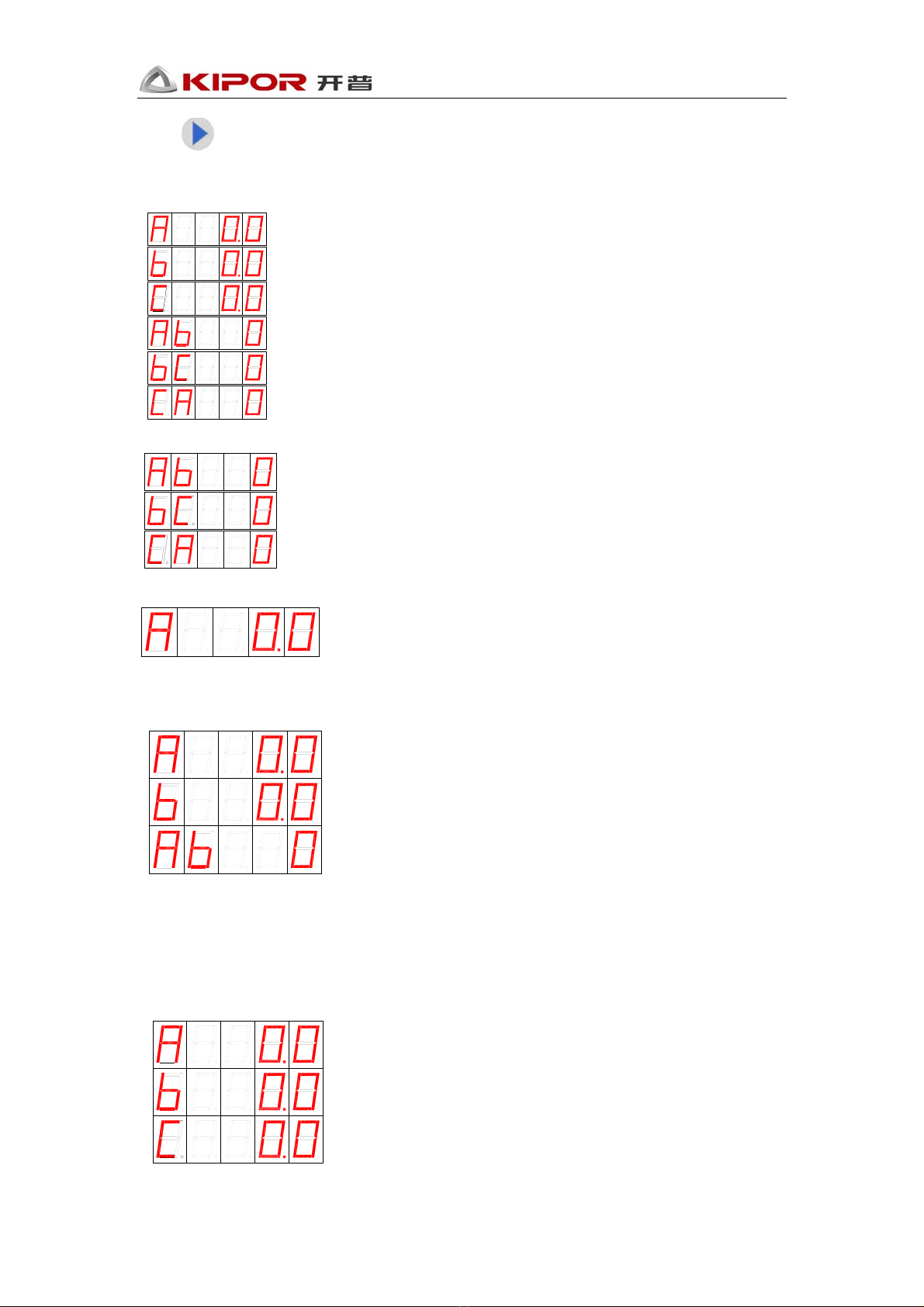
Press , it will display voltage, current, frequency, revolution, battery voltage, run time and
maintenance time.
Note:
Battery charging voltage, switch value input/output state and system delay state is also available
with RS232 Port.
5.2.1.1 LED Status Indication
Genset status and working mode will be displayed in LED Panel.
When genset is stopped, will be lit up.
When genset is in “Manual” Mode, will be lit up.
When genset is in remote control mode, will be lit up.
5.2.1.2 Digital tube Status Indication
If genset switches to the following status, the digital tube will display genset status:
Preheat:
Start:
Starting idle:
Stopping idle:
Stopping delay:

KP310V1.0 Controller Operation Manual
- 7 -
Press to display running parameter, which shows as following:
Voltage
Three-phase four-line
Three-phase three-line
Single-phase two-line
Two-phase three-line
Double-voltage output alternative
120V output equals to single-phase two-line
240V output equals to two-phase three-line
Current
Three-phase four-line

KP310V1.0 Controller Operation Manual
- 8 -
Three-phase three-line
Single-phase two-line
Two-phase three-line
Double-voltage output alternative
120V output equals to single-phase two-line
240V output equals to two-phase three-line
Frequency
Revolution
✪Note: If the “Revolution low” is set as zero, then the speed won’t be displayed..
Battery voltage
Running time
Maintenance Time
Oil filter
Fuel filter
Tabla de contenidos