Keyestudio 4WD Bluetooth Multi-functional Car Manual de usuario

1
www.keyestudio.com
Keyestudio 4WD Mecanum Robot Car
(Makecode)
Contents
1. Introduction.................................................................................................................4
2. Description...................................................................................................................6
3.Parameters.................................................................................................................... 6
4.Kit List............................................................................................................................. 7
5.Preparations:.............................................................................................................. 12

2
www.keyestudio.com
5.1Background Information about Micro:bit...............................................12
( 1 )What is Micro:bit?.................................................................................12
( 2 )Layout...................................................................................................... 13
( 3 ) Pinout......................................................................................................14
( 4 )Notes for the application of Micro:bit main board....................16
5.2.Install Micro:bit driver..................................................................................17
6.Keyestudio 4WD Mecanum Robot Car.............................................................. 18
6.1.Basic Information about Keyestudio 4WD Mecanum Robot Car... 18
6.2. the Installation of keyestudio 4WD Mecanum Robot Car...............20
7.Get Started with Micro:bit......................................................................................42
7.1 Write code and program:........................................................................ 42
7.2.Makecode:.................................................................................................... 53
7.3 Quick Download............................................................................................54
7.4.Makecode extension library:......................................................................62
7.4.Resources and test code............................................................................. 71
7.5.Input test code...............................................................................................72
7.6.Install CoolTerm:......................................................................................... 77
8.Projects........................................................................................................................ 79
Project 1: Heartbeat............................................................................................ 80
Project 2: Light A Single LED............................................................................ 83
Project 3: LED Dot Matrix.................................................................................. 90
Project 4: Programmable Buttons................................................................ 102

3
www.keyestudio.com
Project 5: Temperature Measurement.........................................................113
Project 6: Geomagnetic Sensor..................................................................... 127
Project 7: Accelerometer................................................................................. 142
Project 8: Light Detection................................................................................157
Project 9: Speaker..............................................................................................163
Project 10: Touch-sensitive Logo.................................................................. 169
Project 11: Microphone................................................................................... 175
Project 12: Bluetooth Wireless Communication.......................................187
Project 13:Colorful Lights.............................................................................208
Project 14:WS2812 RGB LEDs..................................................................... 215
Project 15:Servo.............................................................................................. 238
Project 16:Motor............................................................................................. 247
Project 17:Line Tracking Sensor..................................................................260
17.1: Detect Line Tracking Sensor.........................................................260
17.2: Line Tracking Smart Car................................................................ 278
Project 18: Ultrasonic Follow Smart Car..................................................... 288
18.1: Ultrasonic Ranging......................................................................... 288
18.2: Ultrasonic Avoidance Car..............................................................297
18.3: Ultrasonic Follow Smart Car........................................................ 313
Project 19:IR Remote Control..................................................................... 322
19.1:Decode IR Remote Control.........................................................322
19.2:IR Remote Control.........................................................................332

4
www.keyestudio.com
Project 20: Bluetooth Multi-purpose Smart Car.......................................348
20.1: Read Bluetooth Data......................................................................348
20.2: Multi-purpose Smart Car..............................................................363
9. Resources:................................................................................................................369
1. Introduction
Have you wondered to learn programming or have your own
programming robot? Nowadays, programming has developed to a lower
age group, and it will be a trend for everyone to be able to program thanks
to the spread of simple graphical programming platforms, from micro:bit
to Arduino and Raspberry Pi. Maybe you haven't heard of them before. It
doesn't matter because with the help of this product and tutorial, you can
easily install a multi-functional programming car and experience the fun of
being a maker.
Micro:bit is a highly integrated microcontroller of powerful functions and
small size. It is very suitable to be applied in STEAM education for it
functions to make robots, wearable devices and electronic interactive
games via the combination of code programming and graphical
programming.

5
www.keyestudio.com
This Keyestudio 4WD Mecanum Robot Car is a smart DIY car specially
designed for micro:bit. The smart car kit consists of a car body with
extended functions, a PCB base plate with integrated motor drive sensors,
4 decelerating DC motors, Mecanum wheels, various modules and sensors
and acrylic boards. Therefore, you can easily assemble a cool Mecanum
wheel 4WD smart car by yourself, and then use Microsoft's online graphical
programming platform Make Code to program the micro:bit control board
to control the car. In the process, you can not only experience the fun of
creation but enhance hands-on ability and learn programming skills as
well.
MakeCode for micro:bit is the most widely used graphical programming
environment on the micro:bit official website. It is based on the graphical
programming environment developed by Microsoft's open source project
MakeCode. This graphical programming can also be converted to code
languages, python and javascript language. This combination makes learn
programming easy. At the same time, MakeCode programming can be
simulated or programmed for actual electronic components.
For your convenience, source code has been provided in every project, as
well as code programming steps and code explanation in details. Hope you
can better understand them.

6
www.keyestudio.com
2. Description
This product is a smart car based on Micro:bit. It boasts multiply functions
including ultrasonic sound following, line tracking, infrared control and
Bluetooth control. It comes with a passive buzzer which is able to play
music, 4 WS2812RGB LEDs to display different colors, 2 colorful lights to
make direction lights for the car. This product uses two 18650 lithium
batteries for power supply.
When installing and disassembling the battery, please pay attention to the
positive and negative poles of the battery, and be sure not to reverse the
them. By the way, the motor speed of this product is adjustable.
In order to provide you with better experience, corresponding documents
about installation and test code are also provided.
3.Parameters
Connector port input: DC 6V---9V
Operating voltage of drive board system: 5V
Standard operating power consumption: about 2.2W
Maximum power: Maximum output power is 12W
Motor speed: 200RPM/1min
Working temperature range: 0-50℃
Size: 120*120*120mm
Environmental protection attributes: ROHS

7
www.keyestudio.com
Note: working voltage of micro:bit is 3.3V, driver shield integrates 3.3V/5V
communication conversion circuit.
4.Kit List
#
Picture
Components
Quanti
ty
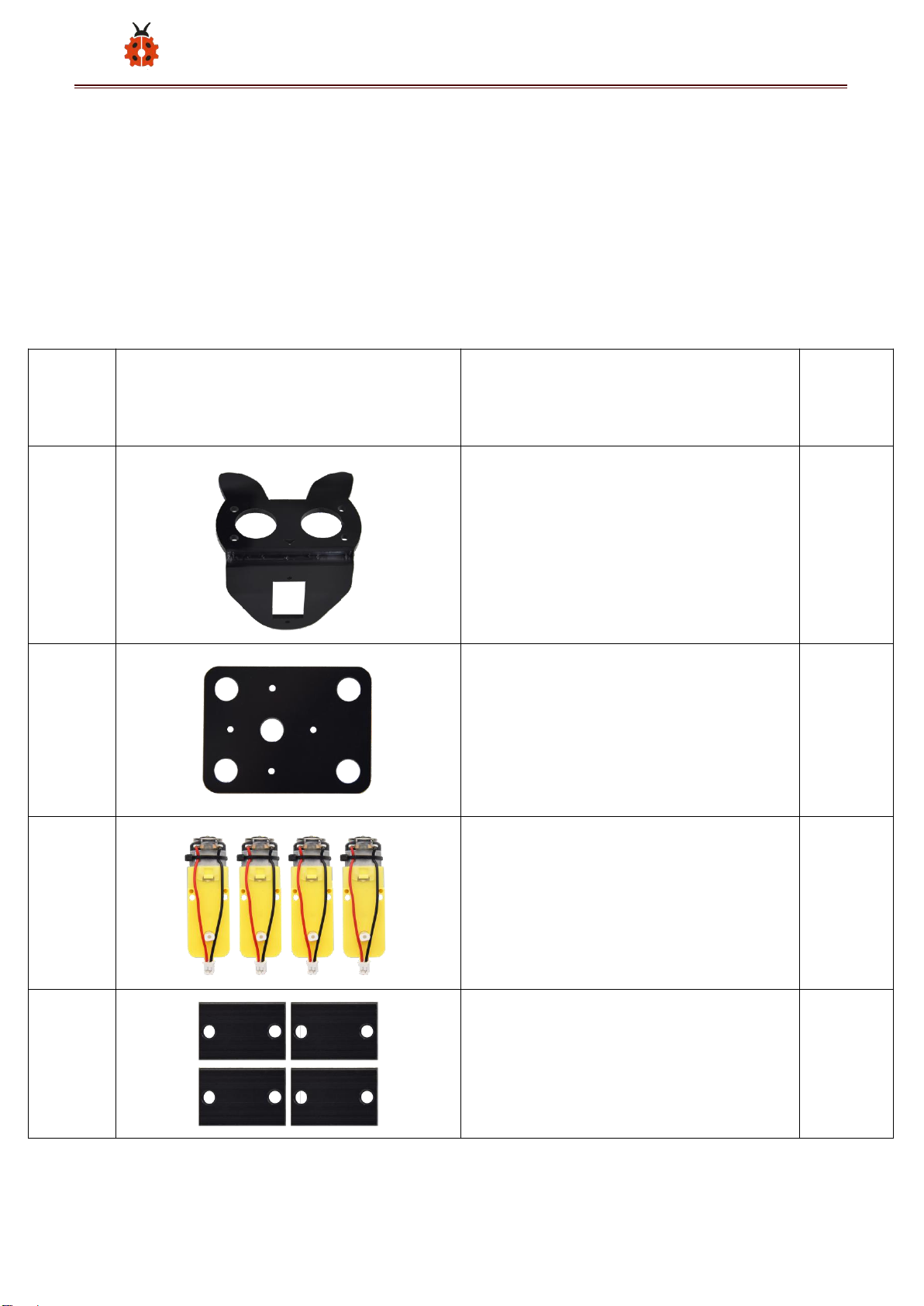
1
KS0511 Acrylic Board T=3mm
1
2
Acrylic Board with Lego Holes
T=3mm
1
3
4.5V Motor
4
4
23*15*5MM Fixing Board
4

8
www.keyestudio.com
5
Servo
1
6
Mecanum Wheels
4
7
Keyestudio Micro:bit IO Port
Expansion Sensor Shield With
Level Conversion
1
8
Micro:bit Main Board V2.0 with
Package for KS4031
1
Micro:bit Main Board V2.0 for
KS4032
0

9
www.keyestudio.com
9
Keyestudio Driver Board
1
10
M3*20MM Dual-pass Copper
Pillar
4
11
4265c Lego Part
4
12
43093 Lego Part
4
13
Acrylic Gasket Six in One Pack
1

10
www.keyestudio.com
14
M3*6MM Round Head Screw
18
15
Keyestudio Ultrasonic Module
1
16
M3 Nickle-plated Nut
14
17
M3*30MM Round Head Screw
9
18
M2 Nickle-plated Nut
3
19
M2*8MM Round Head Screw
3
Otros manuales para 4WD Bluetooth Multi-functional Car
1
Tabla de contenidos
Otros manuales de Robótica de Keyestudio

Keyestudio
Keyestudio Ks0428 Manual de usuario

Keyestudio
Keyestudio 4DOF Manual de usuario

Keyestudio
Keyestudio Smart Little Turtle Robot V3 Manual de usuario

Keyestudio
Keyestudio 4DOF Manual de usuario

Keyestudio
Keyestudio KS0358 Manual de usuario

Keyestudio
Keyestudio Micro:bit Mini Smart Robot Car Manual de usuario
Manuales populares de Robótica de otras marcas

STEMCenter USA
STEMCenter USA Pi-Bot v2.00 Manual de usuario

SunFounder
SunFounder PiDog Manual de usuario

Universal Robots
Universal Robots UR5 Manual de usuario

Universal Robots
Universal Robots E Series Manual de usuario

YASKAWA
YASKAWA MOTOMAN-MPL80 II Manual de usuario

EFORT
EFORT ECR5 Manual de instrucciones