
JVC KS-FX220 Manual de usuario

INSTRUCTIONS
MANUAL DE INSTRUCCIONES
MANUEL D’INSTRUCTIONS
For customer Use:
Enter below the Model No. and
Serial No. which are located on
the top or bottom of the cabinet.
Retain this information for future
reference.
Model No.
Serial No.
GET0106-001B
[J]
For installation and connections, refer to the separate manual.
Para la instalación y las conexiones, refiérase al manual separado.
Pour l’installation et les raccordements, se référer au manuel séparé.
ENGLISH
ESPAÑOL
FRANÇAIS
KS-FX220
CASSETTE RECEIVER
RECEPTOR-REPRODUCTOR DE CASSETTE
RADIOCASSETTE
S.BASS
SEL
DISP
SCM
MO/RND
789
10 11 12
ENCOVER-KS-FX220[J]F 4/11/03, 12:08 PM3

2
ENGLISH
How to reset your unit
Press and hold both the SEL (Select) and (Standby/On/Attenuator) buttons at the same
time for several seconds.
This will reset the built-in microcomputer.
Note:
• Your preset adjustments — such as preset channels or sound adjustments — will also be erased.
SEL (Select)
(Standby/On/Attenuator)
ENCOVER-19-KS-FX220[J]-F 6/11/02, 9*254

3
ENGLISH
Thank you for purchasing a JVC product. Please read all instructions carefully before operation,
to ensure your complete understanding and to obtain the best possible performance from the unit.
CONTENTS
How to reset your unit .............................. 2
LOCATION OF THE BUTTONS ........... 4
Control panel ............................................ 4
BASIC OPERATIONS ...................... 5
Turning on the power ............................... 5
RADIO OPERATIONS ..................... 6
Listening to the radio ................................ 6
Storing stations in memory ...................... 7
Tuning in to a preset station ..................... 8
TAPE OPERATIONS ....................... 9
Listening to a cassette ............................. 9
SOUND ADJUSTMENTS .................. 10
Turning on/off the super bass function ..... 10
Selecting preset sound modes ................. 10
Adjusting the sound ................................. 10
Storing your own sound adjustments ....... 11
BEFORE USE
*For safety....
• Do not raise the volume level too much, as this
will block outside sounds, making driving
dangerous.
• Stop the car before performing any complicated
operations.
*Temperature inside the car....
If you have parked the car for a long time in hot
or cold weather, wait until the temperature in the
car becomes normal before operating the unit.
OTHER MAIN FUNCTIONS ............... 12
Setting the clock ....................................... 12
Detaching the control panel ..................... 13
CD CHANGER OPERATIONS ............. 14
Playing CDs ............................................. 14
Selecting CD playback modes ................. 15
MAINTENANCE ............................ 16
TROUBLESHOOTING ..................... 17
SPECIFICATIONS .......................... 18
ENCOVER-19-KS-FX220[J]-F 6/11/02, 9*254
ENGLISH
4
S.BASS
SEL
DISP
SCM
MO/RND
789
10 11 12
w
u i o
; a s d
12 5 6 7 9 pq83 4
e r t y
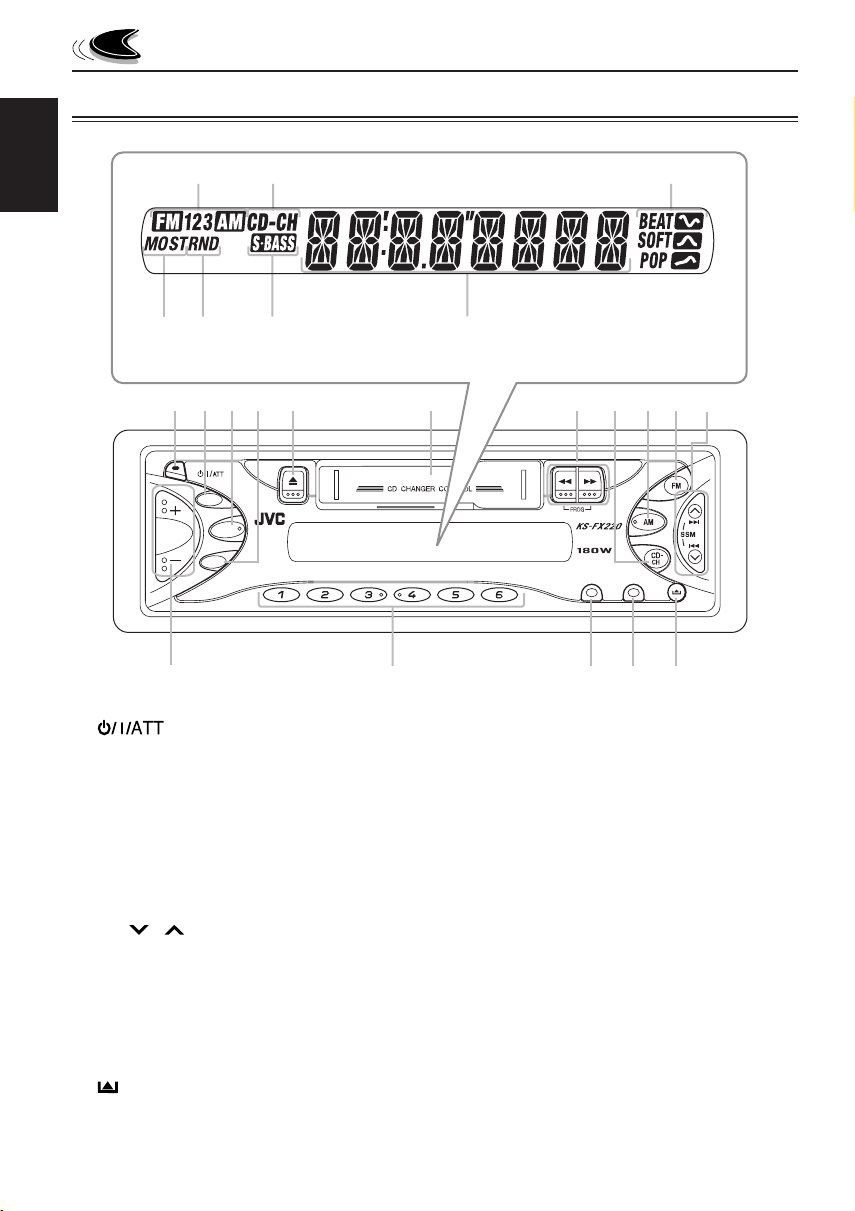
LOCATION OF THE BUTTONS
Control panel
1(Standby/On/Attenuator) button
2S.BASS (Super Bass) button
3SEL (Select) button
4DISP (Display) button
50(Eject) button
6Cassette compartment
71/ ¡(PROG : program) buttons
8CD-CH button
9AM button
pFM button
q4/ ¢buttons
• Also functions as SSM buttons when
pressed together.
w+/– buttons
eNumber buttons
rMO (Monaural) button
RND (Random) button
tSCM (Sound Control Memory) button
y(Control panel release) button
Display window
Display window
uBand indicators
FM1, FM2, FM3,
AM
iCD-CH (CD Changer) indicator
oSound mode indicators
BEAT, SOFT, POP
;MO (Monaural) indicator
ST (Stereo) indicator
aRND (Random) indicator
sS.BASS (Super Bass) indicator
dMain display
ENCOVER-19-KS-FX220[J]-F 6/11/02, 9*254

5
ENGLISH
BASIC OPERATIONS
4
Adjust the sound as you want
(see pages 10 – 11).
To drop the volume in a moment
Press briefly while listening to any
source. “ATT” starts flashing on the display, and
the volume level will drop in a moment.
To resume the previous volume level, press the
button briefly again.
To turn off the power
Press and hold for more than 1 second.
Note:
When you use this unit for the first time, set the built-in
clock correctly, see page 12.
To increase the volume
To decrease the volume
Turning on the power
1
Turn on the power.
Note on One-Touch Operation:
• When you select a source in step 2 below, the
power automatically comes on. You do not
have to press this button to turn on the power.
• If the cassette is already in the cassette
compartment, tape play starts automatically.
However, it is not recommended to leave the
cassette in the compartment when turning off
the power or ignition key. It may damage the
tape head and the cassette.
2
Select the source.
To operate the tuner (FM or AM),
see pages 6 –8.
To operate the tape,
see page 9.
To operate the CD changer,
see pages 14 –15.
3
Adjust the volume.
Volume level appears
S.BASS
SEL
DISP
SCM
MO/RND
789
10 11 12
1
3
2
ENCOVER-19-KS-FX220[J]-F 6/11/02, 9*254

6
ENGLISH
RADIO OPERATIONS
To stop searching before a station is received,
press the same button you have pressed for
searching.
Searching a station manually:
Manual search
1
Select the band (FM1 – 3, AM).
Note:
This receiver has three FM bands (FM1, FM2,
FM3). You can use any one of them to listen to an
FM broadcast.
2
Press and hold ¢or 4until
“M” (manual) starts flashing on the
display.
Listening to the radio
You can use either automatic searching or manual
searching to tune in to a particular station.
Note:
When a cassette is in the cassette com artment, you
cannot select the tuner. Be sure to eject the cassette from
the cassette com artment to listen to the radio.
Searching a station automatically:
Auto search
1
Select the band (FM1 – 3, AM).
Note:
This receiver has three FM bands (FM1, FM2,
FM3). You can use any one of them to listen to an
FM broadcast.
2
Start searching a station.
When a station is received, searching stops.
To search stations of
higher frequencies
To search stations of
lower frequencies
S.BASS
DISP
SCM
MO/RND
789
10 11 12
SEL
FM1 FM2
FM3
AM
FM1 FM2
FM3
AM
Selected band appears
Selected band appears
CONTINUED ON THE NEXT PAGE
ENCOVER-19-KS-FX220[J]-F 6/11/02, 9*254

7
ENGLISH
Storing stations in memory
You can use one of the following two methods to
store broadcasting stations in memory.
• Automatic preset of FM stations: SSM (Strong-
station Sequential Memory)
• Manual preset of both FM and AM stations
FM station automatic preset: SSM
You can preset 6 local FM stations in each FM band
(FM1, FM2 and FM3).
1
Select the FM band (FM1 – 3) you
want to store FM stations into.
Each time you press the button, the FM band
changes as follows:
2
Press and hold both buttons for
more than 2 seconds.
Local FM stations with the strongest signals
are searched and stored automatically in the
band number you have selected (FM1, FM2 or
FM3). These stations are preset in the number
buttons — No.1 (lowest frequency) to No.6 (highest
frequency).
When automatic preset is over, the station stored
in button number 1 will be automatically tuned into.
3
Tune in to a station you want while
“M” is flashing.
• If you release your finger from the button,
the manual mode will automatically turn off
after 5 seconds.
• If you hold down the button, the frequency
keeps changing (in 200 kHz intervals for
FM and 10 kHz for AM) until you release
the button.
When an FM stereo broadcast is hard
to receive:
Press MO/RND (Monaural/Random) while listening
to an FM stereo broadcast.
• Each time you press the button, the MO indicator
lights up and goes off alternately.
When the MO indicator is lit on the display,
the sound you hear becomes monaural but
the reception will be improved.
To restore the stereo effect, press the same
button again.
To tune in to stations
of higher frequencies
To tune in to stations
of lower frequencies
Lights up when receiving an
FM broadcast in stereo.
MO/RND
FM1 FM2
FM3
“SSM”appears, then disappears when automatic
preset is over.
ENCOVER-19-KS-FX220[J]-F 6/11/02, 9*254
8
ENGLISH
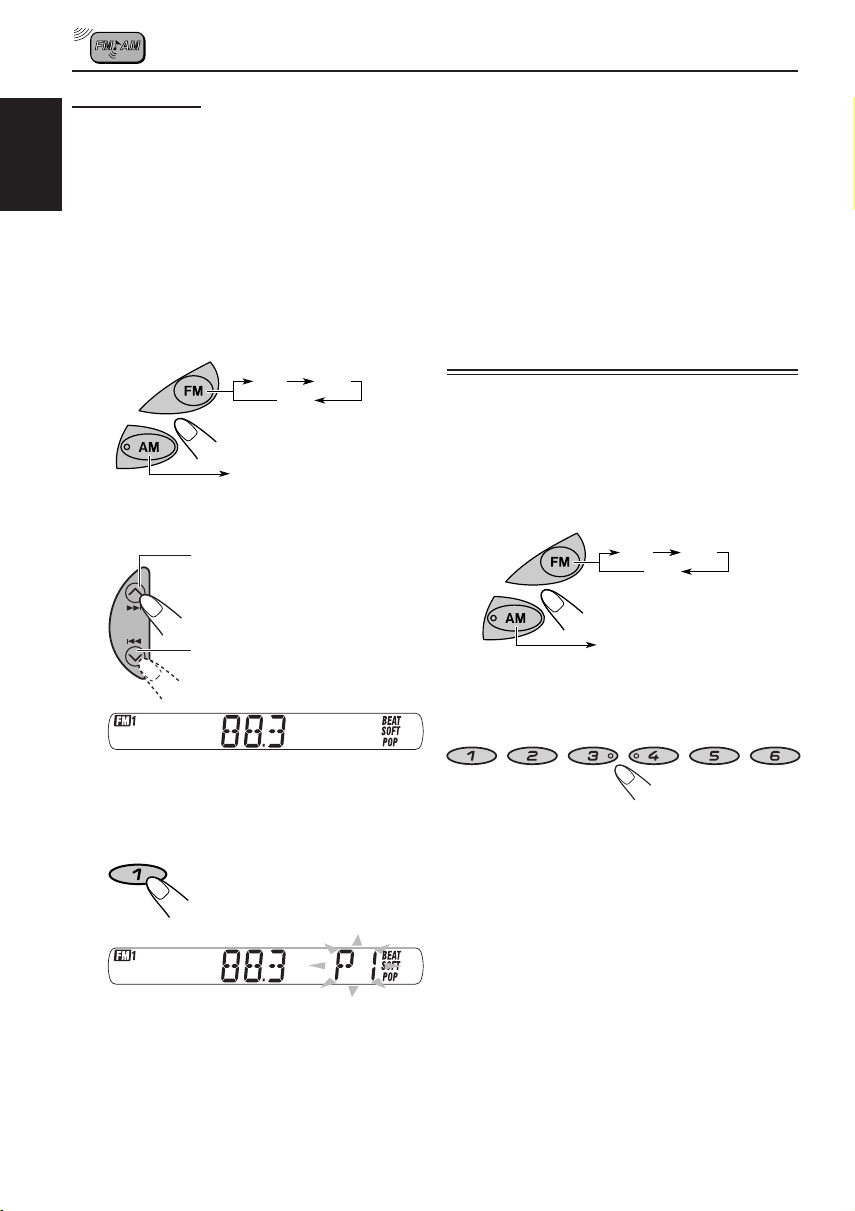
Manual preset
You can preset up to 6 stations in each band (FM1,
FM2, FM3 and AM) manually.
Ex.: Storing an FM station of 88.3 MHz into the
preset number 1 of the FM1 band
1
Select the band (FM1 –3, AM) you
want to store stations into (in this
example, FM1).
Each time you press the button, the FM
band changes as follows:
2
Tune in to a station of 88.3 MHz.
3
Press and hold the number button
(in this example, 1) for more than
2 seconds.
Preset number “P1”flashes for a while
4
Repeat the above procedure to store
other stations into other preset
numbers.
Notes:
• A previously preset station is erased when a new station
is stored in the same preset number.
• Preset stations are erased when the power supply to
the memory circuit is interrupted (for example, during
battery replacement). If this occurs, preset the stations
again.
Tuning in to a preset station
You can easily tune in to a preset station.
Remember that you must store stations first. If you
have not stored them yet, see “Storing stations in
memory”on page 7 and 8.
1
Select the band (FM1 –3, AM).
2
Select the number (1 –6) for the
preset station you want.
To tune in to stations
of higher frequencies
To tune in to stations
of lower frequencies
FM1 FM2
FM3
AM
FM1 FM2
FM3
AM
ENCOVER-19-KS-FX220[J]-F 6/11/02, 9*254

9
ENGLISH
Listening to a cassette
You can playback type I(normal) tapes.
1
Turn on the power.
Note on One-Touch Operation:
If a cassette is already in the cassette compartment,
tape play starts automatically. However, it is not
recommended to leave the cassette in the compartment
when turning off the power or ignition key. It may
damage the tape head and the cassette.
2
Insert a cassette into the cassette
compartment.
When one side of the
tape reaches its end
during play, the other
side of the tape
automatically starts
playing. (Auto Reverse)
3
Select the tape direction.
Press both buttons at
the same time.
Each time you press both
buttons, the tape direction
changes alternately –
forward ( ) and
reverse ( ).
To stop play and eject the cassette.
Press 0.
Tape play stops and the cassette automatically
ejects from the cassette compartment. The source
changes to the previously selected one.
• You cannot change the source if the cassette is
still in the cassette compartment.
To change source, you must eject the cassette
first.
• You can also eject the cassette by pressing 0
while the unit is turned off.
To fast-wind a tape.
Press in ¡or 1.
The tape will be wound in the direction of the
arrows (¡or 1).
To restart playback, lightly press the other
button which is not pressed in (1or ¡).
S.BASS
DISP
SCM
MO/RND
789
10 11 12
SEL
Tape direction
TAPE OPERATIONS
ENCOVER-19-KS-FX220[J]-F 6/11/02, 9*254

10
ENGLISH
Turning on/off the super bass
function
The super bass function allows you to maintain the
richness and fullness of the bass sound regardless
of how low you set the volume.
Each time you press S.BASS, the function turns
on and off alternately.
Selecting preset sound modes
You can select a preset sound adjustment suitable
to the music genre.
Each time you press SCM, the sound mode
changes as follows:
Indication For Preset values
BAS TRE S.BASS
SCM OFF (Flat sound) 00 00 OFF
BEAT Rock or disco music +2 00 ON
SOFT Quiet background music +1 –3 OFF
POP Light music +4 +1 OFF
Notes:
• You can adjust the preset sound mode to your
preference, and store it in memory.
If you want to adjust and store your original sound
mode, see “Storing your own sound adjustments” on
page 11.
• To adjust the ass and tre le reinforcement
levels or to turn on/off the super ass function, see
page 10.
• When one of the sound modes is selected, it is shown
on the display as follows:
For example, when “POP” is selected.
Adjusting the sound
You can adjust the sound characteristics to
your preference.
1
Select the item you want to adjust.
Each time you press the button,
the adjustable items change as
follows:
Indication To do Range
BAS Adjust the bass –6 (min.)
(Bass) |
+6 (max.)
TRE Adjust the treble –6 (min.)
(Treble) |
+6 (max.)
FAD* Adjust the front R6 (Rear only)
(Fader)* and rear speaker |
balance F6 (Front only)
BAL Adjust the left L6 (Left only)
(Balance) and right speaker |
balance R6 (Right only)
VOL Adjust the volume 00 (min.)
(Volume) |
50 (max.)
Note:
*If you are using a two-speaker system, set the fader
level to “00”.
2
Adjust the level.
Note:
Normally the + and – uttons work as the volume
control uttons. So you do not have to select
“VOL” to adjust the volume level.
To increase the level
To decrease the level
(Bass) (Treble) (Fader) (Balance) (Volume)
S.BASS
(BEAT) (POP)
(SOFT)
SEL
SOUND ADJUSTMENTS
ENCOVER-19-KS-FX220[J]-F 6/11/02, 9*254
Tabla de contenidos
Idiomas:
Otros manuales de Receptor de coche de JVC


JVC
JVC EXAD KD-AV7000 Manual de usuario

JVC
JVC KD-DV7206 Guía

JVC
JVC KW-XR811 Manual de usuario

JVC
JVC KD-S690 Manual de usuario

JVC
JVC KD-X200 Manual de usuario

JVC
JVC KD-S52 Manual de usuario

JVC
JVC KD-SX979R Guía

JVC
JVC KD-S30 Manual de usuario

JVC
JVC KW-ADV792 - Arsenal 2-DIN 7" TouchScreen DVD/MP3/CD... Guía

JVC
JVC KW-M865BW Manual de usuario


